
pengenalan
Thank you for choosing the CREATE WINDCALM DC Ceiling Fan. This manual provides essential information for the safe and efficient installation, operation, and maintenance of your new ceiling fan. Please read this manual thoroughly before installation and keep it for future reference.

Figure 1: CREATE WINDCALM DC Ceiling Fan with natural wood blades and remote control.
Arahan Keselamatan
Sentiasa ikuti langkah berjaga-jaga keselamatan asas semasa memasang dan mengendalikan peralatan elektrik untuk mengurangkan risiko kebakaran, kejutan elektrik dan kecederaan diri.
- Pastikan bekalan kuasa diputuskan sebelum pemasangan atau penyelenggaraan.
- Pemasangan mesti dilakukan oleh juruelektrik yang berkelayakan mengikut kod elektrik tempatan.
- The mounting structure must be capable of supporting the fan's weight (approximately 5.5 kg).
- Jangan masukkan objek ke dalam laluan bilah berputar.
- Jauhkan kanak-kanak dan haiwan peliharaan dari kipas semasa operasi.
Kandungan Pakej
Sahkan bahawa semua komponen ada dan tidak rosak sebelum memulakan pemasangan. Jika mana-mana bahagian yang hilang atau rosak, hubungi sokongan pelanggan.
- Pemasangan perumahan motor
- Bilah kipas (3x)
- Alat kawalan jauh
- Pendakap pelekap dan perkakasan
- Manual arahan
Pemasangan
1. Memasang Pendakap
Secure the mounting bracket to a ceiling joist or a suitable electrical junction box capable of supporting the fan's weight. Use the provided screws and washers, ensuring a firm and stable attachment.
2. Sambungan Pendawaian
Connect the fan's electrical wires to your household wiring according to the wiring diagram provided in the separate wiring guide. Ensure all connections are secure and insulated. This fan operates on 240 Volts DC power.
3. Attaching the Fan Body
Carefully lift the fan body and attach it to the mounting bracket. Ensure it is securely seated and all safety clips or screws are engaged.

Figure 2: The CREATE WINDCALM DC ceiling fan installed in a bedroom, highlighting its quiet operation suitable for sleeping environments.
4. Memasang Bilah
Attach the three natural wood blades to the motor housing using the provided screws. Ensure each blade is firmly secured. The fan has a diameter of 132 cm and blade length of 66 cm.

Figure 3: Diagram illustrating the dimensions of the CREATE WINDCALM DC ceiling fan, including blade length and overall diameter.

Rajah 4: Jarak dekat view of the natural wood blade, showcasing the quality and finish of the fan's components.
Operasi
Your CREATE WINDCALM DC Ceiling Fan is controlled by the included remote control.
Fungsi Kawalan Jauh
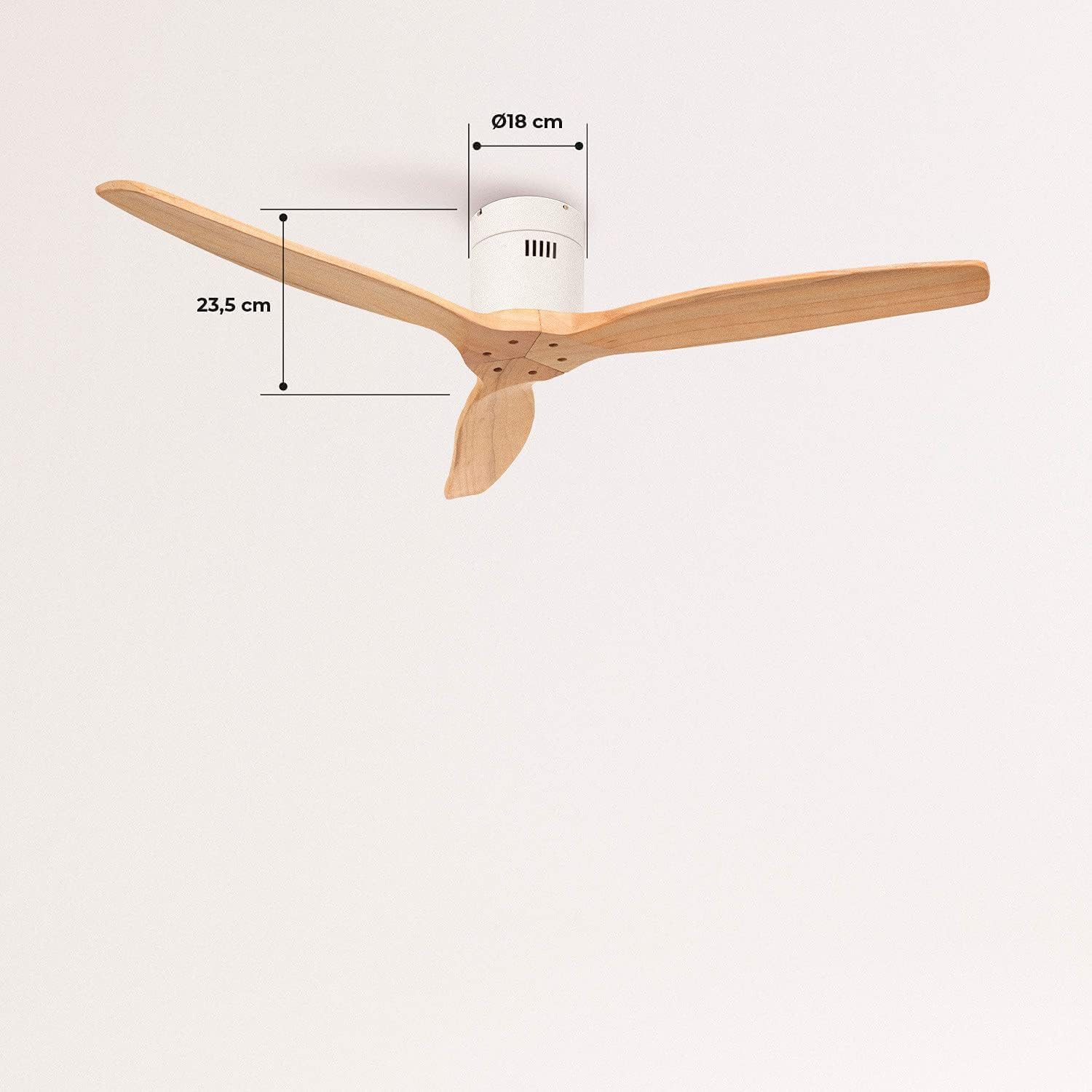
Figure 5: The remote control for the CREATE WINDCALM DC ceiling fan, showing buttons for speed, timer, and direction.
- Butang Kuasa: Menghidupkan/Mematikan kipas.
- Kawalan Kelajuan: Adjusts fan speed through 6 levels. The fan offers airflows from 85 to 210 CFM.
- Fungsi Pemasa: Tetapkan kipas untuk dimatikan secara automatik selepas 1, 2, 4 atau 8 jam.
- Mod Musim Panas/Musim Sejuk: Menukar arah putaran bilah.
Mod Musim Panas
In summer mode, the blades rotate counter-clockwise, pushing cool air downwards to create a refreshing breeze. This is ideal for cooling a room.

Figure 6: Diagram explaining the summer mode operation, where the fan blades rotate counter-clockwise to push cool air downwards.
Mod Musim Sejuk
In winter mode, the blades rotate clockwise, drawing warm air up towards the ceiling and circulating it gently throughout the room. This helps to distribute heat more evenly and can reduce heating costs.

Figure 7: Diagram explaining the winter mode operation, where the fan blades rotate clockwise to circulate warm air upwards.
Penyelenggaraan
Penyelenggaraan tetap memastikan prestasi optimum dan jangka hayat kipas siling anda.
- Pembersihan: Habuk bilah kipas dan perumah motor dengan kerap dengan lembut, damp kain. Jangan gunakan pembersih atau pelarut yang melelas.
- Imbangan Bilah: If the fan wobbles, check that all blade screws are tightened. A balancing kit may be used if necessary.
- Motor: The DC motor is designed for long-term, maintenance-free operation. No lubrication is required.
Menyelesaikan masalah
Jika anda menghadapi masalah dengan kipas anda, rujuk masalah dan penyelesaian biasa berikut:
| Masalah | Kemungkinan Punca | Penyelesaian |
|---|---|---|
| Kipas tidak bermula | Tiada bekalan kuasa; Bateri kawalan jauh rendah; Pendawaian yang salah. | Periksa pemutus litar; Gantikan bateri jauh; Sahkan sambungan pendawaian. |
| Kipas bergoyang | Skru bilah longgar; Bilah yang tidak seimbang; Pendakap pelekap longgar. | Ketatkan semua skru bilah; Gunakan kit pengimbangan bilah; Pastikan pendakap pelekap selamat. |
| Tiada pergerakan udara | Fan running at lowest speed; Incorrect direction for season. | Increase fan speed; Switch to appropriate Summer/Winter mode. |
| Alat kawalan jauh tidak berfungsi | Battery low or incorrectly inserted; Remote not paired. | Replace battery; Refer to remote pairing instructions (if applicable). |
Spesifikasi
| Ciri | Spesifikasi |
|---|---|
| Nombor Model | 62301_134701 |
| Jenama | CIPTA |
| Jenis Motor | DC Motor (153*15 mm copper) |
| Penggunaan Kuasa | 40 Watt |
| Voltage | 240 Volt |
| Diameter Kipas | 132 sm |
| Panjang Bilah | 66 sm |
| Bilangan Kelajuan | 6 |
| Aliran Udara (Maks) | 210 Cubic Meters per Minute (CFM) |
| Tahap Kebisingan | 50 dB |
| Ciri Khas | Timer (1-8h), Summer/Winter Function |
| Berat badan | 5.5 Kilogram |
Waranti dan Sokongan
CREATE products are manufactured to the highest quality standards. For warranty information or technical support, please refer to the contact details provided with your purchase documentation or visit the official CREATE webtapak. Simpan bukti pembelian anda untuk tuntutan waranti.
Untuk bantuan lanjut, anda boleh melawati CREATE Kedai di Amazon.