
1. Pengenalan
This manual provides detailed instructions for the setup, operation, and maintenance of your Crony ZXTL-13A Digital LED Table and Wall Clock. This device displays time, date, day, and temperature, and includes alarm and radio functions. Please read this manual thoroughly before using the product to ensure proper function and longevity.
2. Maklumat Keselamatan
- Jangan dedahkan peranti kepada suhu yang melampau, cahaya matahari langsung atau kelembapan yang tinggi.
- Elakkan daripada menjatuhkan atau meletakkan peranti kepada kesan yang kuat.
- Jangan cuba membuka atau membaiki peranti ini sendiri. Rujuk semua servis kepada kakitangan yang berkelayakan.
- Jauhkan daripada kanak-kanak.
- Use only the specified power adapter and battery type (AAA).
3. Produk Lebihview
The Crony ZXTL-13A is a versatile digital clock designed for both desk and wall mounting. It features a clear LED display and multiple functions.
3.1 Ciri-ciri Utama
- Digital LED Display for Time, Date, Day, and Temperature
- Built-in Alarm Function
- Built-in Radio Function
- Desk & Shelf or Wall Mountable
- Durable Metal Material Construction
- Battery Powered (AAA) and AC Power Option
3.2 Clock Components

Rajah 1: Depan View of the Crony ZXTL-13A Clock. This image shows the main display area with segments for AM/PM, current time, alarm status, day of the week, month, temperature in Celsius, and week number.
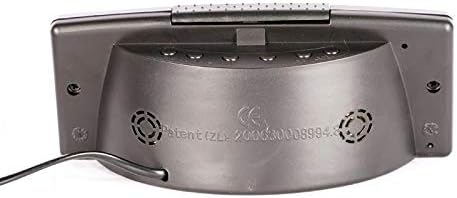
Rajah 2: Belakang View of the Crony ZXTL-13A Clock. This image illustrates the rear panel, typically where control buttons for setting time, alarm, and mode selection are located, along with the power input port and possibly a battery compartment.
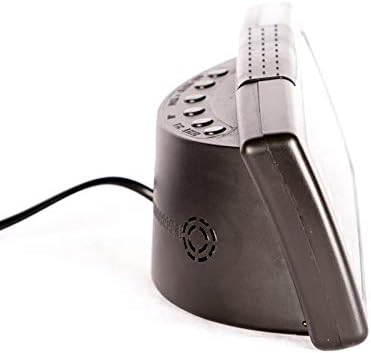
Rajah 3: Sisi View of the Crony ZXTL-13A Clock. This image highlights the clock's profile, demonstrating its integrated stand for desk placement and the connection point for the power cable.
4. Persediaan
4.1 Menghidupkan Jam
The Crony ZXTL-13A clock can be powered by either AAA batteries or an AC power adapter.
- Pemasangan Bateri: Locate the battery compartment on the back of the clock (refer to Figure 2). Insert the required number of AAA batteries, ensuring correct polarity (+/-).
- Kuasa AC: Connect the provided power adapter to the DC input port on the back of the clock (refer to Figure 2 and 3). Plug the adapter into a standard wall outlet.
- For continuous operation and full functionality, it is recommended to use the AC power adapter. Batteries serve as a backup in case of power outage or for portability.
4.2 Pilihan Pemasangan
- Desk/Shelf Placement: Utilize the integrated stand at the base of the clock for stable placement on any flat surface.
- Pemasangan Dinding: The clock features mounting holes on the back for secure attachment to a wall. Use appropriate screws and wall anchors (not included) for installation.
5. Arahan Operasi
The control buttons are typically located on the back of the clock (refer to Figure 2). Common buttons include MODE, UP/+, DOWN/-.
5.1 Menetapkan Masa
- Tekan dan tahan butang MODE butang sehingga digit jam mula berkelip.
- Gunakan ATAS/+ or TURUN/- butang untuk melaraskan jam.
- Tekan MODE again to move to the minute digits, then adjust with ATAS/+ or TURUN/-.
- Teruskan menekan MODE to cycle through 12/24-hour format and AM/PM settings (if applicable), adjusting each with ATAS/+ or TURUN/-.
- Tekan MODE one last time or wait a few seconds for the settings to save automatically.
5.2 Setting Date and Day
- Dari paparan waktu biasa, tekan butang MODE button repeatedly until the date or year digits flash.
- guna ATAS/+ or TURUN/- to set the year, then press MODE.
- Adjust the month, then press MODE.
- Adjust the day, then press MODE. The day of the week should automatically update.
- Wait for the settings to save.
5.3 Menetapkan Penggera
- Tekan ke MODE button until the alarm time is displayed (often indicated by an alarm icon or "AL").
- Tekan dan tahan MODE sehingga angka loceng waktu berkelip.
- Adjust the alarm hour with ATAS/+ or TURUN/-. Tekan MODE.
- Adjust the alarm minute with ATAS/+ or TURUN/-. Tekan MODE.
- To activate/deactivate the alarm, look for a dedicated alarm ON/OFF button or press ATAS/+ or TURUN/- while the alarm time is displayed (not flashing). An alarm icon will appear on the display when active.
5.4 Fungsi Radio
The clock includes a built-in radio. Specific operation details may vary, but generally:
- Press a dedicated RADIO button or cycle through modes using the MODE button until the radio frequency is displayed.
- guna ATAS/+ or TURUN/- to tune to desired stations.
- Some models may have auto-scan or preset functions. Refer to on-screen prompts if available.
5.5 Paparan Suhu
The clock automatically displays the ambient temperature. Some models may allow switching between Celsius (°C) and Fahrenheit (°F). Look for a dedicated button or a setting within the MODE cycle to change the temperature unit.
6. Penyelenggaraan
6.1 Pembersihan
To clean the clock, gently wipe the display and casing with a soft, dry, lint-free cloth. Do not use abrasive cleaners, solvents, or spray directly onto the clock.
6.2 Penggantian Bateri
If using batteries for backup, replace them when the display dims or functions become erratic. Ensure to use fresh AAA batteries and dispose of old batteries responsibly.
7. Penyelesaian masalah
| Masalah | Kemungkinan Punca | Penyelesaian |
|---|---|---|
| Paparan kosong atau malap. | No power, low batteries, or power adapter issue. | Check AC power connection. Replace AAA batteries. Ensure power outlet is functional. |
| Clock not keeping accurate time. | Incorrect initial setting, power interruption. | Reset the time following Section 5.1. Ensure stable power supply. |
| Penggera tidak berbunyi. | Alarm not activated, incorrect alarm time, low volume. | Verify alarm is ON (alarm icon displayed). Check alarm time setting. Adjust volume if applicable. |
| Radio not working or poor reception. | Poor signal, antenna not extended (if applicable), incorrect frequency. | Adjust clock position. Extend any external antenna. Rescan for stations. |
8. Spesifikasi
| Ciri | Perincian |
|---|---|
| Model | ZXTL-13A |
| Jenama | Kroni |
| Jenis Paparan | LED digital |
| Fungsi | Time, Date, Day, Temperature, Alarm, Radio |
| Sumber Kuasa | Battery Powered (AAA), AC Adapter |
| bahan | logam |
| Jenis Pemasangan | Wall Mount, Desk/Shelf |
| Dimensi Pakej | 20 x 9 x 8.6 cm |
| Berat badan | 420 g |
9. Waranti dan Sokongan
For warranty information or technical support, please refer to the documentation included with your purchase or contact Crony customer service directly. Keep your proof of purchase for warranty claims.
For further assistance, please visit the manufacturer's official webtapak atau hubungi saluran sokongan mereka.


