
VMAI HD-019
VMAI 38 Inch 2.1 Sound Bar User Manual
Model: HD-019
1. Pengenalan
Thank you for choosing the VMAI 38 Inch 2.1 Sound Bar. This sound bar is designed to enhance your home entertainment experience with powerful audio, featuring dual built-in subwoofers and versatile connectivity options. Please read this manual thoroughly before use to ensure proper operation and to maximize your enjoyment of the product.
2. Maklumat Keselamatan
- Jangan dedahkan perkakas ini kepada cecair yang menitis atau terpercik.
- Jangan sekat sebarang bukaan pengudaraan. Pasang mengikut arahan pengilang.
- Jangan pasang berhampiran mana-mana sumber haba seperti radiator, daftar haba, dapur, atau radas lain (termasuk amppenghidup) yang menghasilkan haba.
- Lindungi kabel kuasa dari berjalan atau dicubit, terutama pada palam, wadah kemudahan, dan titik di mana mereka keluar dari perkakas.
- Hanya gunakan lampiran/aksesori yang ditentukan oleh pengilang.
- Cabut plag perkakas ini semasa ribut petir atau apabila tidak digunakan untuk jangka masa yang lama.
3. Kandungan Pakej
Sila pastikan semua item disertakan dalam pakej anda:
- VMAI 38 Inch Sound Bar
- Alat kawalan jauh
- Premium 5 ft Optical cable
- 5 ft RCA cable
- Penyesuai Kuasa
- Kurungan dan skru pelekap dinding
- Manual Pengguna
4. Produk Lebihview
The VMAI Sound Bar HD-019 is engineered to deliver a powerful and clear audio experience. It features dual 25W built-in subwoofers and four speakers, providing 90W of total power for room-shaking bass and precise sound.

Figure 4.1: VMAI 38 Inch Sound Bar and included remote control.
The sound bar incorporates advanced DSP technology and Bluetooth 5.0 for stable and fast wireless transmission. It offers multiple input connections including HDMI ARC, Optical, AUX, and USB (for flash drives only).

Figure 4.2: Internal components of the VMAI Sound Bar, highlighting the 6 speakers and 90 watts of power for a superb sound experience.

Figure 4.3: Illustration of the sound bar's dual built-in subwoofers, designed to deliver deep bass.
5. Persediaan
5.1 Pilihan Penempatan
The VMAI Sound Bar offers flexible placement options to suit your home theater setup:
- Peletakan Desktop: Position the sound bar directly in front of your TV on a flat surface, ensuring it does not obstruct the TV's remote sensor.
- Pemasangan Dinding: For an elegant, space-saving setup, the sound bar can be mounted on the wall using the included mounting brackets and template. Ensure the wall can support the weight of the sound bar.

Figure 5.1: The sound bar's mountable design allows for both wall mounting and desktop placement.
5.2 Menyambungkan Bar Bunyi Anda
The sound bar supports various connection methods to integrate with your devices:
- ARC HDMI: Connect an HDMI cable from the sound bar's HDMI ARC port to your TV's HDMI ARC port. This allows for audio return channel functionality, simplifying control.
- Input Optik: Use the included optical cable to connect the sound bar to your TV's optical audio output.
- Input AUX: Connect devices using the included RCA cable to the AUX input.
- Input USB: Untuk memainkan audio daripada pemacu kilat USB.
- Bluetooth 5.0: Wirelessly connect your Bluetooth-enabled devices.

Figure 5.2: The sound bar supports HDMI (ARC), AUX, Optical, USB, and Bluetooth 5.0 connections.
5.3 Important Note for Optical Mode (PCM Setting)
When using the Optical input, it is crucial to adjust your TV's audio settings to PCM (Pulse Code Modulation). Failure to do so may result in no sound or distorted audio.
Steps to enable PCM (may vary by TV brand):
- Go to the 'Settings' menu on your TV.
- Navigate to 'Audio Format' or 'Sound Output' settings.
- Select 'PCM' as the digital audio output format.
- If using HDMI ARC, also check 'HDMI Audio Format' and set it to 'PCM'.
6. Arahan Operasi
6.1 Menghidupkan/Mematikan
Tekan ke Kuasa/Mod butang pada bar bunyi atau alat kawalan jauh untuk menghidupkan atau mematikan unit.
6.2 Pemilihan Input
Tekan ke Selection (M) butang pada bar bunyi atau INPUT button on the remote control to cycle through available input sources (HDMI ARC, Optical, AUX, USB, Bluetooth).
6.3 Kawalan Kelantangan
Gunakan Jilid + dan Isipadu - buttons on the sound bar or remote control to adjust the volume level.
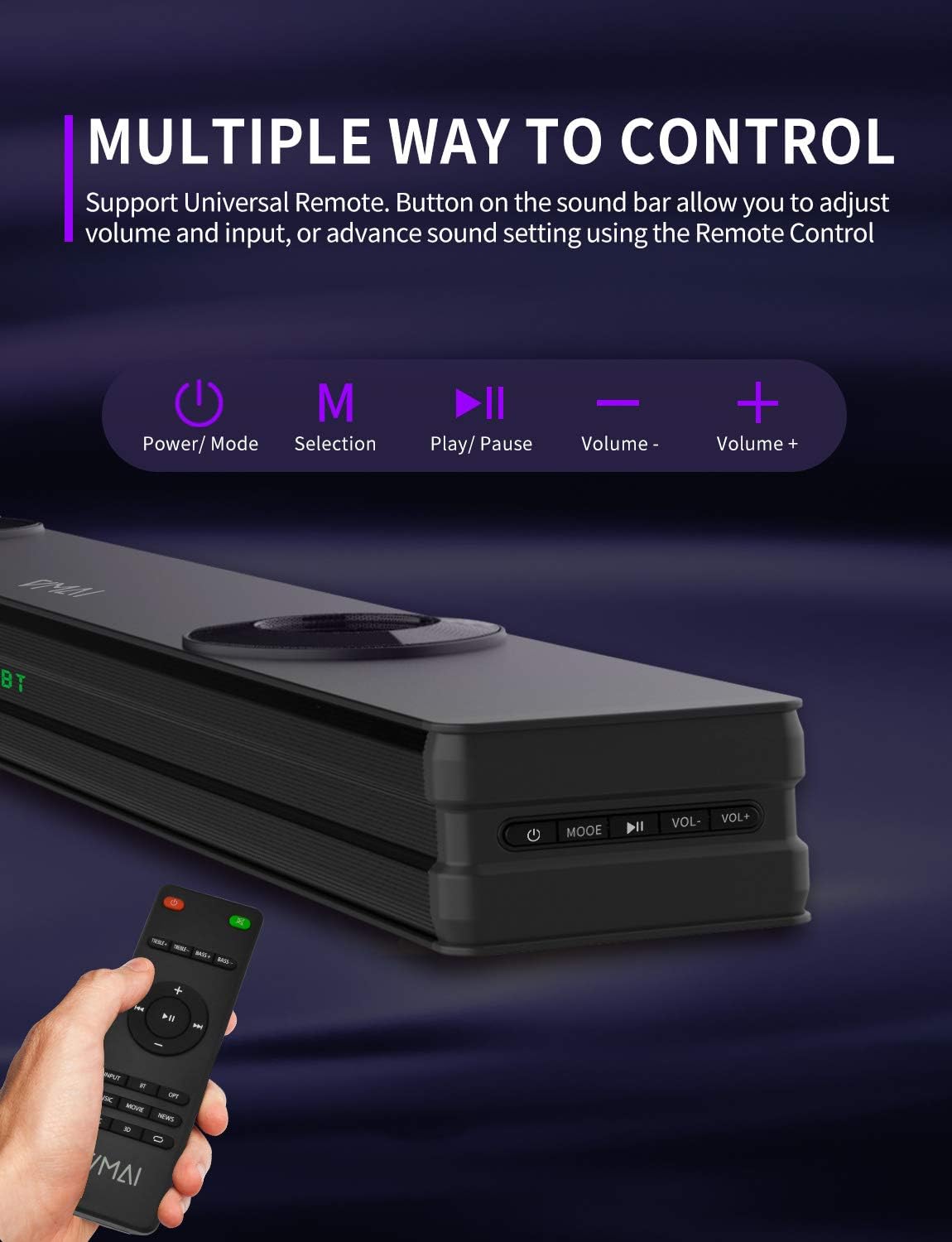
Figure 6.1: The sound bar can be controlled via its integrated buttons or the included remote control.
6.4 Mod Penyamaan
The sound bar features 4 distinct sound modes to optimize your listening experience. Use the remote control to switch between them:
- Mod Muzik: Optimized for music playback, enhancing clarity and bass.
- Mod Filem: Provides a cinematic surround sound experience, ideal for films.
- Mod Berita: Enhances vocal clarity for news broadcasts and dialogue-heavy content.
- Mod Bunyi Sekeliling 3D: Creates an immersive, three-dimensional audio field.
6.5 Berpasangan Bluetooth
To pair your Bluetooth device:
- Switch the sound bar to Bluetooth mode (indicated by 'BT' on the display).
- Dayakan Bluetooth pada peranti anda (telefon pintar, tablet, dll.).
- Cari untuk 'VMAI Sound Bar' in your device's Bluetooth settings.
- Select it to pair. Once connected, the 'BT' indicator will stop flashing.
7. Penyelenggaraan
To ensure the longevity and optimal performance of your VMAI Sound Bar, follow these maintenance guidelines:
- Pembersihan: Gunakan kain lembut dan kering untuk membersihkan permukaan bar bunyi. Jangan gunakan pembersih cecair atau semburan aerosol.
- Pengudaraan: Pastikan bukaan pengudaraan tidak disekat untuk mengelakkan terlalu panas.
- Storan: Jika menyimpan bar bunyi untuk tempoh yang lama, cabut plagnya dari soket kuasa dan simpan di tempat yang sejuk dan kering.
- Elakkan Kelembapan: Keep the sound bar away from water and high humidity.
8. Penyelesaian masalah
If you encounter issues with your VMAI Sound Bar, please refer to the following common problems and solutions:
| Masalah | Kemungkinan Punca / Penyelesaian |
|---|---|
| Tiada bunyi dari bar bunyi. |
|
| Kualiti bunyi yang herot atau lemah. |
|
| Isu sambungan Bluetooth. |
|
| Alat kawalan jauh tidak berfungsi. |
|
| Bass is weak or not noticeable. |
|
9. Spesifikasi
| Ciri | Spesifikasi |
|---|---|
| Nama Model | HD-019 |
| Dimensi (D x W x H) | 4.3"D x 38"W x 2.5"H |
| Berat Barang | 6 paun |
| Kuasa Output Maksimum Pembesar Suara | 90 Watt |
| Input Voltage | 240 Volt |
| Jenis Pembesar Suara | 3D, Soundbar, Subwoofer, Surround Sound |
| Teknologi Ketersambungan | Optical, HDMI (ARC), AUX, USB, Bluetooth |
| Versi Bluetooth | 5.0 |
| Julat Bluetooth | 15.24 Meter (50 Kaki) |
| Mod Keluaran Audio | Stereo, Surround |
| bahan | logam |
| warna | Hitam Matte |
10. Waranti dan Sokongan
VMAI offers a 12-month coverage for its products. Every VMAI sound bar undergoes a strict quality test process before shipment. For any issues or inquiries, please contact VMAI customer support. We are committed to resolving all your problems within 24 hours.
VMAI aims to provide high-quality audio products that deliver fantastic audio-visual enjoyment and an authentic interactive experience.
Ask a question about this manual
Ask about setup, troubleshooting, compatibility, parts, safety, or missing instructions. Manuals+ will review the question and use this page’s manual context to help answer it.