
1. Pengenalan
This manual provides detailed instructions for the installation, operation, and maintenance of your JOOAN 3MP Wireless Security Camera System, Model 703. This system is designed to provide reliable surveillance with features such as 3MP resolution, AI human detection, audio recording, and remote access.

Imej 1.1: Selesaiview of the JOOAN Wireless Security Camera System components.
2. Komponen Sistem
The JOOAN 3MP Wireless Security Camera System typically includes the following components:
- NVR (Network Video Recorder) with pre-installed 1TB HDD
- Wireless IP Cameras (4 units)
- Power Adapters for NVR and cameras
- Tetikus USB
- Kabel Ethernet
- Skru dan Penambat Pemasangan
- Manual Pengguna (dokumen ini)

Image 2.1: The 1TB Hard Disk Drive included with the NVR for video storage.
3. Panduan Persediaan
3.1 Penghidupan dan Sambungan Awal
- Sambungkan NVR ke monitor menggunakan kabel HDMI atau VGA.
- Connect the USB mouse to the NVR.
- Connect the NVR to power using its adapter.
- Connect each camera to its respective power adapter.
- The cameras will automatically pair with the NVR upon power-up.

Image 3.1: Illustration of the 'Auto Pair, Plug N Play' setup process for the camera system.
The system is designed for 'Plug N Play' functionality, meaning cameras should automatically connect to the NVR once powered. For optimal wireless signal, consider the NVR's built-in router capabilities.

Image 3.2: The NVR features a built-in router, providing up to 200ft range with one wall obstruction and up to 1640ft in open spaces.
3.2 Remote Access Setup (Eseecloud App)
Kepada view your cameras remotely on mobile devices or PC, download the Eseecloud application.
- Download the Eseecloud app from your mobile app store (iOS/Android) or the Eseecloud software for PC.
- Daftar akaun dan log masuk.
- On the NVR interface, navigate to Network Setup to find the Cloud ID (QR code).
- In the Eseecloud app, scan the Cloud ID QR code or manually enter the ID to add your device.
- Ensure your NVR is connected to the internet for remote viewing.

Image 3.3: Remote viewing setup showing the Eseecloud app on mobile and PC for multi-device access.
Video 3.1: Demonstrates how to get a local image within one minute, showcasing the quick setup process.
Video 3.2: Tamatview of the Jooan 3MP Super HD Wireless System, highlighting its features and ease of use.
4. Arahan Operasi
4.1 Langsung View dan Main semula
Sebaik sahaja sistem telah disediakan, anda boleh view hidup footage on your connected monitor or through the Eseecloud app. Recorded footage can be accessed via the NVR interface or the app for playback.
4.2 Pengesanan Gerakan dan Makluman
The system features advanced AI Human Detection to minimize false alarms. When motion or a human shape is detected, the system can trigger various alerts:
- NVR Buzzer
- Makluman E-mel
- APP Notification (Push Alert)

Image 4.1: Demonstrates motion detection and the corresponding app push alerts and email notifications.
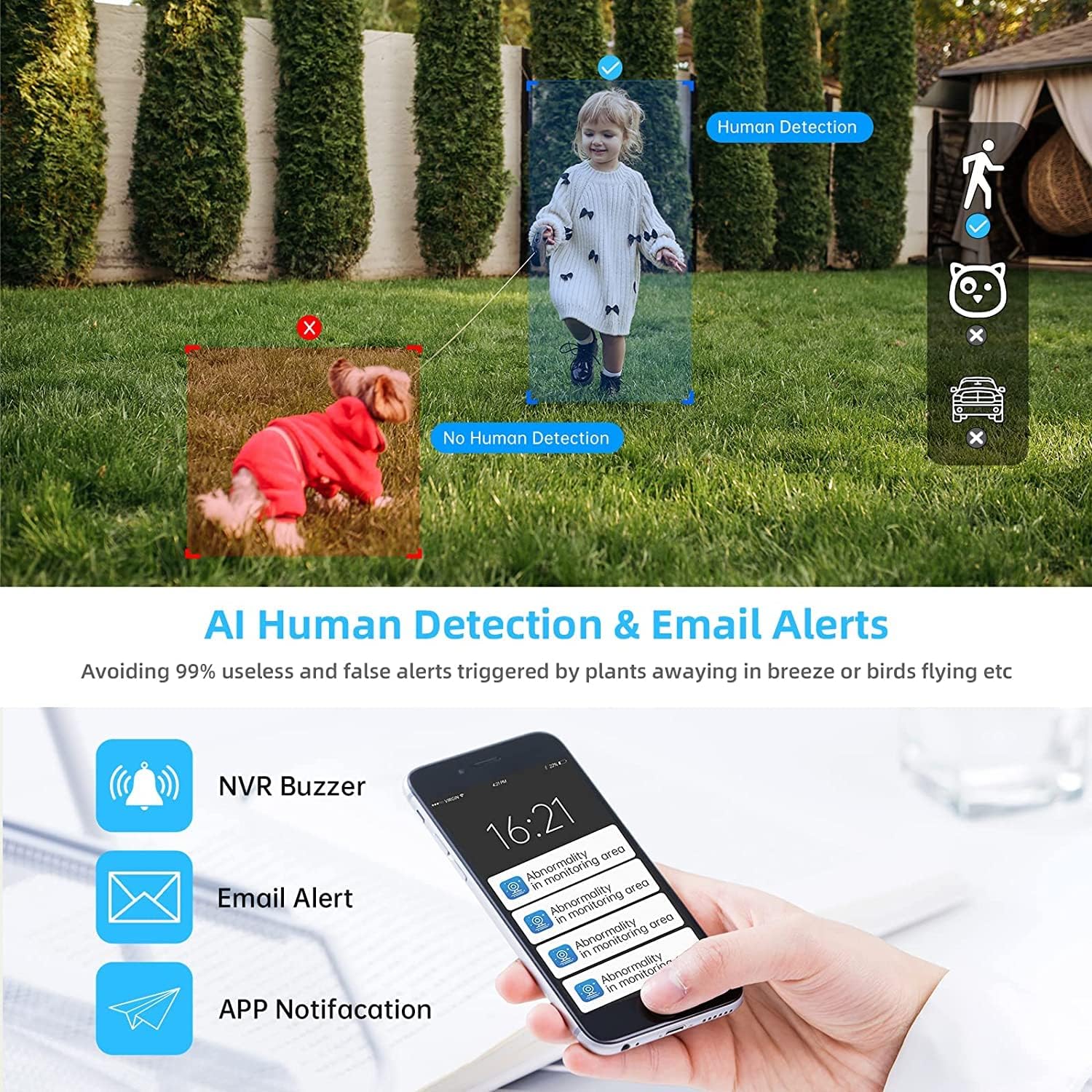
Image 4.2: AI Human Detection feature, distinguishing human shapes from other movements to reduce false alarms.
4.3 Audio Recording (One-Way Audio)
Each camera is equipped with a microphone, allowing for one-way audio recording. You can hear the sound from the monitoring scene during live viewing dan main balik.
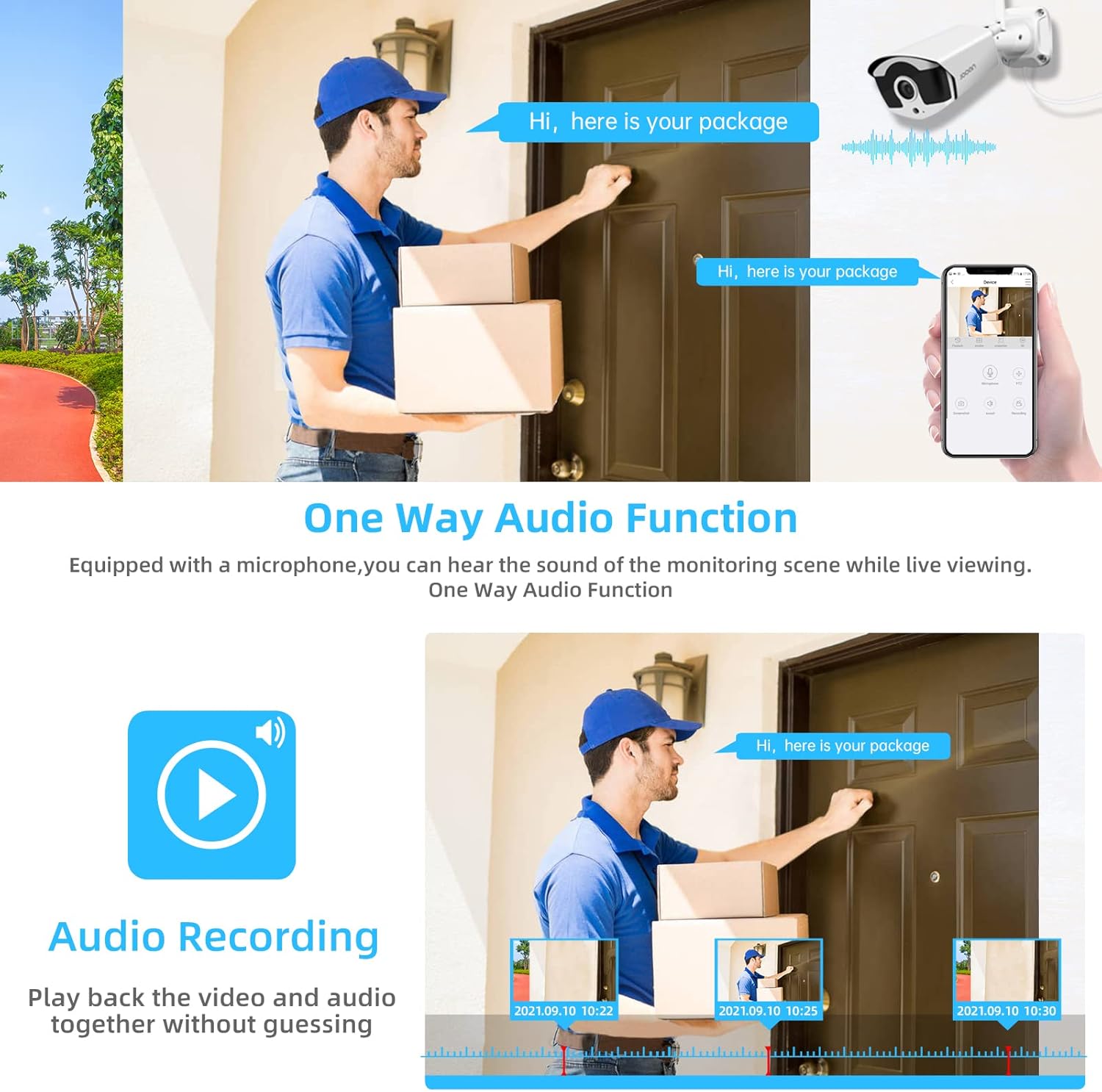
Image 4.3: Illustration of the one-way audio function, showing a delivery person speaking and the audio being recorded.
4.4 Penglihatan Malam
The cameras provide clear night vision, ensuring continuous surveillance even in low-light conditions.

Image 4.4: Depiction of the camera's night vision feature, providing clear images in darkness.
Video 4.1: A short clip demonstrating the night time monitoring capabilities of the camera system.
Mampatan Video 4.5 H.265+
The system utilizes advanced H.265+ video compression technology, which significantly reduces storage space requirements while maintaining high video quality. This allows for longer recording times on the 1TB HDD.

Image 4.5: Comparison showing how H.265+ compression saves storage space compared to H.264 and H.265.
5. Penyelenggaraan
Penyelenggaraan yang kerap memastikan ketahanan dan prestasi optimum sistem keselamatan anda.
- Pembersihan Kanta Kamera: Bersihkan kanta kamera secara berkala dengan lembut, damp kain untuk menghilangkan habuk dan kotoran. Elakkan pembersih yang kasar.
- Pengurusan Kabel: Ensure all cables are securely connected and protected from environmental damage.
- Kemas Kini Perisian: Semak pengeluar website or the Eseecloud app for firmware updates for the NVR and cameras to ensure the latest features and security patches.
- Perlindungan Alam Sekitar: While cameras are IP67 waterproof, extreme weather conditions can still affect performance. Ensure cameras are mounted securely and protected where possible.

Image 5.1: The IP67 waterproof rating ensures the camera's durability against various weather conditions, including rain, snow, and dust.
6. Penyelesaian masalah
If you encounter issues with your JOOAN Security Camera System, refer to the following common troubleshooting steps:
6.1 Tiada Paparan Video
- Semak Kuasa: Ensure the NVR and all cameras are properly powered on.
- Sambungan Monitor: Verify the HDMI/VGA cable connection between the NVR and the monitor.
- Berpasangan Kamera: If a specific camera has no video, check its power and ensure it's within range of the NVR for wireless connection. Re-pair if necessary (refer to NVR manual for specific re-pairing steps).
6.2 Isu Capaian Jauh
- Sambungan Internet: Pastikan NVR disambungkan ke internet melalui kabel Ethernet.
- Log Masuk Apl: Verify your Eseecloud app login credentials.
- ID Awan: Double-check that the correct Cloud ID is entered in the app.
- Tetapan Rangkaian: Ensure your router settings are not blocking the NVR's internet access.
6.3 Masalah Rakaman
- Status HDD: Check the NVR's settings to ensure the 1TB HDD is detected and functioning correctly.
- Jadual Rakaman: Verify that the recording schedule is properly configured.
- Tetapan Pengesanan Pergerakan: If using motion-triggered recording, ensure motion detection is enabled and sensitivity is adjusted appropriately.
7. Spesifikasi
| Ciri | Spesifikasi |
|---|---|
| Jenama | JOOAN |
| Nombor Model | 703 |
| Resolusi Tangkapan Video | 3MP (Clearer than 1080p) |
| Bilangan Saluran | 8 |
| Penglihatan Malam | Night color (up to 100ft) |
| Mod Rakaman | Continuous, Motion Detection, Event |
| Antara Muka Perkakasan | 802.11 ac/b/g/n (Wireless) |
| Input Video | VGA, HDMI |
| Teknologi Penderia Optik | CMOS |
| Penilaian Kalis Air | IP67 |
| HDD Included | 1TB |
8. Waranti dan Sokongan
Untuk maklumat jaminan dan sokongan teknikal, sila rujuk JOOAN rasmi webtapak atau hubungi perkhidmatan pelanggan mereka secara langsung. Simpan resit pembelian anda sebagai bukti pembelian untuk tuntutan waranti.
Anda juga boleh mendapatkan sumber tambahan dan Soalan Lazim di Kedai JOOAN di Amazon.