pengenalan
This manual provides comprehensive instructions for the safe and efficient operation, maintenance, and troubleshooting of your PowaKaddy FX3 Golf Trolley. Please read this manual thoroughly before using your trolley to ensure optimal performance and longevity.
The PowaKaddy FX3 electric golf trolley offers exceptional performance and reliability. It features a powerful and quiet motor, and its compact design allows it to fold down by 20% for easy storage and transport.
Maklumat Keselamatan
Sentiasa patuhi langkah keselamatan berikut untuk mengelakkan kecederaan atau kerosakan pada produk:
- Ensure the trolley is fully assembled and all locking mechanisms are engaged before use.
- Jangan kendalikan troli di cerun yang terlalu curam atau rupa bumi yang tidak rata di mana kestabilan boleh terjejas.
- Keep hands and clothing clear of moving parts, especially the wheels and folding mechanisms.
- Always engage the brake when parking the trolley, especially on inclines.
- Do not overload the trolley beyond its recommended capacity.
- Store the battery in a cool, dry place and follow all charging instructions carefully.
- Keep the trolley away from water and extreme temperatures.
- The trolley features a tamper kawalan system to prevent accidental activation. Always ensure it is disengaged before attempting to operate.
Kandungan Pakej
Sila pastikan semua item ada dalam pakej anda:
- PowaKaddy FX3 Golf Trolley Frame
- PowaKaddy Plug'n'Play 30V High-Performance Lithium Battery (1 included)
- Pengecas Bateri
- Pemasangan Roda Depan
- Roda Belakang (2)
- Manual Pengguna (dokumen ini)
Persediaan
Membuka Troli
The PowaKaddy FX3 features a simple 1-click folding system. To unfold:
- Letakkan troli di atas permukaan yang rata dan stabil.
- Locate the main folding hinge.
- Press the release button/lever and gently lift the handle until the frame locks into its fully extended position. You should hear a click.

Image: The PowaKaddy FX3 Golf Trolley in its fully unfolded position, ready for use.

Image: The PowaKaddy FX3 Golf Trolley in its compact folded state, ideal for transport and storage.
Memasang Roda
The sporty low-profile metallic wheels are easily detachable for cleaning or replacement.
- Align the rear wheels with the axle.
- Push the wheel onto the axle until it clicks securely into place. Ensure the wheel is fully engaged and cannot be pulled off easily.
- The front wheel is typically pre-attached but can be adjusted for straight-line correction (see Maintenance section).

Imej: Jarak dekat view of the PowaKaddy FX3's sporty low-profile metallic wheel.
Pemasangan dan Pengecasan Bateri
The FX3 uses a high-performance 30V Plug'n'Play lithium battery, known for being powerful, slim, and lightweight.
- Ensure the trolley is switched off before installing or removing the battery.
- Cari petak bateri pada rangka troli.
- Slide the Plug'n'Play battery into the compartment until it clicks into place. Ensure the power button on the battery is accessible.
- To charge, connect the charger to the battery's charging port and then plug the charger into a suitable power outlet. The battery level indicator on the display will show charging status.
- Sentiasa cas bateri sepenuhnya sebelum penggunaan pertama.
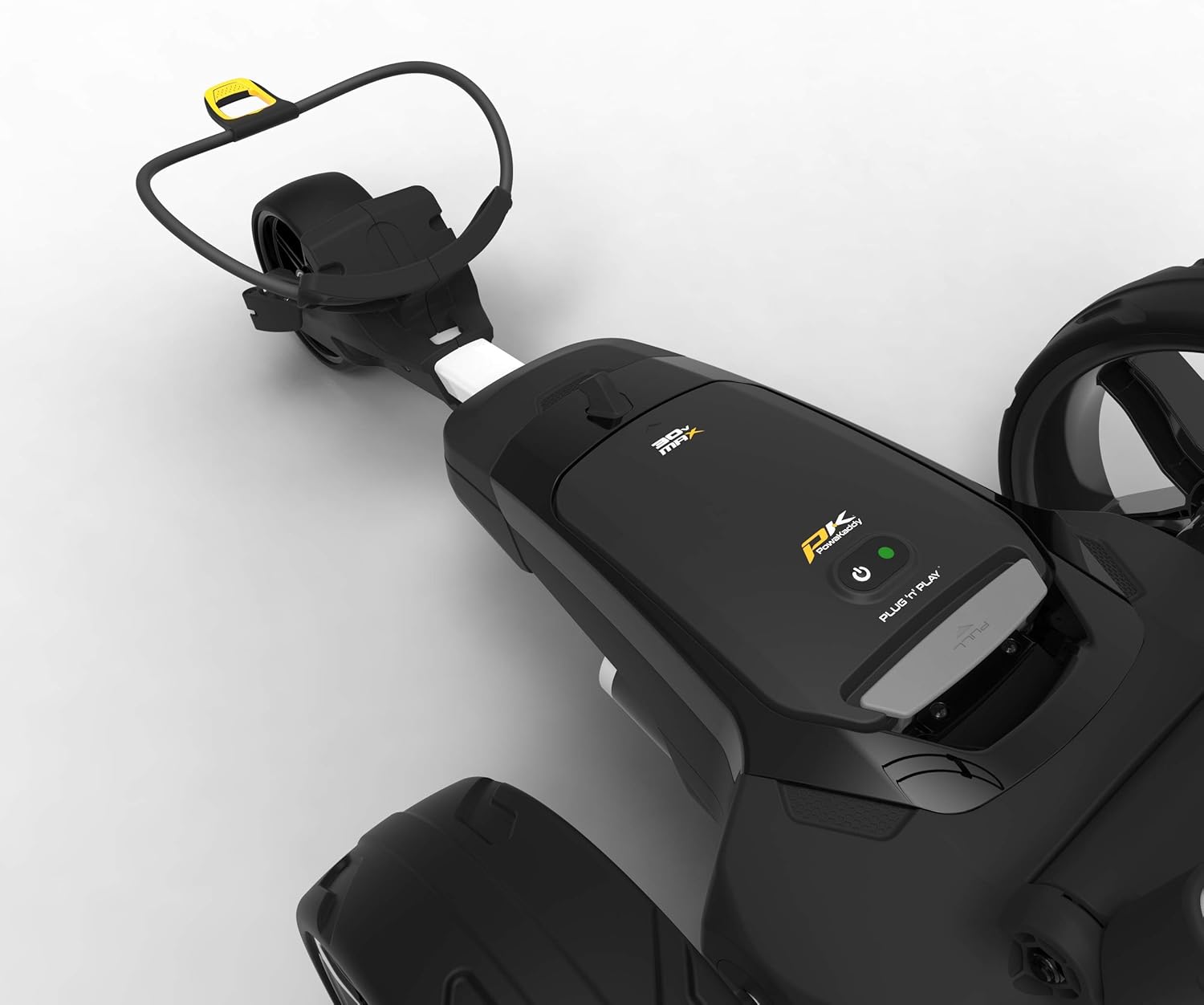
Imej: View of the PowaKaddy FX3's battery compartment, designed for the Plug'n'Play lithium battery.
Arahan Operasi
Kawalan dan Paparan
The PowaKaddy FX3 features an ultra-clear 2.3-inch widescreen color display and a high-performance 30-volt speed control system.

Image: Close-up of the PowaKaddy FX3's handle and the 2.3-inch widescreen color display.

Imej: Atas ke bawah view of the PowaKaddy FX3's control panel and handle.
- Hidupkan/Mati Kuasa: Press the power button (usually located near the display) to turn the trolley on or off. An LED display indicates the power status.
- Kawalan Kelajuan: Use the rotary dial or buttons on the handle to adjust the trolley's speed.
- Start/Pause/Resume Function: Press the designated button to start the trolley, pause its movement, or resume at the same speed.
- Penunjuk Tahap Bateri: The display shows the current battery capacity, allowing you to quickly monitor power levels.
- Display Backlight System: The backlight automatically turns off after 20 minutes of inactivity when the energy-saving mode is activated.
Melaraskan Pemegang
The handle is soft and height-adjustable, adapting to the user's preference for comfortable operation. Locate the handle adjustment mechanism and set it to your desired height, ensuring it locks securely.
Securing Your Golf Bag
The PowaKaddy Key-lock bag system prevents your golf bag from twisting on the trolley. Use the elastic straps with integrated anti-slip handles to securely hold your bag in place.
Penyelenggaraan
Pembersihan
The Powaframe chassis with its low profile and optimal performance is easy to clean. Regularly wipe down the trolley frame and wheels with a damp kain untuk menghilangkan kotoran dan serpihan. Elakkan menggunakan pembersih atau pelarut yang kasar.
The sporty low-profile metallic wheels are easily removable for thorough cleaning.
Pelarasan Roda Depan
If the trolley does not track in a straight line, the front wheel can be adjusted to correct its alignment.
- Locate the front wheel adjustment mechanism (typically a screw or lever near the front wheel).
- Make small adjustments and test the trolley's tracking. Repeat until the trolley moves in a straight line.

Image: Close-up of the PowaKaddy FX3's front wheel, showing the adjustment mechanism for straight-line correction.
Penjagaan Bateri
- Sentiasa cas bateri di kawasan yang mempunyai pengudaraan yang baik.
- Jangan dedahkan bateri kepada suhu yang melampau atau cahaya matahari langsung.
- If storing the trolley for an extended period, ensure the battery is partially charged (around 50%) and stored in a cool, dry place.
Menyelesaikan masalah
| Masalah | Kemungkinan Punca | Penyelesaian |
|---|---|---|
| Troli tidak boleh dihidupkan. | Battery not installed correctly or discharged. Tamper control engaged. | Ensure battery is fully inserted and charged. Disengage tamper kawalan. |
| Trolley moves slowly or inconsistently. | Low battery charge. Obstruction in wheels. | Recharge battery. Check wheels for debris and clear if necessary. |
| Troli ditarik ke satu sisi. | Masalah penjajaran roda hadapan. | Adjust the front wheel as described in the Maintenance section. |
| Paparan malap atau dimatikan. | Mod penjimatan tenaga diaktifkan. | The backlight turns off after 20 minutes of inactivity. Press any button to reactivate. |
Spesifikasi
| Ciri | Perincian |
|---|---|
| Model | PowaKaddy FX3 |
| warna | putih |
| Motor | 30V, 230W Powerful and Quiet Motor |
| Jenis Bateri | 30V Plug'n'Play High-Performance Lithium Battery |
| Paparan | 2.3-inch Widescreen Color Display |
| Saiz Lipat (L x W x H) | 805 x 560 x 346 mm (31.7 x 22.0 x 13.6 inci) |
| Berat (tanpa bateri) | 9.6 kg (21.2 lbs) |
| Jenis Bahan | Aloi |
| pegang | Soft, Height-Adjustable |
| Casis | Powaframe (low profile, easy to clean) |
| roda | Sporty Low-Profile Metallic Wheels |
Waranti dan Sokongan
For warranty information and customer support, please refer to the official PowaKaddy website or contact your local authorized dealer. Keep your proof of purchase for warranty claims.
The manufacturer's reference for this product is part_B085634YR3.
For further assistance, please visit the PowaKaddy support page or contact their customer service directly.