
1. Pengenalan
This manual provides instructions for the proper use and maintenance of your Yenkee YHC 101SR USB 2.0 Hub and Card Reader. Please read this guide thoroughly before using the device to ensure optimal performance and longevity. The YHC 101SR is a versatile adapter that combines a 3-port USB 2.0 hub with a multi-format card reader, designed to expand your computer's connectivity.
2. Kandungan Pakej
- Yenkee YHC 101SR USB 2.0 Hub and Card Reader
- Manual Pengguna (dokumen ini)
3. Ciri-ciri Utama
- Pasang & Main: No driver installation required for most operating systems.
- 3 USB 2.0 Ports: Expand your PC's connectivity for external devices.
- Multi-Format Card Reader: Supports SD, SDXC, SDHC, and Micro SD cards.
- Automatic Card Recognition: Simplifies data transfer from memory cards.
- Reka bentuk padat: Mudah alih dan mudah dibawa.
- Pemindahan Data Berkelajuan Tinggi: Up to 480 Mbps via USB 2.0.
4. Arahan Persediaan
The Yenkee YHC 101SR is designed for simple Plug & Play operation. Follow these steps to set up your device:
- Sambung ke Komputer: Locate an available USB port on your computer. Insert the USB connector of the YHC 101SR into this port.
- Pemasangan Pemandu (Automatik): Your operating system (Windows, macOS, Linux) will automatically detect the device and install the necessary drivers. This process usually takes a few seconds.
- Sedia untuk Digunakan: Once the installation is complete, the device is ready to use. You can now connect USB devices or insert memory cards.
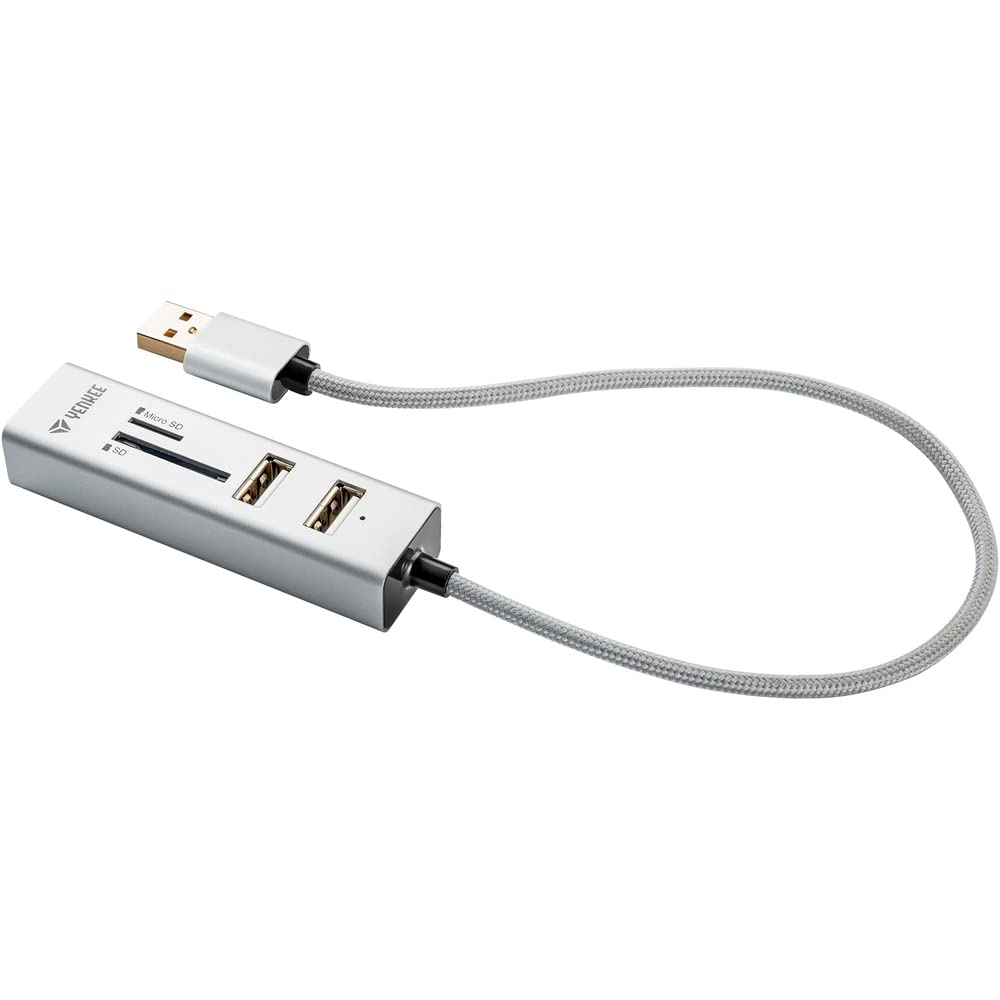
Image 1: The Yenkee YHC 101SR USB 2.0 Hub and Card Reader. This image shows the compact design of the device with its integrated USB cable, ready to be connected to a computer.
5. Arahan Operasi
5.1 Using the USB Hub
The YHC 101SR provides three additional USB 2.0 ports for connecting various peripherals.
- Sambungkan Peranti USB: Plug your USB devices (e.g., mouse, keyboard, flash drive, external hard drive) into any of the three available USB ports on the hub.
- Pengecaman Peranti: Your computer will recognize the connected devices automatically.
- Pertimbangan Kuasa: For high-power consumption devices (e.g., some external hard drives), ensure your computer's USB port can provide sufficient power. If issues arise, try connecting the high-power device directly to a computer port or use a powered USB hub (if available).
5.2 Menggunakan Pembaca Kad
The integrated card reader supports common memory card formats.
- Identify Card Slot: The device has two slots: one for standard SD cards and another for Micro SD cards.
- Masukkan Kad Memori: Gently insert your SD, SDXC, SDHC, or Micro SD card into the corresponding slot until it clicks into place. Ensure the card is inserted in the correct orientation.
- Akses Data: Your computer will detect the memory card as a removable drive. You can then access, transfer, or manage files using your computer's file penjelajah.
- Keluarkan dengan Selamat: Before removing the memory card, always safely eject it from your operating system to prevent data corruption.
6. Penyelenggaraan dan Penjagaan
- Pembersihan: Gunakan kain lembut dan kering untuk membersihkan peranti. Jangan gunakan pembersih cecair atau pelarut.
- Storan: Simpan peranti di tempat yang sejuk dan kering jauh dari cahaya matahari langsung dan suhu yang melampau.
- Pengendalian: Elakkan daripada menjatuhkan peranti atau terkena impak yang kuat.
- Kelembapan: Jauhkan peranti daripada air dan kelembapan yang tinggi.
7. Penyelesaian masalah
| Masalah | Kemungkinan Punca | Penyelesaian |
|---|---|---|
| Peranti tidak dikenali oleh komputer. | Loose connection, faulty USB port, operating system issue. |
|
| USB device connected to hub is not working. | Insufficient power, faulty USB device, driver issue for the connected device. |
|
| Kad memori tidak dikesan. | Incorrect insertion, unsupported card format, faulty card. |
|
8. Spesifikasi
| Nombor Model | YHC 101SR |
| Jenama | Yenkee |
| Piawai USB | USB 2.0 |
| Bilangan Port USB | 3 |
| Slot Pembaca Kad | SD slot, Micro SD slot |
| Format Kad yang Disokong | SD, SDXC, SDHC, Micro SD |
| Kadar Pemindahan Data | Sehingga 480 Mbps |
| Kuasa Keluaran | DC 5V / 500mA |
| Panjang Kabel | 30 sm |
| Dimensi (L x W x H) | 84 x 24 x 16 mm |
| Berat badan | 39 Gram |
| Keperluan Sistem | USB port, Windows Vista/7/8/10, Linux 2.4 or higher, Mac OS X |
| Peranti Serasi | Keyboards, Monitors (as per manufacturer's data) |
9. Waranti dan Sokongan
Yenkee products are designed for reliability and performance. For information regarding warranty terms, technical support, or service, please refer to the official Yenkee webtapak atau hubungi peruncit tempatan anda. Simpan resit pembelian anda sebagai bukti pembelian untuk tuntutan jaminan.
Nota: Butiran jaminan khusus mungkin berbeza mengikut wilayah dan peruncit.


