
1. Pengenalan
Terima kasih kerana membeliasing the Media Tech MT-3333 3-in-1 Home Theater System. This manual provides essential information for the safe and efficient operation of your new audio system. Please read it thoroughly before use and retain it for future reference.
Kandungan Pakej:
- 1 x Media Tech MT-3333 Subwoofer Unit
- 3 x Pembesar Suara Satelit
- 1 x Alat Kawalan Jauh
- 1 x Kabel Audio/Video
- 1 x Manual Pengguna
- 1 x Kabel Optik

Rajah 1.1: Depan view of the Media Tech MT-3333 Home Theater System, showing the central subwoofer unit and two tall satellite speakers, along with a smaller center speaker.
2. Arahan Keselamatan
Untuk memastikan operasi yang selamat dan mengelakkan kerosakan, sila patuhi langkah berjaga-jaga keselamatan berikut:
- Sumber Kuasa: Connect the system only to a power outlet with the specified voltage (AC220-240V 50Hz).
- Pengudaraan: Ensure adequate ventilation around the subwoofer and speakers. Do not block any ventilation openings.
- Air dan Kelembapan: Do not expose the system to rain, moisture, or dripping/splashing liquids. Do not place objects filled with liquids, such as vases, on the apparatus.
- Sumber Haba: Jauhkan sistem daripada sumber haba seperti radiator, daftar haba, dapur atau peralatan lain (termasuk amppenghidup) yang menghasilkan haba.
- penempatan: Place the system on a stable, flat surface. Avoid placing it in direct sunlight or in areas with excessive dust or vibrations.
- Pembersihan: Unplug the system from the power outlet before cleaning. Use a dry cloth only.
- Servis: Jangan cuba servis produk ini sendiri. Rujuk semua perkhidmatan kepada pegawai perkhidmatan yang berkelayakan.
- Kanak-kanak: Keep packaging materials and small parts out of reach of children.
3. Persediaan
Follow these steps to set up your home theater system:
3.1 Membongkar
- Keluarkan semua komponen dari pembungkusan dengan berhati-hati.
- Check that all items listed in the "Package Contents" section are present.
- Simpan bungkusan untuk pengangkutan atau penyimpanan masa hadapan.
3.2 Sambungan Pembesar Suara
Connect the satellite speakers to the corresponding output ports on the rear of the subwoofer unit. Ensure correct polarity (positive to positive, negative to negative) for optimal sound quality.
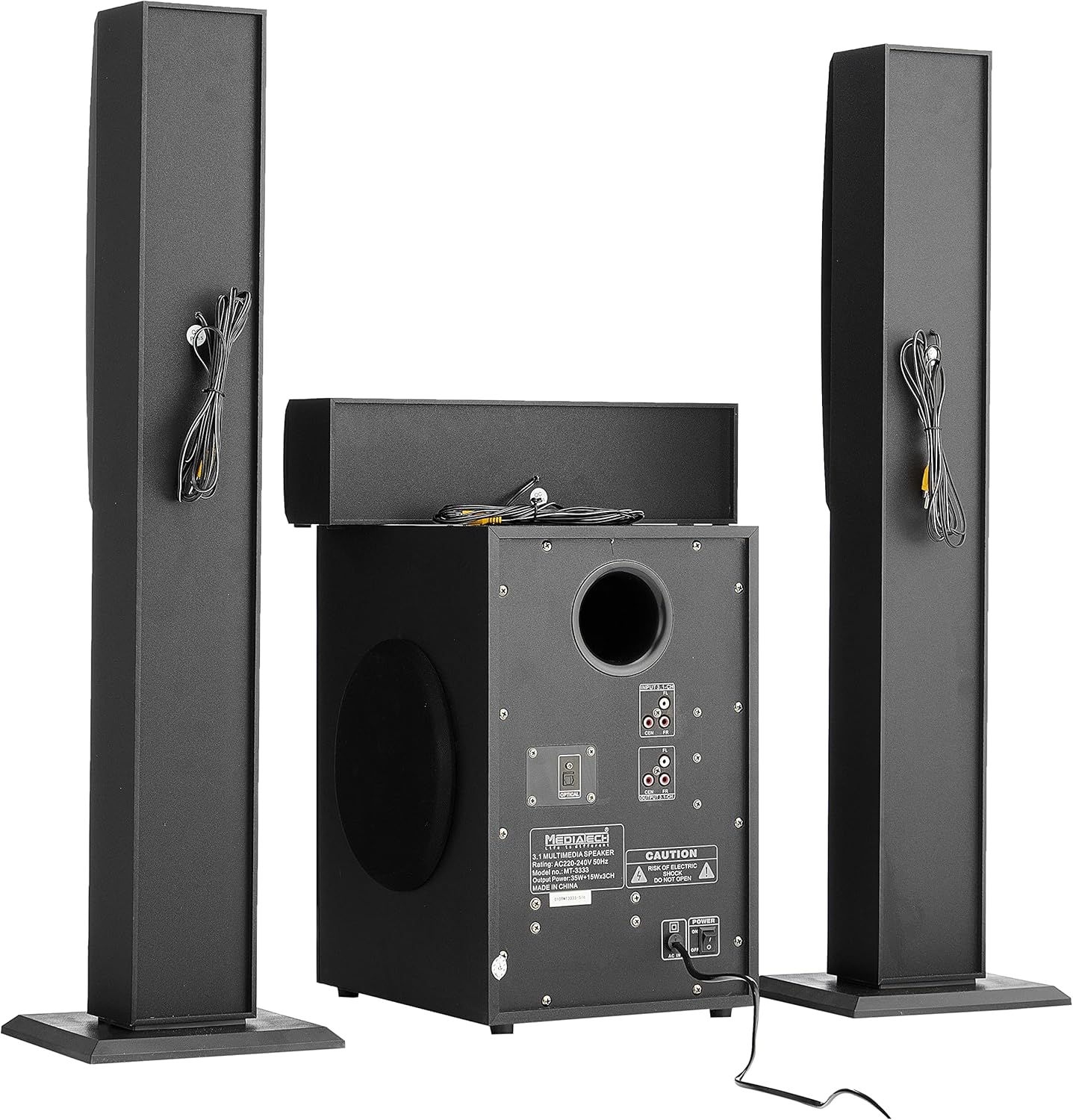
Rajah 3.1: Belakang view of the system, illustrating the subwoofer and satellite speakers connected via cables.
3.3 Sambungan Sumber Audio
The MT-3333 offers multiple input options. Choose the appropriate connection for your audio source:
- Input Optik: For high-quality digital audio from TVs, game consoles, or Blu-ray players. Connect an optical cable from your source to the OPTICAL port on the subwoofer.
- AUX (MP3) Input: For connecting devices with a 3.5mm audio output (e.g., smartphones, tablets, laptops). Use the provided audio cable to connect to the MP3/AUX port.
- Input USB: Masukkan pemacu kilat USB yang mengandungi audio files ke dalam port USB.
- Input Kad SD: Insert an SD memory card containing audio files ke dalam slot kad SD.
- Bluetooth: For wireless audio streaming from Bluetooth-enabled devices. (Refer to Section 4.3 for pairing instructions).

Rajah 3.2: Terperinci view of the subwoofer's rear panel, highlighting the various input and output connections, including the Optical port and 3.1-channel audio inputs/outputs.
3.4 Sambungan Kuasa
- Pastikan semua sambungan audio selamat.
- Connect the power cord to the AC IN port on the rear of the subwoofer.
- Plug the two-pin power plug into a suitable wall outlet.
4. Arahan Operasi
4.1 Menghidupkan/Mematikan
Locate the power switch on the rear panel of the subwoofer. Flip it to the "ON" position to power on the system. Flip it to "OFF" to power off. You can also use the power button on the remote control or the front panel of the subwoofer.
4.2 Pemilihan Input
Press the "MODE" button on the remote control or the front panel to cycle through available input sources: Bluetooth, USB, SD, AUX, and Optical.
4.3 Berpasangan Bluetooth
- Switch the system to Bluetooth mode using the "MODE" button. The display will indicate "BT".
- Dayakan Bluetooth pada peranti mudah alih atau komputer anda.
- Cari untuk available devices and select "MT-3333" from the list.
- Setelah dipasangkan, anda boleh menstrim audio secara wayarles ke sistem.
4.4 Volume, Bass, and Treble Control
- Kelantangan: Use the "VOL+" and "VOL-" buttons on the remote or the main volume knob on the subwoofer to adjust the overall volume.
- Bes: Use the "BASS+" and "BASS-" buttons on the remote to adjust the bass level.
- Tiga kali ganda: Use the "TRE+" and "TRE-" buttons on the remote to adjust the treble level.
4.5 Fungsi Kawalan Jauh
The remote control provides full functionality for your MT-3333 system:

Figure 4.1: The remote control for the Media Tech MT-3333, showing buttons for power, input selection (USB, SD, BT, AUX, OPTICAL), volume, bass, treble, equalizer presets (EQ1-EQ4), and media playback controls.
- Butang Kuasa (Merah): Menghidupkan atau mematikan sistem.
- Input Selection (USB, SD, BT, AUX, DIS, LED): Selects the desired audio source. 'DIS' might refer to display or another input. 'LED' controls lighting.
- Volume Control (VOL+, VOL-): Melaraskan kelantangan induk.
- Bass Control (BASS+, BASS-): Adjusts the bass output.
- Treble Control (TRE+, TRE-): Adjusts the treble output.
- EQ (EQ1-EQ4): Selects preset equalizer modes.
- Media Playback Controls (Play/Pause, Next, Previous, Repeat): For USB/SD card playback.
- Redam: Menyenyapkan output audio.
- Pad Kekunci Berangka (0-9): For direct track selection on USB/SD.
- Lighting Control (LED): Activates or adjusts any integrated lighting features.
5. Penyelenggaraan
Proper maintenance ensures the longevity and optimal performance of your home theater system.
5.1 Pembersihan
- Always unplug the system from the power outlet before cleaning.
- Use a soft, dry cloth to wipe the surfaces of the subwoofer and speakers.
- Jangan gunakan pembersih cecair, aerosol atau agen pembersih yang kasar, kerana ia boleh merosakkan kemasan atau komponen dalaman.
- Use a soft brush or compressed air to gently clean dust from speaker grilles and ventilation openings.
5.2 Penyimpanan
If you plan to store the system for an extended period:
- Disconnect all cables and power cords.
- Simpan sistem di tempat yang sejuk dan kering, jauh dari cahaya matahari langsung dan suhu yang melampau.
- If possible, use the original packaging to protect the components from dust and physical damage.
6. Penyelesaian masalah
If you encounter any issues with your Media Tech MT-3333, refer to the following table for common problems and solutions.
| Masalah | Kemungkinan Punca | Penyelesaian |
|---|---|---|
| Tiada kuasa | Power cord not connected; Power switch off; Wall outlet faulty | Ensure power cord is securely plugged in; Turn power switch ON; Test wall outlet with another device. |
| Tiada bunyi | Incorrect input selected; Volume too low; Speaker cables loose; Mute function active | Press MODE to select correct input; Increase volume; Check speaker connections; Press MUTE on remote. |
| Kualiti bunyi yang lemah | Loose connections; Source audio quality low; Incorrect EQ setting | Check all cable connections; Try a different audio source; Adjust BASS/TREBLE or EQ settings. |
| Alat kawalan jauh tidak berfungsi | Batteries depleted; Obstruction between remote and system; Remote not pointed correctly | Replace remote control batteries; Remove any obstructions; Point remote directly at the subwoofer's sensor. |
| Kegagalan berpasangan Bluetooth | System not in BT mode; Device too far; Interference | Ensure system is in BT mode; Move device closer; Turn off other Bluetooth devices nearby. |
Jika masalah berterusan selepas mencuba penyelesaian ini, sila hubungi sokongan pelanggan.
7. Spesifikasi
| Ciri | Spesifikasi |
|---|---|
| Nombor Model | MT-3333 |
| Kuasa Keluaran | Subwoofer: 35W, Satellite Speakers: 3 x 15W (Total 80W) |
| Saiz Unit Pembesar Suara | Subwoofer: 6.5 inches, Satellite Speakers: 3 x 3 inches |
| bahan | Wood and ABS Plastic |
| Input | USB, AUX (MP3), SD Card, Bluetooth, Optical |
| Bekalan Kuasa | AC220-240V 50Hz |
| Approx. Shipping Dimensions | 76 x 26 x 21 cm |
| lebih kurang Berat Penghantaran | 3.1 kg |
8. Waranti dan Sokongan
Media Tech products are designed for reliability and performance. This product comes with a standard manufacturer's warranty against defects in materials and workmanship under normal use.
For warranty claims, technical support, or service inquiries, please refer to the contact information provided on your purchase receipt or visit the official Media Tech webtapak.
Sila ambil perhatian: The warranty may not cover damage caused by improper installation, accident, misuse, abuse, negligence, or unauthorized modification.