
pengenalan
This manual provides comprehensive instructions for the Doro 6040 Senior Mobile Phone, model 7826. Designed for ease of use, this phone features a clear display, large buttons, and essential functions to keep you connected. Please read this manual carefully to ensure proper operation and maintenance of your device.
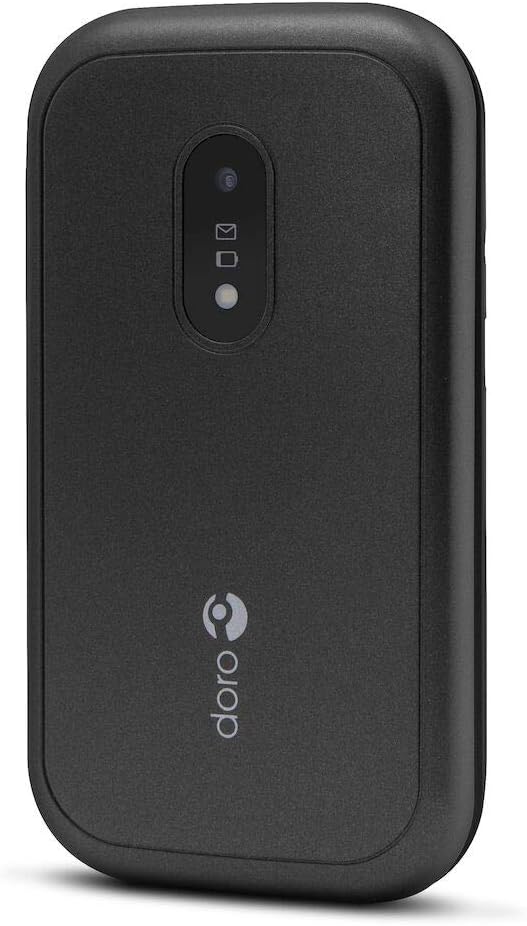
Figure 1: Doro 6040 Senior Mobile Phone (Rear View)
This image displays the rear of the Doro 6040 mobile phone, featuring its black casing. Visible elements include the rear camera lens, indicators for messages and notifications, and the Doro brand logo positioned vertically on the lower part of the phone's back.
Apa yang ada dalam Kotak
Selepas membuka pakej, sila sahkan bahawa semua komponen ada:
- Telefon Bimbit Doro 6040
- Bateri (Ion Litium)
- Penyesuai (Pengecas)
- Panduan Persediaan Pantas
Persediaan
1. Pemasangan Bateri
- Tanggalkan penutup belakang telefon dengan berhati-hati.
- Insert the Lithium Ion battery into the battery compartment, ensuring the gold contacts align with those in the phone.
- Pasang semula penutup belakang sehingga ia terpasang dengan selamat di tempatnya.
2. Pemasangan Kad SIM
The Doro 6040 uses a MicroSIM card.
- Dengan bateri dikeluarkan, cari slot kad SIM.
- Insert your MicroSIM card into the designated slot, ensuring the cut corner aligns correctly.
- Pasang semula bateri dan penutup belakang.
3. Mengecas Telefon
Sebelum penggunaan pertama, cas sepenuhnya bateri telefon.
- Sambungkan penyesuai ke soket kuasa.
- Plug the charging cable into the phone's charging port.
- The battery indicator on the screen will show charging progress. Disconnect the charger once the battery is full.
4. Menghidupkan/Mematikan
- To power on: Press and hold the Power button until the screen lights up.
- Untuk mematikan: Tekan dan tahan butang Kuasa, kemudian pilih "Matikan" daripada pilihan.
Arahan Operasi
Membuat dan Menerima Panggilan
- Untuk mendail: Masukkan nombor telefon menggunakan papan kekunci dan tekan butang panggil hijau.
- Untuk menjawab: Tekan butang panggil hijau apabila telefon berdering.
- Untuk menamatkan panggilan: Tekan butang tamat panggilan berwarna merah.
- Answering by opening: The phone supports answering calls by simply opening the flip.
Contacts (Phonebook)
- Navigasi ke menu "Kenalan".
- Use the navigation keys to scroll through your contacts.
- To call a contact, select their name and press the green call button.
Messaging (SMS/MMS)
- Go to the "Messages" menu to read or compose new messages.
- The phone supports both Short Message Services (SMS) and Multimedia Messaging System (MMS).
Kamera
- Akses kamera daripada menu utama.
- Point the camera at your subject and press the capture button to take a photo.
- The phone features a 2 MP rear camera with a built-in flash.
Butang Kecemasan
The Doro 6040 is equipped with an emergency button on the back, which can be activated if configured. Refer to the Quick Setup Guide for instructions on setting up emergency contacts and functions.
Ciri-ciri Tambahan
- Lampu suluh: An integrated flashlight is available for convenience.
- Fungsi Penggera: Tetapkan penggera untuk peringatan atau panggilan bangun.
- Kalkulator: A basic calculator is included for simple arithmetic.
- Kalendar: Keep track of dates and appointments.
- Bluetooth: Connect to compatible Bluetooth devices (version 3.0).
Penyelenggaraan
- Pembersihan: Use a soft, dry cloth to clean the phone's exterior. Avoid using liquid cleaners or aerosols.
- Penjagaan Bateri: Untuk memanjangkan hayat bateri, elakkan mendedahkan telefon kepada suhu yang melampau. Cas bateri secara berkala, tetapi elakkan pengecasan berlebihan.
- Storan: Jika menyimpan telefon untuk tempoh yang lama, pastikan bateri dicas separa (sekitar 50%) dan simpan di tempat yang sejuk dan kering.
- Kemas Kini Perisian: Keep your phone's software updated if prompted, to ensure optimal performance and security.
Menyelesaikan masalah
If you encounter issues with your Doro 6040, refer to the following common problems and solutions:
| Masalah | Kemungkinan Punca / Penyelesaian |
|---|---|
| Telefon tidak dihidupkan. | Battery may be depleted. Charge the phone for at least 30 minutes. Ensure battery is correctly installed. |
| Tidak boleh membuat atau menerima panggilan. | Check if the SIM card is properly inserted. Ensure you have network coverage. Contact your service provider. |
| Audio quality is poor during calls. | Adjust the call volume. Move to an area with better network signal. Ensure the speaker/microphone is not obstructed. |
| Difficulty finding contacts in phonebook. | Scrolling through contacts using only up/down keys can be slow. Ensure contacts are saved correctly. |
| Ringtone volume is low (custom tones). | Custom ringtones via microSD or Bluetooth may have lower volume than pre-installed tones. Adjust phone volume settings. |
| Telefon membeku atau menjadi tidak responsif. | Tanggalkan dan masukkan semula bateri untuk melakukan tetapan semula lembut. |
Spesifikasi
| Ciri | Perincian |
|---|---|
| Nama Model | Doro 6040 (Model 7826) |
| Dimensi Produk | 2.24 x 0.79 x 4.17 inci (57 x 20 x 106.7 mm) |
| Berat Barang | 4.2 auns (118 g) |
| Paparan | 2.8 Inches, 320 x 240 pixels resolution |
| Kapasiti Bateri | 1000 mAh Litium Ion |
| Talk Time (2G) | 6.8 jam |
| Standby Time (2G) | 420 jam |
| Kamera Belakang | 2 MP with built-in flash |
| Jenis Kad SIM | MicroSIM (Single SIM capacity) |
| Ketersambungan | Bluetooth 3.0, 2G Cellular Technology |
| Bicu Fon Kepala | 3.5 mm |
| Sistem Operasi | Android (Note: This is from the product data, but for a feature phone, it's likely a highly customized or simplified version, not full Android OS as on smartphones.) |
| Kapasiti Penyimpanan Memori | 1.58 MB |
| warna | Hitam |
| Ciri-ciri | Calculator, Calendar, Alarm function, Integrated flashlight, SMS, MMS, Emergency button. |
Waranti dan Sokongan
Maklumat Waranti
The Doro 6040 Senior Mobile Phone comes with a Waranti dua tahun against factory defects. Please retain your proof of purchase for warranty claims.
Sokongan Pelanggan
For further assistance, technical support, or warranty inquiries, please contact Doro customer service. Refer to the contact information provided in your Quick Setup Guide or visit the official Doro webtapak.
For online resources and frequently asked questions, you may visit the Doro Support Page.