
pengenalan
The EVOLVEO EASYPHONE FM is a user-friendly mobile phone designed for straightforward communication. It features large, separated keys, a clear display, and essential functions to ensure ease of use. This manual provides instructions for setting up, operating, and maintaining your device.
1. Kandungan Pakej
Sila semak pakej untuk item berikut:
- EVOLVEO EASYPHONE FM Mobile Phone
- Dok Pengecasan
- Penyesuai AC
- Li-ion 1000 mAh Battery
- Manual Pengguna
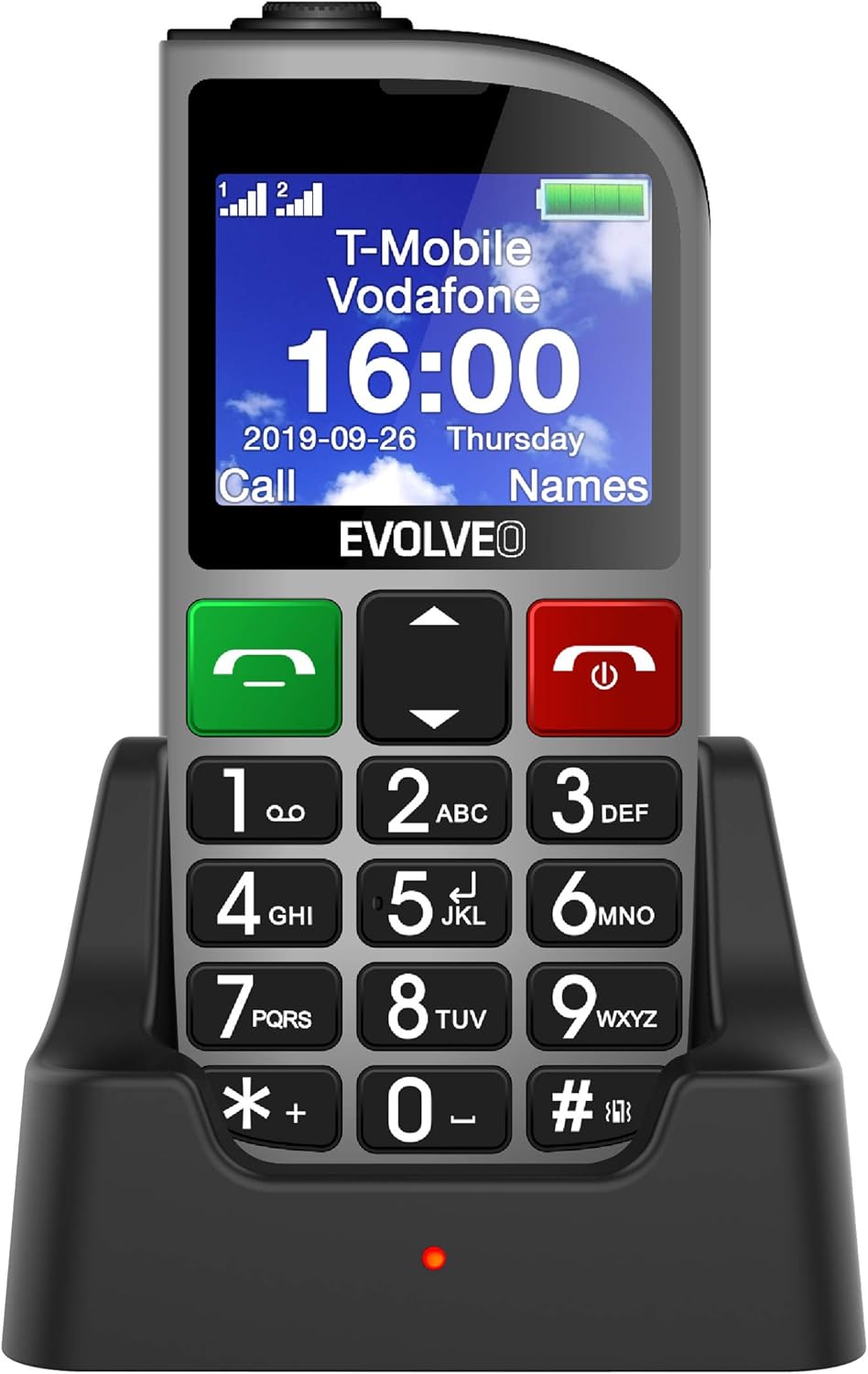
Rajah 1.1: EVOLVEO EASYPHONE FM placed in its charging dock. The phone features a large display showing time and network information, with prominent green call and red end call buttons, and a numeric keypad below.
2. Persediaan
2.1. Pemasangan dan Pengecasan Bateri
- Tanggalkan penutup belakang telefon.
- Insert the Li-ion 1000 mAh battery, ensuring the contacts align correctly.
- Pasang semula penutup belakang.
- Connect the AC adapter to the charging dock.
- Place the phone into the charging dock. The charging indicator light will illuminate.
- Biarkan telefon dicas sepenuhnya sebelum penggunaan pertama.
2.2. Memasukkan Kad SIM
The phone supports two SIM cards (Dual SIM) for GSM/GPRS 850/900/1800/1900 MHz networks.
- Pastikan telefon dimatikan.
- Tanggalkan penutup belakang dan bateri.
- Locate the SIM card slots.
- Insert your SIM card(s) into the designated slots, ensuring correct orientation.
- Masukkan semula bateri dan penutup belakang.
2.3. Inserting a MicroSDHC Card
You can expand the phone's storage for music, photos, and other files by inserting a MicroSDHC card.
- Pastikan telefon dimatikan.
- Tanggalkan penutup belakang dan bateri.
- Locate the MicroSDHC card slot.
- Gently insert the MicroSDHC card until it clicks into place.
- Masukkan semula bateri dan penutup belakang.
3. Arahan Operasi
3.1. Hidupkan/Mati Kuasa
- Untuk menghidupkan: Tekan dan tahan butang Red End Call/Power butang sehingga skrin menyala.
- Untuk mematikan kuasa: Tekan dan tahan butang Red End Call/Power button until the power off options appear, then confirm.

Rajah 3.1: Depan view of the EVOLVEO EASYPHONE FM, highlighting the large display, call buttons, and numeric keypad for easy dialing.
3.2. Membuat dan Menerima Panggilan
- Membuat Panggilan: Dial the number using the numeric keypad and press the Panggilan Hijau butang.
- Dail Cepat: The phone supports quick access to 8 popular contacts. Assign numbers to keys 2-9 for speed dialing. Press and hold the assigned key to dial.
- Menerima Panggilan: Tekan ke Panggilan Hijau butang untuk menjawab panggilan masuk.
- Menamatkan Panggilan: Tekan ke Red End Call/Power button to end an active call.
3.3. Menghantar dan Menerima Mesej SMS
The separated keyboard keys facilitate easy writing of SMS messages.
- Navigate to the Messaging menu.
- Pilih "Tulis Mesej" untuk menulis SMS baharu.
- Masukkan nombor penerima atau pilih daripada kenalan.
- Taip mesej anda menggunakan pad kekunci.
- Tekan "Hantar" untuk menghantar mesej.
3.4. Kawalan Kelantangan
Adjust the call and ringtone volume using the dedicated volume control button located on the left side of the phone.

Rajah 3.2: Left side of the phone, showing the volume control buttons and the FM radio activation button.
3.5. Butang Kecemasan SOS
The SOS button, located on the back of the device, allows for quick emergency calls and messages.
- Before use, configure up to five emergency contact numbers in the phone settings.
- Dalam keadaan kecemasan, tekan dan tahan SOS butang.
- The phone will automatically dial the predefined emergency numbers sequentially and send an emergency message to these contacts.

Rajah 3.3: belakang view of the EVOLVEO EASYPHONE FM, showing the prominent red SOS emergency button and the camera lens.
3.6. Radio FM
The phone includes an FM radio with a dedicated activation button.
- To turn on the FM radio, press the independent FM button on the side of the device.
- The radio can play in the background, allowing you to use other phone functions.
- During an incoming or outgoing call, the radio will automatically mute and resume playback after the call ends.
3.7. Lampu suluh
A powerful flashlight is integrated into the phone, activated by a dedicated button.
- Press the dedicated flashlight button on the side of the phone to turn the flashlight on or off.

Rajah 3.4: Right side of the phone, showing the dedicated flashlight button.
3.8. Ciri-ciri Lain
- kamera: The phone includes a VGA camera for basic photo capture.
- Pemain muzik: Mainkan muzik files stored on your MicroSDHC card.
- Digital Recorder (Dictaphone): Record voice notes.
- Kalendar: Jejaki tarikh dan peristiwa penting.
- Jam loceng: Tetapkan penggera untuk peringatan.
- Kalkulator: Lakukan pengiraan asas.
- Kaca Pembesar: Utilize the screen as a magnifying glass.
4. Penyelenggaraan
4.1. Membersihkan Peranti
- Gunakan kain lembut dan kering untuk membersihkan permukaan dan skrin telefon.
- Avoid using liquid cleaners or abrasive materials, as they may damage the device.
- Ensure no moisture enters the charging port or other openings.
4.2. Penjagaan Bateri
- To prolong battery life, avoid exposing the phone to extreme temperatures.
- Charge the battery regularly, but avoid overcharging or letting it completely drain for extended periods.
- If the phone will not be used for a long time, charge the battery to about 50% before storing it.
5. Penyelesaian masalah
If you encounter issues with your EVOLVEO EASYPHONE FM, refer to the following common problems and solutions:
5.1. Telefon Tidak Dihidupkan
- Pastikan bateri dipasang dan dicas dengan betul.
- Connect the phone to the charger and wait a few minutes before attempting to power it on again.
- Periksa sama ada sesentuh bateri bersih.
5.2. Tidak Boleh Membuat atau Menerima Panggilan
- Check if the SIM card(s) are correctly inserted and activated.
- Ensure you have network coverage.
- Verify that the phone is not in airplane mode (if applicable).
- Check your account balance or subscription status with your service provider.
5.3. FM Radio Not Working
- Ensure you are in an area with good FM signal reception.
- Check if the FM radio is properly activated using its dedicated button.
5.4. Isu Paparan
- If the display is dim, check the brightness settings.
- If the screen is unresponsive, try restarting the phone.
6. Spesifikasi
| Jenama | Evolveo |
| Model | EASYPHONE FM |
| Saiz Paparan | 1.8 inci |
| Resolusi Paparan | 320 x 240 px |
| Teknologi Selular | 2G (GSM/GPRS 850/900/1800/1900 MHz) |
| Sokongan SIM | Dual SIM |
| Ketersambungan | Bluetooth, Bicu 3.5 mm |
| Bateri | Li-ion 1000 mAh |
| Dimensi | 130 × 61 × 16.5 mm |
| Berat badan | 105 g (dengan bateri) |
| Kamera | VGA |
| Peluasan Storan | Slot kad MicroSDHC |
Nota: Spesifikasi tertakluk kepada perubahan tanpa notis terlebih dahulu.
7. Waranti dan Sokongan
For warranty information and technical support, please refer to the warranty card included in your package or visit the official Evolveo webtapak. Simpan bukti pembelian anda untuk tuntutan waranti.