
pengenalan
Thank you for choosing the HONOR Magic Watch 2. This smartwatch is designed to enhance your daily life with advanced fitness tracking, communication features, and a long-lasting battery. It features a vibrant 1.39-inch AMOLED display, a durable metal and plastic body, and a range of sensors to monitor your health and activities. This manual provides essential information for setting up, operating, maintaining, and troubleshooting your device.
Persediaan
1. Membuka Kotak dan Caj Permulaan
Upon unboxing, ensure all standard components are present. It is recommended to fully charge your HONOR Magic Watch 2 before first use. The watch is equipped with a 455 mAh battery, providing up to 14 days of typical usage on a single charge.

Imej: Depan view of the HONOR Magic Watch 2, showcasing its round AMOLED display and black strap.
2. Berpasangan dengan Telefon Pintar Anda
- Download the official HONOR Health or Huawei Health app from your smartphone's app store (compatible with iOS and Android devices).
- Buka apl dan ikut arahan pada skrin untuk membuat akaun atau log masuk.
- Pastikan Bluetooth didayakan pada telefon pintar anda.
- In the app, navigate to 'Devices' and select 'Add device'. Choose your HONOR Magic Watch 2 from the list of available devices.
- Sahkan permintaan berpasangan pada kedua-dua jam tangan dan telefon pintar anda.
3. Konfigurasi Awal
After successful pairing, the app will guide you through initial settings such as personal information, notification preferences, and watch face selection.
Mengendalikan Jam Pintar Anda
1. Navigasi Asas
- Skrin sentuh: Leret ke atas, bawah, kiri atau kanan untuk menavigasi menu dan pemberitahuan. Ketik untuk memilih item.
- Butang: The watch features push buttons for various functions, typically a power/home button and a function button. Refer to the on-screen prompts for specific button actions.
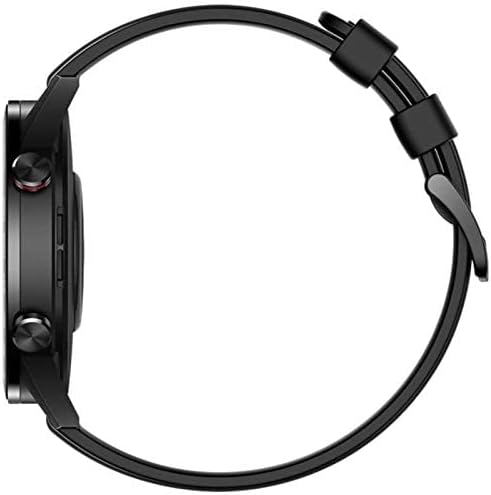
Imej: Sisi view of the HONOR Magic Watch 2, showing the two physical buttons on the right side of the watch case.
2. Ciri-ciri Komunikasi
- Panggilan Bluetooth: Make and receive calls directly from your watch when connected to your smartphone via Bluetooth. The watch includes a microphone for hands-free communication.
- Pemberitahuan: Receive alerts for incoming calls, text messages, and app notifications directly on your watch display.
3. Fitness and Health Tracking
The HONOR Magic Watch 2 offers comprehensive tracking capabilities:
- 15 Fitness Modes: Track various sports activities including climbing, running, walking, long-distance walking, and cycling.
- Pemantau Kadar Jantung: An optical heart rate sensor continuously monitors your heart rate.
- Pemantau SpO2: Mengukur tahap ketepuan oksigen darah.
- Penjejakan Tidur: Monitors your sleep patterns and provides insights for improvement.
- Pemantauan Tekanan: Helps you manage stress levels throughout the day.
- GPS: Integrated GPS provides accurate route tracking for outdoor activities.
- Penjejak Jarak: Records distances covered during your workouts.
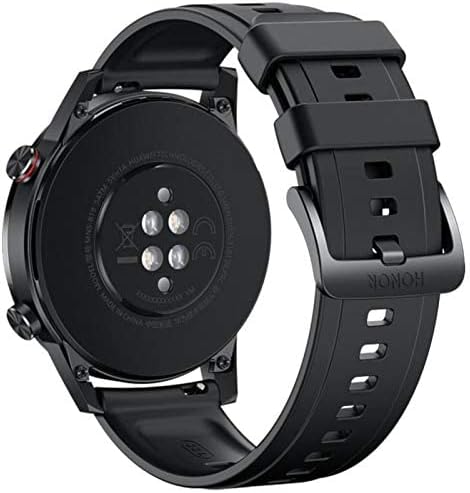
Imej: Belakang view of the HONOR Magic Watch 2, showing the heart rate sensors and charging contacts.
4. Main balik Muzik
Store and play music directly from your watch (4GB storage capacity) or control music playback on your connected smartphone.
Penyelenggaraan
1. Membersihkan Jam Tangan Anda
- Lap skrin jam tangan dan badan dengan kain lembut dan tidak berbulu.
- Untuk kotoran degil, dampLap kain sedikit dengan air. Elakkan menggunakan bahan kimia yang keras atau bahan yang melelas.
- Bersihkan kenalan pengecas secara berkala untuk memastikan pengecasan yang betul.
2. Tahan Air
The HONOR Magic Watch 2 is water-resistant up to 50 meters. This means it can be used for shallow-water activities like swimming in a pool or ocean. It is not suitable for diving, waterskiing, or other activities involving high-velocity water or submersion below shallow depth.
- Bilas jam tangan dengan air bersih selepas terdedah kepada air masin atau air berklorin.
- Jangan tekan butang di bawah air.
- Ensure the watch is dry before charging to prevent damage to the charging contacts.
3. Penjagaan Bateri
- Avoid exposing the watch to extreme temperatures, which can degrade battery life.
- For long-term storage, charge the watch to approximately 50% and store it in a cool, dry place.
Menyelesaikan masalah
Isu dan Penyelesaian Biasa
| Isu | Penyelesaian yang Mungkin |
|---|---|
| Tonton tidak dihidupkan | Pastikan jam tangan dicas sepenuhnya. Sambungkannya ke pengecas selama sekurang-kurangnya 30 minit. |
| Tidak dapat dipasangkan dengan telefon pintar | Check if Bluetooth is enabled on both devices. Restart both the watch and smartphone. Ensure the app is updated to the latest version. |
| Data kadar denyutan jantung/aktiviti yang tidak tepat | Pastikan jam tangan dipakai dengan kemas pada pergelangan tangan anda, tidak terlalu ketat atau terlalu longgar. Bersihkan penderia di belakang jam tangan. |
| Hayat bateri pendek | Reduce screen brightness, disable always-on display, limit background app refresh, and turn off unnecessary notifications. |
| Tonton tidak dicas | Ensure the charging cable and adapter are working correctly. Clean the charging contacts on both the watch and the charger. |
If you encounter issues not listed here, try restarting your watch and smartphone. For persistent problems, refer to the support section.
Spesifikasi
| Ciri | Perincian |
|---|---|
| Nama Model | Jam Tangan Ajaib 2 |
| Nombor Model | Minos-B19S |
| Saiz Paparan | 1.39 inci |
| Jenis Paparan | AMOLED |
| Resolusi | 454 x 454 piksel |
| Max Screen Brightness | 600 nits |
| Sistem Operasi | Android Wear (Compatible with iOS and Android) |
| Kapasiti Storan | 4 GB |
| Kapasiti Bateri | 455 mAh |
| Hayat Bateri | Sehingga 336 jam (14 hari) |
| Ketersambungan | Bluetooth |
| GPS | Yes (Global Positioning System) |
| Tahan Air | 50 meter |
| Dimensi Item | 46 x 46 x 11 mm |
| Bahan Kes | logam |
| Bahan Band | Silicone (standard), Stainless Steel (variant dependent) |
| Penderia | Accelerometer, Optical Heart Rate Sensor |
| Input Antara Muka Manusia | Buttons, Microphone |
| Ciri Khas | Phone calls, Notifications, SMS, Music Player, Calendar Mode |
Maklumat Waranti
This product comes with a manufacturer's warranty of 18 months from the date of purchase. For service or further details, you may contact the manufacturer or its authorized service agent. Alternatively, you may contact Amazon for assistance.
Sokongan
For additional support, frequently asked questions, or to download the latest version of the user manual, please visit the official HONOR support website. You can also find troubleshooting tips and community forums online.
- Sumber Dalam Talian: Visit the HONOR official webtapak untuk sokongan produk.
- Perkhidmatan Pelanggan: Contact HONOR customer service for direct assistance.