
1. Pengenalan
Thank you for choosing the SUNSHINE P-1503T Analog Power Supply. This manual provides essential information for the safe and efficient operation, setup, maintenance, and troubleshooting of your device. Please read this manual thoroughly before using the product and keep it for future reference.
The SUNSHINE P-1503T is a versatile 15-volt, 3-amp analog power supply designed primarily for mobile phone maintenance. It features touch-sensitive controls and includes two USB ports for convenient mobile testing and charging.
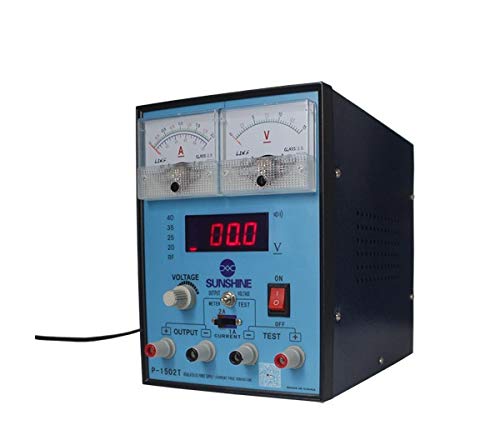
Rajah 1: Depan view of the SUNSHINE P-1503T Analog Power Supply. This image shows the device's display, control knobs, and output terminals, including the two USB ports.
2. Maklumat Keselamatan
AMARAN: Kegagalan mematuhi arahan keselamatan ini boleh mengakibatkan renjatan elektrik, kebakaran atau kecederaan serius.
- Sentiasa sambungkan bekalan kuasa ke salur keluar elektrik yang dibumikan.
- Jangan kendalikan peranti dalam keadaan basah atau damp syarat.
- Pastikan pengudaraan yang betul untuk mengelakkan terlalu panas. Jangan sekat bukaan pengudaraan.
- Jangan buka casing of the power supply. There are no user-serviceable parts inside. Refer all servicing to qualified personnel.
- Avoid touching output terminals when the device is powered on.
- Disconnect the power cord from the outlet before cleaning or if the device will not be used for an extended period.
- Use only the specified input voltage (15 Volts) as indicated on the device.
3. Persediaan
3.1 Membongkar
- Carefully remove the power supply from its packaging.
- Inspect the device for any signs of damage during transit. If damaged, do not use and contact your supplier.
- Ensure all accessories are present (e.g., power cord, test leads if included).
3.2 Menyambung ke Kuasa
- Place the power supply on a stable, level surface with adequate ventilation.
- Connect the provided power cord to the power input socket on the rear of the device.
- Pasangkan hujung kord kuasa yang satu lagi ke dalam soket elektrik yang dibumikan yang sesuai.
4. Arahan Operasi
4.1 Menghidupkan/Mematikan
- To power on the device, press the power switch located on the front panel. The display will illuminate.
- Untuk mematikan kuasa, tekan suis kuasa sekali lagi.
4.2 Adjusting Output
The P-1503T is an analog power supply, typically meaning voltage and current are set via rotary knobs.
- Gunakan Voltage Tombol Pelarasan untuk menetapkan volum output yang dikehendakitage. Monitor the voltagpaparan e.
- Gunakan Tombol Pelarasan Semasa to set the desired current limit. Monitor the current display.
- The device emits a sound upon touch, indicating interaction with its controls.
4.3 Menggunakan Port USB
The power supply features two USB ports on the front panel:
- USB Port 1 (Mobile Testing): Connect a mobile device here for diagnostic purposes. This port is designed to provide stable power for testing mobile phone circuits.
- USB Port 2 (Mobile Charging): Connect a mobile device here for charging. This port delivers power suitable for recharging mobile phone batteries.
Note: Always ensure the output voltage and current settings are appropriate for the device being connected to prevent damage.
5. Penyelenggaraan
5.1 Pembersihan
- Ensure the power supply is turned off and disconnected from the main power outlet before cleaning.
- Gunakan kain lembut dan kering untuk mengelap bahagian luar peranti.
- Do not use liquid cleaners, aerosols, or solvents, as these may damage the casing atau komponen dalaman.
- Pastikan bukaan pengudaraan bersih daripada habuk dan serpihan.
5.2 Penyimpanan
When not in use, store the power supply in a cool, dry place, away from direct sunlight and extreme temperatures.
6. Penyelesaian masalah
| Masalah | Kemungkinan Punca | Penyelesaian |
|---|---|---|
| Peranti tidak dihidupkan. |
|
|
| Tiada keluaran voltage / semasa. |
|
|
| Port USB tidak berfungsi. |
|
|
7. Spesifikasi
| Ciri | Perincian |
|---|---|
| Jenama | SINAR MATAHARI |
| Model | P-1503T |
| Peranti Serasi | Telefon Bimbit |
| Jenis Penyambung | ATX |
| Faktor Bentuk | ATX |
| Kaedah Penyejukan | Udara |
| Input Maksimum Voltage | 15 Volt |
| Input Minimum Voltage | 15 Volt |
| Pengeluar | SINAR MATAHARI |
| System Bus Connector Type | Penyambung 2 |
| Sumber Kuasa | Luaran |
| ASIN | B0847QS2FX |
8. Waranti dan Sokongan
This product is covered by a standard manufacturer's warranty. Please refer to the warranty card included with your purchase for specific terms and conditions. For technical support, service, or warranty claims, please contact your retailer or the manufacturer directly.
For the latest information and support, please visit the official SUNSHINE weblaman web (jika ada).