
Fitfiu MC-160
FITFIU Fitness MC-160 Treadmill User Manual
Model: MC-160
1. Pengenalan
The FITFIU Fitness MC-160 Treadmill is designed to provide an effective and convenient cardio workout experience in the comfort of your home. This ultra-compact folding treadmill features a powerful motor, multiple training programs, and smart connectivity options to help you achieve your fitness goals.

Image: The FITFIU Fitness MC-160 Treadmill in its operational state, showcasing reka bentuk padat dan panel kawalannya.

Imej: Tamatview of the MC-160 treadmill's key features, including speed range (0.6 to 8 MPH), running surface (15.7"x40"), 3HP rated power, 12 programs, compact vertical folding, 320 lbs maximum weight capacity, and Bluetooth connectivity for app integration.
2. Maklumat Keselamatan
Before operating the treadmill, please read and understand all safety instructions. Failure to do so may result in injury or damage to the product.
- Always attach the safety key to your clothing before starting the treadmill. The safety key is designed to stop the treadmill immediately in case of an emergency.
- Ensure the treadmill is placed on a flat, stable surface with adequate clearance around it (at least 2 meters behind and 1 meter on each side).
- Jauhkan kanak-kanak dan haiwan peliharaan dari treadmill semasa operasi.
- Do not operate the treadmill if it is damaged or malfunctioning. Contact customer support for assistance.
- Pakai kasut dan pakaian sukan yang sesuai.
- Rujuk doktor sebelum memulakan sebarang program senaman baharu.
- Jangan melebihi berat pengguna maksimum 120 kg (264 lbs).
- Cabut palam treadmill dari salur keluar kuasa apabila tidak digunakan atau sebelum pembersihan/penyelenggaraan.
3. Persediaan dan Pemasangan
The FITFIU Fitness MC-160 Treadmill requires minimal assembly. Follow these steps to set up your treadmill:
- Membongkar: Keluarkan semua komponen dari pembungkusan dengan berhati-hati. Simpan bahan pembungkusan untuk penyimpanan atau pengangkutan masa hadapan.
- penempatan: Choose a suitable location with a stable, level floor and sufficient space.
- Terbuka: Gently lift the console and handlebars into the upright position. Secure them using the provided knobs or locking mechanisms. Ensure all parts are firmly locked in place before use.
- Sambungan Kuasa: Palamkan kord kuasa ke salur keluar elektrik yang dibumikan.

Image: A user demonstrating how to fold the MC-160 treadmill to a compact size, suitable for storage under furniture, highlighting its low profile of 130mm when folded.

Image: The folded dimensions of the MC-160 treadmill, showing its height (1290mm), width (620mm), and depth (130mm), illustrating its ultra-compact design for vertical storage.
4. Arahan Operasi
4.1. Panel Kawalan Selesaiview
The MC-160 features an intuitive LCD display and control buttons for easy operation.

Imej: Dari dekat view of the MC-160 treadmill's control panel, showing the LCD display, various control buttons for speed and program selection, and the safety key attachment point.
- paparan: Shows Speed, Time, Distance, and Calories burned.
- Mula/Berhenti: Initiates or halts the treadmill belt.
- Kelajuan +/-: Adjusts the running speed.
- Program (P): Selects from 12 pre-set training programs.
- Mod: Toggles display information or sets target goals.
- Kunci Keselamatan: Magnetic key that must be in place for the treadmill to operate. Pulling it off will stop the machine.
4.2. Memulakan Senaman
- Ensure the treadmill is plugged in and the safety key is attached to the console and your clothing.
- Step onto the treadmill belt, holding onto the handrails for balance.
- Press the "Start" button. The belt will begin moving at a low speed.
- Adjust the speed using the "Speed +" or "Speed -" buttons to your desired pace.
4.3. Training Programs
The MC-160 offers 12 pre-set training programs (P01-P12) designed for various fitness levels and goals. Each program automatically adjusts speed over time.

Image: A visual representation of the 12 pre-set training programs (P01-P12) available on the MC-160 treadmill, showing their varying speed profiles over time.
Untuk memilih program:
- From standby mode, press the "Program" button repeatedly to cycle through P01-P12.
- Once your desired program is displayed, press "Start" to begin the workout.
4.4. App Connectivity (KINOMAP)
Enhance your workout experience by connecting your smartphone or tablet via Bluetooth to the KINOMAP app. This allows for immersive virtual workouts and tracking.
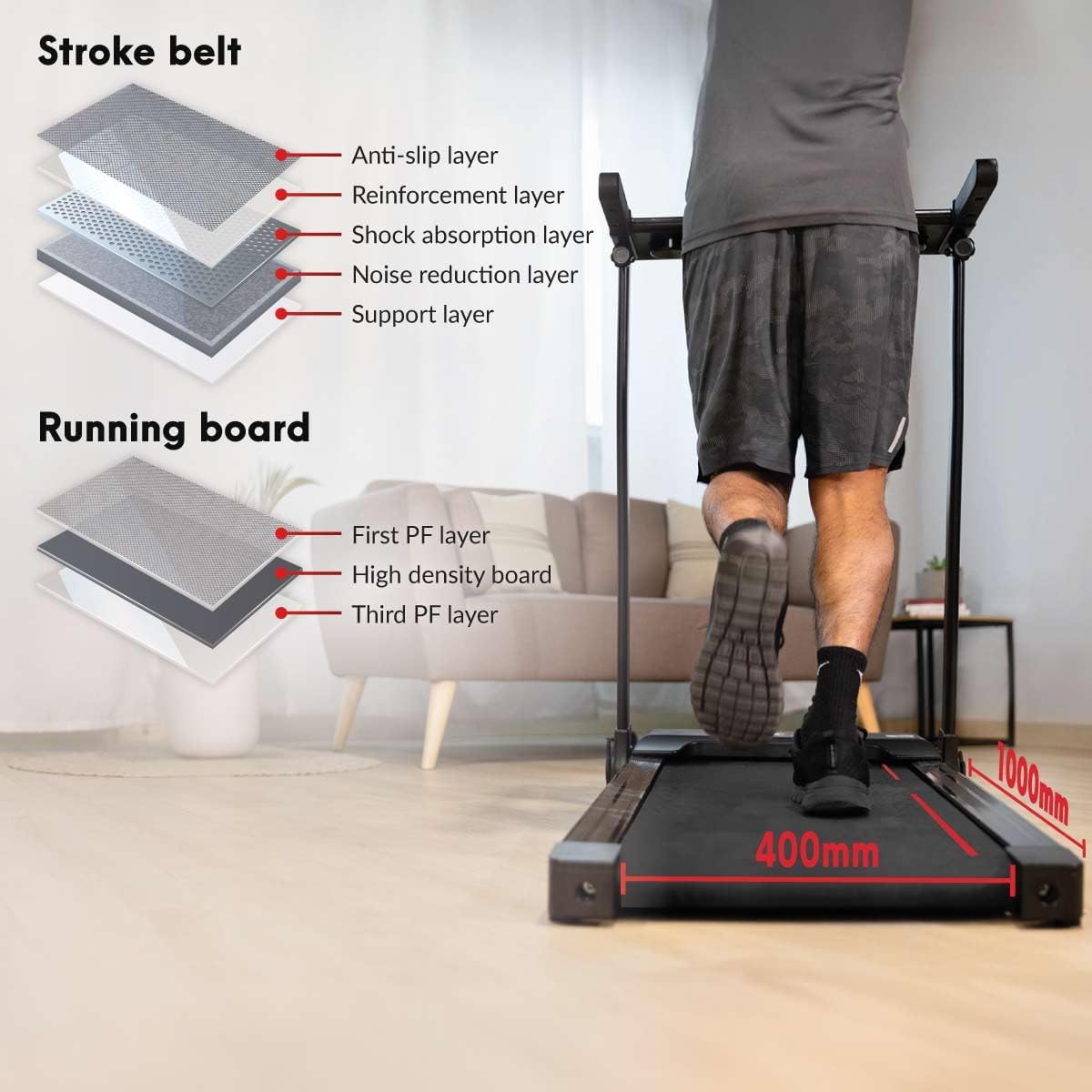
Image: A user holding a smartphone displaying the Kinomap app interface, demonstrating the treadmill's Bluetooth connectivity for interactive virtual training sessions.
- Download the KINOMAP app from your device's app store (Google Play or Apple App Store).
- Dayakan Bluetooth pada telefon pintar/tablet anda.
- Open the KINOMAP app and follow the on-screen instructions to connect to your MC-160 treadmill.
- The treadmill also features built-in Bluetooth speakers for enjoying your favorite music during workouts.
5. Penyelenggaraan
Penyelenggaraan tetap memastikan umur panjang dan prestasi optimum treadmill anda.
- Pembersihan: Lap treadmill dengan iklanamp kain selepas setiap penggunaan untuk mengeluarkan peluh dan habuk. Jangan gunakan pembersih yang kasar.
- Pelinciran tali pinggang: The running belt requires periodic lubrication to reduce friction and wear. Refer to the specific instructions in your detailed manual for the correct type of lubricant and application frequency (typically every 3-6 months depending on usage).
- Ketegangan dan Penjajaran Tali Sawat: Check the running belt tension and alignment regularly. If the belt slips or drifts to one side, adjust it according to the instructions in the full manual.
- Pembersihan Penutup Motor: Periodically remove the motor cover and vacuum any dust or debris that may have accumulated. Ensure the treadmill is unplugged before performing this.

Imej: Meletup view illustrating the multi-layered construction of the treadmill's running belt (anti-slip, reinforcement, shock absorption, noise reduction, support layers) and running board (PF layers, high-density board), contributing to the VCS (Variable Cushioning System).
6. Penyelesaian masalah
If you encounter any issues with your MC-160 treadmill, refer to the table below for common problems and solutions.
| Masalah | Kemungkinan Punca | Penyelesaian |
|---|---|---|
| Treadmill tidak bermula. | Kord kuasa tidak dipasang; Kunci keselamatan tidak ada; Pemutus litar tersandung. | Check power connection; Ensure safety key is properly attached; Reset circuit breaker. |
| Belt slips during use. | Tali pinggang terlalu longgar; Tali pinggang memerlukan pelinciran. | Adjust belt tension (refer to full manual); Lubricate the running belt. |
| Bunyi bising yang luar biasa dari treadmill. | Loose parts; Motor issues; Belt friction. | Check and tighten all bolts and screws; Lubricate belt; If noise persists, contact customer support. |
| Paparan tidak berfungsi. | Loose cable connection; Control panel malfunction. | Check all cable connections; Contact customer support if issue persists. |
For more detailed troubleshooting or issues not listed here, please contact FITFIU Fitness customer support.
7. Spesifikasi
| Ciri | Perincian |
|---|---|
| Jenama | Fitfiu |
| Nama Model | MC-160 |
| warna | Kelabu |
| Kuasa Kuda Motor | 3 HP |
| Kelajuan Maksimum | 14 Kilometer sejam (lebih kurang 8 MPH) |
| Surface Running | 15.7" x 39.37" (400mm x 1000mm) |
| Berat Pengguna Maksimum | 120 Kilogram (lebih kurang 264 paun) |
| Bilangan Program | 12 |
| Jenis Paparan | LCD |
| Ketersambungan | Bluetooth (for KINOMAP app and audio) |
| Dimensi Produk (Tidak dilipat) | 51.57"D x 24.41"W x 8.66"H |
| Dimensi Produk (Dilipat) | 1290mm H x 620mm W x 130mm D (approx. 50.8" H x 24.4" W x 5.1" D) |
| Berat Barang | 29 Kilogram |
| bahan | aluminium |
| Perhimpunan Diperlukan | ya |
8. Waranti dan Sokongan
The FITFIU Fitness MC-160 Treadmill comes with a Waranti pengilang selama 3 tahun. Waranti ini melindungi kecacatan pada bahan dan mutu kerja di bawah penggunaan biasa.
For warranty claims, technical support, or any questions regarding your treadmill, please contact FITFIU Fitness customer service. Keep your proof of purchase for warranty validation.
Sokongan Pelanggan: For assistance, please refer to the contact information provided with your product packaging or visit the official FITFIU Fitness webtapak.