
Docooler H300
Docooler HXSJ H300 USB Wired Gaming Mouse User Manual
Model: H300
1. Produk Lebihview
The Docooler HXSJ H300 is a high-performance USB wired gaming mouse designed for an enhanced gaming experience. It features 7 programmable buttons, adjustable DPI settings, and dynamic breathing lights.

Imej: Depan view of the Docooler HXSJ H300 gaming mouse, showcasing its ergonomic design and vibrant breathing light patterns.
Ciri-ciri Utama:
- Cahaya Pernafasan: Features 7-color breathing light effects for an immersive gaming atmosphere.
- 7 Butang: Equipped with 7 buttons for versatile control, including a dedicated fire key for rapid triple attacks.
- Kabel Tahan Lama: Woven nylon cable with anti-static electromagnetic ring ensures durability and anti-interference performance.
- DPI boleh laras: Offers 5 adjustable DPI settings (1000/1600/2400/3200/5500 DPI) for precise control.
- Reka bentuk ergonomik: Contoured surface designed for comfortable hand feeling, reducing fatigue during extended use.
2. Panduan Persediaan
Follow these steps to set up your Docooler HXSJ H300 gaming mouse:
- Bongkar: Keluarkan tetikus dari bungkusannya dengan berhati-hati.
- Sambung: Locate an available USB 2.0 port on your computer (PC or Laptop). Insert the USB connector of the mouse firmly into the USB port.
- Pemasangan Pemandu: The mouse is plug-and-play. Your operating system (Windows 7/8/10/2000/XP/Vista, Mac OS or later) will automatically detect and install the necessary drivers. No additional software installation is typically required.
- Sahkan: Once connected, the breathing lights on the mouse should illuminate, indicating it is powered on and ready for use.
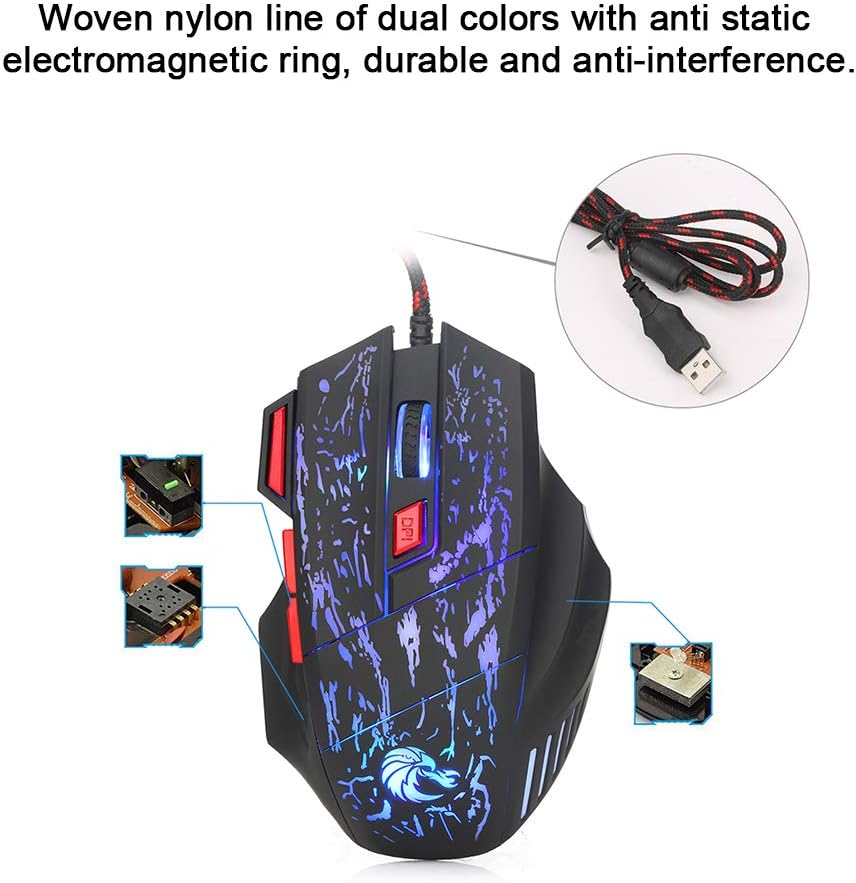
Image: The mouse's durable woven nylon cable with an anti-static electromagnetic ring, designed for reliable connection and reduced interference.
3. Arahan Operasi
The HXSJ H300 mouse features 7 buttons for various functions and adjustable sensitivity.
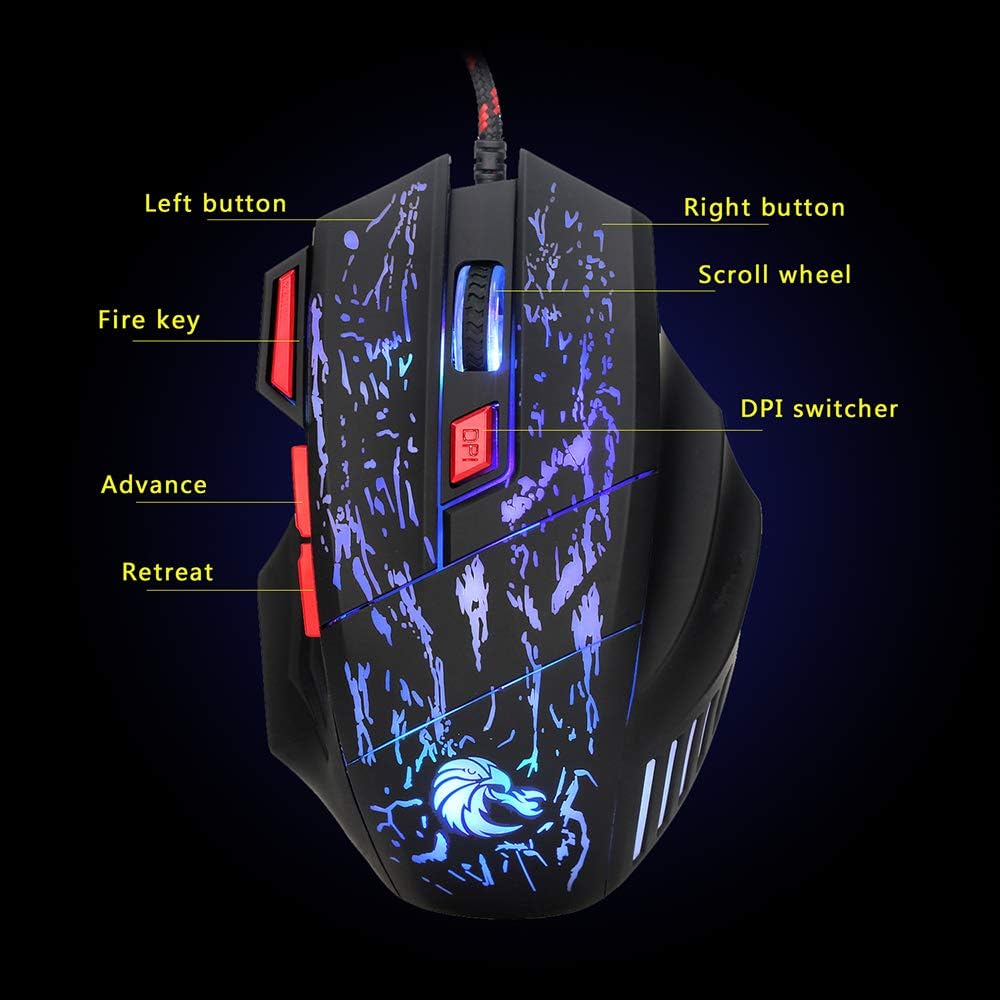
Image: Diagram illustrating the layout and labeling of the seven buttons on the Docooler HXSJ H300 gaming mouse.
Fungsi Butang:
- Butang Kiri: Fungsi klik kiri standard.
- Butang Kanan: Fungsi klik kanan standard.
- Roda Tatal: Menatal kandungan ke atas atau ke bawah. Boleh juga ditekan untuk fungsi klik tengah.
- DPI Switcher: Cycles through the 5 adjustable DPI settings (1000/1600/2400/3200/5500 DPI). Press to change sensitivity.
- Kunci Api: Provides a rapid triple-click action, useful in gaming.
- Advance (Forward): Navigasi ke hadapan web pelayar atau file penjelajah.
- Retreat (Back): Navigasi ke belakang web pelayar atau file penjelajah.
Pelarasan DPI:
The mouse offers 5 levels of DPI (Dots Per Inch) sensitivity. Press the DPI Switcher button, located behind the scroll wheel, to cycle through the available settings. Each press will change the mouse's tracking speed, allowing you to select the optimal sensitivity for your task or game.
Kesan Cahaya Pernafasan:
The mouse features a dynamic 7-color breathing light effect that automatically cycles through colors. This provides visual feedback and enhances the aesthetic appeal during use.

Image: The mouse showcasing its vibrant breathing light feature, cycling through multiple colors.
4. Penyelenggaraan
Penyelenggaraan yang betul memastikan ketahanan dan prestasi optimum tetikus permainan anda.
- Pembersihan: Gunakan kain lembut dan kering untuk mengelap permukaan tetikus. Untuk kotoran degil, sedikit dampen kain dengan air atau pembersih yang lembut dan tidak melelas. Elakkan menggunakan bahan kimia yang keras atau bahan yang melelas.
- Penjagaan Sensor: Pastikan sensor optik di bahagian bawah tetikus bersih dan bebas daripada habuk atau serpihan untuk memastikan pengesanan yang tepat.
- Pengurusan Kabel: Elakkan selekoh tajam atau tarikan berlebihan pada kabel USB untuk mengelakkan kerosakan.
- Storan: Apabila tidak digunakan untuk tempoh yang lama, simpan tetikus di persekitaran yang bersih dan kering, jauh daripada cahaya matahari langsung dan suhu yang melampau.
5. Penyelesaian masalah
If you encounter issues with your Docooler HXSJ H300 gaming mouse, refer to the following common solutions:
| Masalah | Kemungkinan Punca | Penyelesaian |
|---|---|---|
| Mouse not responding / No light | Sambungan USB longgar, port USB rosak, isu pemandu. |
|
| Inaccurate tracking / Cursor erratic | Penderia optik kotor, permukaan pad tetikus tidak sesuai. |
|
| Tetapan DPI tidak berubah | Button not pressed correctly, temporary software glitch. |
|
6. Spesifikasi
Detailed technical specifications for the Docooler HXSJ H300 Gaming Mouse:
| Jenama | Docooler |
| Model | HXSJ H300 |
| Kuantiti Utama | 7 |
| Resolusi (DPI) | 1000, 1600, 2400, 3200, 5500 (Adjustable) |
| Kehidupan Utama | 10 juta klik |
| Voltage Rating / Current | DC 5V / 100mA |
| Versi USB | 2.0 |
| Butang | Left, Right, Scroll Wheel, DPI, Fire Key, Advance, Retreat |
| Kesan Cahaya | Colorful Breathing Light |
| Keserasian | Windows 7 / 8 / 10 / 2000 / XP / Vista, Mac OS or latest |
| warna | Black + Red accents |
| bahan | ABS |
| Panjang Kabel | 140 sm |
| Dimensi Item (P*L*T) | 13.0 * 8.5 * 4.0 cm |
| Berat Barang | 139.0 g |

Image: Technical drawing of the Docooler HXSJ H300 gaming mouse with key dimensions (length, width, height) indicated.
7. Waranti dan Sokongan
For warranty information and technical support, please refer to the documentation provided with your purchase or contact Docooler customer service.
While specific warranty details are not provided in this manual, Docooler products typically come with a standard manufacturer's warranty covering defects in materials and workmanship. Please retain your proof of purchase for any warranty claims.
For further assistance, visit the official Docooler webtapak atau hubungi saluran sokongan mereka.
Ask a question about this manual
Ask about setup, troubleshooting, compatibility, parts, safety, or missing instructions. Manuals+ will review the question and use this page’s manual context to help answer it.