
1. Pengenalan
Terima kasih kerana membeliasing the Moukey MAMP1 220W Bluetooth Dual Channel Power Amppengikat. ini amplifier is designed to provide powerful and versatile audio amplification for various applications, including karaoke, home theater systems, and general audio playback. It features multiple input options, Bluetooth 5.0 connectivity, and intuitive controls for an enhanced audio experience. Please read this manual thoroughly before use to ensure proper operation and to maximize the product's performance.
2. Arahan Keselamatan
Untuk mengelakkan kejutan elektrik, kebakaran atau kerosakan pada unit, sila patuhi langkah berjaga-jaga keselamatan berikut:
- Jangan dedahkan unit ini kepada hujan atau lembapan.
- Jangan buka casing. Tiada bahagian yang boleh diservis pengguna di dalamnya. Rujuk semua servis kepada kakitangan yang berkelayakan.
- Pastikan bekalan kuasa voltage sepadan dengan keperluan yang dinyatakan pada unit.
- Place the unit on a stable, flat surface with adequate ventilation. Do not block ventilation openings.
- Jauhkan unit daripada sumber haba, cahaya matahari langsung dan habuk yang berlebihan.
- Disconnect the power plug from the outlet if the unit will not be used for an extended period.
- Jangan kendalikan unit dengan tangan yang basah.
3. Kandungan Pakej
Sahkan bahawa semua item terdapat dalam pakej:
- Moukey MAMP1 Kuasa AmpUnit penguat
- Alat Kawalan Jauh
- Antena FM
- Manual Pengguna (Dokumen ini)
4. Produk Lebihview
4.1 Front Panel Controls and Functions
The front panel provides access to all primary controls and input ports for easy operation.

Image: Detailed diagram of the Moukey MAMP1 front panel, highlighting each control and port with corresponding numbers.
- Suis kuasa: Menghidupkan atau mematikan unit.
- USB / SD Slot: Untuk memainkan audio files from USB drives (max 32GB) or SD cards (max 16GB).
- Butang Mod: Cycles through input modes (Bluetooth, USB, SD, AUX, FM).
- Butang BT: Directly switches to Bluetooth mode.
- Prev Button: Melangkau ke trek/stesen sebelumnya.
- Butang Main / Jeda: Memainkan atau menjeda main balik audio.
- Butang Seterusnya: Melangkau ke trek/stesen seterusnya.
- Paparan led: Shows current mode, track information, or frequency.
- Folder / Track: Navigates through folders or tracks on USB/SD.
- Tombol Kelantangan Induk: Melaraskan volum keluaran keseluruhan.
- Jack fon kepala: 3.5mm output for monitor headphones.
- Microphone 1 Input: 6.35mm jack for microphone connection.
- Microphone 2 Input: 6.35mm jack for a second microphone connection.
- Tombol Kelantangan Mikrofon: Melaraskan kelantangan mikrofon yang disambungkan.
- Tombol Gema: Controls the echo effect for microphones.
- Tombol Bes: Melaraskan output audio frekuensi rendah.
- Tombol Treble: Melaraskan output audio frekuensi tinggi.
- Tombol Imbangan: Melaraskan keseimbangan saluran kiri/kanan.
- Jack Input AUX: Input 3.5mm untuk peranti audio luaran.
- Pemilih Input: Rotary switch to select between CD, AUX, DVD, and MP3/W inputs.
4.2 Sambungan Panel Belakang
The rear panel houses the main audio input and output connections.

Imej: Belakang view of the Moukey MAMP1 amplifier, menunjukkan semua port input dan output.

Image: Detailed diagram of the Moukey MAMP1 rear panel, highlighting each connection point.
- Audio Input for DVD (RCA): Connect DVD players or other audio sources.
- Audio Input for CD (RCA): Connect CD players or other audio sources.
- Line Out Jack (RCA): For connecting to another ampalat penghidup atau rakaman.
- FM Antenna Jack: Connect the included FM antenna for radio reception.
- Speaker Output Jacks: Connect passive speakers (4-16 Ohm impedance).
- Input Kabel Kuasa: Sambungkan kord kuasa AC.
5. Persediaan
5.1 Penempatan
Letakkan amplifier on a flat, stable surface. Ensure there is sufficient space around the unit for proper ventilation to prevent overheating.
5.2 Sambungan Kuasa
Connect the power cable to the Power Cable Input on the rear panel of the amplifier, then plug the other end into a suitable AC power outlet (115V AC).
5.3 Sambungan Pembesar suara
MAMP1 amplifier supports two sets of passive speakers with an impedance of 4-16 Ohms. Use appropriate speaker wire to connect your speakers to the Speaker Output Jacks on the rear panel.

Image: Diagram illustrating how to connect speakers to the amplifier's binding posts.
- Rotate and loosen the speaker knob on the binding post.
- Insert the bare wire (remove approximately 10mm of insulation) into the hole. Ensure correct polarity (+ to + and - to -).
- Tighten the knobs to secure the wires firmly.
5.4 Input Device Connection
Connect your audio sources (CD player, DVD player, tuner, etc.) to the corresponding RCA Audio Input jacks on the rear panel. For microphones, use the 6.35mm jacks on the front panel. For 3.5mm AUX devices, use the front panel AUX Input Jack.
6. Arahan Operasi
6.1 Hidupkan/Mati Kuasa
Tekan ke Suis Kuasa pada panel hadapan untuk memusingkan amplampu hidup atau mati. Paparan LED akan menyala apabila unit dihidupkan.
6.2 Pemilihan Input
Gunakan Butang Mod on the front panel or the remote control to cycle through available input sources (Bluetooth, USB, SD, AUX, FM). Alternatively, use the Pemilih Input knob on the front panel for RCA inputs (CD, AUX, DVD, MP3/W).
6.3 Kawalan Kelantangan
- Jumlah Induk: Putar Tombol Isipadu Induk to adjust the overall output level of the amplebih hidup.
- Kelantangan Mikrofon: Gunakan Tombol Kelantangan Mikrofon to control the volume of connected microphones independently.
6.4 Kawalan Nada
Adjust the audio characteristics using the Tombol Bass dan Tombol Treble to suit your preference. The Tombol Imbangan allows adjustment of the left and right channel output levels.

Image: Close-up of the Moukey MAMP1 showing the Bass and Treble adjustment knobs.
6.5 Echo Control
Pusingkan Tombol Gema to add or reduce the echo effect on the microphone inputs, suitable for karaoke applications.
6.6 Berpasangan Bluetooth
Untuk menyambungkan peranti Bluetooth:
- Tekan ke Butang BT or cycle through modes until "BLUE" appears on the LED display.
- Dayakan Bluetooth pada telefon pintar, tablet atau komputer anda.
- Cari untuk "Moukey MAMP1" in your device's Bluetooth settings and select it to pair.
- Once paired, you can stream audio wirelessly. Playback will temporarily pause during phone calls to protect privacy.
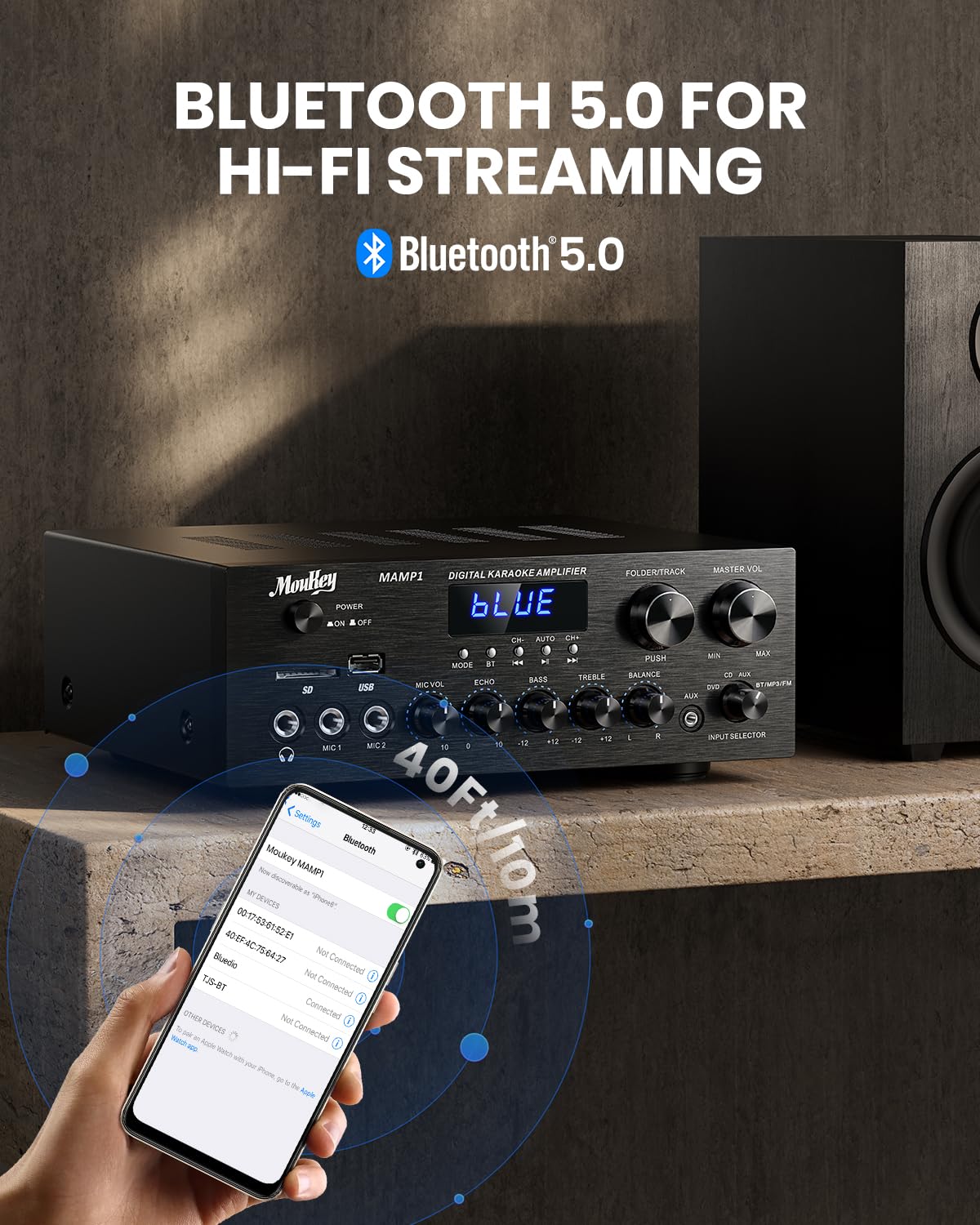
Image: The Moukey MAMP1 amplifier displaying "BLUE" on its screen, indicating Bluetooth mode, with a smartphone showing pairing options.
6.7 Main Semula USB/SD
Insert a USB drive (max 32GB) or SD card (max 16GB) into the respective slot on the front panel. The amplifier will automatically switch to USB/SD mode and begin playback. Use the Sebelumnya, Main/Jeda, Seterusnya, dan Folder/Track butang untuk mengawal main balik.
6.8 Radio FM
Ensure the FM antenna is connected to the rear panel. Select FM mode using the Butang Mod. Gunakan Sebelumnya dan Seterusnya buttons to tune to radio stations. The LED display will show the current frequency.
7. Penyelenggaraan
Untuk mengekalkan prestasi dan penampilan anda amplebih hidup:
- Pembersihan: Gunakan kain lembut dan kering untuk mengelap bahagian luar unit. Jangan gunakan pembersih cecair atau bahan kimia yang melelas.
- Pengudaraan: Pastikan bukaan pengudaraan bersih daripada habuk dan serpihan.
- Storan: Jika menyimpan unit untuk tempoh yang lama, putuskan sambungannya daripada kuasa dan simpan di tempat yang sejuk dan kering.
8. Penyelesaian masalah
If you encounter issues with your Moukey MAMP1 amplifier, rujuk jadual berikut untuk masalah dan penyelesaian biasa:
| Masalah | Kemungkinan Punca | Penyelesaian |
|---|---|---|
| Tiada kuasa | Kabel kuasa tidak disambungkan; Soket kuasa rosak; Suis kuasa dimatikan. | Ensure power cable is securely connected. Try a different power outlet. Press the power switch to ON. |
| Tiada keluaran bunyi | Incorrect input selected; Volume too low; Speakers not connected; Speaker wires loose; Mute function active. | Select the correct input source. Increase Master Volume. Check speaker connections and polarity. Ensure mute is off. |
| Bluetooth tidak bersambung | Amplifier not in Bluetooth mode; Device too far; Device already paired to another unit. | pastikan amplifier is in Bluetooth mode ("BLUE" on display). Move device closer to amplifier. Disconnect from other devices. |
| Mikrofon tidak berfungsi | Microphone not connected; Mic volume too low; Echo knob set to minimum. | Connect microphone securely. Increase Microphone Volume. Adjust Echo knob. |
| Isu main balik USB/SD | Tidak disokong file format; USB drive/SD card corrupted; Capacity exceeded. | Pastikan audio files are in supported formats (e.g., MP3). Try a different USB drive/SD card. Check capacity limits (USB max 32G, SD max 16G). |
Jika masalah berterusan selepas mencuba penyelesaian ini, sila hubungi sokongan pelanggan.
9. Spesifikasi
| Ciri | Spesifikasi |
|---|---|
| Jenama | Moukey |
| Model | MAMP1 |
| Kuasa Keluaran | 220 Watt |
| Saluran | 2 |
| Voltage | 115 Volt (AC) |
| Impedans Pembesar Suara | 4-16 Ohm |
| Versi Bluetooth | 5.0 |
| Julat Bluetooth | Lebih 12 meter (40 kaki) |
| Sokongan Kad USB/SD | USB: Max 32GB, SD: Max 16GB |
| Dimensi (L x W x H) | 25cm x 21.3cm x 9.5cm (lebih kurang 10in x 8in x 4in) |
| UPC | 715802779039 |
| Negara Asal | China |

Image: The Moukey MAMP1 amplifier with its dimensions labeled.
10. Waranti dan Sokongan
This Moukey MAMP1 Kuasa Ampliifier dilengkapi dengan a Waranti 1 tahun dari tarikh pembelian. Waranti ini meliputi kecacatan pembuatan dan mutu kerja di bawah penggunaan biasa.
Waranti tidak meliputi:
- Damage caused by accident, abuse, misuse, flood, fire, or other natural causes.
- Damage caused by unauthorized modification or repair.
- Damage caused by improper installation or connection.
- Cosmetic damage, such as scratches, dents, and broken plastic on ports.
For warranty claims or technical support, please contact the retailer where you purchased the product or visit the official Moukey website for contact information. Please have your purchase receipt and product model number (MAMP1) ready when contacting support.