
Casio Fx-82ESPLUS-2
Casio FX-82ES Plus-2 Scientific Calculator User Manual
Model: Fx-82ESPLUS-2
pengenalan
The Casio FX-82ES Plus-2 Scientific Calculator is designed to support a wide range of mathematical and scientific calculations. Featuring a natural display (Natural-V.P.A.M.) and a dot matrix display, it presents mathematical expressions and results as they appear in textbooks, enhancing comprehension and ease of use. This calculator is equipped with 252 functions, making it suitable for various academic and professional applications.

Imej: Depan view of the Casio FX-82ES Plus-2 Scientific Calculator, showing its display and key layout.
Persediaan
Pemasangan Bateri
The Casio FX-82ES Plus-2 calculator operates on one AAA battery, which is included. To ensure proper functionality, follow these steps for battery installation or replacement:
- Pastikan kalkulator dimatikan.
- Cari penutup petak bateri di bahagian belakang kalkulator.
- Luncurkan penutup mengikut arah yang ditunjukkan oleh anak panah.
- Insert the AAA battery, ensuring the positive (+) and negative (-) terminals are aligned correctly according to the diagram inside the compartment.
- Pasang semula penutup petak bateri, luncurkannya dengan kuat sehingga ia berbunyi klik pada tempatnya.
- Tekan ke ON button to power on the calculator. If the display does not appear, recheck the battery orientation or replace with a new battery.

Imej: Bersudut view of the Casio FX-82ES Plus-2 Scientific Calculator, showing the protective slide cover.
Arahan Operasi
Operasi Asas
To perform basic arithmetic, simply input the numbers and operators. The calculator supports 24 levels of parenthesis for complex expressions.
- Hidupkan/Mati Kuasa: Tekan ON untuk menghidupkan. Tekan SHIFT kemudian AC (OFF) to turn off.
- Kosongkan Entri: Tekan DEL to delete the last entered digit. Press AC to clear all calculations and reset the display.
- Natural Display (V.P.A.M.): Input expressions as they are written, such as fractions (ab/c) and square roots (√). The display will show them in a natural textbook format.
Fungsi Saintifik
The calculator provides 252 built-in functions for various scientific and engineering calculations.
- Fungsi trigonometri: guna dosa, cos, sawo matang for sine, cosine, and tangent. Inverse functions are accessed via SHIFT.
- Fungsi Hiperbolik: Akses hip untuk sinus, kosinus dan tangen hiperbolik.
- Exponents and Logarithms: guna x², x³, xⁿ, log, ln.
- Pengiraan Pecahan: Perform calculations with fractions using the dedicated fraction key.
- Peratustage Pengiraan: Utilize the percentage function for quick calculations.
- Angular Unit Conversions: Convert between degrees (Deg), radians (Rad), and grads (Gra) using SHIFT + PENYEDIAAN MODE.
- Coordinate Conversions: Convert between polar (Pol) and rectangular (Rec) coordinates.
Pengiraan Statistik
The calculator supports various statistical computations for grouped and ungrouped data.
- Kemasukan Data: Enter data in STAT mode.
- Summations: Calculate sums of values.
- Standard Deviations: Compute standard deviations for both grouped and ungrouped data.
- Regression Analysis: Perform linear and other regression analyses.
- Permutasi dan Gabungan: guna nPr dan nCr for permutation and combination calculations.
Penyelenggaraan
Proper care and maintenance will extend the life of your Casio FX-82ES Plus-2 calculator.
- Pembersihan: Wipe the calculator with a soft, dry cloth. For stubborn dirt, a slightly damp cloth can be used, but ensure no moisture enters the device. Do not use abrasive cleaners or solvents.
- Storan: Store the calculator in a cool, dry place away from direct sunlight and extreme temperatures. Use the included slide cover to protect the keys and display from dust and scratches.
- Hayat Bateri: If the display becomes dim or erratic, replace the AAA battery. Remove the battery if the calculator will not be used for an extended period to prevent leakage.
- Elakkan Kesan: Do not drop or subject the calculator to strong impacts, as this can damage internal components or the display.
Menyelesaikan masalah
Isu dan Penyelesaian Biasa
- Kalkulator tidak dihidupkan:
- Check battery installation. Ensure the AAA battery is inserted with correct polarity (+/-).
- Gantikan bateri dengan yang baru.
- Paparan malap atau kosong:
- The battery may be low. Replace the AAA battery.
- Adjust display contrast if available (refer to specific key combinations in the full manual, if applicable, otherwise omit).
- Keputusan pengiraan yang salah:
- Check the current mode setting (e.g., DEG/RAD/GRA for angles). Press PENYEDIAAN MODE untuk berubah.
- Ensure all previous calculations are cleared by pressing AC.
- Verify the input expression for correct syntax and parenthesis usage.
- Perform a calculator reset: Press SHIFT kemudian CLR (RESET), then select "All" to clear all settings and memory.
- Kekunci tidak responsif:
- Bersihkan sekeliling kunci untuk mengeluarkan sebarang serpihan.
- Ensure the calculator has not been exposed to liquids.
Spesifikasi
| Nombor Model | Fx-82ESPLUS-2 |
| Dimensi (L x W x H) | 6.38 x 3.03 x 0.55 inci (162 x 77 x 11 mm) |
| Berat badan | 7.4 auns |
| Sumber Kuasa | 1 x Bateri AAA (termasuk) |
| Fungsi | 252 Fungsi |
| Jenis Paparan | Natural Textbook Display (Natural-V.P.A.M.), Dot Matrix |
| warna | Hitam |
| Pengeluar | CASIO |
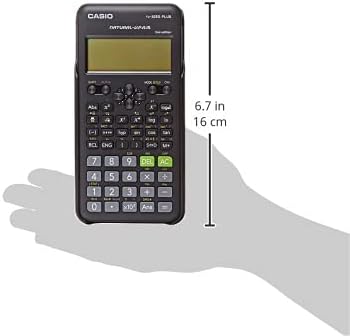
Image: Casio FX-82ES Plus-2 Scientific Calculator with approximate dimensions indicated.
Waranti dan Sokongan
For information regarding warranty coverage, product support, and service, please refer to the official Casio weblaman web atau hubungi khidmat pelanggan Casio secara langsung. Simpan resit pembelian anda sebagai bukti pembelian untuk tuntutan jaminan.
You can find more information and support resources on the official Casio webtapak:
Ask a question about this manual
Ask about setup, troubleshooting, compatibility, parts, safety, or missing instructions. Manuals+ will review the question and use this page’s manual context to help answer it.