
1. Pengenalan
Thank you for choosing the Silvergear Lollipop Kids Camera. This digital camera is designed for children, featuring a durable silicone case, 5.0-megapixel photo resolution, and video recording capabilities. It also includes built-in games for entertainment. This manual provides essential information for the safe and effective use of your camera.
2. Produk Lebihview
Familiarize yourself with the components of your Silvergear Lollipop Kids Camera.
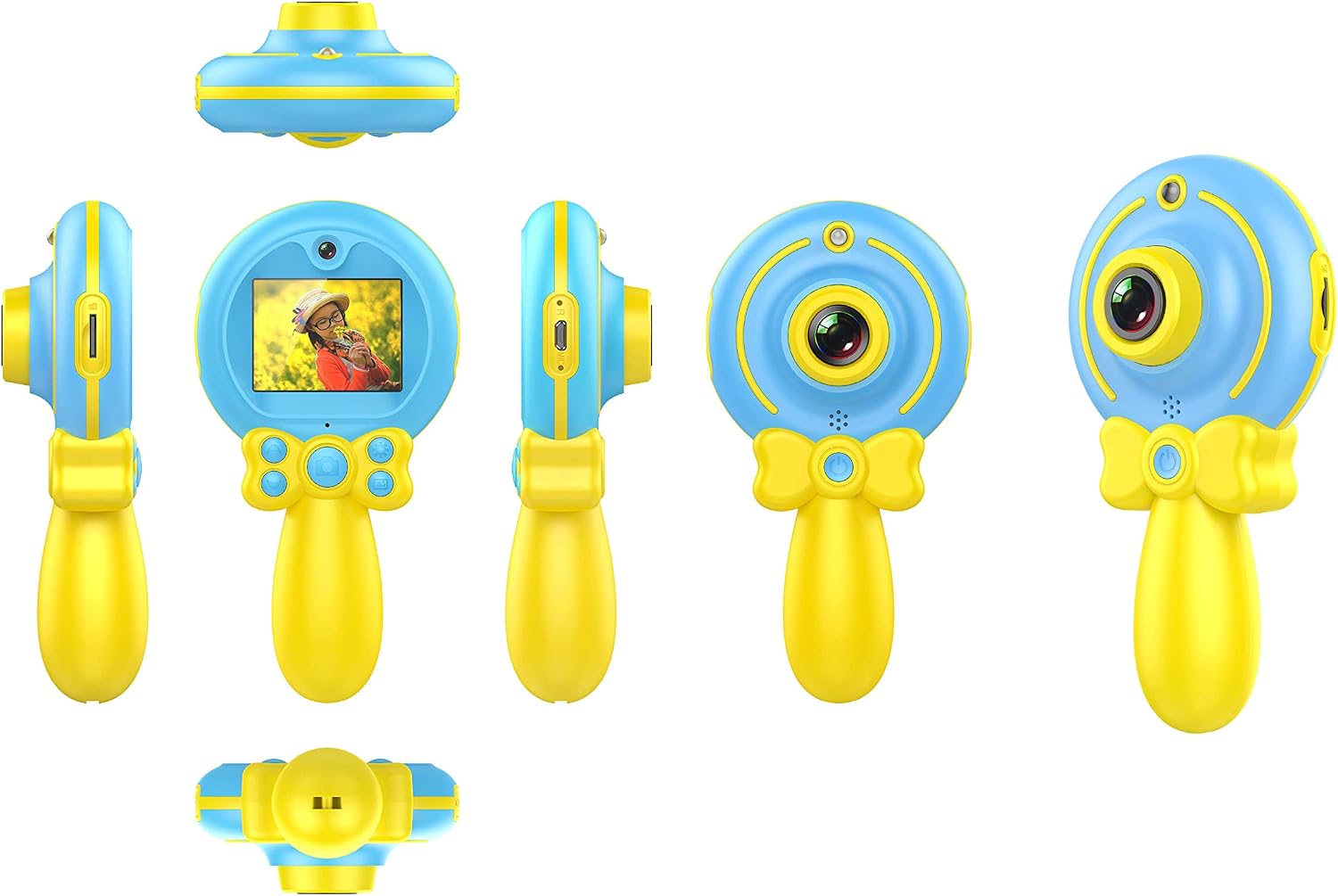
Imej 2.1: Macam-macam views of the Silvergear Lollipop Kids Camera, illustrating its compact design, front and rear lenses, 2-inch display, and control buttons. The camera features a yellow handle and blue body with a silicone protective case.
- Kanta Depan: Untuk mengambil gambar dan video.
- Kanta Belakang: For selfies.
- Skrin Paparan 2 inci: Untuk viewfoto, video dan menu navigasi.
- Butang Kawalan: For power, navigation, and selection.
- Port USB Mikro: Untuk pengecasan dan pemindahan data.
- Slot Kad Mikro SD: Untuk storan yang boleh dikembangkan.
- Wrist Strap Attachment Point: For securing the camera.
3. Persediaan
3.1 Mengecas Bateri
The camera is equipped with a built-in rechargeable Lithium-polymer battery. Before first use, fully charge the camera.
- Connect the included Micro USB cable to the camera's Micro USB port.
- Sambungkan hujung kabel yang satu lagi ke penyesuai kuasa USB (tidak disertakan) atau port USB komputer.
- Lampu penunjuk pengecasan akan menyala. Setelah dicas sepenuhnya, lampu mungkin bertukar warna atau mati.
3.2 Memasukkan Kad SD Mikro
A Micro SD card (not included) is required to save photos and videos. The camera supports cards up to 32GB.
- Cari slot kad SD Mikro pada kamera.
- Gently insert the Micro SD card into the slot with the metal contacts facing down until it clicks into place.
- Untuk mengeluarkan, tolak kad masuk sedikit sehingga ia keluar.
3.3 Menghidupkan/Mematikan
- Untuk Menghidupkan: Tekan dan tahan butang Kuasa selama beberapa saat sehingga skrin menyala.
- Untuk Mematikan: Tekan dan tahan butang Kuasa selama beberapa saat sehingga skrin dimatikan.
4. Arahan Operasi
4.1 Mengambil Foto
The camera features a 5.0-megapixel resolution for still images.

Imej 4.1: A child demonstrating the use of the Silvergear Lollipop Kids Camera for taking photographs.
- Ensure the camera is powered on and in photo mode. Use the navigation buttons to select photo mode if necessary.
- Frame your shot using the 2-inch display screen.
- Press the Shutter button to capture the photo. The camera has autofocus for clear images.
4.2 Merakam Video
The camera can record videos at 640 x 480 pixels resolution at 30 frames per second in MP4 format.
- Switch the camera to video recording mode using the mode selection button.
- Press the Record button to start recording. A timer or indicator will appear on the screen.
- Tekan butang Rakam sekali lagi untuk menghentikan rakaman.
4.3 Bermain Permainan
The camera includes three built-in games for entertainment.

Imej 4.2: A child interacting with the Silvergear Lollipop Kids Camera, viewing content on its screen.
- Navigate to the 'Games' menu option using the navigation buttons.
- Select one of the three available games.
- Use the camera's control buttons to play the game.
4.4 Memindahkan Files
Untuk memindahkan foto dan video ke komputer:
- Connect the camera to a computer using the Micro USB cable.
- The camera should appear as a removable disk drive on your computer.
- Open the camera's folder to access and copy your files.
5. Penyelenggaraan
- Pembersihan: Gunakan kain lembut dan kering untuk membersihkan badan dan skrin kamera. Jangan gunakan pembersih cecair atau bahan kasar.
- Storan: Simpan kamera di tempat yang sejuk dan kering jauh dari cahaya matahari langsung dan suhu yang melampau.
- Penjagaan Bateri: Untuk jangka hayat bateri yang optimum, elakkan daripada kerap mencas sepenuhnya bateri. Cas kamera secara berkala, walaupun tidak digunakan untuk tempoh yang lama.
- Tahan Air: Kamera ini adalah bukan kalis airElakkan pendedahan kepada air atau kelembapan yang tinggi.
6. Penyelesaian masalah
- Kamera tidak dihidupkan: Pastikan bateri telah dicas. Sambungkan kamera ke sumber kuasa dan cuba lagi.
- Tidak boleh mengambil gambar/video: Check if a Micro SD card is inserted correctly and has sufficient free space.
- Kualiti imej yang lemah: Ensure the lens is clean and free from smudges. Check lighting conditions.
- Kamera membeku: Press and hold the Power button to force a shutdown, then restart the camera.
- Computer does not recognize camera: Ensure the USB cable is properly connected. Try a different USB port or cable.
7. Spesifikasi
| Ciri | Spesifikasi |
|---|---|
| Nombor Model | 1087-B |
| Jenama | Silvergear |
| Dimensi (L x W x H) | 9 x 5 x 15 cm |
| Berat badan | 140 gram |
| Resolusi Imej Pegun | 5 Megapiksel |
| Resolusi Video | 640 x 480 pixels (30 FPS) |
| Format Video | MP4 |
| Format Imej | JPEG |
| Saiz Skrin | 2 inci |
| Penyimpanan | Micro SD card support up to 32 GB |
| Bateri | 1 Litium-polimer (termasuk) |
| Ketersambungan | USB |
| Autofokus | ya |
| Tahan Air | Bukan kalis air |
| Ciri Khas | Video recording, filters, 3 built-in games |
8. Kandungan Kotak
- Silvergear Lollipop Kids Camera (Blue)
- Sarung Pelindung Silikon
- Kabel Pengecas USB Mikro
- Tali Pergelangan Tangan
9. Waranti dan Sokongan
Maklumat mengenai jaminan produk dan sokongan pelanggan tidak terdapat dalam data produk yang disediakan. Sila rujuk pembungkusan produk atau maklumat rasmi pengeluar. weblaman web untuk butiran lanjut tentang perlindungan jaminan dan cara menghubungi khidmat pelanggan.