
1. Pengenalan
Thank you for choosing the JUNUO C05 Money Counter. This device is designed for efficient and accurate counting of banknotes, incorporating advanced counterfeit detection technologies. This manual provides essential information for the safe and effective operation, maintenance, and troubleshooting of your money counter.

Figure 1: JUNUO C05 Money Counter
2. Maklumat Keselamatan
- Pastikan bekalan kuasa voltage matches the specifications indicated on the machine.
- Jangan kendalikan mesin dengan tangan basah atau dalam keadaanamp persekitaran.
- Keep the machine away from direct sunlight, high temperatures, and strong magnetic fields.
- Cabut palam kord kuasa sebelum membersihkan atau melakukan sebarang penyelenggaraan.
- Do not attempt to disassemble or repair the machine yourself. Contact qualified service personnel for assistance.
- Jauhkan kanak-kanak daripada mesin semasa operasi.
3. Kandungan Pakej
Sahkan bahawa semua item terdapat dalam pakej:
- JUNUO C05 Money Counter
- Kord Kuasa
- Berus Pembersih
- Manual Pengguna (dokumen ini)

Figure 2: Money Counter with included accessories (power cord and cleaning brush)
4. Produk Lebihview dan Komponen
Familiarize yourself with the main parts of the JUNUO C05 Money Counter:

Rajah 3: Belakang view of the JUNUO C05 Money Counter with labeled components
- Hopper: Where bills are placed for counting.
- Penyusun: Where counted bills are collected.
- Panel Kawalan: Buttons for various functions and settings.
- Skrin Paparan: Shows count, error codes, and mode indicators.
- Suis kuasa: Menghidupkan atau mematikan mesin.
- Soket kuasa: Menyambungkan kord kuasa.
- Tombol Pelarasan: Used to adjust the bill feeding gap.
- Pelabuhan RJ232: For external display connection (optional).
- Pemegang boleh ditarik balik: Untuk mudah dibawa.
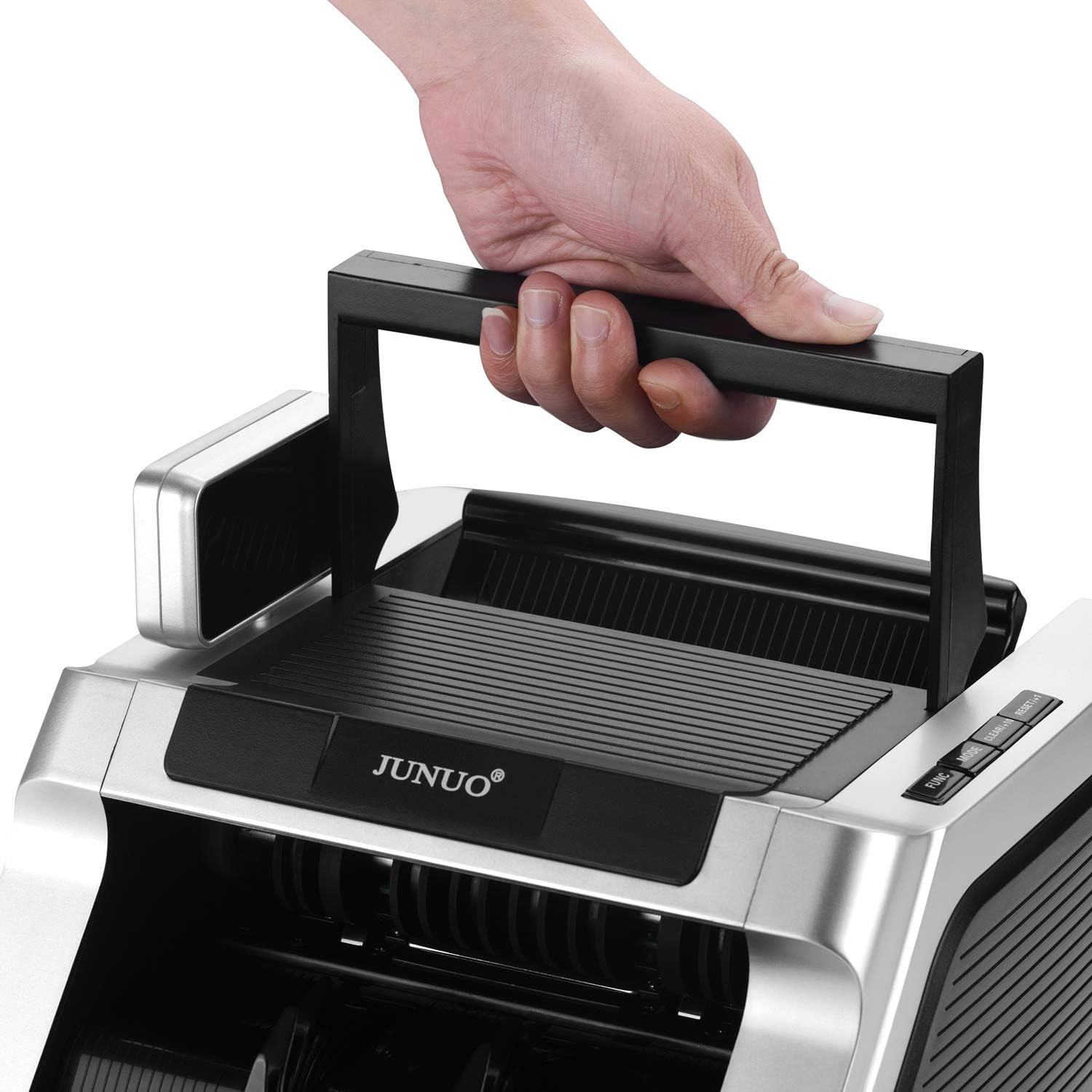
Figure 4: Retractable handle for convenient transport
5. Persediaan
- Membongkar: Carefully remove the money counter and all accessories from the packaging.
- penempatan: Place the machine on a stable, flat, and dry surface, ensuring adequate ventilation.
- Sambungan Kuasa: Connect the power cord to the power socket on the back of the machine, then plug the other end into a suitable electrical outlet.
- Kuasa Awal Hidup: Flip the power switch to the 'ON' position. The machine will perform a self-diagnostic test. Ensure the display lights up and no error codes are shown.
6. Arahan Operasi
6.1 Basic Counting
- Pastikan mesin dihidupkan dan dalam mod siap sedia.
- Place a stack of bills neatly into the hopper. Ensure bills are aligned and not folded or wrinkled.
- The machine will automatically start counting. The count will be displayed on the screen.
- Once counting is complete, remove the counted bills from the stacker.
Important Note: This machine counts the number of bills only. It does not display a total monetary value.
6.2 Pengesanan Palsu
The JUNUO C05 features three detection methods that can be used simultaneously or separately:
- UV (Ultraviolet) Detection: Checks for UV security features present in genuine banknotes.
- MG (Magnetic) Detection: Verifies magnetic ink patterns on banknotes.
- IR (Infrared) Detection: Detects infrared security features, including half-note and chain-note detection.
If a suspicious bill is detected, the machine will stop, and an error code will appear on the display. Remove the suspect bill and press the 'RESET' button to resume counting.

Figure 5: Display indicating active UV and MG detection
6.3 Mod Pengendalian
Use the control panel buttons to select different operating modes:
- TAMBAH Mod: Press the 'ADD' button. The machine will accumulate the count of multiple batches. The total count will be displayed.
- Mod BATCH: Press the 'BATCH' button. Use the numeric keys (if available) or repeated presses to set a desired batch quantity (e.g., 100 bills). The machine will stop counting once the set quantity is reached. Remove the batch and press 'START' to continue counting the next batch.
- RESET/CLEAR: Press 'RESET' or 'CLEAR' to clear the current count or error message and return to standby mode.
7. Penyelenggaraan
Regular maintenance ensures optimal performance and longevity of your money counter.
7.1 Pembersihan
- Matikan: Always turn off and unplug the machine before cleaning.
- Penyingkiran habuk: Use the provided cleaning brush or a soft, dry cloth to remove dust and debris from the hopper, stacker, and internal sensors. Pay special attention to the bill path.
- Pembersihan Sensor: Gently wipe the UV, MG, and IR sensors with a soft, lint-free cloth. Avoid using abrasive materials or harsh chemicals.
7.2 Penyimpanan
When not in use, store the machine in a clean, dry, and dust-free environment. Cover it to prevent dust accumulation.
8. Penyelesaian masalah
Rujuk jadual di bawah untuk isu biasa dan penyelesaiannya:
| Masalah | Kemungkinan Punca | Penyelesaian |
|---|---|---|
| Mesin tidak dihidupkan. | Kord kuasa tidak disambungkan; suis kuasa dimatikan; tiada kuasa dari soket. | Periksa sambungan kord kuasa; pastikan suis kuasa HIDUP; uji soket dengan peranti lain. |
| Bil kerap tersekat. | Bills are wrinkled, folded, or poorly stacked; bill feeding gap incorrect; dust on sensors. | Straighten bills and stack neatly; adjust the bill feeding gap using the knob; clean sensors. |
| Pengiraan yang tidak tepat. | Dust on sensors; bills not properly aligned. | Clean sensors thoroughly; ensure bills are neatly stacked and aligned in the hopper. |
| Counterfeit detection errors (false positives). | Dust on sensors; heavily worn or damaged bills. | Clean sensors; try counting the bill again or manually inspect it. |
9. Spesifikasi
| Ciri | Perincian |
|---|---|
| Jenama | JUNUO |
| Nombor Model | C05 |
| Kelajuan Mengira | Sehingga 1000 bil seminit |
| Kapasiti Hopper | 100 bil |
| Kaedah Pengesanan | UV (Ultraviolet), MG (Magnetik), IR (Inframerah) |
| Penggunaan Kuasa | Less than 60W (working), less than 3W (idle) |
| Tahap Kebisingan | Kurang daripada 60 dB |
| Berat Barang | Kira-kira 11.38 paun |
| Dimensi Pakej | Kira-kira 14 x 11.25 x 9.25 inci |
10. Waranti dan Sokongan
The JUNUO C05 Money Counter comes with a Waranti 1 tahun dari tarikh pembelian. Waranti ini meliputi kecacatan pembuatan dan memastikan operasi yang boleh dipercayai di bawah keadaan penggunaan biasa.
For technical support, warranty claims, or service inquiries, please refer to the contact information provided with your purchase documentation or visit the official JUNUO webtapak.