
1. Pengenalan
Thank you for choosing the Amcrest 1080P WiFi Pan/Tilt Indoor Security Camera (Model: ASH21-W). This manual provides essential information for setting up, operating, and maintaining your device. This camera offers advanced features such as 1080P Full-HD video, pan/tilt functionality, human and pet detection, motion tracking, two-way audio, and various storage options to ensure comprehensive monitoring of your indoor spaces.
2. Apa yang ada di dalam Kotak
- Amcrest ASH21-W 1080P WiFi Pan/Tilt Camera
- Penyesuai Kuasa
- Kabel Kuasa USB
- Plat Pemasangan
- Skru dan Penambat Pemasangan
- Panduan Mula Pantas
Nota: A MicroSD card (up to 256GB) for local storage is not included and must be purchased separately.
3. Persediaan
3.1 Menghidupkan
- Sambungkan kabel kuasa USB ke port kuasa kamera.
- Palamkan penyesuai kuasa ke soket elektrik standard.
- The camera will power on, and the indicator light will begin to flash.
3.2 Muat Turun Aplikasi & Pendaftaran Akaun
- Muat turun Amcrest SmartHome aplikasi daripada App Store (iOS) atau Google Play Store (Android).
- Buka aplikasi dan daftar untuk akaun baharu atau log masuk jika anda sudah memilikinya.
3.3 Berpasangan Peranti
- In the Amcrest SmartHome app, tap the "Add Device" icon (usually a '+' symbol).
- Select your camera model or choose to scan the QR code.
- Imbas kod QR yang terdapat di bahagian bawah kamera anda.
- Follow the on-screen prompts to connect the camera to your 2.4GHz Wi-Fi network and set a device password.
- Name your device (e.g., "Living Room Camera", "Baby's Room").
3.4 Pilihan Pemasangan
The camera can be placed on a tabletop or mounted on a wall or ceiling. Use the provided mounting plate, screws, and anchors for secure installation if mounting is desired.

Imej 1: Amcrest ASH21-W camera on a table, showcasing reka bentuknya yang padat.
4. Arahan Operasi
4.1 Langsung View & Pan/Tilt Control
Once connected, access the live video feed through the Amcrest SmartHome app. Use the on-screen controls to remotely pan (355°) and tilt (80°) the camera lens to view different areas of your room.

Imej 2: Amcrest ASH21-W camera demonstrating pan and tilt motion with blue arrows, indicating its auto-tracking capability.
4.2 Audio Dua Hala
The camera features a built-in microphone and speaker, enabling two-way communication. Tap the "Talk" button in the app to speak through the camera, and tap "Listen" to hear audio from the camera's location.

Imej 3: A person using a smartphone to engage in two-way talk through the Amcrest camera, showing the live feed on the phone screen.
4.3 Baby Monitor Mode
Activate Baby Monitor Mode in the app to receive notifications based on adjustable sound thresholds (VOX alarm). This feature is ideal for monitoring infants or pets, alerting you to sounds like crying or barking without requiring constant visual monitoring.
Imej 4: Amcrest ASH21-W camera with a smartphone displaying the baby monitor interface, showing a baby in a crib and audio level graphs.
4.4 Motion Detection & Smart Tracking
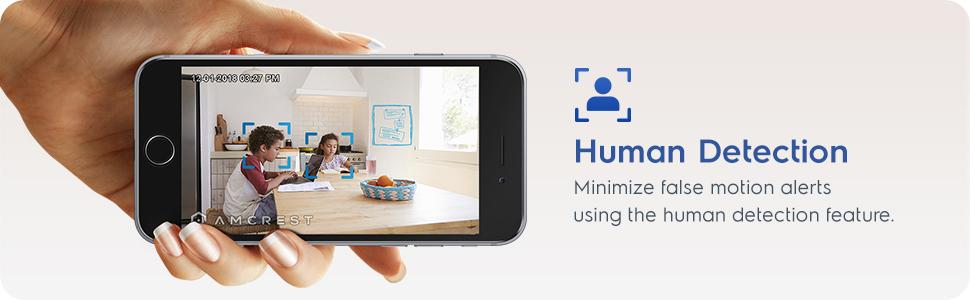
Enable motion detection to receive alerts and record footage when movement is detected. Utilize the human detection filter to reduce false alarms. With Smart Tracking enabled, the camera will automatically pan and tilt to follow detected human movement across the room.

Imej 5: Amcrest ASH21-W camera on a table, with a smartphone showing a human detection alert and a 93-degree viewing angle graphic.
4.5 Penglihatan Malam
The camera provides clear night vision up to 33 feet in absolute darkness, ensuring continuous monitoring even in low-light conditions.
4.6 Rakaman & Penyimpanan
Recordings can be stored in several ways:
- Kad MicroSD: Insert a MicroSD card (up to 256GB, not included) into the camera's slot for local storage.
- Amcrest Cloud: Utilize optional cloud storage services for remote access to recordings.
- Perisian Pihak Ketiga: Compatible with Amcrest NVRs and third-party surveillance software like Blue Iris, Synology, QNAP NAS, Zoneminder, and RTSP.

Imej 6: Amcrest ASH21-W camera highlighting the MicroSD card slot and showing icons for Amcrest Smart Home Cloud and MicroSD Card storage options.
4.7 Alerts & Notifications
Receive instant notifications on your smartphone when motion or human detection events occur. Review event playback directly from the app.
Video 1: Official Amcrest video demonstrating the Smart Home WiFi Pan/Tilt Baby Monitor Camera's features, including setup, app interface, baby monitor mode, human detection, smart tracking, night vision, and storage options.
5. Penyelenggaraan
- Pembersihan: Use a soft, dry cloth to clean the camera lens and body. Avoid harsh chemicals or abrasive materials.
- Kemas kini Firmware: Regularly check the Amcrest SmartHome app for firmware updates to ensure optimal performance and security.
- penempatan: Ensure the camera is placed in a location with good Wi-Fi signal strength and away from direct heat sources or extreme temperatures.
6. Penyelesaian masalah
- Isu Ketersambungan: Ensure your Wi-Fi network is 2.4GHz. Check your router's signal strength and try restarting both the camera and your router.
- Tiada Langsung View: Verify the camera is powered on and connected to Wi-Fi. Check the app for any error messages.
- Penggera Palsu: Adjust motion detection sensitivity settings in the app. Utilize human detection filters to minimize alerts from non-human movement.
- Kualiti Imej Lemah: Pastikan kanta kamera bersih. Periksa kelajuan sambungan internet anda.
- Masalah Audio Dua Hala: Check volume settings on your phone and in the app. Ensure there is no obstruction to the camera's microphone or speaker.
7. Spesifikasi
| Ciri | Perincian |
|---|---|
| Resolusi Tangkapan Video | 1080p |
| Julat Pan/Sendeng | Pan 355 °, Condong 80 ° |
| Viewsudut | 93 Darjah |
| Julat Penglihatan Malam | Sehingga 33 Kaki |
| Pilihan Storan | MicroSD (up to 256GB), Amcrest Cloud, NVR/3rd Party Software |
| Ketersambungan | Wi-Fi (2.4GHz) |
| Audio Dua Hala | Ya (Mikrofon & Pembesar Suara Terbina Dalam) |
| Pengesanan Pergerakan | Yes (Human & Pet Detection, Motion-Tracking) |
| Peranti Serasi | Amazon Alexa |
| Sumber Kuasa | Corded Electric (5V DC, 5W) |
| Dimensi (L x W x H) | 4.17 x 3.04 x 3.04 inci |
| Berat Barang | 0.53 paun (8.4 auns) |
| bahan | plastik |
| Penggunaan Dalaman/Luar | Dalaman |
8. Waranti dan Sokongan
The Amcrest ASH21-W camera comes with a full 1-year US Warranty. For any technical assistance or support, please contact Amcrest directly. Lifetime technical support is provided by Amcrest, a United States-based company headquartered in Houston, TX.
For further assistance, please refer to the Amcrest SmartHome app's support section or visit the official Amcrest webtapak.