
Awei A831BL
Awei A831BL In-Ear Bluetooth Headset User Manual
Model: A831BL
pengenalan
This manual provides detailed instructions for the proper use and maintenance of your Awei A831BL In-Ear Bluetooth Headset. Please read this manual carefully before using the device to ensure optimal performance and longevity.
Produk Selesaiview
The Awei A831BL is a wireless in-ear Bluetooth headset designed for mobile phone use, offering clear audio and a built-in microphone. It is suitable for various activities, including sports.
Ciri-ciri Utama:
- Kesambungan Bluetooth tanpa wayar
- Reka bentuk dalam telinga
- Integrated microphone for calls
- Up to 8 hours of continuous talk/music time
- Pure bass and high-quality sound
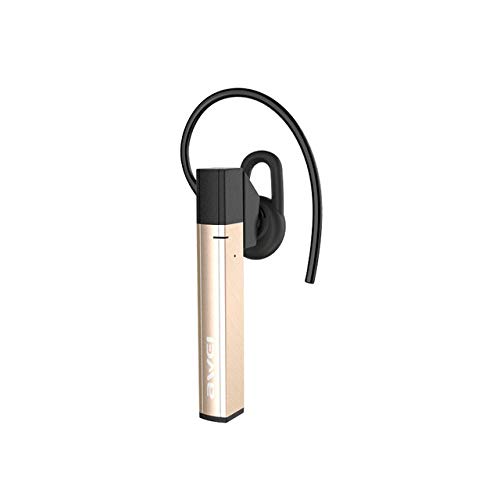
Rajah 1: Awei A831BL In-Ear Bluetooth Headset. This image shows the compact design of the headset, highlighting its in-ear form factor and wireless nature.
Persediaan
1. Mengecas Alat Dengar
Before first use, fully charge the headset. Connect the charging cable to the headset's charging port and the other end to a USB power source (e.g., computer, wall adapter). The indicator light will typically show red during charging and turn blue or off when fully charged.
2. Berpasangan dengan Peranti Bluetooth
- Pastikan alat dengar dimatikan.
- Press and hold the multi-function button (usually the power button) for approximately 5-7 seconds until the indicator light flashes red and blue alternately. This indicates pairing mode.
- On your mobile phone or Bluetooth-enabled device, go to the Bluetooth settings and enable Bluetooth.
- Cari untuk available devices. The headset should appear as "Awei A831BL" or similar.
- Select the headset from the list to connect. If prompted for a password, enter "0000".
- Once successfully paired, the indicator light will typically flash blue slowly or turn off, and you may hear an audible confirmation.
Nota: The headset will automatically attempt to reconnect to the last paired device when turned on, if the device's Bluetooth is active and within range.
Arahan Operasi
Hidupkan/Mati Kuasa
- Hidupkan kuasa: Press and hold the multi-function button for about 3 seconds until the blue indicator light flashes and you hear a power-on prompt.
- Matikan: Press and hold the multi-function button for about 3-4 seconds until the red indicator light flashes and you hear a power-off prompt.
Main balik Muzik
- Main/Jeda: Tekan butang pelbagai fungsi sekali.
- Lagu Seterusnya: Tekan dan tahan butang Naik Kelantangan (+).
- Trek Sebelumnya: Tekan dan tahan butang Turun Kelantangan (-).
- Kelantangan: Tekan pendek butang Kelantangan Naik (+).
- Perlahankan suara: Tekan pendek butang Kelantangan Turun (-).
Pengurusan Panggilan
- Jawab/Tamatkan Panggilan: Tekan butang pelbagai fungsi sekali.
- Tolak Panggilan: Press and hold the multi-function button for about 2 seconds.
- Dail Semula Nombor Terakhir: Tekan dua kali butang berbilang fungsi.
Penyelenggaraan
- Keep the headset dry. Avoid exposure to moisture or liquids.
- Clean the headset with a soft, dry cloth. Do not use abrasive cleaners.
- Simpan set kepala di tempat yang sejuk dan kering jauh dari suhu yang melampau.
- Elakkan daripada menjatuhkan atau meletakkan set kepala kepada kesan yang kuat.
- Do not attempt to disassemble or modify the headset, as this will void the warranty.
Menyelesaikan masalah
| Masalah | Penyelesaian |
|---|---|
| Alat dengar tidak dihidupkan. | Pastikan alat dengar dicas sepenuhnya. Sambungkannya ke sumber kuasa dan cuba lagi. |
| Tidak boleh berpasangan dengan peranti. |
|
| Tiada bunyi atau kelantangan rendah. |
|
| Kualiti panggilan kurang baik. |
|
Spesifikasi
| Ciri | Perincian |
|---|---|
| Nombor Model | A831BL |
| Jenama | Awei |
| warna | emas |
| Teknologi Ketersambungan | Wayarles (Bluetooth) |
| Faktor Bentuk Fon Kepala | Dalam Telinga |
| Mikrofon | ya |
| Pembatalan Bunyi | Tidak |
| Hayat Bateri (Bual/Muzik) | Sehingga 8 jam |
| Jenis Kawalan | Kawalan Kelantangan |
| bahan | plastik |
| Komponen yang Disertakan | Kusyen telinga |
| Dimensi Produk | 16.8 x 10.4 x 3.6 cm; 150 gram |
Waranti dan Sokongan
For warranty information or technical support, please refer to the documentation included with your purchase or contact the manufacturer directly. Keep your proof of purchase for warranty claims.
Ask a question about this manual
Ask about setup, troubleshooting, compatibility, parts, safety, or missing instructions. Manuals+ will review the question and use this page’s manual context to help answer it.