
1. Pengenalan dan Lebihview
The Escort EDM 1111A is a versatile digital multimeter designed for accurate measurement of various electrical parameters. This device is essential for electricians, technicians, and hobbyists for testing circuits, components, and power sources. It features a clear digital display and a rotary dial for selecting different measurement functions.

The Escort EDM 1111A Digital Multimeter with red and black test leads connected, ready for use.
Fungsi utama termasuk:
- DC Voltage (DCV) measurement
- Vol. ACtage (ACV) measurement
- DC Current (DCA) measurement
- AC Current (ACA) measurement
- Pengukuran rintangan (Ω).
- Capacitance (CX) measurement
- Diode and Transistor (hFE) testing
2. Persediaan
2.1 Pemasangan Bateri
The Escort EDM 1111A requires a DC 9V 006P battery for operation. To install or replace the battery:
- Pastikan multimeter dimatikan.
- Cari petak bateri di bahagian belakang unit.
- Carefully slide open or unscrew the battery cover.
- Insert a new 9V 006P battery, observing the correct polarity (+/-).
- Gantikan penutup bateri dengan selamat.

Bahagian belakang view of the Escort EDM 1111A Digital Multimeter, showing the battery compartment cover and the product label.
2.2 Menghubungkan Petunjuk Ujian
The multimeter comes with two test leads, typically one red (positive) and one black (negative/common). Proper connection is crucial for accurate and safe measurements.
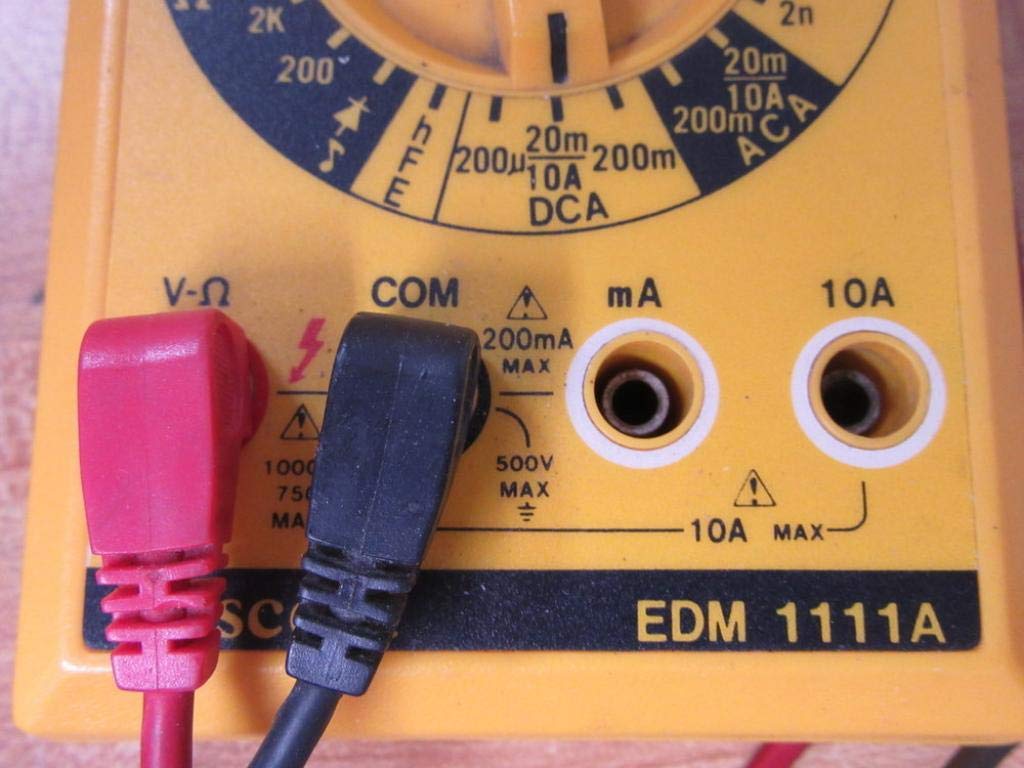
- Bagi kebanyakan voltage, resistance, and low current measurements, connect the black lead to the 'COM' (Common) jack.
- Connect the red lead to the 'V-Ω-mA' jack for voltage, resistance, and milliampsebelum pengukuran semasa.
- For high current measurements (up to 10A), connect the red lead to the '10A' jack. Always ensure the correct jack is used to prevent damage to the meter or circuit.

A closer look at the input jacks (V-Ω, COM, mA, 10A) and the lower portion of the rotary dial, indicating current measurement ranges.

The red and black test probes (leads) used with the Escort EDM 1111A Digital Multimeter, featuring pointed tips for electrical contact.
3. Arahan Operasi
Before taking any measurements, ensure the test leads are correctly connected and the rotary dial is set to the appropriate function and range.

Terperinci view of the rotary selector dial on the Escort EDM 1111A Digital Multimeter, displaying various measurement functions such as DCV, ACV, Ω, DCA, ACA, and CX.
3.1 Mengukur DC Voltage (DCV)
- Set the rotary dial to the desired DCV range (e.g., 200m, 2, 20, 200, 1000). Choose a range higher than the expected voltage.
- Connect the red lead to the positive (+) side of the circuit and the black lead to the negative (-) side.
- Baca voltagnilai e pada paparan.
3.2 Mengukur Vol ACtage (ACV)
- Set the rotary dial to the desired ACV range (e.g., 200m, 2, 20, 200, 750). Choose a range higher than the expected voltage.
- Sambungkan petunjuk ujian merentasi vol ACtagsumber e. Kekutuban tidak penting untuk volum ACtage.
- Baca voltagnilai e pada paparan.
3.3 Mengukur Rintangan (Ω)
- Pastikan litar atau komponen dinyahtenagakan sebelum mengukur rintangan.
- Set the rotary dial to the desired Ω range (e.g., 200, 2K, 20K, 200K, 2M, 20M, 200M).
- Sambungkan petunjuk ujian merentasi komponen yang akan diukur.
- Baca nilai rintangan pada paparan.
3.4 Mengukur Arus DC (DCA)
- Pastikan litar dinyahtenagakan.
- Set the rotary dial to the desired DCA range (e.g., 200µ, 2m, 20m, 200m, 10A).
- Penting: For currents up to 200mA, use the 'V-Ω-mA' jack for the red lead. For currents up to 10A, use the '10A' jack.
- Break the circuit and connect the multimeter in series with the load. The current must flow through the multimeter.
- Hidupkan semula litar dan baca nilai arus.
3.5 Mengukur Arus AC (ACA)
- Pastikan litar dinyahtenagakan.
- Set the rotary dial to the desired ACA range (e.g., 200µ, 2m, 20m, 200m, 10A).
- Penting: For currents up to 200mA, use the 'V-Ω-mA' jack for the red lead. For currents up to 10A, use the '10A' jack.
- Pecahkan litar dan sambungkan multimeter secara bersiri dengan beban.
- Hidupkan semula litar dan baca nilai arus.
3.6 Measuring Capacitance (CX)
- Pastikan kapasitor dinyahcas sepenuhnya sebelum ujian.
- Set the rotary dial to the CX range (e.g., 2n, 20n, 200n, 2µ, 20µ).
- Sambungkan petunjuk ujian merentasi terminal kapasitor.
- Baca nilai kapasitans pada paparan.
3.7 Diode and Transistor (hFE) Testing
Refer to the specific markings on the dial for diode and transistor testing functions. Typically, diode test mode allows checking the forward voltage drop of a diode, and hFE mode is used for measuring the DC current gain of transistors.
4. Penyelenggaraan
4.1 Penggantian Bateri
Replace the 9V 006P battery when the low battery indicator appears on the display or if the multimeter fails to power on. Follow the instructions in Section 2.1.
4.2 Pembersihan
Untuk membersihkan multimeter, gunakan alat pembersih lembutamp kain. Jangan gunakan pembersih atau pelarut yang kasar, kerana ia boleh merosakkanasing or display. Ensure the device is turned off and disconnected from any circuits before cleaning.
4.3 Penyimpanan
When not in use for extended periods, store the multimeter in a cool, dry place, away from direct sunlight and extreme temperatures. Consider removing the battery to prevent leakage, which could damage the internal components.
5. Penyelesaian masalah
| Masalah | Kemungkinan Punca | Penyelesaian |
|---|---|---|
| Tiada paparan atau paparan malap | Bateri rendah atau mati | Replace the 9V 006P battery. |
| Bacaan yang salah | Incorrect range selected Poor lead connection Damaged test leads Incorrect input jack used | Pilih julat yang sesuai. Ensure leads are firmly connected. Inspect and replace damaged leads. Verify leads are in the correct V-Ω-mA or 10A jack. |
| "OL" (Lebihan) dipaparkan | Measurement exceeds selected range | Beralih kepada julat yang lebih tinggi. |
| Tiada bip kesinambungan | Continuity function not selected Litar terbuka | Ensure dial is on continuity/diode test. Check the circuit for breaks. |
6. Spesifikasi
| Parameter | Nilai |
|---|---|
| Model | EDM 1111A |
| Dimensi Produk (L x W x H) | 8 x 4 x 2 inci |
| Berat Barang | 1.84 paun |
| Sumber Kuasa | DC 9V 006P Battery |
| Jenis Pengukuran | Multimeter |
| Pengeluar | pengiring |
| Tarikh Mula-mula Tersedia | 21 November 2019 |
| DC Voltage Julat | 200mV, 2V, 20V, 200V, 1000V |
| Vol. ACtage Julat | 200mV, 2V, 20V, 200V, 750V |
| Julat Arus DC | 200µA, 2mA, 20mA, 200mA, 10A |
| Julat Arus AC | 200µA, 2mA, 20mA, 200mA, 10A |
| Julat Rintangan | 200Ω, 2KΩ, 20KΩ, 200KΩ, 2MΩ, 20MΩ, 200MΩ |
| Capacitance Ranges | 2nF, 20nF, 200nF, 2µF, 20µF |
7. Maklumat Waranti
For specific warranty details regarding your Escort EDM 1111A Digital Multimeter, please refer to the documentation provided at the time of purchase or contact the manufacturer directly. Warranty terms typically cover defects in materials and workmanship under normal use.
8. Sokongan Pelanggan
If you encounter any issues or have questions not covered in this manual, please contact Escort customer support. Have your product model number (EDM 1111A) and serial number (if applicable, found on the back label) ready when contacting support for faster assistance.
The product label on the back of the Escort EDM 1111A, indicating 'DIGITAL MULTIMETER DC 9V 006P BATTERY', serial number, and 'MADE IN TAIWAN R.O.C.'.