
Blyss B081QF516T
Blyss Wired Video Intercom System User Manual
Model: B081QF516T
pengenalan
This manual provides detailed instructions for the installation, operation, and maintenance of your Blyss Wired Video Intercom System. Please read this manual thoroughly before using the product to ensure proper function and safety.
Maklumat Keselamatan
- Pastikan bekalan kuasa diputuskan sebelum pemasangan atau penyelenggaraan.
- Jangan dedahkan peranti kepada suhu yang melampau, kelembapan atau cahaya matahari langsung.
- Elakkan daripada menjatuhkan atau meletakkan peranti kepada kesan yang kuat.
- Jangan cuba membuka atau membaiki unit sendiri. Rujuk semua servis kepada kakitangan yang berkelayakan.
- Jauhkan daripada kanak-kanak.
Kandungan Pakej
Please check the package contents upon opening to ensure all components are present:
- 1 x Indoor Monitor Unit
- 1 x Outdoor Peephole Camera Unit
- Skru Pemasangan dan Palam Dinding
- Manual Pengguna (dokumen ini)
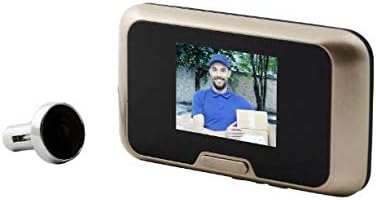
Image: The main components of the Blyss Wired Video Intercom System, showing the indoor monitor and the outdoor peephole camera.
Persediaan dan Pemasangan
Follow these steps for proper installation of your video intercom system:
- Sediakan Pintu: Ensure the existing peephole hole is clean and of the correct diameter for the outdoor camera unit. If no peephole exists, drill a suitable hole according to the product specifications (typically 14-22mm).
- Install Outdoor Camera: Insert the outdoor peephole camera unit through the hole from the outside of the door. Ensure the cable is fed through to the inside.
- Pasang Monitor Dalaman: Secure the mounting bracket for the indoor monitor unit on the inside of the door, aligning it with the camera cable. Use the provided screws and wall plugs if necessary.
- Sambungkan Kabel: Connect the cable from the outdoor camera unit to the corresponding port on the indoor monitor unit. Ensure a secure connection.
- Hidupkan kuasa: Insert the required batteries (if applicable, though specifications state "No" for batteries included/required, implying wired power or internal battery) or connect the power adapter to the indoor monitor unit. The system should power on automatically.
- Kefungsian Ujian: Check the display on the indoor monitor to ensure it shows a clear image from the outdoor camera. Test the doorbell function if applicable.
Arahan Operasi
Using your Blyss Video Intercom System is straightforward:
- Viewing Outside: When someone presses the doorbell button on the outdoor unit, the indoor monitor will automatically display the live video feed. You can also manually press the view button on the indoor monitor to see outside at any time.
- Taking Photos/Recording: If your model supports it, there may be a button to capture a still image or record a short video clip of the visitor. Refer to the on-screen icons for these functions.
- Melaraskan Tetapan: Access the system settings via the menu button on the indoor monitor. Here you can adjust brightness, contrast, ringtone volume, and other preferences.
Penyelenggaraan
To ensure the longevity and optimal performance of your intercom system:
- Pembersihan: Use a soft, dry cloth to clean the indoor monitor screen and the outdoor camera lens. Do not use abrasive cleaners or solvents.
- Unit Luar: Periodically check the outdoor camera lens for dirt, dust, or cobwebs that may obstruct the view.
- Sambungan: Ensure all wired connections remain secure.
Menyelesaikan masalah
If you encounter issues with your Blyss Video Intercom System, refer to the following common problems and solutions:
| Masalah | Kemungkinan Punca | Penyelesaian |
|---|---|---|
| Tiada imej pada monitor dalaman. | Power disconnected; loose cable connection; faulty camera/monitor. | Check power supply. Ensure all cables are securely connected. If problem persists, contact support. |
| Imej kabur atau herot. | Dirty camera lens; poor lighting; cable interference. | Clean the camera lens. Ensure adequate lighting. Check cable for damage or interference. |
| Doorbell not ringing. | Ringtone volume too low; faulty doorbell button; wiring issue. | Check ringtone volume in settings. Inspect doorbell button for damage. Verify wiring connections. |
| System frequently cuts off or shows "camera error". | Loose connection; power instability; internal fault. | Ensure all connections are firm. Check power source stability. If issues persist, professional inspection may be required. |
If the problem cannot be resolved using the above solutions, please contact customer support.
Spesifikasi
- model: B081QF516T
- Pengeluar: Blyss
- Dimensi Pakej: 18.6 x 10.9 x 4.6 cm
- Berat Barang: 296 g
- Bateri Diperlukan: No (implies wired power or internal rechargeable battery)
- Pertama Tersedia: 19 Nov. 2019
Waranti dan Sokongan
For warranty information or technical support, please refer to the contact details provided at the point of purchase or visit the official Blyss webtapak. Simpan resit pembelian anda sebagai bukti pembelian untuk tuntutan waranti.
For further assistance, you may contact Blyss customer service through their official channels. Please have your product model number (B081QF516T) ready when contacting support.
Ask a question about this manual
Ask about setup, troubleshooting, compatibility, parts, safety, or missing instructions. Manuals+ will review the question and use this page’s manual context to help answer it.