

1. Pengenalan
The RENAISSER Raphael 520 Stylus is a high-precision digital pen designed for seamless interaction with compatible Microsoft Surface and other devices. Featuring MPP 2.0 technology, it offers 4096 levels of pressure sensitivity and tilt support, providing a natural writing and drawing experience. Its ergonomic design, magnetic attachment, and long-lasting rechargeable battery make it an ideal tool for creative and professional tasks.


2. Persediaan
2.1 Pengecasan Awal
Before first use, it is recommended to fully charge your Raphael 520 Stylus. The stylus features ultra-fast charging capabilities.
- Connect the stylus to a power source using the provided charging cable.
- Cas selama 20 minit memberikan masa penggunaan selama lebih kurang 50 jam.
- A full 1-hour charge can last for over 100 hours of continuous use.

2.2 Sambungan Peranti
The Raphael 520 Stylus is designed for automatic connection with compatible devices. Simply turn on the stylus, and it should be recognized by your device without the need for Bluetooth pairing.
- Press the power button on the stylus for 1 second to turn it on.
- The stylus will automatically connect to your compatible Surface or other device.
3. Operating the Stylus
3.1 Pressure Sensitivity and Tilt
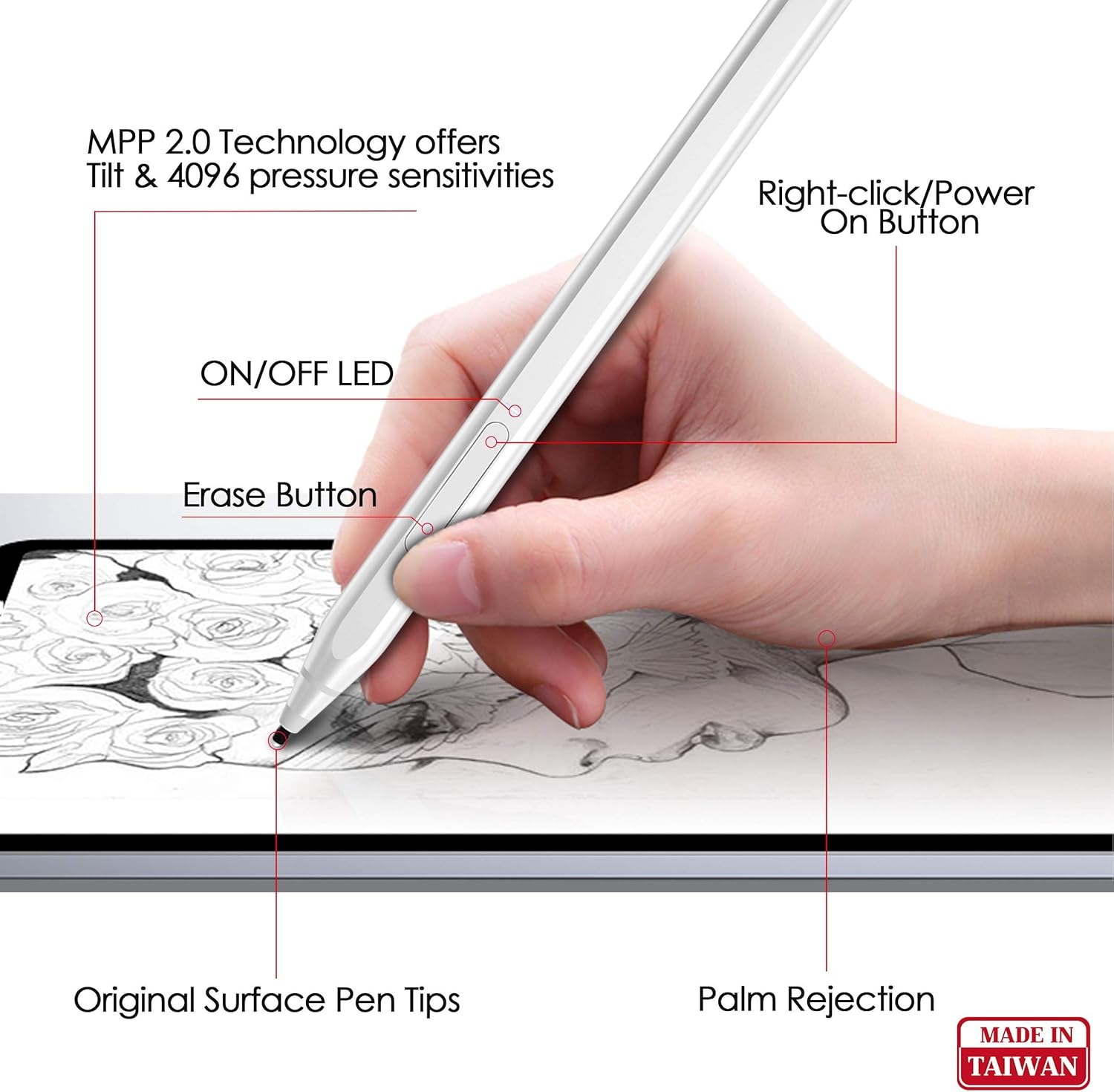
The Raphael 520 Stylus supports 4096 levels of pressure sensitivity, allowing for precise control over line thickness and opacity. Its tilt sensitivity enables shading effects, mimicking a traditional pencil.
- Apply varying pressure to create different line weights.
- Tilt the stylus at an angle to achieve shading effects in supported applications.
3.2 Penolakan Tapak Tangan
The palm rejection feature allows you to rest your hand comfortably on the screen while writing or drawing, preventing unintended marks.

3.3 Fungsi Butang
The stylus includes convenient buttons for enhanced functionality:
- Butang Padam: Located on the side, this button allows you to quickly erase content.
- Right-Click/Power On Button: This button serves as a right-click function in applications and also powers on the stylus.
4. Ciri-ciri dan Reka Bentuk
The Raphael 520 Stylus is engineered with user comfort and performance in mind.
- Reka bentuk ergonomik: With a 9.2 mm diameter and weighing only 14 grams, the stylus is comfortable for extended use. Its streamlined design ensures a balanced feel.
- Bahan Premium: Constructed from high-quality aluminum alloy, the pen is both lightweight and durable.
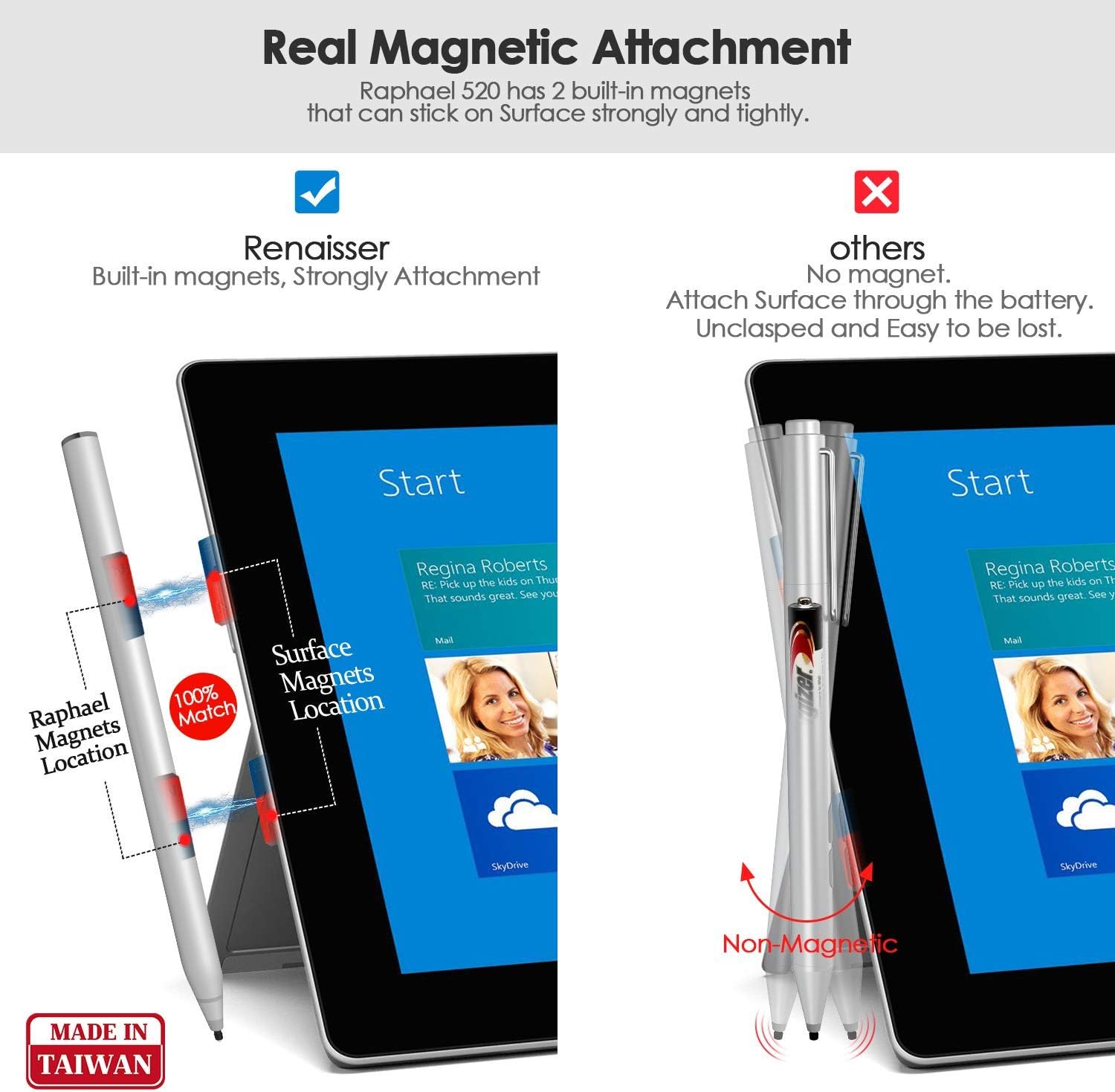
- Lampiran Magnetik: The stylus features built-in magnets, allowing it to securely attach to the left side of compatible Surface devices (e.g., Surface Pro/Go/Book), similar to the original Surface Pen.
- Original Surface Pen Tips Supported: The Raphael 520 comes with HB-type and 2H-type pen tips that provide a gentle friction, simulating the feel of writing on real paper. These tips are compatible with original Surface Pen tips.



5. Keserasian
The RENAISSER Raphael 520 Stylus is compatible with a wide range of devices. Please refer to the list below for confirmed compatibility:

Microsoft Surface:
- Surface Pro 9, Surface Pro 8, Surface Pro 7+, Surface Pro 7, Surface Pro 6, Surface Pro 5, Surface Pro 4
- Surface Duo/ Duo 2
- Surface Pro X
- Surface Go/Go 2/Go 3
- Surface Book/Book 2/Book 3
- Surface Studio 1st Gen, Surface Studio 2, Surface Studio 2+
- Surface Laptop 1/Laptop 2/Laptop 3/Laptop 4/Laptop 5
- Studio Komputer Riba Surface
*Note: Not compatible with Surface Laptop Go, Surface Laptop Go 2, and other touch screen computers not explicitly listed.
6. Penyelenggaraan
6.1 Pembersihan
To maintain the performance and appearance of your stylus:
- Lap badan stylus dengan kain lembut, kering dan tidak berbulu.
- Elakkan menggunakan bahan kimia yang keras atau bahan yang melelas.
6.2 Penggantian Petua
Over time, the pen tip may wear down. Replace it with a new tip from the included spares or purchase official RENAISSER replacement tips.
- Gently pull the old tip straight out from the stylus.
- Insert the new tip firmly until it clicks into place.
7. Penyelesaian masalah
7.1 Stilus Tidak Memberi Respons
- Ensure the stylus is charged. Connect it to a power source and allow it to charge for at least 20 minutes.
- Press the power button on the stylus to ensure it is turned on.
- Verify that your device is compatible with the Raphael 520 Stylus (refer to Section 5).
- Mulakan semula peranti anda.
- If experiencing delays or issues with specific applications (e.g., OneNote), try restarting the application or checking for software updates for both the application and your device's operating system.
7.2 Inaccurate Tracking or Pressure Sensitivity
- Check if the pen tip is securely seated. If loose, remove and reinsert it.
- Replace the pen tip if it appears worn or damaged.
- Pastikan skrin peranti anda bersih dan bebas daripada comot atau serpihan.
- Calibrate your stylus in your device's settings if available.
7.3 Magnetic Attachment Issues
- Ensure you are attempting to attach the stylus to the correct side of your Surface device (typically the left side).
- Verify that your specific Surface model supports magnetic attachment for styluses.
8. Spesifikasi
| Ciri | Perincian |
|---|---|
| Jenama | REAISSER |
| Nombor Model | Rafael 520 |
| Sensitiviti Tekanan | 4096 Peringkat |
| Sensitiviti Condongkan | Disokong |
| Penolakan Telapak Tangan | Disokong |
| bahan | Aloi Aluminium |
| Berat Barang | 14 Gram (0.494 auns) |
| Dimensi Produk (LxWxH) | 5.59 x 0.36 x 0.34 inci |
| Jenis Bateri | Litium-Ion (1 bateri A disertakan) |
| Masa Mengecas | 1 Hour for full charge |
| warna | Perak |
9. Waranti dan Sokongan
For warranty information, technical support, or any inquiries regarding your RENAISSER Raphael 520 Stylus, please contact RENAISSER customer service. Details can typically be found on the official RENAISSER webtapak atau melalui platform pembelian anda.
RENAISSER is committed to providing quality products and support to its users.