
pengenalan
The Perel EDIN305N is a 230V 16A 3600W DIN-rail mount digital weekly timer designed for indoor use. This device allows for precise, programmable control of electrical circuits, enabling automatic switching ON and OFF of connected appliances or lighting systems over a weekly cycle. It features a clear digital display and multiple programming options to suit various scheduling needs.
Langkah-langkah Keselamatan
AMARAN: Electrical installation should only be performed by a qualified electrician. Incorrect wiring can lead to electric shock, fire, or damage to the device and connected equipment. Always disconnect power at the main circuit breaker before installation or maintenance.
- Ensure the power supply matches the device's specifications (230V~50Hz).
- Jangan melebihi kapasiti beban maksimum 16A / 3600W.
- This device is designed for indoor use only. Avoid exposure to moisture, dust, or extreme temperatures.
- Jangan cuba membuka atau membaiki peranti sendiri. Rujuk semua servis kepada kakitangan yang berkelayakan.
- Jauhkan daripada kanak-kanak.
Produk Selesaiview
The Perel EDIN305N digital timer consists of a main body with a digital display, control buttons, and terminal blocks for electrical connections. A transparent cover protects the display and buttons.
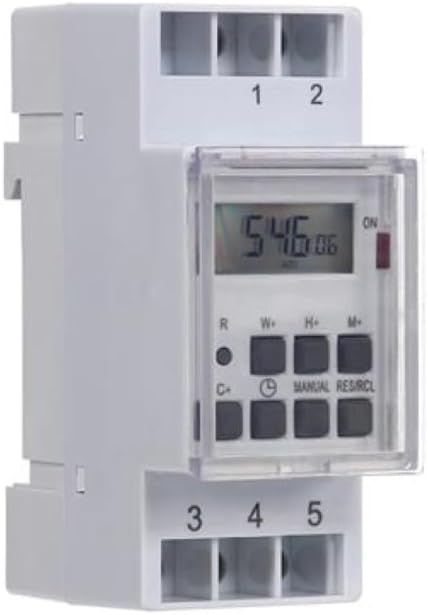
Rajah 1: Depan view of the Perel EDIN305N Digital Weekly Timer. The image displays the LCD screen, control buttons (R, W+, H+, M+, C+, Clock, Manual, RES/RCL), and numbered terminal blocks (1, 2 at the top, 3, 4, 5 at the bottom).
Butang Kawalan:
- R: Reset button (recessed).
- W+: Weekday setting.
- H+: Tetapan jam.
- M+: Minute setting.
- C+: Clear program.
- ikon jam: Used to set current time and day, and to exit programming mode.
- MANUAL: Manual override for ON/AUTO/OFF modes.
- RES/RCL: Reset/Recall program.
Blok Terminal:
- 1, 2: Power supply input (N, L).
- 3, 4, 5: Output terminals for controlled circuit (Common, Normally Open, Normally Closed).
Spesifikasi Teknikal
| Parameter | Nilai |
|---|---|
| Nombor Model | EDIN305N |
| Voltage | 230V~50Hz |
| Maks. semasa | 16A |
| Maks. kuasa | 3600W |
| Bilangan Tetapan | 7 (ON/OFF programs) |
| Jenis Pemasangan | DIN-Rel |
| Dimensi (L x W x H) | 2.36 x 3.54 x 1.57 inci (60 x 90 x 40 mm) |
| Berat badan | 0.12 kg (4.2 auns) |
| bahan | plastik |
| warna | putih |
| Bateri Diperlukan | No (internal battery for memory backup) |
Pemasangan
1. Pemasangan
The Perel EDIN305N is designed for DIN-rail mounting. Securely attach the timer to a standard 35mm DIN-rail within an electrical enclosure. Ensure sufficient space for wiring and ventilation.
2. Pendawaian
PENTING: Ensure power is disconnected at the main circuit breaker before proceeding with wiring. Follow local electrical codes and regulations.
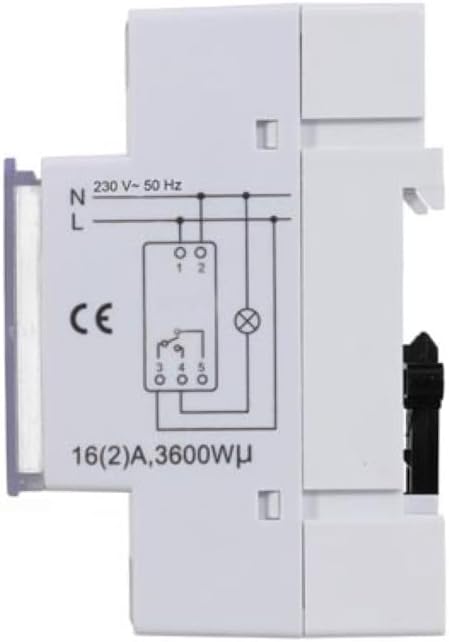
Rajah 2: sebelah view of the Perel EDIN305N Digital Weekly Timer showing the electrical wiring diagram. It illustrates connections for Neutral (N), Live (L), and the output contacts (1, 2, 3, 4, 5) for controlling a load.
Refer to the wiring diagram (Figure 2) and the terminal block labels on the device:
- Connect the Neutral (N) wire of your 230V AC supply to terminal 1.
- Connect the Live (L) wire of your 230V AC supply to terminal 2.
- For the controlled circuit:
- Terminal 3: Common contact for the relay output.
- Terminal 4: Normally Open (NO) contact. The circuit connected here will be ON when the timer is active.
- Terminal 5: Normally Closed (NC) contact. The circuit connected here will be OFF when the timer is active.
- Connect the load (e.g., light, appliance) between the Live (L) supply and either terminal 4 (for NO operation) or terminal 5 (for NC operation), with terminal 3 connected to the Live (L) supply. Alternatively, connect the load between terminal 4 or 5 and the Neutral (N) supply, with terminal 3 connected to the Live (L) supply. Consult a qualified electrician for specific load wiring configurations.
Persediaan dan Operasi Awal
1. Power On and Reset
After wiring and restoring power, the display will illuminate. If the display is blank or shows erratic characters, press the recessed R (Reset) button using a pointed non-metallic object (e.g., a pen tip). This will clear all settings and restore default values.
2. Menetapkan Waktu dan Hari Semasa
- Tekan dan tahan butang ikon jam butang.
- Sambil memegang ikon jam butang, tekan W+ to set the current day of the week (1=Monday, 7=Sunday).
- Sambil memegang ikon jam butang, tekan H+ untuk menetapkan jam semasa (0-23).
- Sambil memegang ikon jam butang, tekan M+ untuk menetapkan minit semasa (0-59).
- Lepaskan ikon jam button. The time and day are now set.
3. Pengaturcaraan Kitaran HIDUP/MATI
Pemasa ini menyokong sehingga 7 program ON/OFF. Setiap program terdiri daripada masa ON dan masa OFF.
- Tekan ke ikon jam button once to enter programming mode. The display will show "1 ON".
- Tekan W+ to select the day(s) for this program. You can choose a single day, a block of days (e.g., Mon-Fri), or all days.
- Tekan H+ to set the ON hour for program 1.
- Tekan M+ to set the ON minute for program 1.
- Tekan ke ikon jam butang sekali lagi. Paparan akan menunjukkan "1 OFF".
- Repeat steps 2-4 to set the OFF day(s), hour, and minute for program 1.
- To set additional programs (2-7), press the ikon jam button to cycle through "2 ON", "2 OFF", etc., and repeat the setting process.
- Selepas menetapkan semua program yang dikehendaki, tekan butang MANUAL butang untuk keluar dari mod pengaturcaraan dan kembali ke paparan masa semasa.
4. Penggantian Manual
Tekan ke MANUAL button repeatedly to cycle through the operating modes:
- ON: Output sentiasa HIDUP, mengatasi semua program.
- AUTO: Pemasa beroperasi mengikut kitaran ON/OFF yang diprogramkan.
- MATI: Output sentiasa MATI, mengatasi semua program.
Pastikan pemasa ditetapkan kepada AUTO for programmed operation.
5. Clearing Programs
To clear a specific program:
- Masuk ke mod pengaturcaraan dengan menekan butang ikon jam button until the desired program number (e.g., "3 ON") is displayed.
- Tekan ke C+ button. This will clear both the ON and OFF times for that specific program.
- Repeat for other programs as needed.
- Tekan MANUAL untuk keluar dari mod pengaturcaraan.
To clear all programs and reset the device, use the recessed R Butang (Tetapkan Semula).
Penyelenggaraan
- Bersihkan peranti dengan kain lembut dan kering. Jangan gunakan pembersih atau pelarut yang melelas.
- Ensure the transparent cover is closed to protect the display and buttons from dust and splashes.
- Regularly check electrical connections for tightness, especially in high-vibration environments.
Menyelesaikan masalah
| Masalah | Kemungkinan Punca | Penyelesaian |
|---|---|---|
| Paparan kosong. | Tiada bekalan kuasa; bateri dalaman kehabisan kuasa. | Check power connections (terminals 1 & 2). Ensure main power is ON. If power is present, press the R (Reset) button. The internal battery recharges when connected to power. |
| Pemasa tidak HIDUP/MATI seperti yang diprogramkan. | Incorrect program settings; timer in manual ON/OFF mode. | Verify program settings (time, day, ON/OFF). Ensure the timer is in AUTO mod dengan menekan butang MANUAL butang. |
| Connected appliance not receiving power. | Incorrect wiring; appliance fault; timer fault. | Check wiring according to Figure 2. Test the appliance directly. If wiring and appliance are fine, the timer may be faulty. |
| Buttons unresponsive or display erratic. | Software glitch; low internal battery. | Press the recessed R (Reset) button. Ensure the timer has been connected to power for at least 24 hours to fully charge the internal battery. |
Pelupusan
Do not dispose of this product with general household waste. This electronic device contains materials that can be recycled. Please dispose of it at a designated collection point for electrical and electronic equipment waste, in accordance with local regulations.
Waranti dan Sokongan
Perel products are manufactured to high quality standards. For warranty information, technical support, or service inquiries, please refer to the documentation provided with your purchase or contact your local Perel distributor or retailer. Please have your model number (EDIN305N) and purchase details ready when contacting support.