
pengenalan
The Power Dynamics PDM25 is a compact and versatile 100V amplifier designed for small installations such as shops, restaurants, and offices. It offers easy operation, reliable performance, and a range of features including Bluetooth connectivity, an integrated MP3 player, USB input, AUX input, and a wireless remote control. This manual provides essential information for the safe and efficient use of your PDM25 amplebih hidup.
Arahan Keselamatan
- Baca manual ini dengan teliti sebelum menggunakan produk.
- Simpan manual ini untuk rujukan masa hadapan.
- Patuhi semua amaran dan ikut semua arahan.
- Jangan gunakan alat ini berhampiran air.
- Bersihkan hanya dengan kain kering.
- Jangan sekat sebarang bukaan pengudaraan. Pasang mengikut arahan pengilang.
- Jangan pasang berhampiran mana-mana sumber haba seperti radiator, daftar haba, dapur, atau radas lain (termasuk amppenghidup) yang menghasilkan haba.
- Jangan kalahkan tujuan keselamatan plag terkutub atau jenis pembumian. Palam terkutub mempunyai dua bilah dengan satu lebih lebar daripada yang lain. Palam jenis pembumian mempunyai dua bilah dan serampang pembumian ketiga. Bilah lebar atau serampang ketiga disediakan untuk keselamatan anda. Jika palam yang disediakan tidak sesuai dengan alur keluar anda, rujuk juruelektrik untuk menggantikan alur keluar usang.
- Lindungi kord kuasa daripada berjalan atau tersepit, terutamanya pada palam, bekas kemudahan dan tempat keluar dari radas.
- Hanya gunakan lampiran/aksesori yang ditentukan oleh pengilang.
- Cabut plag radas ini semasa ribut petir atau apabila tidak digunakan untuk jangka masa yang lama.
- Rujuk semua servis kepada kakitangan perkhidmatan yang berkelayakan. Servis diperlukan apabila radas telah rosak dalam apa jua cara, seperti kord bekalan kuasa atau palam rosak, cecair telah tertumpah atau objek jatuh ke dalam radas, radas telah terdedah kepada hujan atau lembapan, tidak beroperasi seperti biasa. , atau telah digugurkan.
- AMARAN: Untuk mengurangkan risiko kebakaran atau kejutan elektrik, jangan dedahkan radas ini kepada hujan atau lembapan.
- PERHATIAN: Do not open the cover. No user-serviceable parts inside. Refer servicing to qualified personnel only.
Produk Selesaiview
The PDM25 amplifier features a user-friendly front panel with controls for various audio sources and volume adjustments, along with a clear digital display. The rear panel provides all necessary connections for speakers, external audio sources, and power.

Rajah 1: Panel Hadapan Atasview of the PDM25 Amplebih hidup.

Figure 2: Rear Panel Connections of the PDM25 Amplebih hidup.
Persediaan
1. Membongkar
Buang dengan berhati-hati amplifier from its packaging. Inspect the unit for any signs of damage during transit. Retain the original packaging for future transport or storage.
2. penempatan
Letakkan amplifier on a stable, flat surface. Ensure adequate ventilation around the unit to prevent overheating. Avoid placing it near heat sources or in direct sunlight.
3. Sambungan Pembesar Suara
The PDM25 supports both 100V line speakers and low impedance (4-16 Ohm) speakers.
- For 100V Line Speakers: Connect the positive (+) terminal of your 100V speaker system to the "100V" terminal on the amplifier's rear panel. Connect the negative (-) terminal to the "COM" terminal.
- For Low Impedance Speakers (4-16 Ohm): Connect the positive (+) terminal of your speaker to the "4-16 Ohm" terminal on the amplifier's rear panel. Connect the negative (-) terminal to the "COM" terminal.
Ensure correct polarity (+ to + and - to -) for optimal sound quality. Do not connect both 100V and low impedance speakers simultaneously to the same output.
4. Sambungan Sumber Audio
- Input AUX: Connect external audio devices (e.g., CD player, mixer) to the RCA "AUX" input jacks on the rear panel using an RCA cable.
- Input Mikrofon: Connect a microphone to the 6.3mm jack on the front panel.
- Input USB: Masukkan pemacu kilat USB yang mengandungi MP3 files ke dalam port USB pada panel hadapan.
5. Sambungan Kuasa
Connect the supplied power cable to the AC inlet on the rear panel of the amplifier and then to a suitable mains power outlet (230 Vac/50 Hz).
Arahan Operasi
1. Hidupkan/Mati Kuasa
Press the "ON/OFF" switch on the front panel to power on or off the amplebih hidup.
2. Pemilihan Sumber
Use the "MODE" button on the front panel or the remote control to cycle through available input sources: Bluetooth, USB/MP3, AUX, and Radio. The selected mode will be displayed on the digital screen.

Figure 3: Front Panel Controls and USB Input.
3. Kawalan Kelantangan
- Jumlah Induk: Adjust the main output volume using the large "VOLUME" knob on the front panel.
- Individual Source Volume: Adjust the volume for MP3, AUX, and MIC inputs using their respective smaller "VOLUME" knobs.
4. Kawalan Nada
Use the "TREBLE" and "BASS" knobs on the front panel to adjust the high and low frequencies of the audio output.
5. Operasi Bluetooth
- Select "Bluetooth" mode using the "MODE" button. The display will show "BLUE".
- On your Bluetooth-enabled device (smartphone, tablet, etc.), search for available devices and select "PDM25".
- Setelah dipasangkan, anda boleh menstrim audio secara wayarles ke amplebih hidup.
6. USB/MP3 Player Operation
- Insert a USB flash drive into the USB port. The amplifier will automatically switch to USB mode and begin playing MP3 files.
- Use the play/pause, next, and previous track buttons on the front panel or remote control to manage playback.
7. Operasi Radio
In Radio mode, use the control buttons to scan for and select radio stations.
8. Alat Kawalan Jauh
The included remote control provides convenient access to power, mode selection, volume, track control, and equalizer presets.
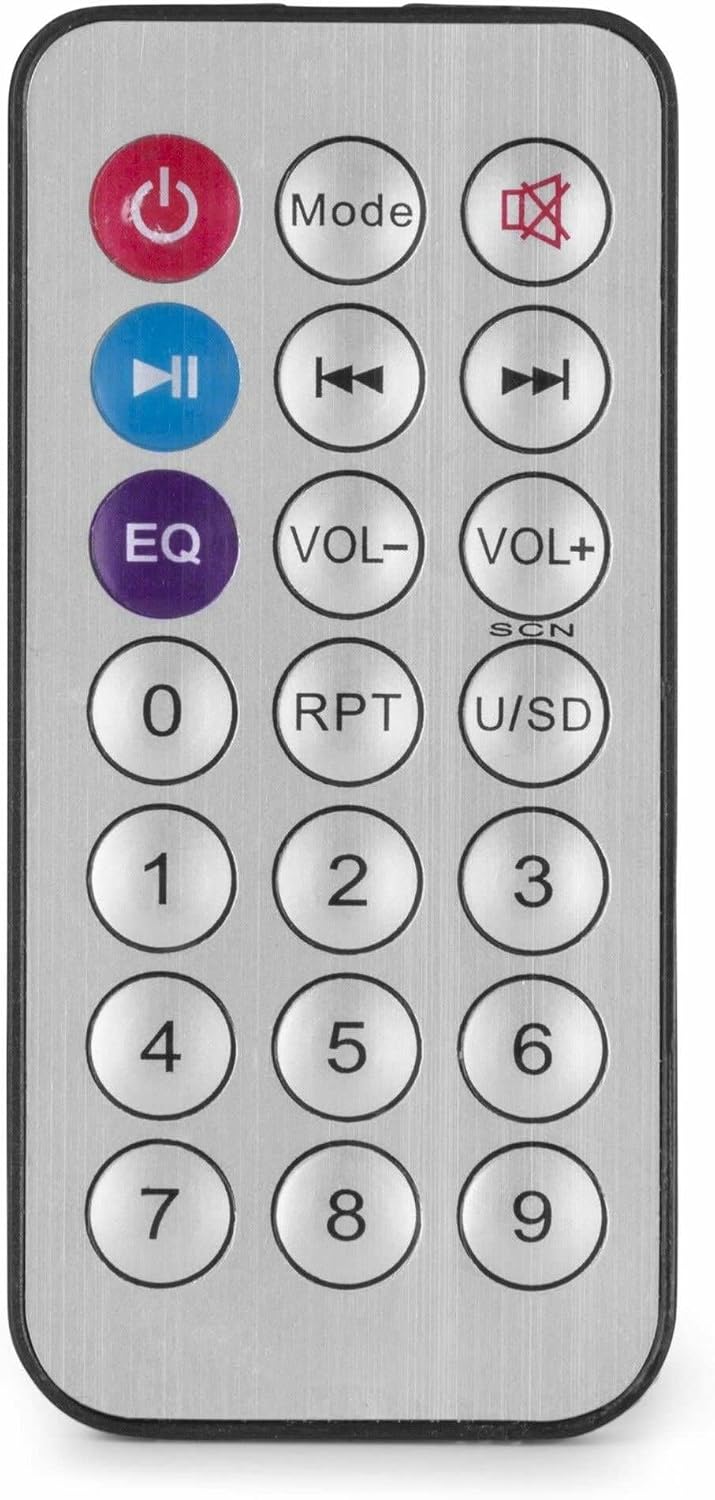
Figure 4: Wireless Remote Control.
Penyelenggaraan
- Pembersihan: Disconnect the power before cleaning. Use a soft, dry cloth to wipe the exterior of the amppengikat. Jangan gunakan pembersih cecair atau aerosol.
- Pengudaraan: Ensure that the ventilation openings are clear of dust and debris to maintain proper airflow.
- Storan: If storing the unit for an extended period, disconnect it from power and store it in a cool, dry place, preferably in its original packaging.
Menyelesaikan masalah
| Masalah | Kemungkinan Punca | Penyelesaian |
|---|---|---|
| Tiada kuasa | Power cable not connected; Power outlet faulty; Ampsuis dimatikan. | Check power cable connection; Test power outlet; Ensure amplifier switch is ON. |
| Tiada keluaran bunyi | Incorrect source selected; Volume too low; Speaker connections faulty; Mute activated. | Select correct input source; Increase master and source volume; Check speaker wiring; Deactivate mute function on remote. |
| Bluetooth tidak bersambung | AmpPengaktif tiada dalam mod Bluetooth; Peranti terlalu jauh; Peranti telah dipasangkan dengan unit lain. | pastikan amplifier is in Bluetooth mode ("BLUE" displayed); Move device closer; Disconnect from other devices and try again. |
| Isu main balik USB | Pemacu USB tidak diformat dengan betul; Tidak serasi file format; pemacu USB rosak. | Ensure USB drive is FAT32 formatted; Use MP3 files; Try a different USB drive. |
| Bunyi herot | Volume too high; Incorrect impedance matching for speakers; Faulty audio source. | Kurangkan kelantangan; Sahkan padanan impedans pembesar suara amplifier output; Test with a different audio source. |
Spesifikasi
- Kuasa Output: 25 W
- Output pembesar suara: 100V and 4-16 Ohm
- Julat Kekerapan: 50 Hz - 18 kHz
- Nisbah Signal-to-Noise: >75 dB
- Sambungan Voltage: 230 Vac/50 Hz
- Dimensi (L x W x H): 205 x 285 x 65 mm
- Berat: 1.5 kg
- ciri-ciri: Bluetooth, USB MP3 Player, Radio, AUX Input, Microphone Input, Bass/Treble Control, Integrated Equalizer, Remote Control
- Nombor Model: PDM25
- Pengeluar: Tronios BV
Waranti dan Sokongan
For warranty information and technical support, please refer to the documentation provided with your purchase or visit the official Power Dynamics webtapak. Simpan bukti pembelian anda untuk sebarang tuntutan waranti.
Pengeluar: Tronios BV
Webtapak: www.power-dynamics.eu