
1. Arahan Keselamatan Penting
Sila baca semua arahan keselamatan dan pengendalian dengan teliti sebelum menggunakan televisyen ini. Simpan arahan ini untuk rujukan masa hadapan.
- Sumber Kuasa: Sambungkan TV hanya kepada bekalan kuasa yang ditunjukkan pada label.
- Pengudaraan: Pastikan pengudaraan yang betul. Jangan sekat bukaan pengudaraan.
- Pembersihan: Cabut plag TV dari salur keluar dinding sebelum membersihkan. Gunakan kain lembut dan kering. Jangan gunakan pembersih cecair atau pembersih aerosol.
- Air dan Kelembapan: Do not use this TV near water, such as a bathtub, washbowl, kitchen sink, laundry tub, swimming pool, or in a wet basement.
- haba: Position the TV away from heat sources such as radiators, heat registers, stoves, or other products (including amppenghidup) yang menghasilkan haba.
- Kabel: Protect the power cord from being walked on or pinched, particularly at plugs, convenience receptacles, and the point where they exit from the TV.
- kilat: Cabut palam TV ini semasa ribut petir atau apabila tidak digunakan untuk tempoh yang lama.
- Servis: Jangan cuba menservis TV ini sendiri. Rujuk semua servis kepada kakitangan servis yang berkelayakan.
2. Produk Lebihview
The CHIQ L40H7N is a 40-inch Full HD Smart TV designed to provide an immersive viewing experience with integrated smart features. It offers a resolution of 1080p and includes connectivity options such as Wi-Fi and Bluetooth.
Ciri-ciri Utama:
- Full HD (1080p) Resolution: Delivers clear and detailed images.
- Fungsi TV Pintar: Access popular streaming services like Netflix, YouTube, and Prime Video.
- Integrated Wi-Fi and Bluetooth: For wireless connectivity and device pairing.
- Port Kesambungan Berbilang: Includes 3 HDMI and 2 USB ports for various external devices.
- Penala Tiga: Supports DVB-T/T2/C/S/S2 for versatile broadcast reception.
- Audio Dolby: Enhanced sound experience.
- Sokongan HDR10: Provides improved contrast and color reproduction.
- Quad Core CPU: Ensures smooth performance for smart features and applications.

Imej: Depan view of the CHIQ L40H7N Smart TV, showcasinbezel dan paparannya yang nipis.
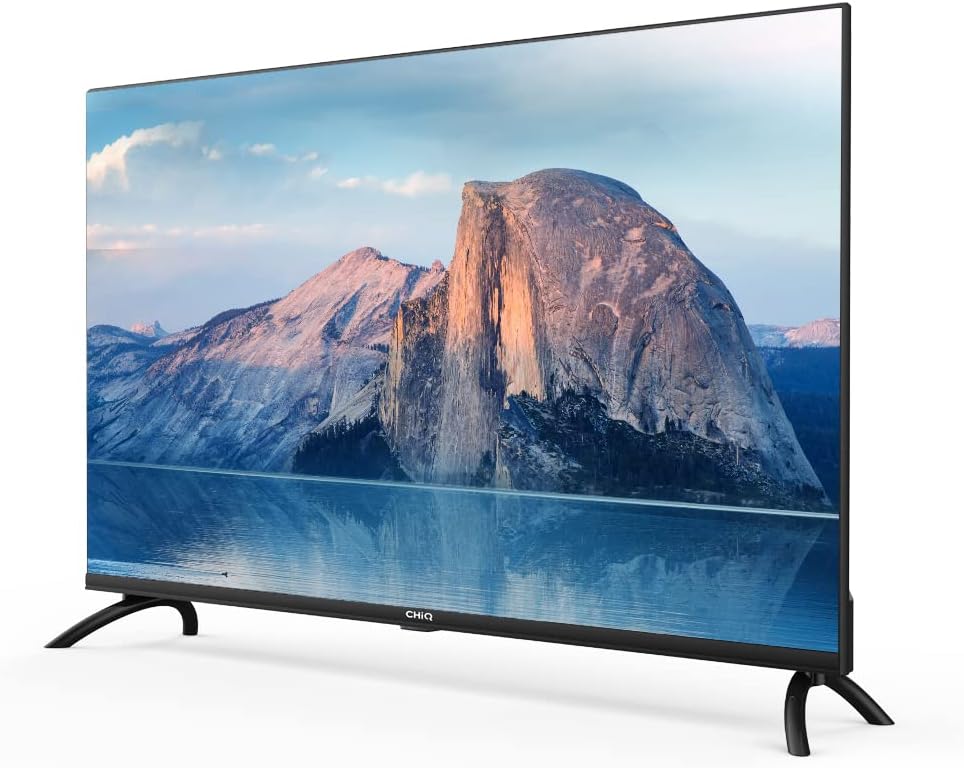
Imej: Sisi view of the CHIQ L40H7N Smart TV, highlighting its thin profile.
3. Persediaan
3.1 Membongkar
- Carefully open the packaging and remove the TV and all accessories.
- Ensure all components are present: TV unit, remote control, batteries, power cord, stand components, and user manual.
- Retain the packaging materials for future transport or servicing.
3.2 Pemasangan Stand
Untuk memasang pendirian TV:
- Letakkan TV menghadap ke bawah di atas permukaan yang lembut dan rata (cth., selimut atau busa) untuk mengelakkan kerosakan skrin.
- Jajarkan kaki pendirian dengan slot yang sepadan di bahagian bawah TV.
- Selamatkan kaki pendirian menggunakan skru yang disediakan. Pastikan ia diketatkan dengan kuat.

Image: Diagram showing the dimensions of the CHIQ L40H7N TV, including height with stand (568.9mm), width (900.3mm), and depth with stand (178.9mm).
3.3 Pemasangan Dinding (Pilihan)
If you choose to wall mount your TV, please consult a professional installer and refer to the specific instructions provided with your wall mount bracket. Ensure the wall mount is compatible with the TV's VESA mounting pattern.
3.4 Menyambung Peranti
Connect your external devices to the TV's ports:
- HDMI: Connect Blu-ray players, game consoles, or set-top boxes to the HDMI ports (HDMI1, HDMI2, HDMI3).
- USB: Insert USB drives for media playback into the USB ports (USB1, USB2).
- Antena/Kabel: Connect your antenna or cable TV signal to the appropriate input.
- Ethernet: Untuk sambungan internet berwayar yang stabil, sambungkan kabel Ethernet ke port LAN.
3.5 Sambungan Kuasa
After connecting all necessary cables, plug the power cord into the TV's power input, then into a wall outlet.
3.6 Kuasa Awal Hidup
Press the power button on the remote control or on the TV. Follow the on-screen instructions to complete the initial setup, including language selection, network connection, and channel scanning.
4. Mengendalikan TV
4.1 Fungsi Kawalan Jauh
Alat kawalan jauh membolehkan anda menavigasi ciri-ciri TV:
- Butang Kuasa: Menghidupkan atau mematikan TV.
- Jilid +/-: Melaraskan tahap kelantangan.
- Saluran +/-: Menukar saluran TV.
- Input/Sumber: Memilih sumber input (HDMI, USB, TV).
- Butang Navigasi (Atas/Bawah/Kiri/Kanan/OK): Menavigasi menu dan mengesahkan pilihan.
- Laman Utama/Hab Pintar: Mengakses antara muka TV Pintar.
- Butang Apl: Dedicated buttons for Netflix, YouTube, Prime Video, etc.
4.2 Ciri TV Pintar
Your CHIQ L40H7N TV provides access to a range of smart features and applications:
- Mengakses Apl: Press the Home button or dedicated app buttons to launch applications like Netflix, YouTube, and Prime Video.
- App Store: Muat turun dan pasang aplikasi tambahan daripada gedung aplikasi bersepadu.
- Pencerminan Skrin: Hantar kandungan daripada telefon pintar atau tablet yang serasi ke TV anda.

Image: The CHIQ Smart TV displaying the Netflix application interface, along with other streaming apps like YouTube and Prime Video.

Image: A CHIQ Smart TV screen showing a variety of content from streaming services, indicating a rich media experience.
4.3 Sambungan Rangkaian
To use Smart TV features, connect your TV to the internet:
- Wi-Fi: Pergi ke Tetapan > Rangkaian > Wi-Fi, pilih rangkaian anda dan masukkan kata laluan.
- Ethernet: Connect an Ethernet cable from your router to the TV's LAN port. The TV will automatically detect the wired connection.
4.4 Kesambungan Bluetooth
Pair Bluetooth devices like headphones or speakers:
- Enable Bluetooth on your external device and set it to pairing mode.
- On the TV, go to Settings > Remotes & Accessories > Bluetooth.
- Select your device from the list and follow the on-screen prompts to pair.
4.5 Pemilihan Input
Press the 'Input' or 'Source' button on your remote to switch between connected devices (HDMI1, HDMI2, HDMI3, USB, TV Tuner).
4.6 Tetapan Gambar dan Bunyi
Adjust display and audio preferences via the Settings menu:
- Mod Gambar: Choose from standard, dynamic, movie, or custom settings.
- Kecerahan/Kontras/Warna: Fine-tune image quality.
- Mod Suara: Select audio presets like standard, music, movie, or custom.
- Audio Dolby: The TV supports Dolby Audio for enhanced sound.
- HDR10: Experience improved contrast and color with HDR10 content.

Image: The CHIQ L40H7N TV displaying a scene with the Dolby Audio logo, indicating support for enhanced sound.

Image: A split-screen comparison on the CHIQ L40H7N TV, demonstrating the visual improvement with HDR10 technology, showing richer colors and contrast.

Image: An illustration of a Quad Core CPU, representing the processing power within the CHIQ L40H7N TV for smooth operation.

Image: The CHIQ L40H7N TV positioned on a media console in a living room, showcasing its aesthetic integration into a home environment.
5. Penyelenggaraan
5.1 Membersihkan TV
Untuk mengekalkan penampilan dan prestasi TV:
- Skrin: Lap skrin perlahan-lahan dengan kain lembut yang tidak berbulu. Untuk tanda degil, ringankan dampen kain dengan air atau pembersih skrin khusus (jangan sembur terus ke skrin).
- Kabinet: Lap kabinet TV dengan kain lembut dan kering. Elakkan menggunakan pembersih atau pelarut yang kasar.
- Sentiasa cabut plag TV sebelum membersihkan.
5.2 Kemas Kini Perisian
Regular software updates can improve performance and add new features:
- Kemas Kini Automatik: Pastikan TV anda disambungkan ke Internet untuk kemas kini automatik.
- Semakan Manual: You can manually check for updates in the Settings menu (e.g., Settings > About > System Update).
6. Penyelesaian masalah
Jika anda menghadapi masalah dengan TV anda, rujuk masalah dan penyelesaian biasa berikut:
- Tiada Kuasa:
- Check if the power cord is securely plugged into the TV and the wall outlet.
- Ensure the wall outlet is functioning by testing it with another device.
- Try pressing the power button on the TV itself, not just the remote. - Tiada Gambar, Tetapi Bunyi Hadir:
- Check the input source. Ensure it matches the device you are trying to view (e.g., HDMI1 for a Blu-ray player).
- Verify that the external device is powered on and functioning correctly.
- Try a different HDMI cable or port. - Tiada Bunyi, Tetapi Gambar Hadir:
- Check the volume level and ensure the TV is not muted.
- Verify audio output settings in the TV menu (e.g., internal speakers, external audio system).
- If using an external device, check its volume and audio settings. - Alat Kawalan Jauh Tidak Berfungsi:
- Replace the batteries in the remote control.
- Ensure there are no obstructions between the remote and the TV's IR sensor.
- Point the remote directly at the TV. - Isu Sambungan Rangkaian:
- Restart your router and modem.
- Check Wi-Fi password if connecting wirelessly.
- If using a wired connection, ensure the Ethernet cable is properly connected.
If the problem persists, consult the CHiQ customer support or a qualified technician.
7. Spesifikasi
Below are the technical specifications for the CHIQ L40H7N Smart TV:
| Ciri | Spesifikasi |
|---|---|
| Jenama | CHiQ |
| Nama Model | L40H7N |
| Saiz Skrin | 40 Inci |
| Teknologi Paparan | LCD |
| Resolusi | 1080p (HD Penuh) |
| Kadar Segar Semula | 60 Hz |
| Ciri Khas | Full HD, Smart TV, HDR10, Dolby Audio |
| Teknologi Ketersambungan | Bluetooth, Ethernet, HDMI (3 port), USB (2 port), Wi-Fi |
| Perkhidmatan Internet yang Disokong | Amazon Instant Video, Netflix, YouTube |
| Peranti Serasi | Laptop, Smart Speaker, Smart Watch, Tablet, Car Audio System, Cellphone |
| Penggunaan Kuasa (SDR) | 47.0 W |
| Kelas Kecekapan Tenaga (SDR) | G |
| Screen Diagonal (cm) | 100.3 sm |
| Screen Resolution (pixels) | 1920 x 1080 |
| Kemas Kini Perisian Dijamin Minimum Sehingga | 20-01-2030 |
| Minimum Guaranteed Spare Parts Until | 20-01-2029 |
Untuk maklumat tenaga terperinci, sila rujuk pangkalan data EPREL: https://eprel.ec.europa.eu/qr/454406

Image: The EU Energy Label for the CHIQ L40H7N TV, showing an energy efficiency class G and consumption of 47 kWh/1000h.
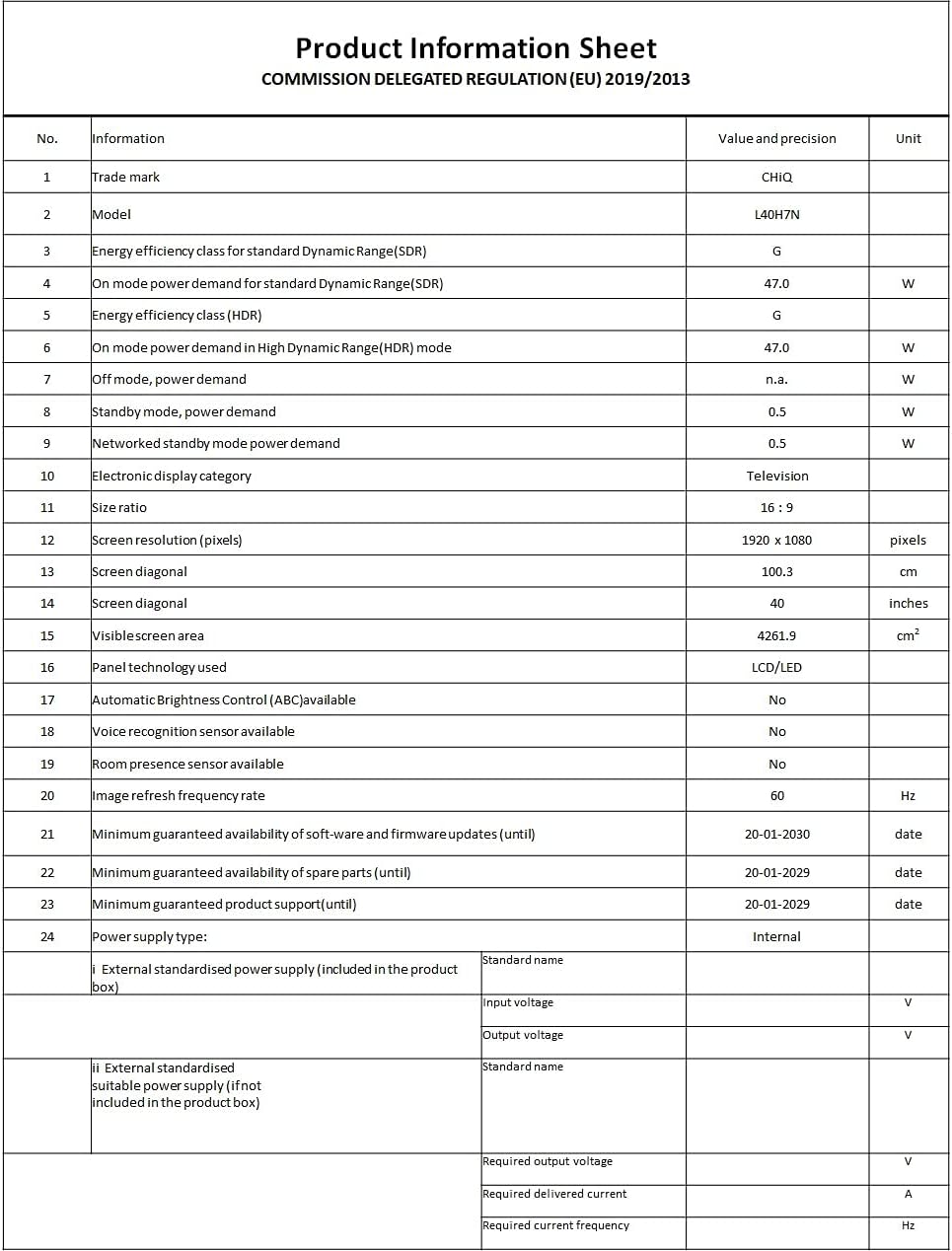
Image: A Product Information Sheet for the CHIQ L40H7N, detailing various specifications and compliance with COMMISSION DELEGATED REGULATION (EU) 2019/2013.
8. Waranti dan Sokongan
Your CHIQ L40H7N Smart TV comes with a manufacturer's warranty. Please refer to the warranty card included in your product packaging for specific terms and conditions, including warranty period and coverage details.
Sokongan Pelanggan:
For technical assistance, troubleshooting, or warranty claims, please contact CHiQ customer support. Contact information can typically be found on the CHiQ official webtapak atau dalam dokumentasi produk anda.