
pengenalan
This manual provides essential information for the safe and efficient operation of your Prolink PRO851SFCU 850VA Line Interactive Uninterruptible Power Supply (UPS). This UPS system features PROLiNK’s Super-Fast Charging technology, designed to provide stable backup power for home and small office applications. It includes an integrated 3-Step Automatic Voltage Regulation (AVR) system to protect connected devices from voltage turun naik.
Maklumat Keselamatan
Sila baca semua arahan keselamatan dengan teliti sebelum pemasangan dan operasi. Kegagalan mematuhi arahan ini boleh mengakibatkan renjatan elektrik, kebakaran atau kecederaan serius.
- Jangan buka UPS casing. There are no user-serviceable parts inside. Refer servicing to qualified service personnel.
- Jangan pasang UPS di bawah cahaya matahari langsung, berhampiran sumber haba atau dalam persekitaran yang mempunyai habuk, kelembapan atau bahan menghakis yang berlebihan.
- Pastikan UPS disambungkan ke soket kuasa AC yang dibumikan.
- Do not connect appliances that could overload the UPS, such as laser printers, vacuum cleaners, or hair dryers, to the battery backup outlets.
- Sekiranya berlaku kebakaran, gunakan alat pemadam api kimia kering. Air boleh menyebabkan renjatan elektrik.
- The battery inside the UPS is not user-replaceable. Contact qualified service personnel for battery replacement.
Produk Selesaiview
The Prolink PRO851SFCU UPS provides reliable power protection and backup for your electronic devices. Key features include:
- Super-Fast Charging Technology: Recharges the battery to 90% capacity within 2-4 hours.
- 3-Step Automatic Voltage Peraturan (AVR): Features 2 boosts and 1 buck to regulate output voltage, preventing undervoltage brownouts and overvoltage melonjak.
- Universal Sockets: Provides compatibility with a wide range of devices.
- Pemantauan Perisian: Includes a USB port for software monitoring and control.

Rajah 1: Depan view of the Prolink PRO851SFCU 850VA UPS, showing the power button and status indicators.
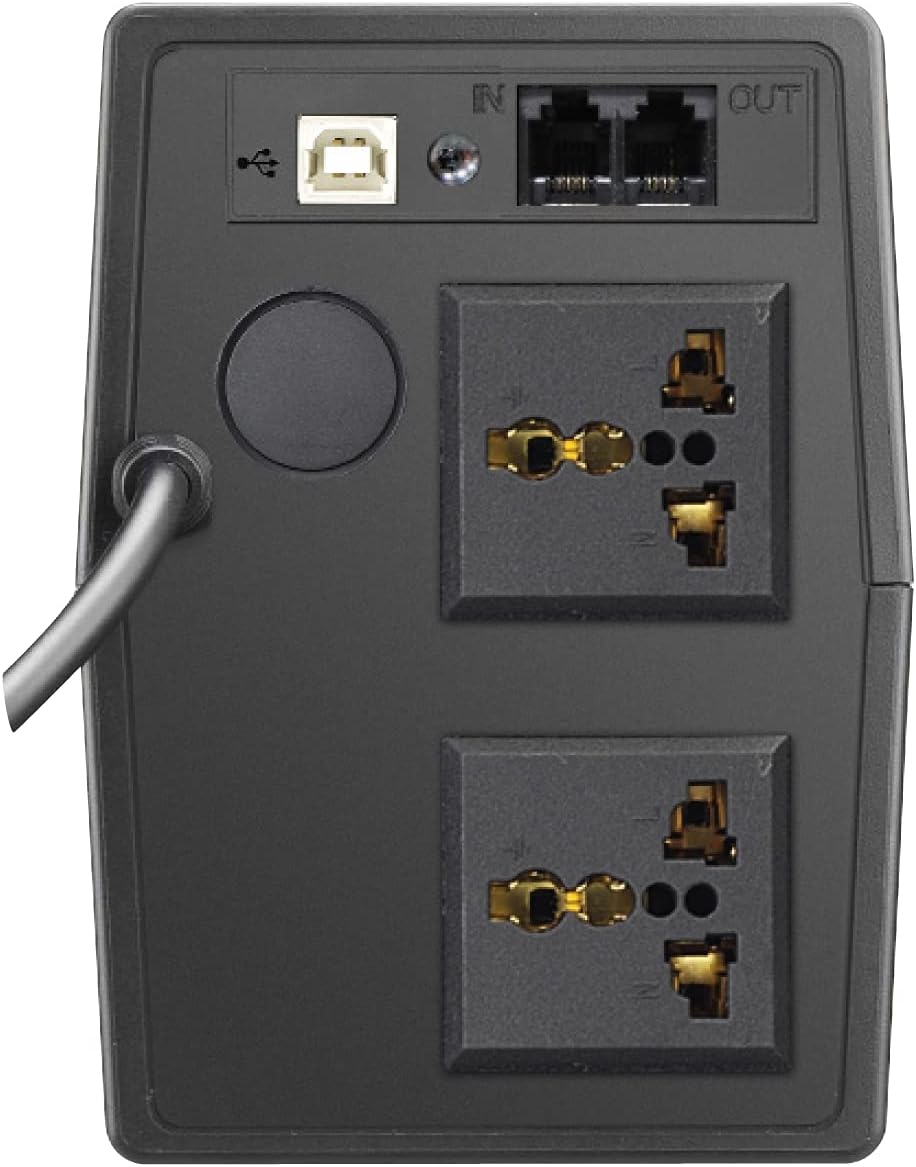
Rajah 2: Belakang view of the Prolink PRO851SFCU 850VA UPS, highlighting the USB port, RJ11 ports, and universal output sockets.

Figure 3: Diagram illustrating key features of the Prolink PRO851SFCU 850VA UPS, including Super Fast Charging, Wide Input Voltage, Overload Protection, Over Temperature Protection, Surge Protection, Early Shutdown Warning System, and Universal Socket.

Figure 4: Detailed specifications table for the Prolink PRO851SFCU 850VA UPS, covering capacity, input/output, battery, protection, monitoring, interface, and physical attributes.
Persediaan
- Membongkar: Buka bungkusan UPS dengan berhati-hati dan periksa untuk sebarang kerosakan penghantaran. Simpan bahan pembungkusan untuk pengangkutan atau penyimpanan pada masa hadapan.
- penempatan: Place the UPS in a well-ventilated area, away from direct sunlight, heat, dust, and moisture. Ensure adequate clearance around the unit for proper airflow.
- Pengecasan Awal: Before initial use, connect the UPS to a standard AC power outlet and allow it to charge for at least 8 hours to ensure optimal battery performance. The UPS will charge whether it is turned on or off.
- Menyambung Peranti:
- Connect your computer, monitor, and other critical electronic devices to the UPS's battery backup outlets. These outlets provide power during outages.
- For devices that do not require battery backup but need surge protection, use the surge-only outlets (if available on your model).
- Sambungan USB (Pilihan): Connect the provided USB cable from the UPS to your computer for software monitoring and automatic shutdown capabilities.
- RJ11 Connection (Optional): Connect your modem/fax line to the RJ11 ports for surge protection of your telephone/network line.
Arahan Operasi
Menghidupkan UPS
Press and hold the power button for approximately 2 seconds until you hear a beep. The UPS will perform a self-test, and the indicators will light up.
Mematikan UPS
Ensure all connected devices are turned off. Press and hold the power button for approximately 2 seconds until you hear a long beep. The UPS will shut down.
Operasi Mod Bateri
Semasa kuasa outage, the UPS will automatically switch to battery mode, providing power to connected devices. An audible alarm will sound to indicate battery operation. The alarm will typically sound every 10 seconds in battery mode and every second when the battery is low.
Vol. Automatiktage Peraturan (AVR)
The UPS continuously monitors incoming AC power. If the voltage fluctuates outside acceptable limits, the AVR function will automatically adjust the output voltage to a safe level without switching to battery power.
Pemantauan Perisian
Install the provided monitoring software (e.g., ViewPower) on your computer. This software allows you to monitor UPS status, battery level, input/output voltage, and configure automatic shutdown settings for your computer during extended power outages.
Penyelenggaraan
- Penjagaan Bateri: To maintain optimal battery life, ensure the UPS is connected to AC power at all times. Avoid frequent deep discharges.
- Pembersihan: Clean the exterior of the UPS with a soft, dry cloth. Do not use liquid or aerosol cleaners.
- Storan: If storing the UPS for an extended period, fully charge it, then disconnect it from AC power. Recharge the UPS every three months to prevent battery degradation.
- Penggantian Bateri: The internal battery is not user-serviceable. If the battery needs replacement, contact Prolink customer support or a qualified service technician.
Menyelesaikan masalah
| Masalah | Kemungkinan Punca | Penyelesaian |
|---|---|---|
| UPS tidak dihidupkan. | Battery discharged or not connected to AC power. | Ensure the UPS is plugged into a live AC outlet and allow it to charge for several hours. |
| UPS berbunyi bip berterusan dalam mod bateri. | Amaran bateri lemah. | Save your work and shut down your computer immediately. The UPS will shut down shortly. |
| UPS terlebih beban. | Too many devices connected or devices drawing too much power. | Disconnect non-essential devices from the UPS. Check the total wattage of connected devices against the UPS capacity (850VA). |
| UPS tidak memberikan masa sandaran yang diharapkan. | Bateri sudah lama atau tidak dicas sepenuhnya. | Ensure the UPS is fully charged. If the battery is old, it may need replacement by a qualified technician. |
Spesifikasi
| Ciri | Perincian |
|---|---|
| Kapasiti | 850VA |
| Input Voltage Julat | 140 - 300VAC ±5% |
| Keluaran Voltage (Mod AC) | 230VAC ± 10% |
| Keluaran Voltage (Mod Bateri) | 230VAC ± 10% |
| Masa Pemindahan | 2ms biasa |
| Jenis Bateri | 12V/10Ah x 1pc (Lead Acid) |
| Masa Isi Ulang | 2 - 4 hours to 90% capacity |
| Perlindungan | Short Circuit, Overload, Over-temperature, Surge Protection |
| Antara muka | USB Connector, RJ11 Ports |
| Dimensi (D x W x H) | 27.9D x 10.1W x 14.2H cm |
| Berat badan | 4.9 kg |
Nota: Spesifikasi tertakluk kepada perubahan tanpa notis terlebih dahulu.
Waranti dan Sokongan
Your Prolink PRO851SFCU UPS comes with a standard manufacturer's warranty. Please refer to the warranty card included with your product for specific terms and conditions. For technical support, service, or warranty claims, please contact Prolink customer service through their official webtapak atau maklumat hubungan yang diberikan dalam dokumentasi produk anda.
For additional resources and software downloads, visit the official Prolink webtapak: www.prolink2u.com