
Casio JF-100BM
Casio JF-100BM Standard Function Calculator User Manual
Model: JF-100BM
pengenalan
This manual provides detailed instructions for the operation and maintenance of your Casio JF-100BM Standard Function Calculator. Designed for business and general use, this desktop calculator features a large display for easy readability and a kickstand for optimal viewing. Please read this manual thoroughly to ensure proper use and to maximize the lifespan of your device.
Persediaan
Sumber Kuasa
The Casio JF-100BM calculator is powered by both solar energy and a battery backup. This dual power system ensures reliable operation in various lighting conditions. No specific battery installation is required by the user for initial setup.
Penggunaan Awal
The calculator is ready for use upon unboxing. Simply ensure it is exposed to sufficient light for the solar panel to function, or that the internal battery has adequate charge.
Pelarasan Kickstand
Untuk mempertingkatkan viewing comfort, locate the kickstand on the underside of the calculator. Gently pull it out to raise the calculator to an angled position. Push it back in to return the calculator to a flat position.

Image: A single Casio JF-100BM calculator displayed in its clear retail blister packaging, showing the front of the device.
Arahan Operasi
Pengiraan Asas
Perform standard arithmetic operations:
- Tambahan: Enter first number, press +, enter second number, press =.
- Penolakan: Enter first number, press -, enter second number, press =.
- Pendaraban: Enter first number, press ×, enter second number, press =.
- Bahagian: Enter first number, press ÷, enter second number, press =.
Fungsi Jelas
- AC (Semua Jelas): Clears all entries and memory, resetting the calculator to its initial state.
- C (Clear Entry): Clears the last entered number or the current calculation entry without affecting previous operations or memory.
Fungsi Memori
The calculator includes memory functions for storing and recalling values:
- M+ (Memory Plus): Menambah nilai yang dipaparkan pada memori.
- M- (Memori Tolak): Menolak nilai yang dipaparkan daripada memori.
- BSMM (Memori Ingat/Kosongkan): Press once to recall the memory value. Press twice to clear the memory.
Pengiraan Cukai
The calculator features dedicated keys for tax calculations:
- TAX+ (Tax Plus): Menambah cukai pada nilai yang dipaparkan.
- TAX- (Tax Minus): Menolak cukai daripada nilai yang dipaparkan.
- RATE SET %: Used to set the tax rate percentage. Refer to the calculator's on-screen prompts or a more detailed guide for specific steps to set the rate.
Cost, Sell, Margin Calculations
These functions are useful for business calculations:
- KOS: Used in conjunction with SELL and MARGIN to calculate the cost of an item.
- JUAL: Used to calculate the selling price.
- MAR (Margin): Used to calculate the profit margin.
Jumlah Besar (GT)
The GT key accumulates the results of all calculations performed since the last GT clear. Press GT untuk memaparkan jumlah keseluruhan.
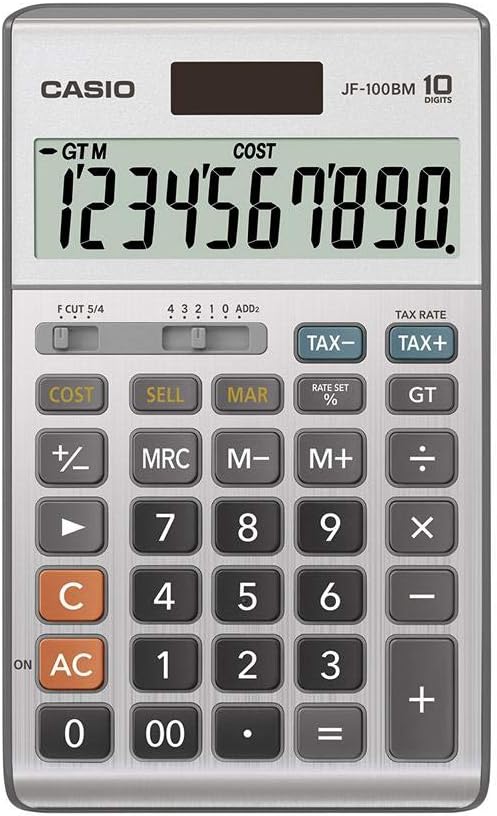
Image: A detailed close-up of the Casio JF-100BM calculator's display and keypad, showing the layout of all function buttons and the large digital display.
Penyelenggaraan
Pembersihan
To clean the calculator, gently wipe the surface with a soft, dry cloth. For stubborn dirt, slightly dampen the cloth with water and then wipe dry immediately. Do not use abrasive cleaners, solvents, or chemical sprays, as these can damage the casing dan paparan.
Penyimpanan
Simpan kalkulator di tempat yang sejuk dan kering, jauh daripada cahaya matahari langsung dan suhu yang melampau. Elakkan meletakkan objek berat di atas kalkulator.
Menyelesaikan masalah
Paparan adalah Kosong atau Malap
- Ensure the calculator is exposed to sufficient light for solar power.
- If the display remains dim, the battery may be low or depleted. While the JF-100BM has solar power, a backup battery ensures consistent performance. Consult a service professional for battery replacement if needed, as it is not typically user-replaceable.
Keputusan Pengiraan Salah
- Tekan AC to clear all previous calculations and memory, then re-enter your calculation.
- Verify that the correct tax rate is set if you are performing tax calculations.
- Check the decimal point setting (F CUT 5/4, 4 3 2 1 0 ADD2 switch) to ensure it matches your required precision.
Spesifikasi
| Ciri | Perincian |
|---|---|
| Nombor Model | JF-100BM |
| Jenama | Casio |
| Jenis Kalkulator | Business, Standard Function |
| Paparan | Large 10-digit display |
| Sumber Kuasa | Solar Plus Battery Backup |
| bahan | plastik |
| warna | Perak |
| Dimensi Produk | 9.5 x 6.75 x 1.5 inci |

Image: A cardboard carton containing five individually packaged Casio JF-100BM calculators, illustrating the product as sold in a multi-pack.
Waranti dan Sokongan
For information regarding warranty coverage, service, and technical support for your Casio JF-100BM calculator, please refer to the warranty card included with your purchase or visit the official Casio support webtapak. Simpan bukti pembelian anda untuk tuntutan waranti.
Nota: This manual provides general operational guidelines. For advanced functions or specific troubleshooting not covered here, please consult the comprehensive guide available on the manufacturer's website or contact Casio customer support.
Ask a question about this manual
Ask about setup, troubleshooting, compatibility, parts, safety, or missing instructions. Manuals+ will review the question and use this page’s manual context to help answer it.