
pengenalan
This manual provides detailed instructions for the safe and efficient use of your FONESTAR DOTS-N Bluetooth TWS Speaker. Please read this manual thoroughly before operating the device and retain it for future reference.
The FONESTAR DOTS-N is a portable Bluetooth TWS speaker featuring Bluetooth 4.2 and NFC connectivity. It offers powerful sound with enhanced bass, playback controls, and hands-free calling. Equipped with a rechargeable Li-Ion battery providing up to 10 hours of autonomy, it also includes a 3.5mm auxiliary input. Its compact design makes it suitable for home use.
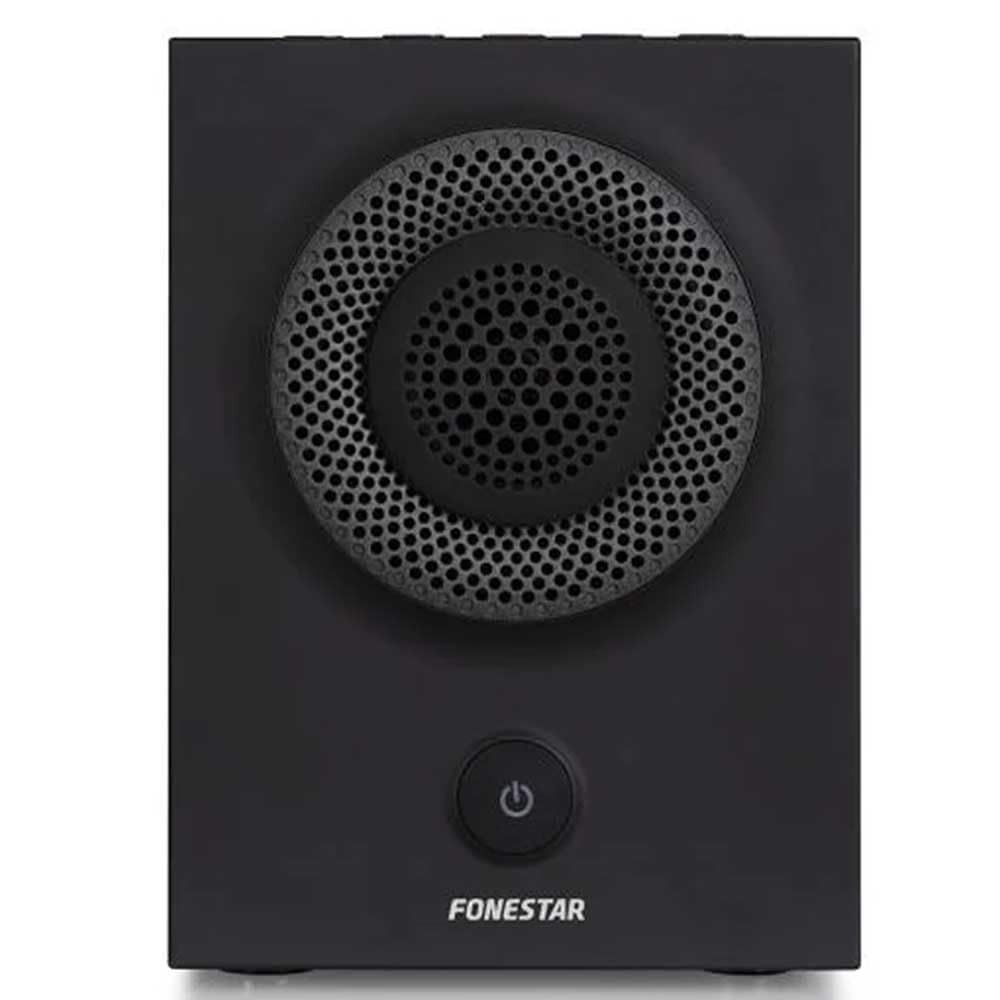
Rajah 1: Depan view of the FONESTAR DOTS-N Bluetooth TWS Speaker.
Persediaan
1. Membongkar
Keluarkan semua komponen dari pembungkusan dengan berhati-hati. Pastikan semua item yang disenaraikan di bawah ada:
- FONESTAR DOTS-N Bluetooth TWS Speaker
- Kabel Pengecas USB ke USB Mikro
- Kabel Audio Stereo 3.5mm
- Manual Pengguna (dokumen ini)
2. Mengisi Speaker
Before first use, fully charge the speaker. Connect the Micro USB end of the charging cable to the speaker's charging port and the USB-A end to a compatible USB power adapter (not included) or a computer's USB port.
- Lampu penunjuk pengecasan akan menyala semasa pengecasan.
- Masa pengecasan adalah lebih kurang 3 jam untuk pengecasan penuh.
- Lampu penunjuk akan bertukar atau mati setelah pengecasan selesai.
3. Menghidupkan/Mematikan
To power on the speaker, press and hold the power button (usually indicated by a ⏻ symbol) for a few seconds until you hear an audible prompt or see an indicator light. To power off, repeat the process.
Arahan Operasi
1. Berpasangan Bluetooth
The speaker supports Bluetooth 4.2 for wireless audio streaming.
- Ensure the speaker is powered on and in pairing mode (usually indicated by a flashing LED). If not, press the Bluetooth pairing button or power button briefly to enter pairing mode.
- Pada telefon pintar, tablet anda atau peranti berdaya Bluetooth lain, pergi ke tetapan Bluetooth.
- Cari untuk available devices and select "FONESTAR DOTS-N" from the list.
- Once paired, the speaker will emit an audible confirmation, and the LED indicator will typically become solid.
2. Penggandingan NFC (Komunikasi Medan Dekat)
For devices with NFC, pairing can be done quickly:
- Ensure NFC is enabled on your device and the speaker is powered on.
- Tap your NFC-enabled device gently against the NFC area on the speaker (refer to product diagram for exact location, if available).
- Confirm the pairing request on your device.
3. Fungsi True Wireless Stereo (TWS).
The TWS function allows you to pair two FONESTAR DOTS-N speakers together for a stereo sound experience.
- Ensure both DOTS-N speakers are powered on and not connected to any other Bluetooth device.
- On one speaker (this will be the primary speaker), press and hold the TWS button (if available) or a designated button for TWS pairing.
- Pembesar suara utama akan mencari pembesar suara sekunder. Setelah disambungkan, kedua-dua pembesar suara akan mengeluarkan bunyi pengesahan.
- Now, connect your Bluetooth device to the primary speaker as described in the "Bluetooth Pairing" section. Audio will play in stereo through both speakers.
4. Auxiliary Input (AUX)
For non-Bluetooth devices, use the included 3.5mm stereo audio cable.
- Connect one end of the 3.5mm audio cable to the AUX-in port on the speaker.
- Sambungkan hujung yang satu lagi ke bicu fon kepala atau output audio peranti anda.
- The speaker will automatically switch to AUX mode or may require manual selection via a mode button.
5. Playback Control and Hands-Free Calls
The speaker features integrated controls for music playback and managing calls:
- Main/Jeda: Press the Play/Pause button (often combined with the power button or a dedicated button).
- Kelantangan Naik/Turun: Use the volume buttons (+ / -) pada pembesar suara.
- Trek Seterusnya / Sebelumnya: Long press or double-press the volume buttons, or use dedicated track skip buttons if present.
- Jawab/Tamatkan Panggilan: Press the Play/Pause button during an incoming call to answer, and again to end the call.
- Tolak Panggilan: Tekan dan tahan butang Main/Jeda semasa panggilan masuk.
Penyelenggaraan
1. Pembersihan
- Always power off the speaker before cleaning.
- Gunakan kain lembut, kering dan tidak berbulu untuk mengelap permukaan luar.
- Jangan gunakan pembersih, lilin atau pelarut yang melelas kerana ia boleh merosakkan kemasan.
- Elakkan mendapatkan kelembapan ke dalam mana-mana bukaan.
2. Penyimpanan
- Simpan pembesar suara di tempat yang sejuk dan kering jauh dari cahaya matahari langsung dan suhu yang melampau.
- Jika menyimpan untuk tempoh yang lama, cas bateri kepada kira-kira 50% setiap beberapa bulan untuk mengekalkan kesihatan bateri.
3. Penjagaan Bateri
- Do not expose the battery to excessive heat, fire, or direct sunlight.
- Elakkan menyahcas sepenuhnya bateri dengan kerap, kerana ini boleh mengurangkan jangka hayatnya.
- Only use the provided charging cable or a certified equivalent.
Menyelesaikan masalah
| Masalah | Kemungkinan Punca | Penyelesaian |
|---|---|---|
| Speaker tidak dihidupkan. | Bateri habis. | Cas pembesar suara menggunakan kabel USB yang disediakan. |
| Tidak boleh berpasangan melalui Bluetooth. | Pembesar suara tidak berada dalam mod berpasangan; peranti terlalu jauh; gangguan. | Ensure speaker is in pairing mode. Move device closer (within 10m). Turn off other Bluetooth devices. |
| Tiada bunyi atau kelantangan rendah. | Volume too low on speaker or source device; incorrect input mode. | Increase volume on both speaker and source device. Check if the correct input (Bluetooth/AUX) is selected. |
| Gandingan TWS gagal. | Speakers are already paired to another device; incorrect TWS pairing procedure. | Pastikan kedua-dua pembesar suara diputuskan sambungannya daripada peranti lain. Ikuti langkah pemasangan TWS dengan teliti. |
| Penyelewengan bunyi. | Volume too high; low battery; poor signal. | Reduce volume. Charge the speaker. Move source device closer to the speaker. |
Spesifikasi Teknikal

Figure 2: Dimensions of the FONESTAR DOTS-N Bluetooth TWS Speaker.
| Nama Model | DOTS-N |
| Jenama | FONESTAR |
| Teknologi Ketersambungan | Bluetooth 4.2, NFC, 3.5mm AUX |
| Julat Tanpa Wayar | Sehingga 10 meter (33 kaki) |
| Mod Keluaran Audio | Stereo (dengan TWS) |
| Jenis Pembesar Suara | 3" Coaxial Woofer with Tweeter, 3" Subwoofer, 4" Passive Radiator |
| Kuasa Output Pembesar Suara Maks | 12 Watt RMS |
| Respons Kekerapan | 80 - 20,000 Hz |
| Nisbah Isyarat-ke-Bunyi | ≥ 75 dB |
| Sumber Kuasa | Dikuasakan oleh Bateri (Li-ion Boleh Dicas Semula) |
| Kapasiti Bateri | 2200 mAh, 7.4 V |
| Autonomi Bateri | Sehingga 10 jam (pada volum 50%) |
| Masa Mengecas | Lebih kurang 3 jam |
| Kaedah Kawalan | Taktil (Sentuhan) |
| Ciri Khas | High-res audio, Bluetooth, Integrated microphone, USB port (for charging) |
| Peranti Serasi | Telefon Pintar, Tablet |
| Penggunaan yang Disyorkan | For home |
| warna | Hitam |
| Dimensi (W x H x D) | 125 x 175 x 158 mm (lebih kurang 4.9 x 6.9 x 6.2 inci) |
| Berat Barang | 1.82 kg (kira-kira 4.01 paun) |
| Kalis air | Tidak |
Note: Specifications are subject to change without prior notice. Battery autonomy may vary depending on usage, volume level, and music type.
Maklumat Waranti
FONESTAR products are designed and manufactured to the highest quality standards. This product is covered by a limited warranty against manufacturing defects from the date of purchase. The specific terms and duration of the warranty may vary by region and retailer.
Please retain your proof of purchase (receipt or invoice) as it will be required for any warranty claims. The warranty does not cover damage caused by misuse, accident, unauthorized modification, or normal wear and tear.
For detailed warranty terms and conditions, please refer to the warranty card included with your product or contact your local FONESTAR distributor or retailer.
Sokongan Pelanggan
If you encounter any issues that are not resolved by the troubleshooting guide, or if you require further assistance, please contact FONESTAR customer support or your authorized retailer.
When contacting support, please be prepared to provide the following information:
- Product Model: FONESTAR DOTS-N
- Tarikh Pembelian
- Penerangan mengenai isu tersebut
- Maklumat hubungan anda
For the most up-to-date support information, including contact details and FAQs, please visit the official FONESTAR webtapak.