
pengenalan
Thank you for choosing the 70mai RC03 Rear Car Camera. This manual provides detailed instructions for the installation, operation, and maintenance of your device. Please read this manual thoroughly before using the product to ensure proper function and safety.
The 70mai RC03 is designed to enhance your driving safety by providing a clear view of the area behind your vehicle, with the flexibility for front installation as well.
Produk Selesaiview
Ciri-ciri Utama
- Reversible Rear Camera: Can be installed at the rear or front of the vehicle for flexible monitoring.
- Dual Recording Capability: Supports recording in 720 HD resolution.
- Enhanced Vision: Features night vision and a wide-angle lens for comprehensive coverage.
- Reka bentuk tahan lasak: IPX7 water resistance ensures reliable performance in various weather conditions.
Kandungan Pakej
The following items are included in your 70mai RC03 Rear Car Camera package:
- 1 x Xiaomi 70mai RC03 Rear Camera
- 1 x Kabel Video
- 2 x Skru Pemasangan
Komponen Produk
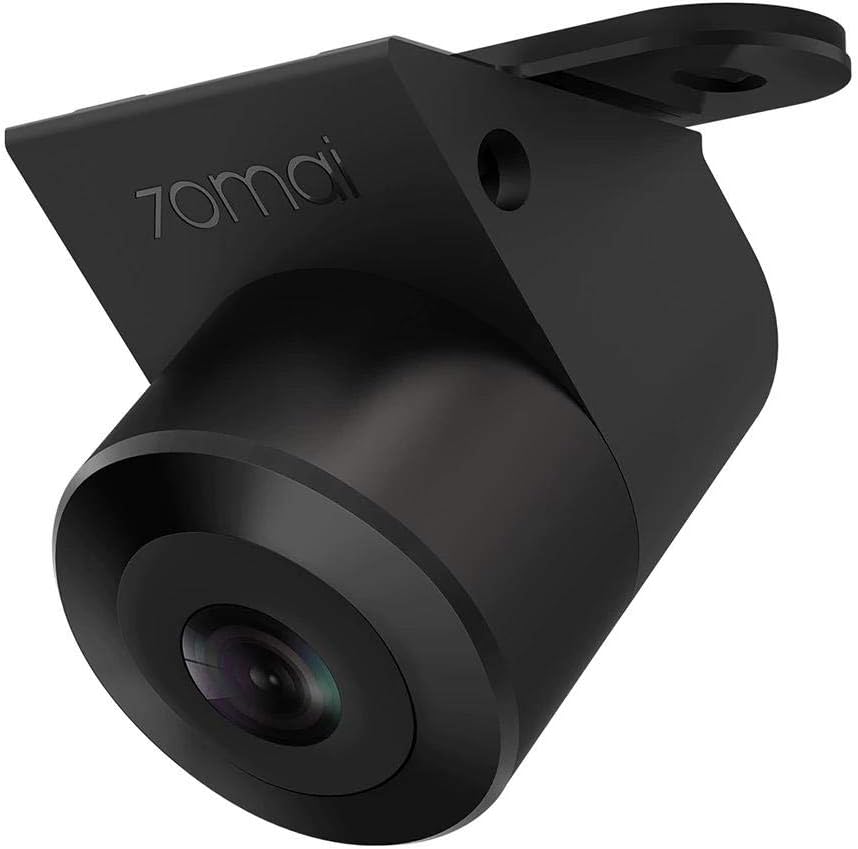
Rajah 1: The 70mai RC03 Rear Car Camera unit. This image shows the compact design of the camera with its lens and mounting bracket.

Rajah 2: The 70mai RC03 Rear Car Camera installed on the exterior of a vehicle, demonstrating its water-resistant design with water droplets visible on the casing. This illustrates a typical installation scenario.
Maklumat Keselamatan
- Ensure all wiring is correctly connected and secured to prevent interference with vehicle operation.
- Do not attempt to disassemble or modify the camera. This may void the warranty and cause damage.
- Keep the camera lens clean for optimal performance.
- Rujuk profesional untuk pemasangan jika anda tidak pasti tentang sebarang langkah.
Persediaan dan Pemasangan
The 70mai RC03 camera is designed for surface mounting and connects via an RCA connector. It can be installed as a rear or front camera.
- Pilih Lokasi Pemasangan: Decide whether to install the camera at the rear or front of your vehicle. Ensure the chosen spot provides a clear, unobstructed view and allows for secure mounting.
- Lekapkan Kamera: Use the provided installation screws to securely attach the camera to the chosen surface. Ensure the camera is oriented correctly for the desired viewsudut ing.
- Sambungkan Kabel Video: Connect one end of the video cable to the camera's RCA port.
- Kabel Laluan: Carefully route the video cable through your vehicle's interior to the main recording unit or display. Ensure the cable is not pinched or exposed to moving parts.
- Connect to Main Unit: Connect the other end of the video cable (RCA connector) to the corresponding input on your main dash cam or display unit.
- Sambungan Kuasa: Connect the camera's power cable (if separate) to a suitable power source in your vehicle, typically linked to the reverse light circuit for rear cameras or an accessory power source for front cameras.
- Kefungsian Ujian: After installation, power on your vehicle and the main recording unit to verify that the camera is functioning correctly and providing a clear image. Adjust the camera angle if necessary.
Arahan Operasi
The 70mai RC03 camera operates in conjunction with a compatible main dash cam or display unit. Refer to your main unit's manual for specific instructions on viewing and recording footage.
- Hidupkan/Mati Kuasa: The camera typically powers on and off automatically with your vehicle's ignition or when the main unit is activated.
- Rakaman: When connected to a compatible 70mai dash cam, the RC03 will automatically begin recording in 720p resolution, providing dual recording capability.
- Penglihatan Malam: The camera is equipped with night vision technology to provide clear images in low-light conditions.
- Sudut Lebar View: The wide-angle lens captures a broad field of view, minimizing blind spots.
Penyelenggaraan
- Membersihkan Lensa: Bersihkan lensa kamera dengan kerap dengan lembut, damp kain untuk memastikan kualiti imej yang jelas. Elakkan pembersih yang kasar.
- Tahan Air: The camera has an IPX7 water resistance rating, meaning it can withstand immersion in water up to 1 meter for 30 minutes. However, avoid prolonged submersion or high-pressure water jets.
- Pemeriksaan Kabel: Periodically check all cables for wear, damage, or loose connections.
- Kemas kini Firmware: If applicable, check the 70mai official website for any available firmware updates for your camera or main unit.
Menyelesaikan masalah
If you encounter issues with your 70mai RC03 camera, refer to the following common problems and solutions:
- Tiada Imej pada Paparan:
- Check all cable connections, especially the RCA video cable and power supply.
- Ensure the main dash cam or display unit is powered on and correctly configured to receive input from the RC03.
- Verify the camera's power source is active (e.g., reverse light circuit).
- Fuzzy or Distorted Image:
- Bersihkan lensa kamera dengan teliti.
- Periksa sebarang halangan dalam medan kamera view.
- Ensure the video cable is not damaged or experiencing interference.
- Kamera Tidak Merakam:
- Confirm that the main dash cam is recording and properly configured for dual-channel recording.
- Check the storage capacity of your main dash cam's memory card.
Spesifikasi
| Nombor Model | Midrive RC03 |
| Pengeluar | Xiaomi |
| Jenama | 70mai |
| Teknologi Penderia Optik | CMOS |
| Effective Capture Resolution | 720 Pixels (720p) |
| Jenis Kanta | Sudut Lebar |
| sebenarnya View sudut | 138 darjah |
| Bidang View | 146 Darjah |
| Jenis Penyambung | RCA |
| Jenis Pemasangan | Lekapan Permukaan |
| Tahan Air | IPX7 |
| Display Technology (if applicable to main unit) | LCD |
| Screen Size (if applicable to main unit) | 3 Inci |
| Bateri | 1 AA - included (likely for main unit, not camera itself) |
Waranti dan Sokongan
For warranty information and customer support, please refer to the documentation provided with your main 70mai dash camera unit or visit the official 70mai website. Information regarding spare parts availability and software update guarantees is not available at this time.
For technical assistance or inquiries, please contact 70mai customer service through their official channels.