
1. Pengenalan
Produk Selesaiview
The Ubio Labs Lightning Charging Kit provides a complete charging solution for your Apple devices. This kit includes a high-speed wall charger and durable Lightning cables, designed to deliver efficient power to compatible smartphones and tablets.

This image displays the complete Ubio Labs Lightning Charging Kit, including two white wall chargers and two white braided Lightning cables of different lengths.
2. Kandungan Pakej
Sila sahkan bahawa semua item terdapat dalam pakej anda:
- 1 x Ubio Labs 12W USB-A Wall Charger
- 1 x Ubio Labs 6 ft Lightning Cable
- 1 x Ubio Labs 10 ft Lightning Cable

The product packaging for the Ubio Labs Fast Mobile Charging Kit, highlighting its compatibility with iPhone, iPad, and iPod, alongside the included wall chargers and Lightning cables.
3. Arahan Persediaan
Menyambung Pengecas
- Unfold the prongs on the Ubio Labs wall charger.
- Palamkan pengecas dinding ke soket elektrik standard.

Satu jarak dekat view of the Ubio Labs wall charger, illustrating its convenient folding prongs designed for compact storage and travel.
Menyambungkan Peranti Anda
- Connect the USB-A end of the Lightning cable into the USB port on the Ubio Labs wall charger.
- Connect the Lightning end of the cable into the charging port of your compatible Apple device (iPhone, iPad, or iPod).
- Peranti anda harus menunjukkan bahawa ia sedang dicas.

An image showing the Ubio Labs wall charger plugged into a standard electrical outlet, with a Lightning cable connected to a smartphone, demonstrating the charging process.
4. Arahan Operasi
Mengecas Peranti Anda
Once properly connected, the Ubio Labs Lightning Charging Kit will begin charging your device. The 12W USB-A output is designed to provide faster charging speeds compared to standard 5W chargers. Ensure your device is compatible with Lightning connectors for optimal performance.

A terperinci view of the two Ubio Labs Lightning cables, featuring their durable braided exterior and polished aluminum connectors.
5. Penyelenggaraan dan Penjagaan
To ensure the longevity and optimal performance of your Ubio Labs Lightning Charging Kit, please follow these care guidelines:
- Keringkan: Avoid exposing the charger and cables to moisture or liquids.
- Suhu: Do not expose the product to extreme temperatures (hot or cold).
- Pembersihan: Clean the charger and cables with a soft, dry cloth. Do not use harsh chemicals or abrasive materials.
- Pengendalian Kabel: Always grasp the connector head when plugging or unplugging cables. Avoid pulling directly on the cable itself to prevent damage.
- Storan: Store the kit in a cool, dry place when not in use. The folding prongs on the charger make it compact for travel and storage.
6. Penyelesaian masalah
Peranti Tidak Mengecas
- Semak Salur Keluar Kuasa: Ensure the wall charger is securely plugged into a functional electrical outlet. Try plugging another device into the same outlet to confirm it has power.
- Semak Sambungan: Verify that both the USB-A end of the cable is firmly inserted into the charger and the Lightning end is securely connected to your device.
- Try a Different Cable/Charger: If available, try using a different Lightning cable or another wall charger to isolate the issue.
- Periksa Kabel: Check the Lightning cable for any visible signs of damage, such as fraying or bent connectors.
- Mulakan semula Peranti: Sometimes, a simple restart of your smartphone or tablet can resolve charging issues.
Pengecasan perlahan
- Verify Charger Output: Ensure you are using the Ubio Labs 12W charger. Lower wattage chargers will charge slower.
- Penggunaan Peranti: Heavy usage of your device (e.g., gaming, streaming) while charging can slow down the charging process.
- Apl Latar Belakang: Tutup aplikasi latar belakang yang tidak diperlukan pada peranti anda.
7. Spesifikasi Produk
| Jenama | Makmal Ubio |
| Model | Lightning Charging Kit |
| Jenis Penyambung | kilat |
| Peranti Serasi | Cellular Phones (iPhone), Tablets (iPad) |
| Total USB Ports (per charger) | 1 |
| Jenis Penyambung Kuasa Utama | 2 Pin (Folding Prongs) |
| Output Pengecas | 2.4A / 12W |
| Panjang Kabel | 6 ft, 10 ft |
| ASIN | B07YR6Y7KG |
| UPC | 810012140850 |
| Dimensi Pakej | 10.83 x 10.55 x 2.36 inci |
| Berat Barang | 14.7 auns |
8. Maklumat Keselamatan
Sila baca dan patuhi garis panduan keselamatan berikut:
- The wall charger is UL disenaraikan, ensuring safety, performance, and reliability.
- Advanced protection circuits are integrated to keep your devices safe during charging.
- The product has been extensively tested for hazardous materials and verified for compliance with ROHS, Proposition 65, FCC, BC, DOE, CE, and California Energy Commission (BC) standards.
- The cables are certified to meet Apple performance standards and use authentic Lightning connectors.
- Jangan buka, ubah suai atau cuba membaiki produk.
- Elakkan menggunakan produk dalam persekitaran yang mempunyai kelembapan yang tinggi atau suhu yang melampau.
- Jauhkan daripada kanak-kanak.
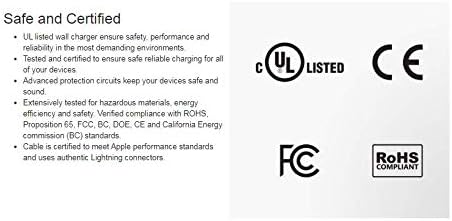
This image highlights key features of the Ubio Labs charger, including 2.4A/12W USB-A charging, flush mount design with folding prongs, and two certified cables. It also displays safety certifications such as UL Listed, CE, FCC, and RoHS Compliant.
9. Waranti dan Sokongan
Waranti Terhad
Ubio Labs products are manufactured to the highest quality standards. For specific warranty terms and conditions, please refer to the warranty information provided with your purchase or visit the official Ubio Labs webtapak.
Sokongan Pelanggan
If you encounter any issues or have questions regarding your Ubio Labs Lightning Charging Kit, please visit the official Ubio Labs website for customer support resources, FAQs, and contact information.