
pengenalan
The Motorola E202 is a digital cordless phone designed for ease of use and practicality. It features a bright backlit display, speakerphone functionality, and a "Do Not Disturb" mode. This model incorporates essential calling features, including advanced call blocking technology that allows you to block up to 10 unwanted numbers. This manual provides detailed instructions for setting up, operating, and maintaining your Motorola E202 cordless phone.
Kandungan Pakej
Sebelum anda memulakan, sila pastikan semua item yang disenaraikan di bawah terdapat dalam pakej anda:
- Cordless Handset and Base Unit
- Additional Cordless Handset and Charger
- Penyesuai Kuasa (x2)
- Rechargeable Ni-MH Batteries (x4)
- Tali Talian Telefon
- Manual Pengguna (dokumen ini)

Image: The Motorola E202 Digital Cordless Phone, showing the handset resting in its base unit.
Persediaan
- Pasang Bateri: Open the battery compartment cover on the back of each handset. Insert the two supplied Ni-MH rechargeable batteries, observing the correct polarity (+ and -). Close the battery compartment cover securely.

Imej: Sisi view of the Motorola E202 handset, showing the battery compartment area.
- Unit Pangkalan Sambung:
- Connect one end of the telephone line cord to the TEL LINE socket on the back of the main base unit.
- Sambungkan hujung satu lagi kord talian telefon ke soket dinding telefon anda.
- Connect one power adapter to the POWER socket on the main base unit and plug the other end into a mains power outlet.
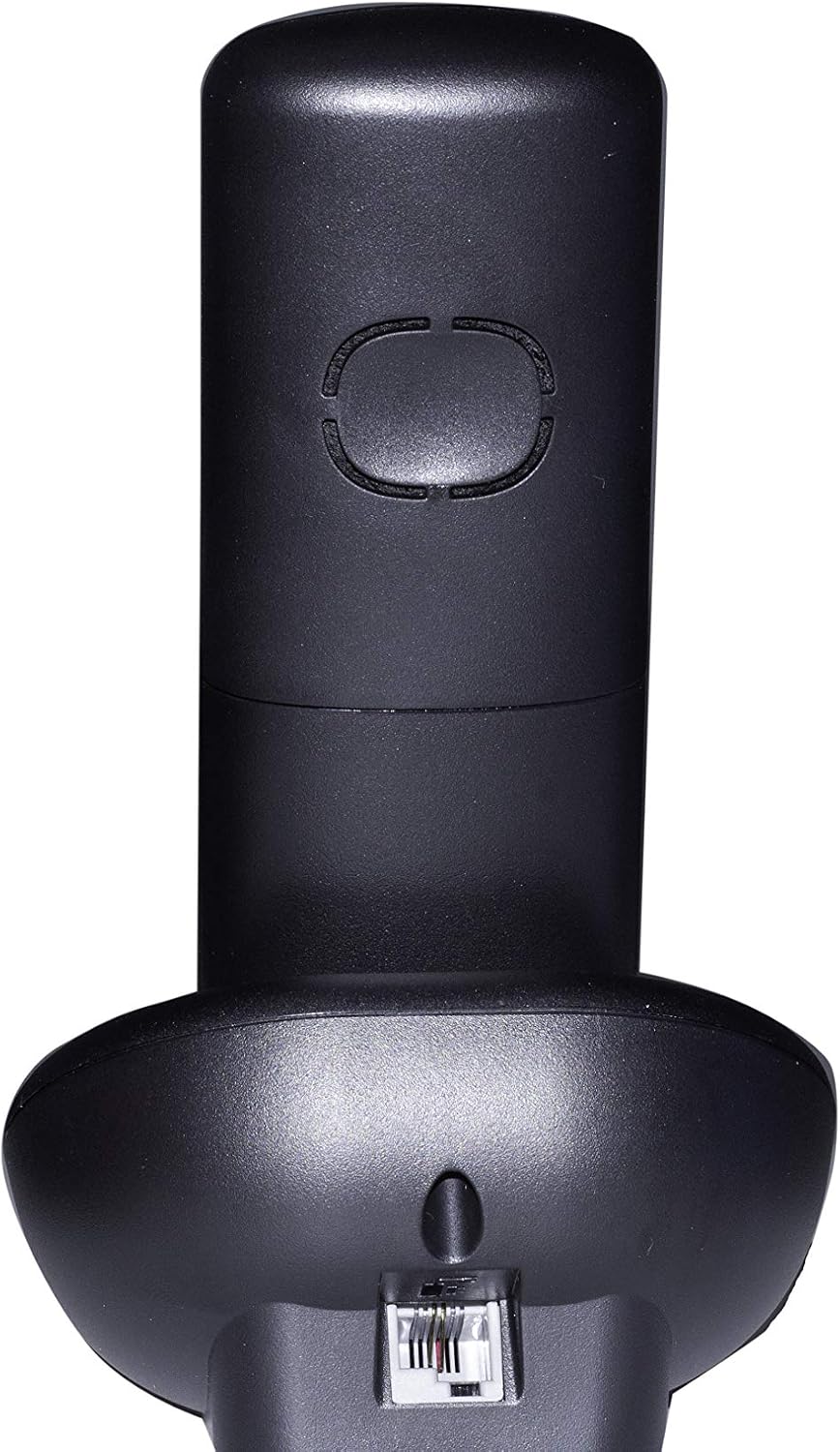
Imej: Belakang view of the Motorola E202 base unit, showing the telephone line and power input ports.
- Connect Additional Charger: Connect the second power adapter to the POWER socket on the additional charger unit and plug the other end into a mains power outlet.
- Mengecas Telefon bimbit: Place each handset on its respective base/charger unit. The handsets will emit a short beep, and the display will indicate charging. Allow the handsets to charge for at least 16 hours before first use to ensure optimal battery performance.
Arahan Operasi

Imej: Depan view of the Motorola E202 handset, highlighting the display and keypad.
Membuat dan Menerima Panggilan
- Buat panggilan: Tekan ke Butang Panggilan Hijau (looks like a phone receiver), then dial the number. Alternatively, dial the number first and then press the Butang Panggilan Hijau.
- Terima Panggilan: Apabila telefon berdering, tekan butang Butang Panggilan Hijau.
- Tamatkan Panggilan: Tekan ke Butang Panggilan Tamat Merah (looks like a phone receiver with a line through it) atau letakkan semula telefon bimbit pada tapak/pengecas.
- Telefon pembesar suara: Semasa panggilan, tekan Butang telefon pembesar suara (looks like a speaker icon) to activate or deactivate the speakerphone.
Buku telefon
- Buku telefon boleh menyimpan sehingga 50 nama dan nombor.
- To access the phonebook, press the Up/Down navigation buttons apabila telefon bimbit tidak berfungsi.
- Ikut gesaan pada skrin untuk menambah, mengedit atau memadam entri.
Penyekatan Panggilan
- The Motorola E202 features advanced call blocking technology, allowing you to block up to 10 specific numbers.
- To block a number, navigate to the Call Blocking menu via the handset's menu options.
- You can also activate the "Do Not Disturb" function by pressing the dedicated "Do Not Disturb" button (looks like a crescent moon).
Caller ID and Redial
- ID Pemanggil: The handset display shows the caller's name and number (if available and subscribed to Caller ID service). The Caller ID list stores up to 20 names and numbers.
- Panggil semula: The phone automatically stores the last 10 dialed numbers. Press the Butang memanggil semula (looks like an 'R' or a curved arrow) to access and redial these numbers.
Penyelenggaraan
To ensure the longevity and optimal performance of your Motorola E202 cordless phone, follow these maintenance guidelines:
- Pembersihan: Lap telefon bimbit dan unit asas dengan lembut, damp kain. Jangan gunakan pembersih atau pelarut yang melelas.
- Penjagaan Bateri: Use only the specified rechargeable Ni-MH batteries. If the phone will not be used for an extended period, remove the batteries to prevent leakage.
- penempatan: Keep the phone away from heat sources, direct sunlight, and moisture. Avoid placing it near other electrical appliances that may cause interference.
- Elakkan Titisan: Handle the handset with care to prevent damage from accidental drops.
Menyelesaikan masalah
If you encounter issues with your Motorola E202, refer to the following common problems and solutions:
| Masalah | Penyelesaian |
|---|---|
| Tiada nada dail. |
|
| Tidak boleh membuat atau menerima panggilan. |
|
| Kualiti bunyi atau gangguan yang lemah. |
|
| Paparan telefon bimbit kosong. |
|
Spesifikasi
| Ciri | Perincian |
|---|---|
| Jenama | Motorola |
| Model | E202 |
| warna | Hitam |
| Jenis Telefon | Telefon tanpa wayar |
| Bilangan Telefon bimbit | 2 (Dual Cordless Phone) |
| Bateri Diperlukan | 2 AAA Ni-MH rechargeable batteries per handset (included) |
| bahan | Akrilonitril Butadiena Stirena (ABS) |
| Dimensi Item (LxWxH) | 20 x 30 x 20 cm (approximate, likely packaging dimensions) |
| Jenis Sistem Menjawab | digital |
| Peranti Serasi | Other cordless devices of the same model, automatic answering, fax |
| Operasi berbilang talian | ya |
| ID pemanggil | Yes (Caller ID list with 20 names and numbers) |
| Kapasiti Buku Telefon | 50 nama dan nombor |
| Penyekatan Panggilan | Blocks up to 10 numbers, "Do Not Disturb" function |
| Dail Semula Memori | 10 nombor terakhir |
| Masa Berbual | Sehingga 10 jam |
| Masa Tunggu Sedia | Sehingga 200 jam |
Waranti
The Motorola E202 Digital Cordless Phone comes with a Waranti 24 bulan from the date of purchase. This warranty covers manufacturing defects and material faults under normal use. Please retain your proof of purchase for warranty claims. The warranty does not cover damage caused by misuse, accidents, unauthorized repairs, or normal wear and tear.
Sokongan
For further assistance, technical support, or to report a problem not covered in this manual, please refer to the official Motorola support channels. You can often find additional resources, FAQs, and contact information on the official Motorola website. A PDF version of this user manual is also available for download from the product's Amazon page or Motorola's support site.
Untuk mendapatkan maklumat sokongan terkini, sila lawati: www.motorola.com/support