
ROCCAT ROC-12-940-BN
Roccat Vulcan 122 Mechanical Gaming Keyboard User Manual
Model: ROC-12-940-BN
1. Pengenalan
The Roccat Vulcan 122 is a high-performance mechanical gaming keyboard designed for precision and durability. It features Roccat's unique Titan switches, advanced AIMO RGB lighting, and a robust aluminum construction. This manual provides detailed instructions for setting up, operating, maintaining, and troubleshooting your keyboard.

Image: The Roccat Vulcan 122 keyboard shown with a Roccat mouse and headset, demonstrating its vivid, dynamic lighting synergy with AIMO.
Ciri-ciri Utama:
- Unique design with lowered keycaps and reduced reaction time.
- RGB lighting with configurable LED effects and adjustable AIMO effects.
- High-quality and resistant design with robust materials and an anodized aluminum surface.
- Advanced anti-ghosting with N-Key Rollover (NKRO).
- Programmable macro keys and ROCCAT Easy-Shift[+].
2. Persediaan
2.1 Menyambung Papan Kekunci
To connect your Roccat Vulcan 122 keyboard:
- Unpack the keyboard and its accessories.
- Plug the USB connector from the keyboard into an available USB port on your computer.
- The operating system will automatically detect and install the necessary drivers.
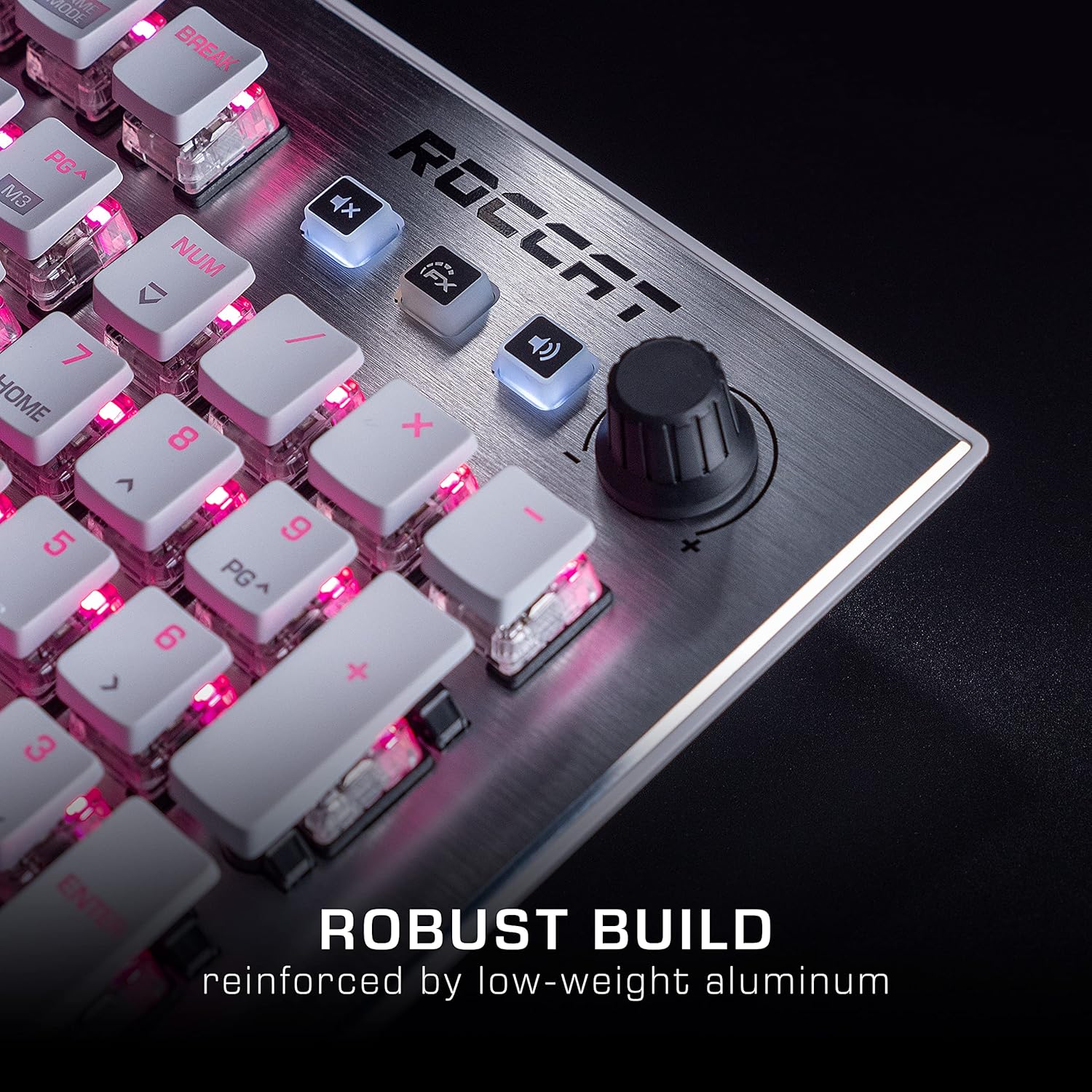
Image: The Roccat Vulcan 122 keyboard shown with its detachable wrist rest, ready for connection.
2.2 Pemasangan Perisian (ROCCAT Swarm)
For full functionality and customization, install the ROCCAT Swarm software:
- Lawati ROCCAT rasmi webtapak (www.roccat.com) dan navigasi ke bahagian sokongan.
- Download the latest version of the ROCCAT Swarm software for your operating system.
- Jalankan pemasang dan ikut arahan pada skrin.
- After installation, launch ROCCAT Swarm to configure your keyboard settings, lighting, and macros.
3. Mengendalikan Papan Kekunci
3.1 Fungsi Kekunci Standard
The Vulcan 122 functions as a standard QWERTY keyboard. All alphanumeric keys, function keys (F1-F12), navigation keys, and the numeric keypad operate as expected.
3.2 Kawalan Media
The keyboard features dedicated media controls for convenient audio management.
- Tombol Kelantangan: Located in the upper right corner, rotate to adjust system volume.
- Butang Bisukan: Press to mute/unmute audio.
- Butang FX: Cycles through lighting effects or other programmable functions.

Imej: Dari dekat view of the mixer-style media controls on the Roccat Vulcan 122, including the volume knob and dedicated function keys.
3.3 RGB Lighting Customization (AIMO)
The Vulcan 122 features advanced RGB lighting with Roccat's AIMO intelligent lighting system. Use the ROCCAT Swarm software to:
- Select from various pre-set lighting effects.
- Customize individual key illumination.
- Laraskan kecerahan dan kelajuan kesan.
- Synchronize lighting with other AIMO-compatible devices.
3.4 Programmable Macro Keys and Easy-Shift[+]
The keyboard includes programmable macro keys and the Easy-Shift[+] function, allowing you to assign secondary functions to keys.
- Use the ROCCAT Swarm software to record and assign macros to designated keys.
- Easy-Shift[+] allows you to double the number of assignable functions by holding down the Easy-Shift[+] key (usually Caps Lock by default, configurable in Swarm) and pressing another key.
3.5 Anti-Ghosting with NKRO
The Vulcan 122 features advanced anti-ghosting technology with N-Key Rollover (NKRO), ensuring that every key press is registered accurately, even when multiple keys are pressed simultaneously.

Image: A hand demonstrating typing on the Roccat Vulcan 122 keyboard, emphasizing the ergonomic design of the keys for comfortable use.
4. Penyelenggaraan
4.1 Membersihkan Papan Kekunci
To ensure the longevity and optimal performance of your Vulcan 122 keyboard, regular cleaning is recommended.
- Putuskan sambungan papan kekunci daripada komputer anda sebelum membersihkan.
- Gunakan kain lembut dan tidak berbulu sedikit dampened with water or a mild cleaning solution to wipe the keycaps and surface. Avoid harsh chemicals.
- For dust and debris between keys, use compressed air. The raised keycap design makes cleaning easier.
- Pastikan papan kekunci benar-benar kering sebelum menyambungkannya semula.

Image: A close-up of the Roccat Vulcan 122 keyboard keys, illustrating their design which facilitates easy cleaning and resistance to dust and liquids.
5. Penyelesaian masalah
If you encounter issues with your Roccat Vulcan 122 keyboard, refer to the following common problems and solutions:
- Papan kekunci tidak bertindak balas:
- Pastikan kabel USB disambungkan dengan selamat ke kedua-dua papan kekunci dan komputer.
- Cuba pasangkan papan kekunci ke port USB yang berbeza.
- Mulakan semula komputer anda.
- Check if the keyboard is disabled in your operating system's device manager.
- Pencahayaan RGB tidak berfungsi atau tidak betul:
- Ensure the ROCCAT Swarm software is installed and up to date.
- Semak tetapan pencahayaan dalam perisian Swarm.
- Perform a firmware update for the keyboard via Swarm.
- Kunci tidak mendaftar atau hantu:
- Bersihkan kekunci yang terjejas seperti yang diterangkan dalam bahagian Penyelenggaraan.
- Ensure the keyboard's firmware is up to date.
- Uji papan kekunci pada komputer lain untuk menolak isu khusus sistem.
- ROCCAT Swarm software not detecting keyboard:
- Pastikan papan kekunci disambungkan dengan betul.
- Restart the Swarm software and your computer.
- Pasang semula perisian ROCCAT Swarm.
- Periksa sebarang perisian atau pemacu yang bercanggah.
6. Spesifikasi
| Ciri | Perincian |
|---|---|
| Jenama | Roccat |
| Nama Model | Vulcan 122 |
| Nombor Model | ROC-12-940-BN |
| Penerangan Papan Kekunci | mekanikal |
| Jenis Suis | Taktil |
| bahan | aluminium |
| Ciri Khas | Pencahayaan latar |
| Peranti Serasi | Laptop (PC) |
| Sokongan Sistem Pengendalian | Windows 10, Windows 7, Windows 8 |
| Dimensi Produk | 46.2 x 23.5 x 3.2 cm |
| Berat Barang | 1.15 kg |

Imej: Meletup view diagram illustrating the components of a Roccat Titan Tactile mechanical switch, highlighting its design for swift and precise response.
7. Waranti dan Sokongan
7.1 Maklumat Waranti
Your Roccat Vulcan 122 keyboard is covered by a manufacturer's warranty. The specific terms and duration of the warranty may vary by region and retailer. Please retain your proof of purchase for warranty claims. For detailed warranty information, refer to the warranty card included with your product or visit the official ROCCAT webtapak.
7.2 Sokongan Teknikal
For technical assistance, driver updates, or further inquiries, please visit the official ROCCAT support page:
Anda boleh mendapatkan Soalan Lazim, panduan penyelesaian masalah dan maklumat hubungan untuk khidmat pelanggan di laman web mereka. webtapak.
Ask a question about this manual
Ask about setup, troubleshooting, compatibility, parts, safety, or missing instructions. Manuals+ will review the question and use this page’s manual context to help answer it.