
1. Pengenalan dan Lebihview
Thank you for choosing the Bewinner 12-inch LED Digital Photo Frame. This device allows you to display your favorite photos, play music and videos, and utilize clock and calendar functions. It features a high-resolution 12-inch LED screen (1280x800) and supports various media formats.

Image: The digital photo frame showcasing its 12-inch LED screen with a high-resolution image.
The frame is constructed from high-quality ABS material and comes with an infrared remote control for convenient operation. It includes built-in speakers and a 3.5mm headphone jack for audio output.
Kandungan Pakej:
- 1 x Bewinner Digital Photo Frame
- 1 x Alat Kawalan Jauh
- 1 x Penyesuai Kuasa/Pengecas
- 1 x Penyangga Bingkai
- 1 x Manual Pengguna (dokumen ini)
2. Persediaan
2.1 Membongkar
Carefully remove all components from the packaging. Ensure all items listed in the package contents are present and undamaged.
2.2 Memasang Stand
Locate the detachable frame stand. Insert the stand into the designated slot on the back of the digital photo frame. Ensure it is securely attached to provide stable support on any flat surface.

Imej: Belakang view of the digital photo frame with the stand in place, highlighting the port layout.
2.3 Sambungan Kuasa
Connect the provided power adapter to the DC IN port on the digital photo frame. Plug the other end of the adapter into a standard electrical outlet. The frame will typically power on automatically or enter standby mode.
2.4 Inserting a Memory Card or USB Drive
The digital photo frame supports external storage via SD cards (up to 32GB, not included) and USB 2.0 host devices. Insert your SD card into the memory card slot or connect a USB flash drive to the USB host port. Ensure the media is inserted correctly.
Nota: This device does not have significant internal storage for media files. An external SD card or USB drive is required to display photos, videos, or music.

Imej: Side profile of the digital photo frame, illustrating the various input ports including USB and SD card slots.
3. Arahan Operasi
The digital photo frame can be operated using the buttons on the back of the frame or the included infrared remote control.
3.1 Navigasi Asas
- Butang Kuasa: Turns the frame on or off.
- Menu/Setup Button: Accesses the main menu and settings.
- Butang Anak Panah (Atas/Bawah/Kiri/Kanan): Navigasi melalui menu dan pilih pilihan.
- Butang Masukkan: Mengesahkan pilihan.
- Butang Keluar: Returns to the previous screen or main display.
- Butang Kelantangan: Adjust audio volume (VOL+, VOL-).
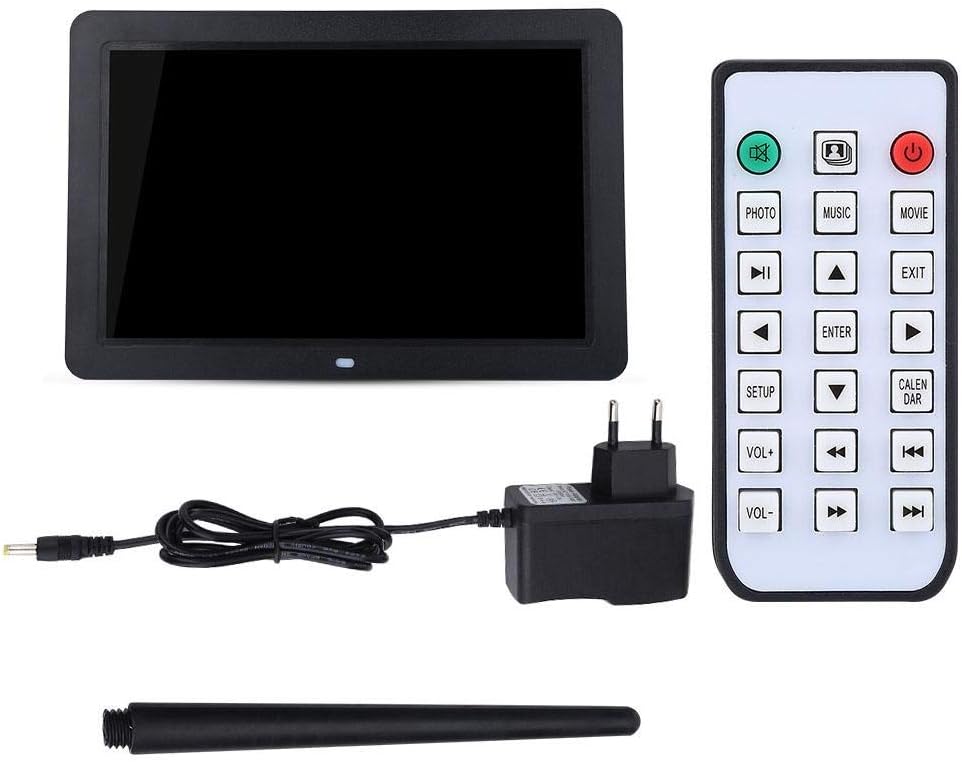
Image: The included remote control, showing buttons for various functions like Photo, Music, Movie, Setup, Calendar, and volume control.
3.2 Photo Playback
The frame supports JPEG and JPG image formats. To view foto:
- Ensure your photos are stored on a compatible SD card or USB drive.
- From the main menu, select "Photo" or press the FOTO butang pada alat kawalan jauh.
- Navigate to your desired folder or select "All Photos" to start a slideshow.
- You can configure slideshow duration, transition effects, and brightness settings in the "Setup" menu.

Image: The digital photo frame displaying a high-resolution image, demonstrating its photo playback capability.
3.3 Main balik Muzik
The frame supports MP3 audio format. To play music:
- Store your MP3 files on a compatible SD card or USB drive.
- From the main menu, select "Music" or press the MUZIK butang pada alat kawalan jauh.
- Browse your music files and select a track to play.
- Adjust the volume using the VOL+ and VOL- buttons. You can also connect headphones to the 3.5mm jack.

Image: The digital photo frame displaying a visual while playing music, with an overlay indicating MP3 support.
3.4 Main balik Video
The frame supports various video formats including RM, RMVB, MKV, MOV, M4V, MPG, FLV, PMP, AVI, VOB, DAT, MP4, and 3PG. To play videos:
- Store your video files on a compatible SD card or USB drive.
- From the main menu, select "Movie" or press the FILEM butang pada alat kawalan jauh.
- Layari video anda files and select a video to play.
- Laraskan kelantangan menggunakan butang VOL+ dan VOL-.
3.5 Clock and Calendar Functions
The digital photo frame includes built-in clock and calendar functions. To access these:
- From the main menu, select "Calendar" or press the KALENDAR butang pada alat kawalan jauh.
- You can set the time and date in the "Setup" menu.
3.6 Tetapan dan Penyesuaian
Access the "Setup" menu to customize various settings:
- Bahasa: Pilih bahasa pilihan anda.
- Tetapan Paparan: Laraskan kecerahan, kontras dan nisbah aspek.
- Tetapan Tayangan Slaid: Configure interval, transition effects, and playback mode (e.g., sequential, random).
- Masa dan Tarikh: Tetapkan masa dan tarikh semasa.
- Main Auto: Set the frame to automatically play music, images, videos, or a mixed sequence upon startup.
4. Penyelenggaraan
4.1 Membersihkan Skrin
To clean the LED screen, gently wipe it with a soft, lint-free cloth. For stubborn smudges, slightly dampLap kain dengan air atau larutan pembersih yang selamat untuk skrin. Elakkan menggunakan bahan kimia yang keras atau bahan yang kasar.
4.2 Penjagaan Am
- Keep the digital photo frame away from direct sunlight, excessive heat, and moisture.
- Elakkan daripada menjatuhkan atau meletakkan peranti kepada kesan yang kuat.
- Do not attempt to disassemble the frame, as this will void any potential warranty and may cause damage.
- When not in use for extended periods, unplug the power adapter.
5. Penyelesaian masalah
If you encounter issues with your Bewinner Digital Photo Frame, please refer to the following common problems and solutions:
| Masalah | Kemungkinan Punca / Penyelesaian |
|---|---|
| Bingkai tidak dihidupkan. |
|
| No photos/videos/music displayed. |
|
| Alat kawalan jauh tidak berfungsi. |
|
| Images appear washed out or too bright/dark. |
|
| Audio is distorted or no sound. |
|
6. Spesifikasi
| Ciri | Perincian |
|---|---|
| Jenama | Bewinner |
| Nombor Model | Bewinner1moich0rzq-03 |
| Saiz Skrin | 12 inci |
| Jenis Paparan | LED |
| Resolusi | 1280 x 800 (WXGA) |
| Nisbah Aspek | 16:9 |
| Kecerahan | 250 cd/m² |
| Bahan Cangkang | ABS (Acrylonitrile Butadiene Styrene) |
| warna | Hitam |
| Sokongan Storan Luaran | SD Card (up to 32GB), USB 2.0 Host |
| Format Gambar yang Disokong | JPEG, JPG (Base Encoding) |
| Format Muzik yang Disokong | MP3 |
| Format Video yang Disokong | RM, RMVB, MKV, MOV, M4V, MPG, FLV, PMP, AVI, VOB, DAT, MP4, 3PG |
| Format E-buku yang Disokong | TXT |
| Pembesar Suara Terbina dalam | 8Ω2W * 2 |
| Kaedah Operasi | Infrared Remote Control, On-frame Buttons |
| Antara muka | 3.5mm Headphone Jack, Memory Card Slot, USB 2.0 Host, Mini USB Adapter, Charging Port |
| Dimensi (L x W x H) | Lebih kurang 30.5 x 20.2 x 2.5 cm (12.0 x 7.9 x 1.0 inci) |
| Berat badan | lebih kurang 895g |
| Sumber Kuasa | Kabel Elektrik |

Image: Dimensional diagram of the digital photo frame, indicating its width and height.
7. Waranti dan Sokongan
Information regarding specific warranty terms and conditions for the Bewinner Digital Photo Frame is not provided in the product details. For warranty claims or technical support, please refer to the retailer or manufacturer's official webtapak tempat anda membeli produk.
Please note that information on spare parts availability and guaranteed software updates is also not available.