
1. Produk Lebihview
The Prolink PRO700SFCU is a single-phase input/single-phase output Line-Interactive Uninterruptible Power Supply (UPS) system designed to provide stable backup power. It features Prolink's Super-Fast Charging technology, enabling the battery to recharge to 90% capacity within 2-4 hours. This UPS is suitable for home and small office applications, protecting devices such as computers, modems, wireless routers, and network equipment from power disruptions.
Ciri-ciri Utama:
- Pengecasan Super Cepat: Battery recharges to 90% capacity within 2-4 hours.
- Perlindungan lonjakan: Protects connected equipment from spikes and surges.
- Advanced Early Warning: Alerts users to output overload, high temperature, or low battery conditions, allowing time to save data or shut down systems.
- Perlindungan Lebihan: Initiates an alarm and automatic shutdown to prevent damage and prolong UPS lifespan.
- Perlindungan Suhu Lebih: Shuts down the power supply if internal temperatures become unacceptably high.
- Pengurusan Bateri Pintar: Protects the battery from overcharging and deep discharging.
- Vol. Automatiktage Peraturan (AVR): Boosts and bucks voltage for stable output.
- Universal Sockets: Serasi dengan pelbagai peranti.
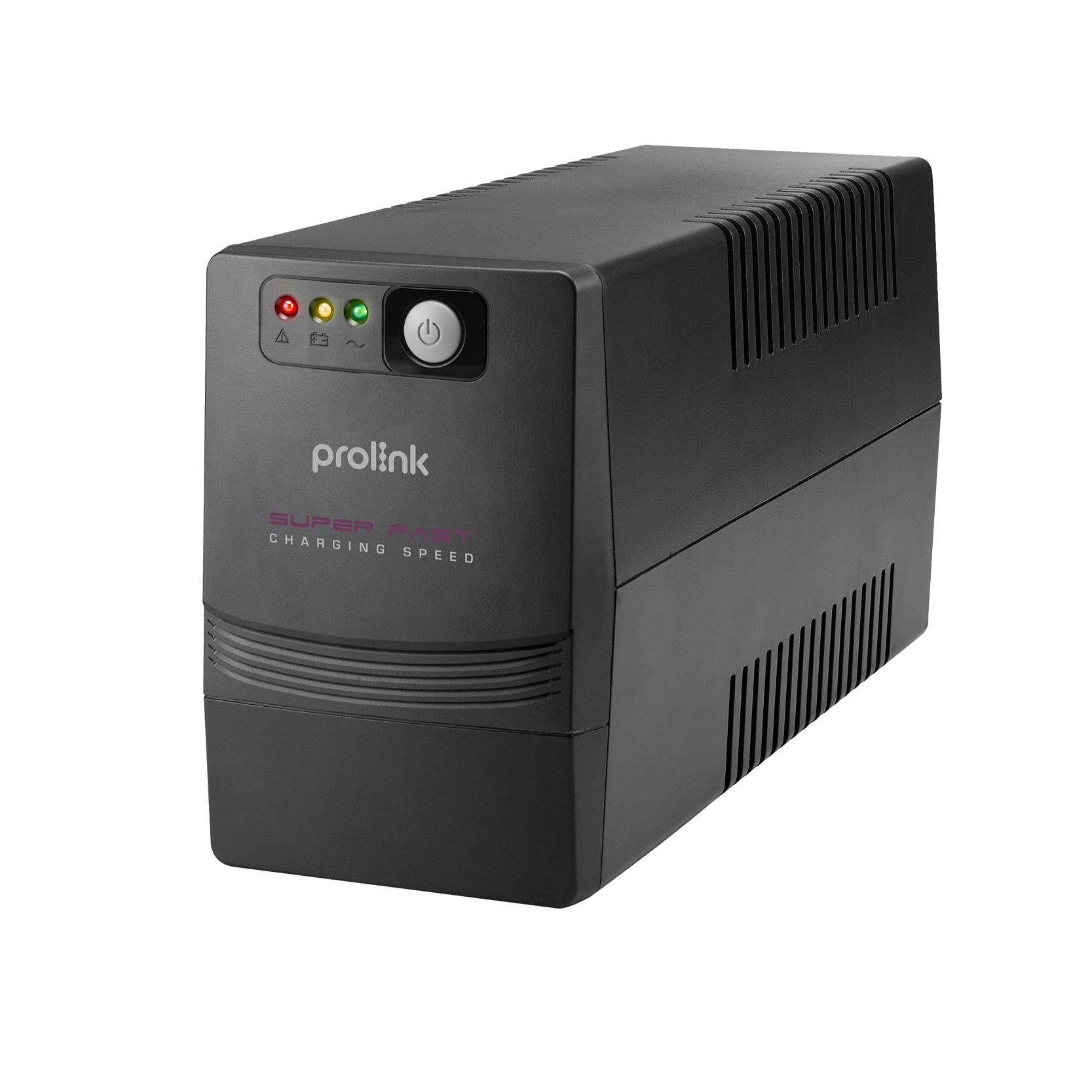
Rajah 1: Depan view of the Prolink PRO700SFCU UPS, showing its compact design.

Figure 2: Prolink PRO700SFCU UPS highlighting key features such as Super Fast Charging, True AVR, and Universal Sockets.
2. Maklumat Keselamatan
Please read and follow all safety instructions carefully before installing, operating, or servicing the UPS. Keep this manual for future reference.
Langkah berjaga-jaga am:
- Jangan buka UPS casing. There are no user-serviceable parts inside. Refer servicing to qualified service personnel.
- Jangan pasang UPS di bawah cahaya matahari langsung, berhampiran sumber haba atau dalam persekitaran yang mempunyai habuk, kelembapan atau bahan menghakis yang berlebihan.
- Pastikan pengudaraan yang mencukupi di sekitar UPS. Jangan halang bukaan pengudaraan.
- Connect the UPS to a grounded power outlet.
- Do not connect non-computer related loads such as medical equipment, life support systems, or other critical devices to the UPS.
- In case of emergency, press the OFF button and disconnect the power cord from the AC power supply to disable the UPS.
Keselamatan Bateri:
- Batteries can present a risk of electrical shock and high short-circuit current. Observe the following precautions:
- Jangan buang bateri ke dalam api; mereka mungkin meletup.
- Jangan buka atau rosakkan bateri. Elektrolit yang dikeluarkan berbahaya kepada kulit dan mata.
- Battery servicing should be performed or supervised by personnel knowledgeable about batteries and the required precautions.
- Replace batteries only with the same type and number of batteries as originally installed.
3. Kandungan Pakej
Sahkan bahawa semua item yang disenaraikan di bawah disertakan dalam pakej anda. Jika terdapat sebarang item yang hilang atau rosak, sila hubungi pengedar anda.
- Prolink PRO700SFCU UPS Unit
- Manual Pengguna
- Kord Kuasa AC
- Kabel Komunikasi USB
4. Persediaan
Follow these steps to properly set up your Prolink PRO700SFCU UPS.
4.1 Pembongkaran dan Penempatan:
- Keluarkan UPS dari pembungkusannya dengan berhati-hati.
- Place the UPS in a clean, dry, and well-ventilated area, away from direct sunlight, heat, and moisture.
- Ensure there is sufficient space around the UPS for proper airflow.
4.2 Connecting to Power:
- Connect the supplied AC power cord to the UPS input socket (labeled "INPUT 10A max") on the rear panel.
- Palamkan hujung satu lagi kord kuasa AC ke salur keluar dinding yang dibumikan.
4.3 Menyambung Peranti:
- Plug your computer, monitor, modem, or other critical equipment into the UPS output sockets (labeled "OUTPUT") on the rear panel.
- For USB communication and monitoring, connect the USB cable from the UPS USB port to your computer's USB port.
4.4 Pengecasan Awal:
For optimal performance, charge the UPS for at least 4-6 hours before initial use. The UPS will charge automatically when connected to AC power, even if the unit is turned off.
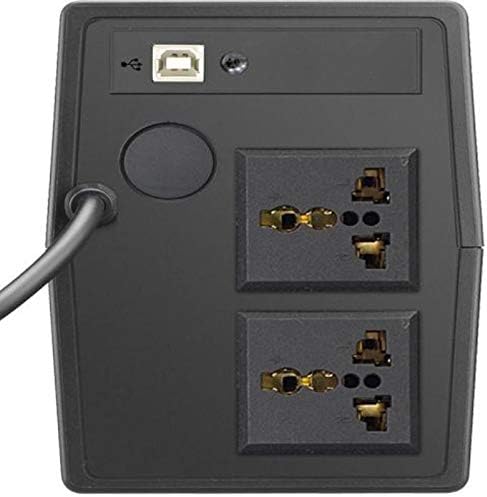
Figure 3: Rear panel of the UPS, illustrating the input power connection, output sockets, and USB port.
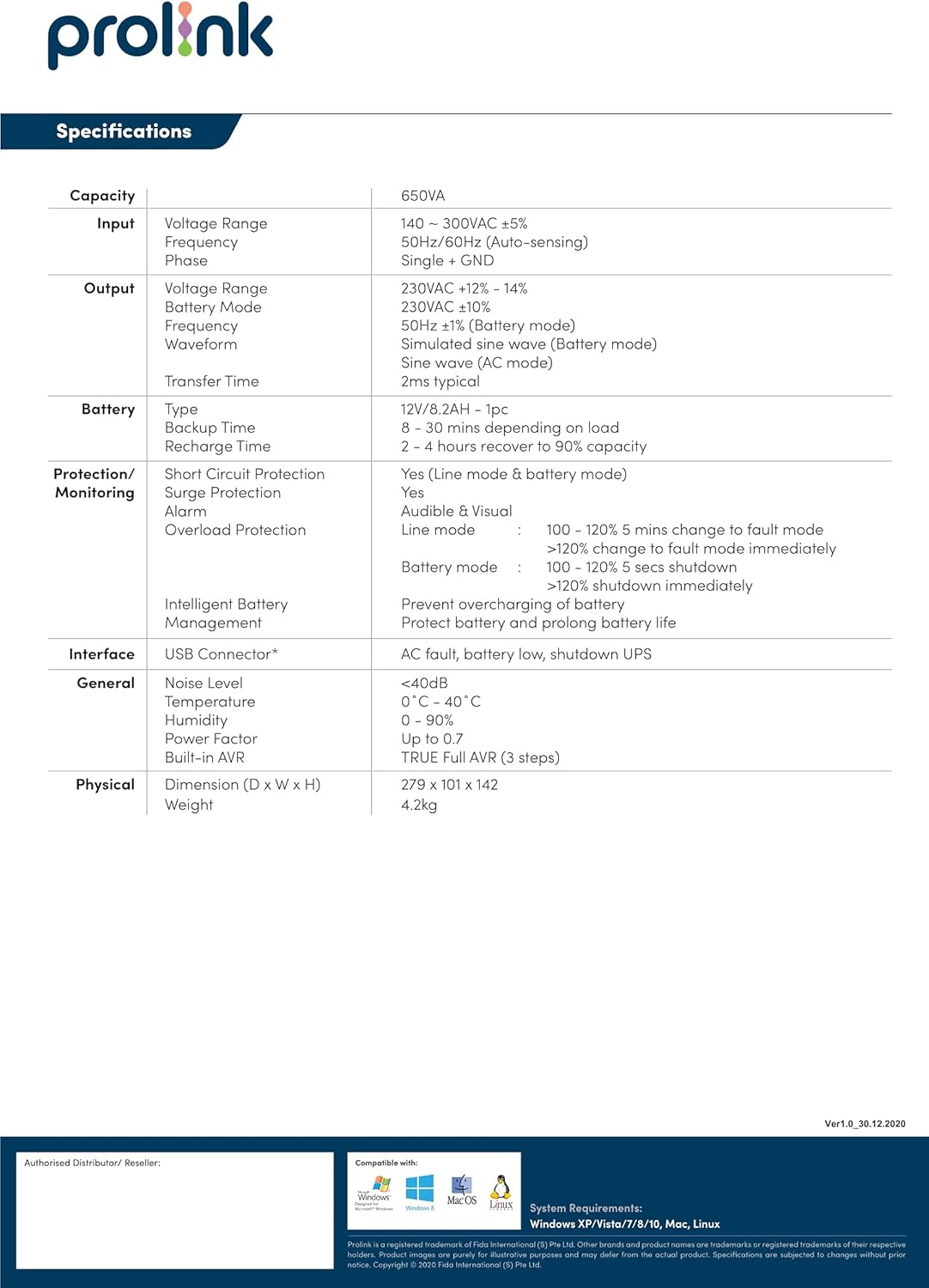
Figure 4: Detailed diagram of the UPS rear panel, indicating Power AC Input, Backup Outlets, and USB Port.
5. Operasi
5.1 Menghidupkan/Mematikan:
- Untuk Menghidupkan: Press and hold the 'ON/MUTE' button for approximately 3 seconds until you hear a beep and the LCD display illuminates.
- Untuk Mematikan: Press and hold the 'OFF/ENTER' button for approximately 3 seconds until the LCD display turns off.
5.2 Memahami Paparan LCD:
The comprehensive LCD display panel provides real-time status information about the UPS, including input/output voltage, battery level, load capacity, and operational mode. Refer to the display for current operating conditions.
5.3 Mod ECO:
The UPS may feature an ECO mode for energy saving. When active, the UPS operates with higher efficiency by bypassing the inverter during stable power conditions. Consult the LCD display or specific model features for activation and status of ECO mode.
5.4 USB Communication:
The USB port allows for software monitoring and control of the UPS. Install the provided monitoring software on your computer to view UPS status, configure settings, and enable automatic shutdown during extended power outages.
6. Penyelenggaraan
Penyelenggaraan tetap memastikan jangka hayat dan prestasi optimum UPS anda.
6.1 Penjagaan Bateri:
- Keep the UPS connected to AC power to ensure the battery remains fully charged. This prolongs battery life.
- If the UPS is stored for an extended period, recharge the battery every three months for at least 4-6 hours.
- Penggantian bateri hanya boleh dilakukan oleh kakitangan servis yang berkelayakan.
6.2 Pembersihan:
- Use a soft, dry cloth to clean the exterior of the UPS.
- Jangan gunakan pembersih cecair atau aerosol.
- Pastikan bukaan pengudaraan bebas daripada habuk dan serpihan.
6.3 Storan:
- Store the UPS in a cool, dry place.
- Ensure the battery is fully charged before storing.
7. Penyelesaian masalah
This section addresses common issues you might encounter with your UPS. If the problem persists, contact customer support.
| Masalah | Kemungkinan Punca | Penyelesaian |
|---|---|---|
| UPS tidak dihidupkan | No AC input power; Low battery; UPS fault | Check AC power connection; Charge battery for 4-6 hours; Contact support if fault persists. |
| UPS berbunyi bip secara berterusan | Overload; Low battery; UPS fault | Reduce connected load; Allow battery to charge; Contact support if fault persists. |
| Masa sandaran yang singkat | Bateri tidak dicas sepenuhnya; Hayat bateri tamat | Charge battery for 4-6 hours; Consider battery replacement by qualified personnel. |
| Amaran berlebihan | Connected load exceeds UPS capacity | Putuskan sambungan peralatan yang tidak penting untuk mengurangkan beban. |
8. Spesifikasi
Technical specifications for the Prolink PRO700SFCU 650VA UPS.
| Ciri | Spesifikasi |
|---|---|
| Kapasiti | 650VA |
| Input Voltage Julat | 140 - 300VAC ±5% |
| Kekerapan Input | 50Hz/60Hz (Autopenderiaan) |
| Keluaran Voltage Julat | 230VAC ±12% - 14% (Battery Mode: 230VAC ±10%) |
| Kekerapan Output | 50Hz ±1Hz (Battery Mode: 50Hz ±1Hz) |
| Bentuk Gelombang Output | Simulated Sine Wave (AC Mode: Sine Wave) |
| Masa Pemindahan | 2ms biasa |
| Jenis Bateri | 12V/7.2AH x 1pc |
| Masa Sandaran | 8 - 30 minutes (depending on load) |
| Masa Isi Ulang | 2 - 4 hours to 90% capacity |
| Perlindungan Lonjakan | ya |
| Penggera Boleh Didengar | Battery Mode, Low Battery, Overload, UPS Fault |
| Antara muka | Penyambung USB |
| Tahap Kebisingan | <40dB |
| Suhu Operasi | 0°C - 40°C |
| Kelembapan | 0 - 90% (non-condensing) |
| Faktor Kuasa | Sehingga 0.7 |
| AVR terbina dalam | AVR Penuh BENAR (3 langkah) |
| Dimensi (D x W x H) | 279 x 101 x 142 mm |
| Berat badan | 4.2 kg |
| Jumlah Outlet Kuasa | 2 |
| Jenis Penyambung | IEC 320 C13/C14 |
| Jenis Palam Kuasa | Jenis G |
9. Waranti dan Sokongan
Maklumat Waranti:
This Prolink PRO700SFCU UPS is covered by a manufacturer's warranty. Please refer to the warranty card included in your package or visit the official Prolink webtapak untuk terma dan syarat waranti terperinci khusus untuk wilayah anda.
Sokongan Pelanggan:
For technical assistance, troubleshooting, or service inquiries, please contact Prolink customer support. You can find contact information on the official Prolink webtapak atau melalui pengedar tempatan anda.
Webtapak: www.prolink2u.com