1. Pengenalan
Terima kasih kerana membeliasing the MUSE M-10 Red Radio Alarm Clock. This manual provides essential information for the safe and efficient operation of your device. Please read these instructions carefully before use and retain them for future reference.

Figure 1: MUSE M-10 Red Radio Alarm Clock. This image shows the front view of the red alarm clock with its digital LED display showing '12:00' and various control buttons on the top panel.
2. Arahan Keselamatan
- Baca semua arahan sebelum mengendalikan perkakas.
- Do not expose this appliance to rain or moisture to prevent fire or shock hazards.
- Pastikan penyesuai kuasa mudah diakses.
- Hanya gunakan lampiran/aksesori yang ditentukan oleh pengilang.
- Jangan letakkan produk di bawah cahaya matahari langsung atau berhampiran sumber haba.
- Avoid placing the product on surfaces that are unstable or subject to vibration.
- Jangan buka casing; merujuk semua perkhidmatan kepada kakitangan yang berkelayakan.
- Buang bateri terpakai secara bertanggungjawab, mengikut peraturan tempatan.
3. Produk Lebihview
3.1 Panel Hadapan dan Paparan
The front panel features a clear 0.6-inch white LED display for time and alarm indicators.
3.2 Kawalan Panel Atas
The top panel houses all control buttons for easy access:
- MEM: Memory button for saving and recalling radio presets.
- SET: Button for setting time and alarm parameters.
- AL1: Alarm 1 setting button.
- AL2: Alarm 2 setting button.
- << HR: Hour adjustment button (backward).
- MIN >>: Minute adjustment button (forward).
- MENGEJUTKAN: Activates the snooze function during an alarm.
- TIDUR: Mengaktifkan fungsi pemasa tidur.
- DIMMER: Melaraskan kecerahan paparan.

Gambar 2: Lebihview of the MUSE M-10 Red Radio Alarm Clock's functions, including its 0.6-inch white LED display, PLL radio, 20 FM presets, dimmer, dual alarm, snooze, and sleep features.
4. Persediaan
4.1 Sambungan Kuasa
Connect the provided AC adapter to the DC IN jack on the rear of the unit and then plug it into a standard wall outlet. The unit will power on and the display will light up.
4.2 Pemasangan Sandaran Bateri
For time and alarm settings backup during a power outage, install 2 x AAA batteries (not included) into the battery compartment located on the bottom of the unit. Ensure correct polarity (+/-) when inserting batteries.
5. Arahan Operasi
5.1 Menetapkan Masa
- Tekan dan tahan butang SET butang sehingga digit jam berkelip.
- Gunakan << HR or MIN >> butang untuk melaraskan jam.
- Tekan SET again, and the minute digits will flash.
- Gunakan << HR or MIN >> butang untuk melaraskan minit.
- Tekan SET sekali lagi untuk mengesahkan dan keluar dari mod tetapan masa.
5.2 Menetapkan Penggera (Penggera 1 dan Penggera 2)
Unit ini mempunyai dua penggera bebas.
- Tekan dan tahan butang AL1 (atau AL2) button until the alarm hour digits flash.
- Gunakan << HR or MIN >> butang untuk menetapkan jam penggera yang diingini.
- Tekan AL1 (atau AL2) again, and the alarm minute digits will flash.
- Gunakan << HR or MIN >> butang untuk menetapkan minit penggera yang diingini.
- Tekan AL1 (atau AL2) again to select the alarm source: Buzzer or Radio.
- Tekan AL1 (atau AL2) once more to confirm and activate the alarm. An alarm icon will appear on the display.
5.3 Operasi Radio FM
The unit has a PLL FM radio with 20 preset stations.
- tuning: Tekan ke << HR or MIN >> buttons to manually tune the radio frequency. Press and hold these buttons for automatic scanning to the next available station.
- Menyimpan Pratetap: Tune ke stesen yang anda inginkan. Tekan dan tahan butang MEM button until 'P01' (or the next available preset number) flashes. Use << HR or MIN >> untuk memilih nombor pratetap, kemudian tekan MEM sekali lagi untuk berjimat.
- Pratetap Mengingat: Tekan sebentar MEM butang untuk mengitar semula stesen pratetap yang disimpan.
5.4 Fungsi Tunda
Apabila penggera berbunyi, tekan butang MENGEJUTKAN butang untuk menyenyapkan penggera buat sementara waktu selama lebih kurang 9 minit. Penggera akan berbunyi semula selepas tempoh ini.
5.5 Fungsi Pemasa Tidur
Tekan ke TIDUR button repeatedly to set a sleep timer (e.g., 90, 60, 30, 15 minutes, or OFF). The radio will play for the selected duration and then automatically turn off.
5.6 Dimmer Paparan
Tekan ke DIMMER button repeatedly to cycle through display brightness levels: High, Low, or Off.

Figure 3: Key features of the MUSE M-10 Red Radio Alarm Clock, including snooze, radio or buzzer alarm, dimmable display, and FM PLL radio with 20 presets.
6. Penyelenggaraan
- Pembersihan: Lap unit dengan kain lembut dan kering. Jangan gunakan pembersih atau pelarut yang melelas.
- Penggantian Bateri: Gantikan bateri sandaran setiap tahun atau apabila paparan menunjukkan tanda-tanda malap semasa kuasa dimatikantages.
- Storan: Jika menyimpan unit ini untuk tempoh yang lama, tanggalkan bateri sandaran untuk mengelakkan kebocoran.
7. Penyelesaian masalah
| Masalah | Kemungkinan Punca | Penyelesaian |
|---|---|---|
| Tiada kuasa/Paparan dimatikan | Penyesuai kuasa tidak disambungkan atau rosak. | Check power adapter connection. Try a different outlet. |
| Penggera tidak berbunyi | Penggera tidak diaktifkan atau ditetapkan dengan tidak betul. | Ensure alarm icon is visible on display. Re-check alarm time and source settings. |
| Penerimaan radio yang lemah | FM antenna not extended or poor signal area. | Fully extend the FM wire antenna. Adjust its position for better reception. |
| Masa/tetapan hilang selepas kuasa outage | Backup batteries not installed or depleted. | Install new AAA batteries for backup. |
8. Spesifikasi
- model: M-10 MERAH
- Jenama: MUSE
- paparan: 0.6-inch White LED, Digital
- Radio: FM PLL Radio with 20 Presets
- penggera: Penggera Berganda (Buzzer atau Radio)
- Ciri Khas: Snooze, Sleep Timer, Display Dimmer (High/Low/Off)
- Sumber Kuasa: AC Adapter (included), 2 x AAA batteries for backup (not included)
- Dimensi (L x W x H): 12 x 7 x 10.9 cm (kira-kira 4.7 x 2.8 x 4.3 inci)
- Berat: 200 gram (lebih kurang 0.44 paun)
- Bahan: plastik
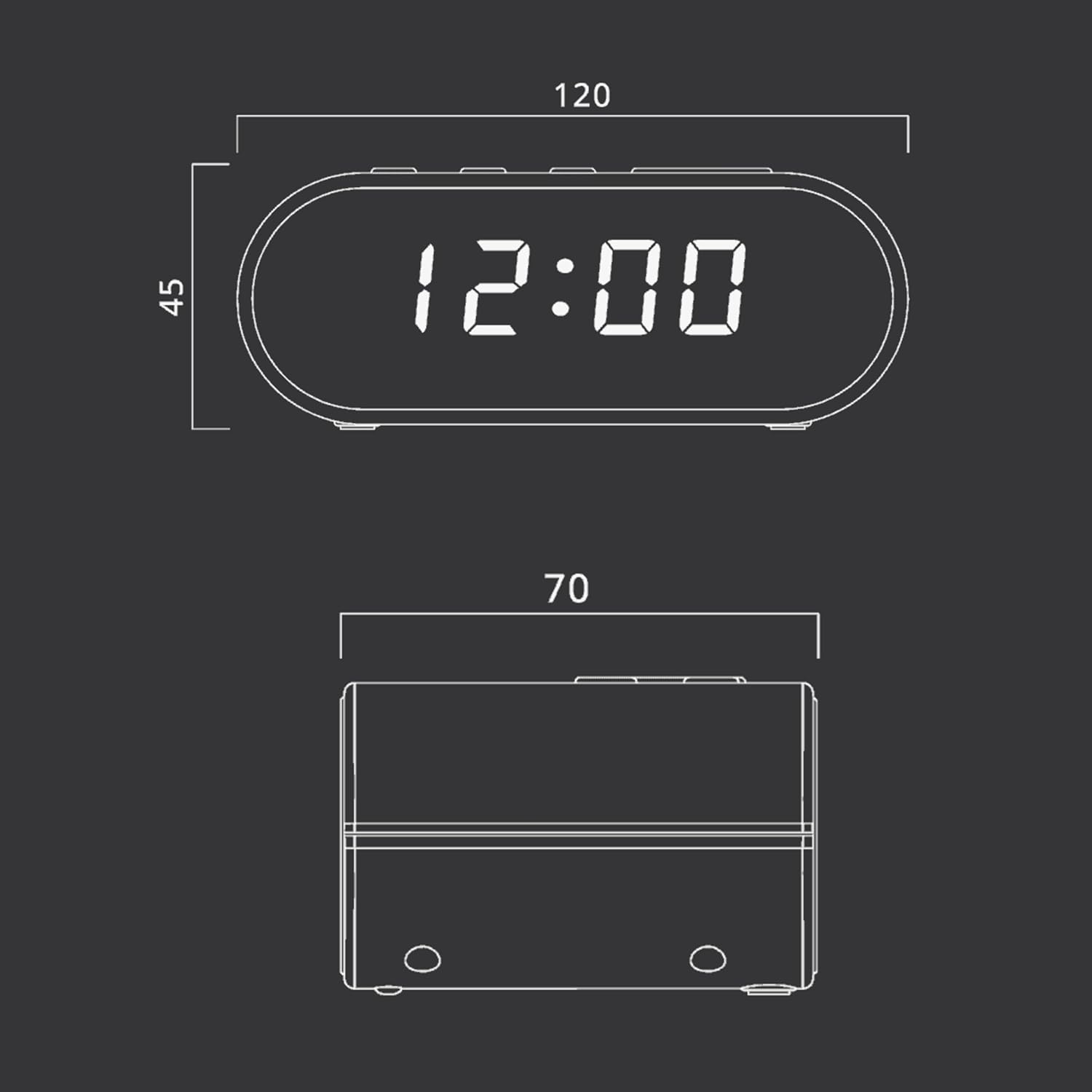
Figure 4: Dimensional drawing of the MUSE M-10 Red Radio Alarm Clock, showing its length (120mm), width (70mm), and height (45mm).
9. Waranti dan Sokongan
For warranty information or technical support, please refer to the warranty card included with your product or contact your local MUSE distributor. Keep your purchase receipt as proof of purchase.