
pengenalan
This manual provides essential information for setting up, operating, maintaining, and troubleshooting your VAIO SX12 laptop. Please read this manual thoroughly to ensure proper use and to maximize the performance and longevity of your device.

Rajah 1: Depan view of the VAIO SX12 laptop with the screen open.
Persediaan
1. Membongkar dan Pemeriksaan Awal
Keluarkan semua komponen dari pembungkusan dengan berhati-hati. Sahkan bahawa semua item yang disenaraikan dalam bahagian 'What's in the Box' ada dan tidak rosak. Jika ada item yang hilang atau rosak, hubungi sokongan pelanggan.
- VAIO SX12 Laptop
- Penyesuai AC
- Kain Pembersih
2. Menyambungkan Penyesuai AC
Connect the AC adapter to the power input port on the laptop and then plug the adapter into a wall outlet. The battery will begin charging automatically.
3. Kuasa Awal Hidup
Press the power button located on the top right of the keyboard. The laptop will boot up and guide you through the initial Windows 10 Pro setup process.
Beroperasi
1. Papan Kekunci dan Pad Sentuh
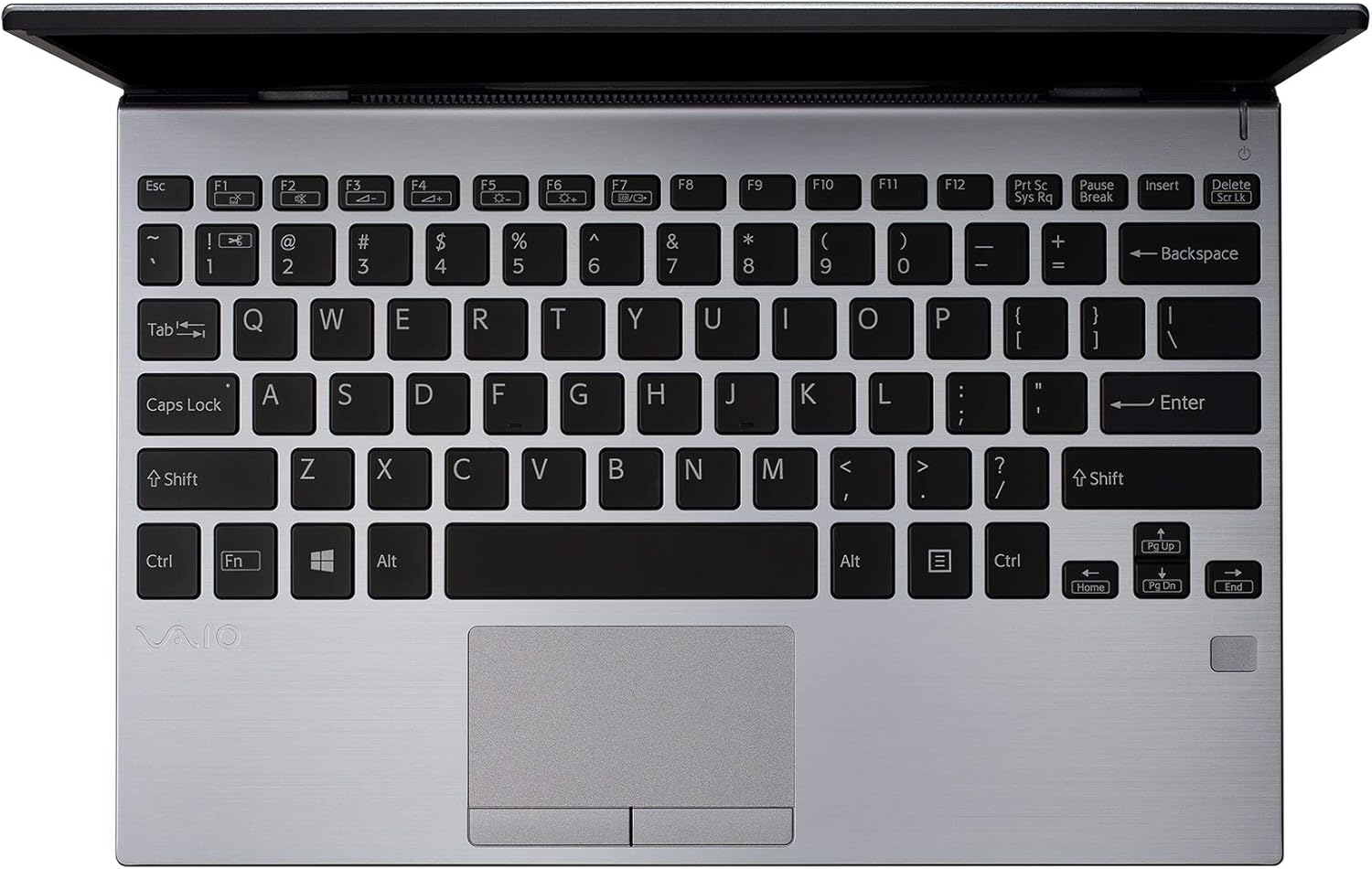
Rajah 2: Atas-bawah view of the VAIO SX12 keyboard and touchpad.
The VAIO SX12 features a full-sized keyboard and a precision touchpad. Familiarize yourself with the function keys (F1-F12) which control various system settings such as screen brightness, volume, and wireless connectivity.
- Kekunci Fungsi: Use the 'Fn' key in combination with F1-F12 for secondary functions.
- Pad sentuh: Supports multi-touch gestures for scrolling, zooming, and navigating.
2. Menyambung Peranti
The VAIO SX12 offers a variety of ports for connecting external devices.

Rajah 3: Bahagian kiri view of the VAIO SX12, showing the power input, USB ports, HDMI, Ethernet, and VGA ports.

Rajah 4: Bahagian kanan view of the VAIO SX12, showing the SD card slot, USB ports, and audio jack.
- Port USB: Connect USB devices such as external drives, keyboards, or mice.
- Port HDMI: Sambung ke paparan luaran atau projektor.
- Port VGA: Connect to older external displays or projectors.
- Pelabuhan Ethernet: Sambung ke rangkaian berwayar.
- Slot Kad SD: Masukkan kad SD untuk pemindahan data.
- Jack Audio: Sambungkan fon kepala atau pembesar suara luaran.
Penyelenggaraan
1. Membersihkan Komputer Riba
- Use the provided cleaning cloth or a soft, lint-free cloth to wipe the screen and exterior surfaces.
- Jangan gunakan bahan kimia yang keras, pembersih yang kasar atau pelarut.
- Pastikan komputer riba dimatikan dan dicabut plag sebelum dibersihkan.
2. Penjagaan Bateri
- Untuk memanjangkan hayat bateri, elakkan daripada menyahcas sepenuhnya bateri dengan kerap.
- Simpan komputer riba di tempat yang sejuk dan kering jika tidak digunakan untuk tempoh yang lama.
- The battery is internal and not user-replaceable. Contact authorized service for battery replacement.
3. Kemas Kini Perisian
Periksa dan pasang kemas kini sistem pengendalian dan pemacu secara berkala untuk memastikan prestasi dan keselamatan yang optimum.
Menyelesaikan masalah
1. Komputer Riba Tidak Dapat Dihidupkan
- Pastikan penyesuai AC disambungkan dengan selamat pada kedua-dua komputer riba dan salur keluar kuasa yang berfungsi.
- Sahkan alur keluar kuasa berfungsi dengan memasang peranti lain.
- Jika bateri habis sepenuhnya, biarkan ia mengecas sekurang-kurangnya 30 minit sebelum cuba menghidupkan.
2. Isu Paparan
- If the screen is blank, try adjusting the brightness using the function keys.
- If an external monitor is connected, ensure the display output is correctly configured (e.g., duplicate, extend).
- Mulakan semula komputer riba.
3. Peripheral Not Recognized
- Ensure the peripheral is properly connected to the correct port.
- Try connecting the peripheral to a different port or another computer to rule out device malfunction.
- Semak pengurus peranti dalam Windows untuk masalah pemacu.
Spesifikasi
| Ciri | Spesifikasi |
|---|---|
| Nama Model | VAIO SX12 |
| Nombor Model Item | VJS121C11L |
| Pemproses | Intel Core i5-8265U (3.9 GHz max) |
| RAM | 8 GB LPDDR3 |
| Pemacu Keras | 512 GB PCIe SSD |
| Sistem Operasi | Windows 10 Pro |
| Saiz Skrin | 12.5 Inci |
| Resolusi Skrin | 1920 x 1080 piksel (HD Penuh) |
| Kad Grafik | Grafik Intel Bersepadu |
| Kesambungan Wayarles | 802.11a/b/g/n/ac, Bluetooth |
| Port USB 3.0 | 4 |
| Berat Barang | 1.97 paun |
| Dimensi Produk | 11.3 x 8 x 0.62 inci |
| warna | Perak |
| Bateri | 1 bateri Lithium Ion (termasuk) |
Waranti dan Sokongan
For warranty information and technical support, please refer to the documentation included with your product or visit the official VAIO support webtapak. Simpan resit pembelian anda sebagai bukti pembelian untuk tuntutan waranti.