
1. Produk Lebihview
The Walfront Digital Power Analyzer Watt Meter is a versatile instrument designed for measuring various electrical parameters in DC circuits. It provides clear and accurate readings for voltage, current, power, energy (Wh), and charge (Ah). This device is suitable for use with 12V, 24V, 36V, and 48V battery bank systems, handling up to 100 amps intermittently and 50 amps secara berterusan.
Ciri-ciri utama termasuk:
- Paparan LCD yang jelas: Provides precise and easy-to-read measurements.
- Lebar Voltage Julat: Operates from 0 to 60 volts.
- Kapasiti Arus Tinggi: Menyokong sehingga 100 amps puncak dan 50 amps berterusan.
- Multi-function Measurement: Measures energy (Wh), charge (Ah), power (W), current (A), and voltage (V).
- Penggunaan Kuasa Rendah: Efficient design with only 0.001 Ohms resistance and 36 mA consumption.
- Ketepatan Tinggi: Offers 0.01 A current and 0.01 V voltage resolutions.
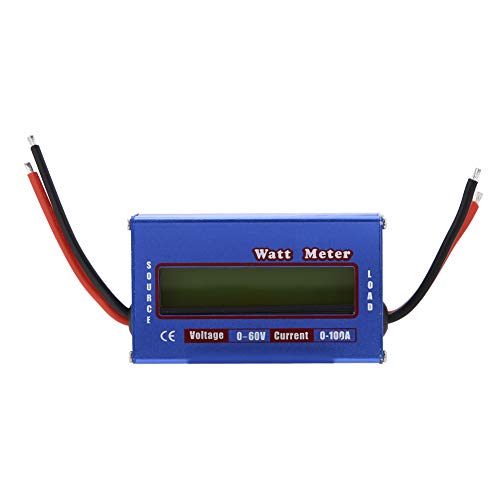
Rajah 1: Depan view of the Walfront Digital Power Analyzer Watt Meter, showing the LCD screen and approximate dimensions.
2. Maklumat Keselamatan
Sila baca dan fahami semua arahan keselamatan sebelum mengendalikan peranti. Kegagalan mematuhi arahan ini boleh mengakibatkan renjatan elektrik, kebakaran atau kecederaan serius.
- Always ensure the device is connected correctly according to the wiring diagram.
- Jangan melebihi vol maksimumtage (60V) or current (100A peak, 50A continuous) ratings.
- Avoid contact with live circuits.
- Do not operate the device in wet conditions or in the presence of flammable gases or vapors.
- Jauhkan peranti daripada kanak-kanak.
- Jika peranti kelihatan rosak, jangan gunakannya.
3. Persediaan dan Sambungan
The watt meter features two sets of wires: "SOURCE" and "LOAD".
- Kenal pasti Terminal: The device has clearly labeled "SOURCE" and "LOAD" connections. The "SOURCE" side connects to your power supply (e.g., battery), and the "LOAD" side connects to the device you wish to measure (e.g., motor, ESC).
- Sambungkan ke Sumber Kuasa: Connect the red wire from the "SOURCE" side to the positive (+) terminal of your DC power source (e.g., battery). Connect the black wire from the "SOURCE" side to the negative (-) terminal of your DC power source.
- Connect to Load: Connect the red wire from the "LOAD" side to the positive (+) input of your electrical load. Connect the black wire from the "LOAD" side to the negative (-) input of your electrical load.
- Ensure Polarity: Always ensure correct polarity (positive to positive, negative to negative) to prevent damage to the meter and connected devices.
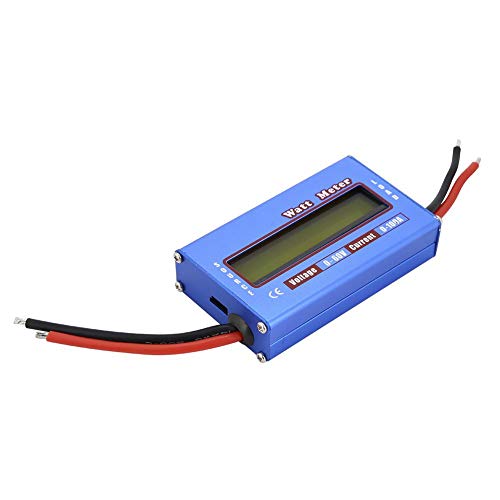
Rajah 2: Atas view of the watt meter, indicating "SOURCE" and "LOAD" connections for proper wiring.

Rajah 3: Sisi view of the watt meter, illustrating the robust wire connections.
4. Operasi
Once properly connected, the watt meter will automatically power on and display real-time measurements on its LCD screen.
4.1 Membaca Paparan
The LCD display shows various parameters simultaneously. Common readings include:
- Voltage (V): Vol semasatage litar.
- Semasa (A): The current flowing through the circuit.
- Kuasa (W): The instantaneous power consumption.
- Tenaga (Wh): The total energy consumed over time.
- Cas (Ah): The total charge (amp-hours) passed through the circuit.
- Puncak Amps (Ap): Arus tertinggi yang direkodkan semasa tempoh pengukuran.
- Voltage Minimum (Vm): Vol terendahtage recorded (sag).
4.2 Resetting Measurements
To reset accumulated energy (Wh) and charge (Ah) readings, disconnect the power from the meter for a few seconds and then reconnect it. This will clear the accumulated values and start new measurements.
5. Penyelenggaraan
The Walfront Digital Power Analyzer Watt Meter requires minimal maintenance.
- Pembersihan: Lap peranti dengan kain lembut dan kering. Jangan gunakan pembersih atau pelarut yang melelas.
- Storan: Simpan peranti di tempat yang sejuk dan kering jauh dari cahaya matahari langsung dan suhu yang melampau.
- Pemeriksaan: Periodically inspect the wires and connections for any signs of wear or damage.
6. Penyelesaian masalah
| Masalah | Kemungkinan Punca | Penyelesaian |
|---|---|---|
| Tiada paparan/Peranti tidak dihidupkan | Incorrect wiring; No power from source; Damaged device. | Check all connections for correct polarity and secure contact. Ensure the power source is active. If damaged, discontinue use. |
| Bacaan tidak tepat | Loose connections; Device operating outside specified range; Interference. | Verify all connections are tight. Ensure voltage and current are within 0-60V and 0-100A. Relocate away from strong electromagnetic fields. |
| Readings not resetting | Continuous power supply. | Disconnect power completely for a few seconds to clear accumulated data. |
7. Spesifikasi
| Parameter | Nilai |
|---|---|
| Jenama | Walfront |
| Model | Walfront36hxv74n9g |
| Voltage Julat | 0 - 60V DC |
| Julat Semasa | 0 - 100A (100A peak, 50A continuous) |
| Resolusi Semasa | 0.01 A |
| Voltage Resolusi | 0.01 V |
| Rintangan | 0.001 ohm |
| Penggunaan Kuasa | 36 mA |
| Dimensi | 4.13 x 3.03 x 1.38 inci (lebih kurang) |
| Berat badan | 0.1 Kilogram (lebih kurang) |
| warna | Hitam, Biru |
8. Waranti dan Sokongan
For warranty information and technical support, please refer to the documentation provided with your purchase or contact Walfront customer service. Keep your purchase receipt as proof of purchase.
Manufacturer: Eujgoov