
1. Pengenalan
This manual provides detailed instructions for the proper use and maintenance of your Zerone AYNEFY0oxm4abc37 USB Endoscope. This device is designed for visual inspection in hard-to-reach areas, offering compatibility with Android smartphones and various computer operating systems. Please read this manual thoroughly before operating the endoscope to ensure optimal performance and longevity.
2. Produk Lebihview
2.1 Ciri-ciri Utama
- Reka bentuk padat: Features a slim 5.5mm diameter lens for accessing narrow spaces.
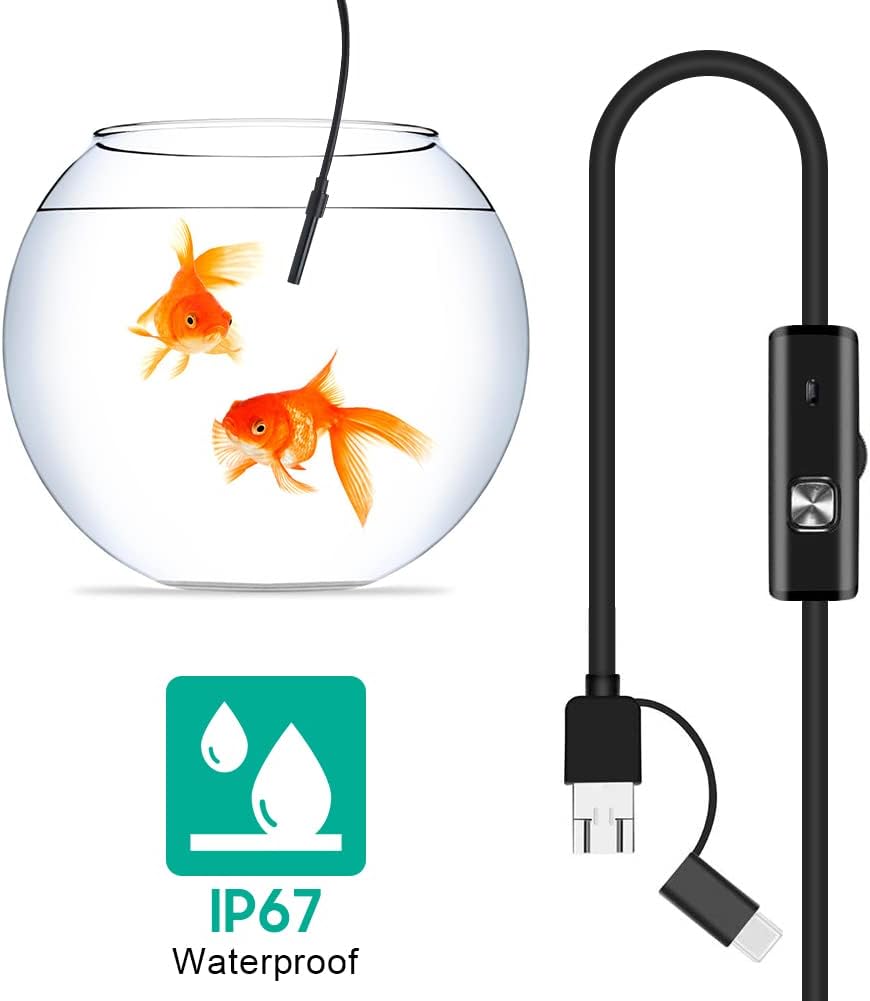
- Penilaian Kalis Air: IP67 waterproof-rated, suitable for moist or underwater inspections.
- Pencahayaan boleh laras: Equipped with 6 adjustable LED lights to enhance visibility in dark environments.
- Pengimejan Definisi Tinggi: 2.0MP CMOS HD camera provides clear and detailed images and videos.
- Pembinaan Tahan Lama: Crafted from high-quality materials for reliability and extended use.
- Keserasian Luas: 3-in-1 USB connector supports Android smartphones (with OTG function) and computers (Windows XP/W7/W8/VISTA/W10).
- Jangkauan Lanjutan: Includes a 5-meter USB cable for flexible inspection tasks.
2.2 Komponen



3. Persediaan
3.1 Keperluan Sistem
- Peranti Android: Android 4.4 or higher with OTG (On-The-Go) and UVC (USB Video Class) support.
- Komputer: Windows XP, Windows 7, Windows 8, Windows Vista, Windows 10.
3.2 Pemasangan Perisian
For Android devices, download and install a compatible camera application from the Google Play Store that supports USB OTG endoscopes. Recommended applications include 'USB Camera', 'AN98', or 'CameraFi'. For Windows computers, the device typically functions with the built-in 'Camera' application or other webcam software. Drivers are usually installed automatically upon connection.
3.3 Menyambungkan Endoskop
- Untuk Android: Connect the appropriate connector (Micro-USB or USB-C) of the endoscope cable to your smartphone. Ensure your phone's OTG function is enabled in settings if it doesn't automatically detect the device.
- Untuk PC: Connect the standard USB-A connector of the endoscope cable to an available USB port on your computer.
- Open the installed camera application on your device. The endoscope feed should appear.
4. Arahan Operasi
4.1 Melaraskan Kecerahan LED
The control unit on the cable features a wheel or button to adjust the brightness of the 6 LED lights at the camera tip. Rotate the wheel or press the button to increase or decrease illumination as needed for clear viewdalam pelbagai persekitaran.
4.2 Menggunakan Aksesori
- Side Mirror: Attach the side mirror to the camera tip to view objects at a 90-degree angle. This is useful for inspecting walls of pipes or tight corners.
- Magnet: Attach the magnet to the camera tip to retrieve small metallic objects from inaccessible areas.
- cangkuk: Attach the hook to the camera tip to retrieve small non-metallic objects.
4.3 Menangkap Imej dan Video
Use the functions within your chosen camera application to capture still images or record video footage from the endoscope. Refer to your application's specific instructions for these features.

5. Penyelenggaraan
5.1 Pembersihan
- After each use, gently wipe the camera lens and probe with a soft, dry cloth.
- Untuk kotoran degil, sedikit damp cloth can be used, ensuring no liquid enters the control unit or connectors.
- Do not use abrasive cleaners or solvents, as these can damage the lens or casing.
5.2 Penyimpanan
- Simpan endoskop di tempat yang sejuk dan kering, jauh daripada cahaya matahari langsung dan suhu yang melampau.
- Avoid kinking or sharply bending the cable to prevent internal damage.
- Keep the lens cap on when not in use to protect the lens from dust and scratches.
6. Penyelesaian masalah
- No Image/Device Not Detected:
- Ensure the endoscope is securely connected to your device.
- For Android, verify that OTG function is enabled in your phone's settings.
- Cuba port USB lain pada komputer anda.
- Ensure the correct camera application is open and selected (if multiple cameras are detected).
- Mulakan semula peranti anda dan cuba lagi.
- Imej Kabur:
- The endoscope has a fixed focal length. Ensure the object being viewed is within the optimal focal range (typically a few centimeters from the lens).
- Bersihkan lensa kamera untuk sebarang kotoran atau serpihan.
- Adjust the LED brightness to prevent overexposure or underexposure.
- Lampu LED Tidak Berfungsi:
- Check the LED brightness adjustment wheel/button on the control unit.
- Ensure the endoscope is properly connected and receiving power.
- Application Crashes/Freezes:
- Try a different compatible camera application.
- Pastikan sistem pengendalian peranti anda dikemas kini.
- Tutup aplikasi latar belakang yang lain untuk mengosongkan sumber sistem.
7. Spesifikasi
| Ciri | Spesifikasi |
|---|---|
| Nombor Model | AYNEFY0oxm4abc37 |
| Diameter Kanta | 5.5mm |
| Resolusi Kamera | 2.0MP CMOS HD (Video Capture Resolution: 1080p) |
| Lampu LED | 6 LED boleh laras |
| Panjang Kabel | 5 meter |
| Penilaian Kalis Air | IP67 |
| Ketersambungan | 3-in-1 USB (USB-A, Micro-USB, USB-C) |
| Keserasian | Android (OTG/UVC support), Windows XP/7/8/VISTA/10 |
| Dimensi Produk | 4.72 x 4.72 x 1.38 inci |
| Berat Barang | 4.6 auns |
| warna | Hitam |
| Pengeluar | Zerone |
8. Waranti dan Sokongan
For warranty information or technical support, please refer to the product packaging or contact the retailer from whom the product was purchased. You may also visit the official Zerone webtapak untuk bantuan lanjut.