
1. Pengenalan
This manual provides detailed instructions for the safe and efficient operation of your Auna Sarah Ann multi-functional audio system. Please read this manual thoroughly before using the device and retain it for future reference.
The Auna Sarah Ann is a versatile audio system featuring a 3-speed turntable, CD player, cassette player, DAB+ and FM radio, Bluetooth connectivity, USB and SD card playback, AUX input, and headphone output. It also includes integrated stereo speakers and a remote control for convenient operation.
2. Arahan Keselamatan
- Baca semua arahan dengan teliti sebelum digunakan.
- Jauhkan unit dari sumber panas, cahaya matahari langsung, kelembapan, air, dan cecair lain.
- Jangan kendalikan unit jika ia telah terdedah kepada air, lembapan atau sebarang cecair lain untuk mengelakkan kejutan elektrik, letupan, dan/atau kecederaan kepada diri sendiri dan kerosakan pada unit.
- Jangan gunakan unit jika ia telah terjatuh atau rosak dalam apa jua cara.
- Pembaikan peralatan elektrik hendaklah hanya dilakukan oleh juruelektrik yang bertauliah. Pembaikan yang tidak betul boleh menyebabkan pengguna menghadapi risiko yang serius.
- Jangan gunakan unit dengan tangan yang basah.
- Jangan masukkan objek ke dalam sebarang bukaan.
- Pastikan unit bebas daripada habuk, serabut, rambut, dsb.
- Jangan gunakan unit ini untuk apa-apa selain daripada penggunaan yang dimaksudkan.
- Jauhkan unit daripada kanak-kanak.
3. Kandungan Pakej
- Auna Sarah Ann Multi-functional Audio System
- Alat Kawalan Jauh
- Penyesuai 45 RPM
- Manual Pengguna (dokumen ini)
4. Produk Lebihview
The Auna Sarah Ann combines classic audio playback with modern connectivity options.

Imej 4.1: Depan view of the Auna Sarah Ann audio system, displaying the turntable, control panel, CD tray, and integrated speakers. A remote control and a smartphone connected via Bluetooth are also shown.
4.1 Ciri-ciri Utama
- Meja Putar 3-Kelajuan: Supports 33 1/3, 45, and 78 RPM records. Includes a 45 RPM adapter.
- Pembesar Suara Stereo Bersepadu: Provides clear audio output.
- Kesambungan Bluetooth: Wirelessly stream audio from compatible devices.
- Pemain CD: For playback of audio CDs.
- Cassette Player: For playback of audio cassettes.
- DAB+ and FM Radio: Digital and analog radio reception.
- Slot USB dan Kad SD: For MP3 playback and recording.
- Input AUX: Connect external audio sources via 3.5mm jack.
- Output Fon Kepala: For private listening via 3.5mm jack.
- Talian RCA Keluar: Sambungkan ke luaran amppengangkat atau pembesar suara berkuasa.
- Kawalan Jauh: Operasi yang mudah dari jauh.
- Fungsi Berhenti Automatik: Protects vinyl records by stopping the turntable when a record finishes.
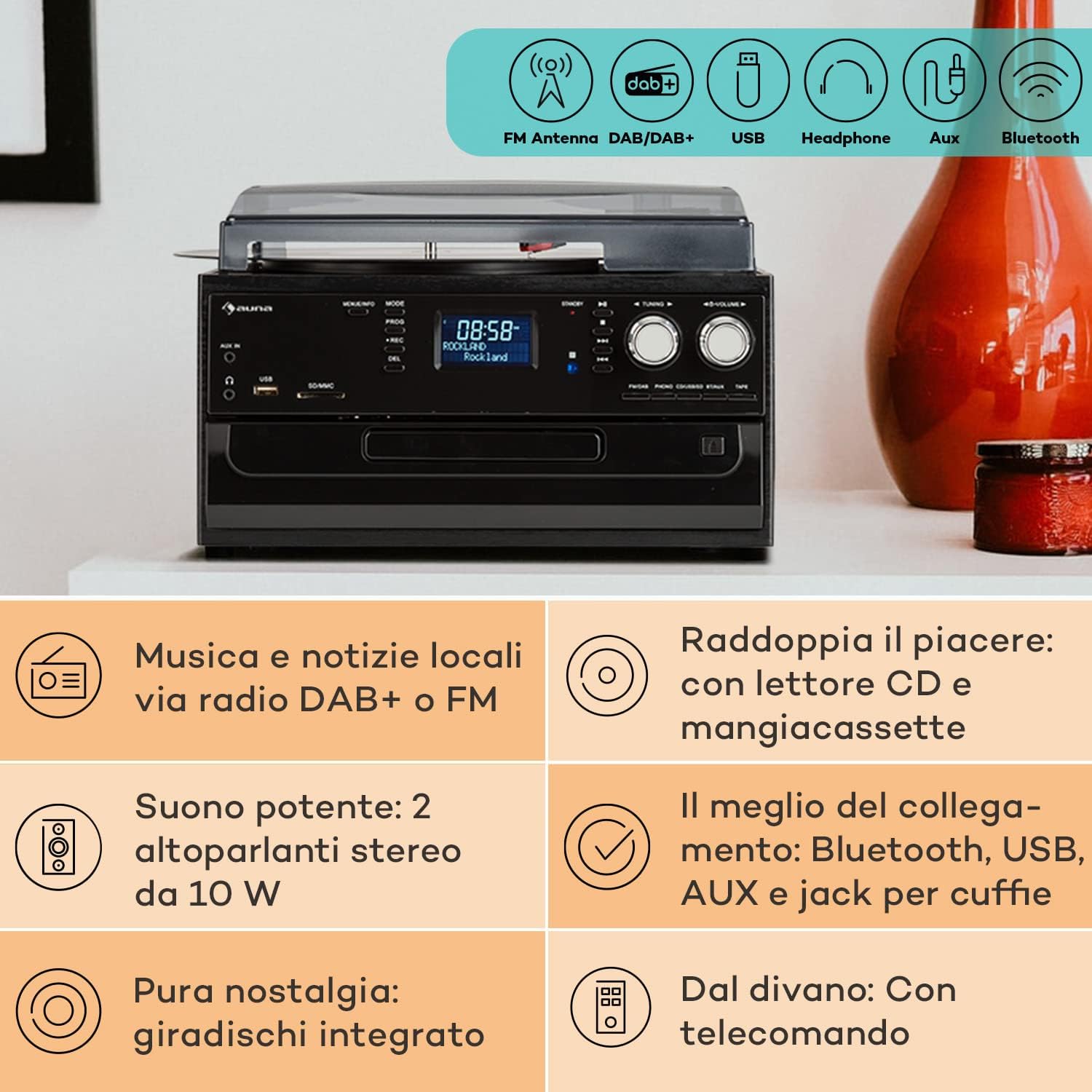
Image 4.2: Visual representation of the various connectivity options available on the Auna Sarah Ann, including FM/DAB+ radio, USB, headphone jack, AUX input, and Bluetooth.
5. Persediaan
5.1 Membongkar dan Meletakkan
- Keluarkan unit dengan berhati-hati dari pembungkusannya.
- Place the unit on a stable, level surface, away from direct sunlight, heat sources, and excessive dust or moisture.
- Pastikan pengudaraan yang mencukupi di sekeliling unit.
5.2 Sambungan Kuasa
Connect the power cable to the AC inlet on the back of the unit and then to a standard 230V, 50Hz wall outlet.
5.3 Pemasangan Bateri Kawalan Jauh
The remote control requires 2 x AAA batteries (not included). Open the battery compartment on the back of the remote control, insert the batteries according to the polarity indicators, and close the compartment.
5.4 Sambungan Antena
The unit features an integrated FM antenna. For optimal DAB+ and FM radio reception, ensure the unit is placed in an area with good signal strength. Adjust the unit's position if reception is poor.
5.5 Connecting External Devices (Optional)
- Fon kepala: Plug 3.5mm headphones into the headphone jack on the front panel.
- External Audio Source (AUX IN): Connect an external audio device (e.g., MP3 player, smartphone) to the AUX IN jack on the front panel using a 3.5mm audio cable.
- Luaran Amplifier/Speakers (RCA LINE OUT): Connect the RCA LINE OUT jacks on the rear of the unit to the audio input of an external amppembesar suara atau pembesar suara berkuasa menggunakan kabel RCA.
6. Arahan Operasi
6.1 Operasi Asas
- Tekan ke KUASA butang untuk menghidupkan atau MATI unit.
- Gunakan MODE button on the unit or remote control to select the desired function (PHONO, CD, TAPE, USB, SD, AUX, FM, DAB, Bluetooth).
- Laraskan kelantangan menggunakan JILID knob on the unit or the VOL +/- butang pada alat kawalan jauh.
6.2 Turntable Operation (PHONO)

Imej 6.1: Terperinci view of the turntable section, showing the platter, tonearm, and a vinyl record in place, highlighting the classic playback functionality.
- Angkat penutup habuk.
- Letakkan rekod vinil pada pinggan meja putar.
- Select the appropriate speed (33, 45, or 78 RPM) using the speed selector switch. Use the 45 RPM adapter for singles if needed.
- Lepaskan kunci tonearm.
- Gently lift the tonearm and position the stylus over the desired track of the record.
- Turunkan lengan nada perlahan-lahan ke atas rekod. Main balik akan bermula.
- The automatic stop function will stop the turntable when the record finishes. To disable/enable this, refer to the specific switch on the unit (if present, usually labeled "AUTO STOP").
- At the end of playback, gently lift the tonearm, return it to its rest, and engage the tonearm lock.
6.3 CD Player Operation (CD)
- Tekan ke MODE butang untuk memilih mod CD.
- Tekan ke BUKA/TUTUP butang untuk membuka dulang CD.
- Letakkan CD dengan sisi label menghadap ke atas ke dalam dulang.
- Tekan ke BUKA/TUTUP button again to close the tray. The unit will read the CD.
- Tekan MAIN/JEDA untuk memulakan atau menjeda main semula.
- guna SKIP FORWARD/BACKWARD butang untuk menavigasi trek.
- Tekan BERHENTI untuk menamatkan main balik.
6.4 Cassette Player Operation (TAPE)
- Tekan ke MODE butang untuk memilih mod TAPE.
- Insert a cassette tape into the side cassette slot.
- Use the cassette control buttons (PLAY, STOP/EJECT, FWD, REW) to operate the cassette player.
6.5 Operasi Radio (DAB+/FM)
- Tekan ke MODE butang untuk memilih mod FM atau DAB.
- Dalam mod FM, tekan dan tahan butang PENALAAN +/- buttons for automatic station search, or press briefly for manual tuning.
- In DAB mode, the unit will automatically scan for available stations. Use the PENALAAN +/- buttons to navigate through the station list.
- To save a station, refer to the manual's specific instructions for preset functions (usually involving a "PROG" or "MEMORY" button).
6.6 Operasi Bluetooth

Image 6.2: Demonstrates wireless music streaming via Bluetooth from a smartphone to the audio system, and the use of a USB drive for digital media playback.
- Tekan ke MODE button to select Bluetooth mode. The display will show "BT" or "Bluetooth" and the unit will enter pairing mode, indicated by a flashing Bluetooth icon.
- Pada peranti berdaya Bluetooth anda (telefon pintar, tablet, dll.), dayakan Bluetooth dan cari peranti yang tersedia.
- Select "Auna Sarah Ann" (or similar name) from the list of devices.
- Once paired, the Bluetooth icon will stop flashing, and you can play music from your device through the Auna Sarah Ann.
6.7 USB/SD Card Operation
- Insert a USB flash drive into the USB port or an SD card into the SD/MMC slot.
- Tekan ke MODE button to select USB or SD mode. The unit will automatically detect and begin playing MP3 files.
- guna SKIP FORWARD/BACKWARD butang untuk menavigasi trek.
- Gunakan FOLDER button on the remote to navigate through folders (if applicable).
- MP3 Recording: The unit supports recording from other sources (e.g., vinyl, CD, radio) to USB/SD. Press the REC button to start recording. Manual title division is available during recording. Refer to the full manual for detailed recording instructions.
6.8 Operasi Input AUX
- Connect your external audio device to the AUX IN jack using a 3.5mm audio cable.
- Tekan ke MODE butang untuk memilih mod AUX.
- Control playback from your external device. The volume can be adjusted on the Auna Sarah Ann unit.
7. Penyelenggaraan
7.1 Membersihkan Unit
- Sentiasa cabut plag unit daripada salur keluar kuasa sebelum membersihkan.
- Gunakan kain lembut dan kering untuk mengelap permukaan luar.
- Jangan gunakan pembersih, lilin atau pelarut yang melelas kerana ia boleh merosakkan kemasan.
- For the dust cover, use a soft cloth and a mild, non-abrasive cleaner if necessary.
7.2 Turntable Stylus Care
- The stylus (needle) is a delicate component. Handle it with extreme care.
- Bersihkan stylus secara berkala menggunakan berus lembut, berus perlahan-lahan dari belakang ke hadapan.
- A worn stylus can damage records and degrade sound quality. Replace the stylus when signs of wear are apparent (e.g., distorted sound, skipping).
7.3 Penjagaan Rekod
- Keep records clean and free of dust. Use a record brush before each play.
- Simpan rekod secara menegak di dalam sarungnya, jauh daripada haba dan cahaya matahari langsung.
8. Penyelesaian masalah
If you experience problems with your Auna Sarah Ann, please consult the following table before seeking professional service.
| Masalah | Kemungkinan Punca | Penyelesaian |
|---|---|---|
| Tiada kuasa | Kabel kuasa tidak disambungkan; Soket kuasa tidak aktif. | Pastikan kabel kuasa disambungkan dengan selamat; Cuba salur keluar kuasa yang berbeza. |
| Tiada bunyi | Kelantangan terlalu rendah; Mod salah dipilih; Fon kepala disambungkan. | Increase volume; Select correct input mode; Disconnect headphones if using speakers. |
| Meja putar tidak berputar | Unit not in PHONO mode; Auto-stop engaged and no record playing. | Select PHONO mode; Place a record and lower the tonearm. |
| Penerimaan radio yang lemah | Weak signal; Antenna position. | Adjust unit position for better signal; Perform a new auto-scan for DAB+ stations. |
| Kegagalan berpasangan Bluetooth | Device too far; Bluetooth not enabled on external device; Unit not in pairing mode. | Ensure devices are within range; Enable Bluetooth on your device; Select Bluetooth mode on the Auna Sarah Ann. |
| Alat kawalan jauh tidak berfungsi | Bateri berkurangan atau dimasukkan dengan salah; Halangan antara alat kawalan jauh dan unit. | Replace batteries; Check battery polarity; Remove any obstructions. |
Jika masalah berterusan selepas mencuba penyelesaian ini, sila hubungi sokongan pelanggan.
9. Spesifikasi
| Ciri | Perincian |
|---|---|
| Jenama | AUNA |
| Nama Model | Sarah Ann |
| Dimensi Produk (L x W x H) | 30 x 32.5 x 21.5 cm |
| Berat badan | 4.55 kg |
| Bekalan Kuasa | 230V, 50Hz |
| Kelajuan Meja Putar | 33 1/3, 45, 78 RPM |
| Jenis Motor | Pemanduan Terus |
| Penala Radio | DAB+, FM |
| Sokongan Bluetooth | ya |
| Ketersambungan | USB Input, SD Input, AUX Input (3.5mm), Headphone Output (3.5mm), RCA Line Out |
| Mod Keluaran Audio | Stereo |
| Bateri Kawalan Jauh | 2 x AAA (tidak termasuk) |

Image 9.1: Visual representation of the unit's dimensions (length, width, height) and a summary of its various input/output connections.
10. Waranti dan Sokongan
10.1 Maklumat Waranti
Your Auna Sarah Ann audio system comes with a manufacturer's warranty. Please refer to the warranty card or documentation included with your purchase for specific terms, conditions, and duration of the warranty. Keep your proof of purchase for warranty claims.
10.2 Sokongan Pelanggan
For technical assistance, troubleshooting beyond this manual, or warranty inquiries, please contact Auna customer support. Contact details can typically be found on the Auna webtapak atau pada pembungkusan produk.