
1. Pengenalan
Terima kasih kerana membeliasing the Bewinner Portable Remote Control. This device is designed to provide convenient control over your PC or laptop's media functions, allowing you to navigate applications, play media, and execute custom shortcuts from a distance. This manual provides detailed instructions for setup, operation, maintenance, and troubleshooting to ensure optimal performance.

The Bewinner Portable Remote Control is designed for ease of use and portability, allowing you to control your PC media from a comfortable distance.
2. Maklumat Keselamatan
Sila baca dan patuhi garis panduan keselamatan ini untuk mengelakkan kerosakan pada produk atau kecederaan pada diri anda:
- Do not expose the remote control or USB receiver to water or excessive moisture.
- Elakkan daripada menjatuhkan peranti atau terkena impak yang kuat.
- Do not attempt to disassemble or modify the remote control. This will void the warranty.
- Jauhkan bateri daripada kanak-kanak. Jika tertelan, dapatkan rawatan perubatan segera.
- Buang bateri terpakai mengikut peraturan tempatan.
- Ensure proper battery polarity when installing.
3. Kandungan Pakej
Sahkan bahawa semua item terdapat dalam pakej anda:
- 1 x Bewinner Portable Remote Control
- 1 x USB Infrared Receiver
- Nota: 2 x bateri AAA TIDAK disertakan dan mesti dibeli secara berasingan.
4. Produk Lebihview
The Bewinner Portable Remote Control features a slim design with various buttons for comprehensive PC control.

Depan view of the remote control, highlighting its button layout.
Fungsi Butang:
- Butang Kuasa: Turns the computer on or off (requires system configuration).
- Butang tetikus: Activates/deactivates mouse mode for cursor control using directional keys.
- Directional Keys (Up, Down, Left, Right): Navigation in menus, web pages, or mouse cursor movement.
- Butang Masukkan: Mengesahkan pilihan.
- Kelantangan Naik/Turun: Melaraskan kelantangan sistem.
- Redam: Redam/nyahredamkan audio.
- Play/Pause, Stop, Previous/Next Track: Kawalan main balik media.
- Skrin Penuh: Toggles full-screen mode for media players.
- My PC: Membuka 'PC Ini' atau 'Komputer Saya'.
- Ruang belakang: Performs a backspace action.
- Halaman Atas/Bawah: Tatal halaman.
- Tab: Performs a tab action.
- Esc: Escapes current action or closes menus.
- Desktop: Minimizes all windows to show the desktop.
- Numlock: Toggles numeric keypad functionality.
- Kekunci Berangka (0-9): Nombor input.
- Custom Shortcut Keys (A, B, C, D): Programmable keys for launching applications.

Terperinci view of the top section of the remote, including power and custom shortcut buttons.

Terperinci view of the bottom section of the remote, showing numeric and function keys.
5. Persediaan
5.1. Pemasangan Bateri
- Cari petak bateri di belakang alat kawalan jauh.
- Luncurkan penutup bateri ke bawah untuk membukanya.
- Masukkan dua bateri AAA, pastikan kekutuban (+ dan -) betul.
- Pasang semula penutup bateri dengan menggesernya kembali ke kedudukannya sehingga ia berbunyi klik.
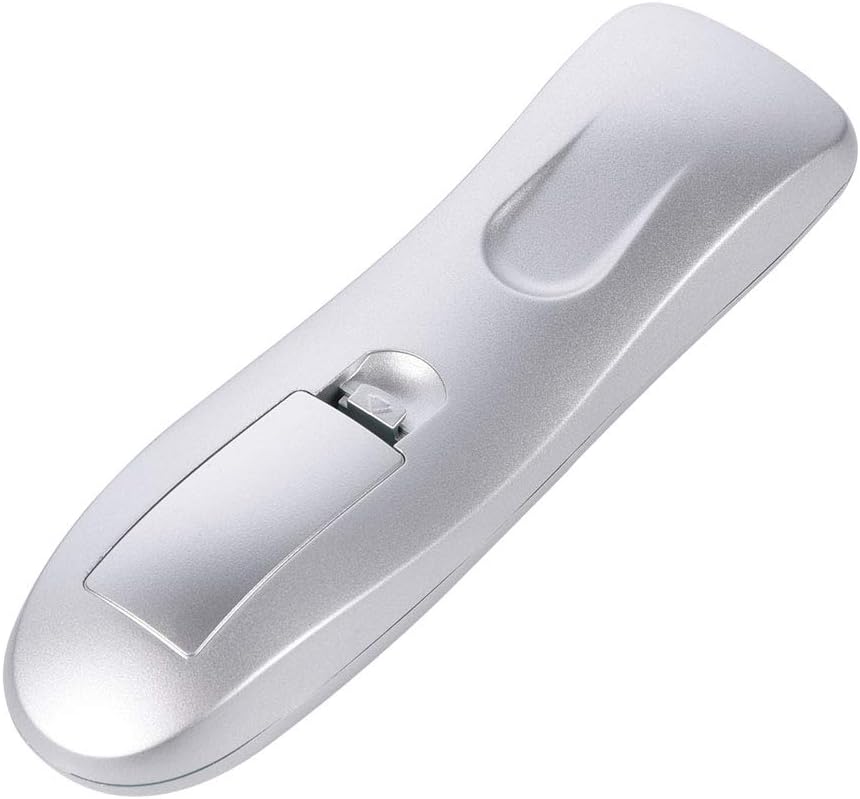
Buka petak bateri untuk memasukkan bateri.

Pastikan penutup bateri ditutup dengan selamat selepas dipasang.
5.2. Connecting the USB IR Receiver
- Cari port USB yang tersedia pada PC atau komputer riba anda.
- Plug the USB Infrared Receiver into the USB port.
- The operating system (Windows 98/ME/XP/MCE/Vista/2000 and later) will automatically detect and install the necessary drivers. No manual driver installation is required.
- Once the drivers are installed, the remote control is ready for use.

The remote control and its accompanying USB Infrared Receiver.
6. Arahan Operasi
6.1. Kawalan Asas
- Kawalan Langsung: Most buttons (e.g., volume, media playback, page navigation) function directly without additional setup.
- Mod tetikus: Tekan ke tetikus button to activate cursor control. Use the directional keys to move the cursor. Press the tetikus button again to exit mouse mode.
- Jarak penghantaran: The remote operates effectively up to 10 meters (approximately 33 feet) from the USB IR receiver. Ensure a clear line of sight between the remote and the receiver for optimal performance.

The remote control offers a transmission distance of up to 10 meters.
6.2. Customizing Shortcut Keys (A, B, C, D)
The remote features four customizable shortcut keys (A, B, C, D) that can be programmed to launch specific applications. Each shortcut key can be configured to start up to three programs.
To customize these keys, you will typically need to use a third-party software or the operating system's built-in shortcut management features. Refer to your operating system's documentation for detailed instructions on assigning custom shortcuts to applications.
6.3. Keserasian
The remote control is compatible with the following operating systems:
- Windows 98
- Windows ME
- Windows XP
- Windows MCE
- Windows Vista
- Windows 2000
- Later versions of Windows
It supports most common playback software, including but not limited to: WinDvd, RealPlayer, Winamp, MediaPlayer, PowerDvd, and web browsers like IE.
7. Penyelenggaraan
7.1. Pembersihan
To clean the remote control, use a soft, dry cloth. Do not use liquid cleaners, aerosols, or solvents, as these may damage the device.
7.2. Penggantian Bateri
If the remote control's performance degrades or it stops responding, replace the AAA batteries. Refer to section 5.1 for battery installation instructions.
8. Penyelesaian masalah
| Masalah | Kemungkinan Punca | Penyelesaian |
|---|---|---|
| Jauh tidak bertindak balas. | Low or dead batteries. Incorrect battery polarity. USB receiver not properly connected. No line of sight. | Replace batteries. Check battery polarity. Ensure USB receiver is firmly plugged in. Ensure clear path between remote and receiver. |
| Pergerakan kursor tetikus tidak menentu atau perlahan. | Weak signal. Obstruction between remote and receiver. | Move closer to the receiver. Remove any obstructions. Ensure direct line of sight. |
| Custom shortcut keys do not work. | Keys not programmed. Incorrect programming. | Refer to your operating system's documentation for programming custom shortcuts. Ensure the correct application path is set. |
| Alat jauh berfungsi secara berselang-seli. | Interference. Low battery. | Ensure no other IR devices are causing interference. Replace batteries. |
9. Spesifikasi
- Jenama: Bewinner
- Nama Model: Bewinnerrygza79bs3
- Teknologi Ketersambungan: Inframerah
- Peranti Serasi: Komputer riba, PC
- Julat Maksimum: 10 Meter
- Jenis Bateri: 2 x AAA (tidak termasuk)
- Button Quantity: 10 (including numeric and function keys)
- Ciri Khas: Universal control for PC media
- Sistem Operasi yang Disokong: WIN98, WINME, WINXP, Windows MCE, Vista, WIN2000, and later Windows versions.
10. Waranti & Sokongan
Bewinner products are manufactured with quality and performance in mind. If you encounter any issues with your Portable Remote Control, please contact our customer service team.
For product support, technical assistance, or warranty inquiries, please reach out to the seller or manufacturer through the platform where the product was purchased. Our professional customer service team is available to assist you with any questions or concerns.