
roborock S6 Pure
Roborock S6 Pure Robot Vacuum and Mop User Manual
Model: S6 Pure
pengenalan
This manual provides detailed instructions for the safe and efficient operation, maintenance, and troubleshooting of your Roborock S6 Pure Robot Vacuum and Mop. Please read this manual thoroughly before using the product and retain it for future reference.
Maklumat Keselamatan Penting
Sentiasa ikuti langkah berjaga-jaga keselamatan asas apabila menggunakan peralatan elektrik untuk mengurangkan risiko kebakaran, renjatan elektrik dan kecederaan.
- Do not use the robot vacuum outdoors or on wet surfaces.
- Do not allow children to operate the robot vacuum.
- Ensure the charging dock is placed on a level surface against a wall.
- Remove any loose cables, small objects, or fragile items from the floor before operation.
- Do not use the robot vacuum to pick up large debris, sharp objects, or liquids.
- Only use the original charging dock and power adapter provided by Roborock.
Komponen Produk
Familiarize yourself with the main components of your Roborock S6 Pure.

Imej: Atas view of the Roborock S6 Pure Robot Vacuum, showing the LiDAR sensor tower, power button, and spot cleaning button.
- LiDAR Navigation System: For precise mapping and navigation.
- Berus Utama: Untuk membersihkan karpet dan lantai keras.
- Berus Sisi: Menyapu serpihan dari tepi dan sudut.
- Tong sampah: Collects dirt and debris.
- Water Tank & Mop Cloth: For mopping functions.
- Dok Pengecasan: For automatic recharging.
- Butang Kuasa: To turn on/off and start/pause cleaning.
- Spot Cleaning Button: For targeted cleaning of small areas.
Panduan Persediaan
1. Membongkar dan Meletakkan
- Tanggalkan vakum robot dan semua aksesori daripada pembungkusan dengan berhati-hati.
- Choose a suitable location for the charging dock. It should be placed against a wall, on a hard, level surface, with at least 0.5 meters (1.6 feet) clear space on both sides and 1.5 meters (4.9 feet) in front.
- Connect the power adapter to the charging dock and plug it into a wall outlet. Ensure the cable is neatly tucked away to prevent entanglement.
2. Pengecasan Awal
Place the robot vacuum onto the charging dock. Ensure the charging contacts on the robot align with those on the dock. The power indicator light on the robot will illuminate, indicating it is charging. Fully charge the robot before first use (approximately 3-5 hours).
3. Pemasangan dan Sambungan Apl
For full functionality, download the Roborock app on your smartphone.
- Scan the QR code in the quick start guide or search for "Roborock" in your app store.
- Buka apl dan buat akaun.
- Follow the in-app instructions to add your S6 Pure robot vacuum. This typically involves connecting to the robot's Wi-Fi hotspot and then connecting the robot to your home Wi-Fi network.

Image: The Roborock S6 Pure robot vacuum next to a smartphone displaying the Roborock app interface, demonstrating advanced app control capabilities.
Arahan Operasi
1. Starting a Clean
- Melalui Butang Robot: Press the Power button once to start a full clean. Press it again to pause. Press and hold to turn off.
- Via Roborock App: Open the app, select your S6 Pure, and tap "Clean" to start. You can also select specific rooms or zones to clean.

Image: The Roborock S6 Pure robot vacuum cleaning a specific area, illustrating its selective room cleaning feature based on a mapped layout.
2. Fungsi Mengemop
The S6 Pure can vacuum and mop simultaneously. To use the mopping function:
- Isi tangki air dengan air bersih.
- Pasangkan kain mop pada tangki air.
- Slide the water tank assembly into the back of the robot until it clicks into place.
- Start a cleaning cycle. The robot will automatically switch to mopping mode on hard floors.
3. Pemetaan dan Navigasi
The S6 Pure uses Precision LiDAR Navigation to create an accurate map of your home. This map is used for efficient cleaning paths, multi-floor mapping, and setting no-go zones.

Image: A visual representation of the Roborock S6 Pure utilizing LiDAR navigation to map a room, showing distance measurements and effective home-mapping.

Image: An illustration depicting a multi-story house with the Roborock S6 Pure, showing how it can map and store layouts for different floors.
4. Kawalan Suara (Alexa)
The Roborock S6 Pure is compatible with Amazon Alexa. To enable voice control:
- Ensure your Roborock S6 Pure is connected to the Roborock app and your home Wi-Fi.
- Buka apl Amazon Alexa.
- Go to "Skills & Games" and search for "Roborock".
- Enable the Roborock skill and link your Roborock account.
- You can now use commands like: "Alexa, ask Roborock to start cleaning." or "Alexa, ask Roborock to go home."
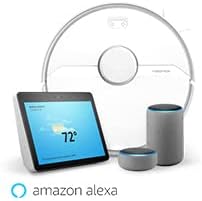
Image: The Roborock S6 Pure robot vacuum shown alongside Amazon Echo devices, illustrating its compatibility with Amazon Alexa for voice control.
Penyelenggaraan
Penyelenggaraan tetap memastikan prestasi optimum dan memanjangkan jangka hayat vakum robot anda.
1. Tong habuk dan Penapis
- Empty Dustbin: After each cleaning cycle, open the top cover, remove the dustbin, and empty its contents.
- Penapis Bersih: Tap the filter to remove dust. The filter can also be rinsed with water; ensure it is completely dry before reinserting. Clean at least once a week, or more frequently if used often.
2. Berus Utama dan Berus Sisi
- Berus Utama: Remove the main brush cover and the brush itself. Use the cleaning tool provided to cut and remove any tangled hair or debris. Clean weekly.
- Berus Sisi: Check for tangled hair or debris. If necessary, remove the screw holding the side brush and clean it. Replace if damaged. Clean monthly.
3. Wheels and Sensors
- Roda: Wipe the drive wheels and omnidirectional wheel with a dry cloth to remove dust and hair. Clean monthly.
- Penderia: Gently wipe all sensors (cliff sensors, wall sensor, charging contacts) with a soft, dry cloth. Clean monthly.
4. Mop Cloth and Water Tank
- Mop Cloth: Remove the mop cloth after each use and wash it thoroughly. It can be hand-washed or machine-washed.
- Tangki Air: Empty any remaining water from the tank after each use. Rinse the tank if necessary.
Menyelesaikan masalah
Rujuk bahagian ini untuk isu biasa dan penyelesaiannya.
| Masalah | Kemungkinan Punca | Penyelesaian |
|---|---|---|
| Robot tidak dihidupkan. | Bateri lemah atau tidak dicas. | Letakkan robot di dok pengecas dan pastikan ia dicas sepenuhnya. |
| Robot tidak boleh kembali ke dok pengecasan. | Charging dock is blocked or out of range. | Ensure the charging dock has clear space around it. Move the dock to a more central location if needed. |
| Prestasi pembersihan adalah lemah. | Dustbin full, brushes tangled, or filter clogged. | Empty the dustbin, clean the main brush and side brush, and clean or replace the filter. |
| Robot kerap tersangkut. | Halangan, kabel longgar atau permukaan gelap. | Clear the cleaning area of obstacles. Use no-go zones in the app for problematic areas. |
| Isu sambungan apl. | Incorrect Wi-Fi password, router issues, or robot offline. | Ensure correct Wi-Fi password. Restart your router and the robot. Re-pair the robot with the app if necessary. |
Spesifikasi
| Ciri | Perincian |
|---|---|
| Nama Model | S6Pure |
| Jenama | roborock |
| Dimensi Produk | 14"L x 14"W x 4"H |
| Berat Barang | 15.17 paun |
| Hayat Bateri | Sehingga 180 minit |
| Jenis Penapis | kain |
| Kaedah Kawalan | Suara, Apl |
| Peranti Serasi | Amazon Echo |
| Sumber Kuasa | Dikuasakan Bateri |
| Voltage | 220 Volt |
| UPC | 606015769620 |
Waranti dan Sokongan
Untuk maklumat jaminan dan sokongan teknikal, sila rujuk Roborock rasmi webtapak atau hubungi perkhidmatan pelanggan mereka secara langsung. Simpan resit pembelian anda sebagai bukti pembelian untuk tuntutan waranti.
Sumber Dalam Talian: www.roborock.com
Manual Pengguna (PDF): Muat turun Manual PDF
Ask a question about this manual
Ask about setup, troubleshooting, compatibility, parts, safety, or missing instructions. Manuals+ will review the question and use this page’s manual context to help answer it.