
1. Pengenalan
This manual provides essential information for the safe and efficient operation of your RAGGIE RGS 1500W 12V Solar Power Inverter. This device is designed to convert 12V DC electricity from batteries or solar panels into 220V AC electricity, allowing you to power standard household appliances from a DC power source. Please read this manual thoroughly before installation and use.
2. Maklumat Keselamatan
AMARAN: Kegagalan mematuhi arahan keselamatan ini boleh mengakibatkan renjatan elektrik, kebakaran, kecederaan serius atau kematian.
- Ensure the inverter is installed in a well-ventilated, dry, and cool environment, away from direct sunlight, heat sources, and flammable materials.
- Do not expose the inverter to rain, moisture, or liquids.
- Sambungkan inverter hanya kepada sumber kuasa DC 12V. Menyambungkan kepada volt yang berbezatage boleh merosakkan unit.
- Always connect the battery terminals with correct polarity: positive (+) to positive, and negative (-) to negative. Reverse polarity will damage the unit.
- Pastikan semua sambungan ketat dan kukuh untuk mengelakkan pemanasan melampau dan arka.
- Jangan buka penyongsang casing. Tiada bahagian yang boleh diservis pengguna di dalamnya. Rujuk semua servis kepada kakitangan yang berkelayakan.
- Jauhkan kanak-kanak daripada inverter dan sambungannya.
- Always disconnect the DC power source before performing any maintenance or troubleshooting.
- Ensure the inverter is properly grounded.
3. Produk Lebihview
The RAGGIE RGS 1500W inverter features robust construction and essential ports for reliable power conversion.
3.1 Komponen Panel Belakang
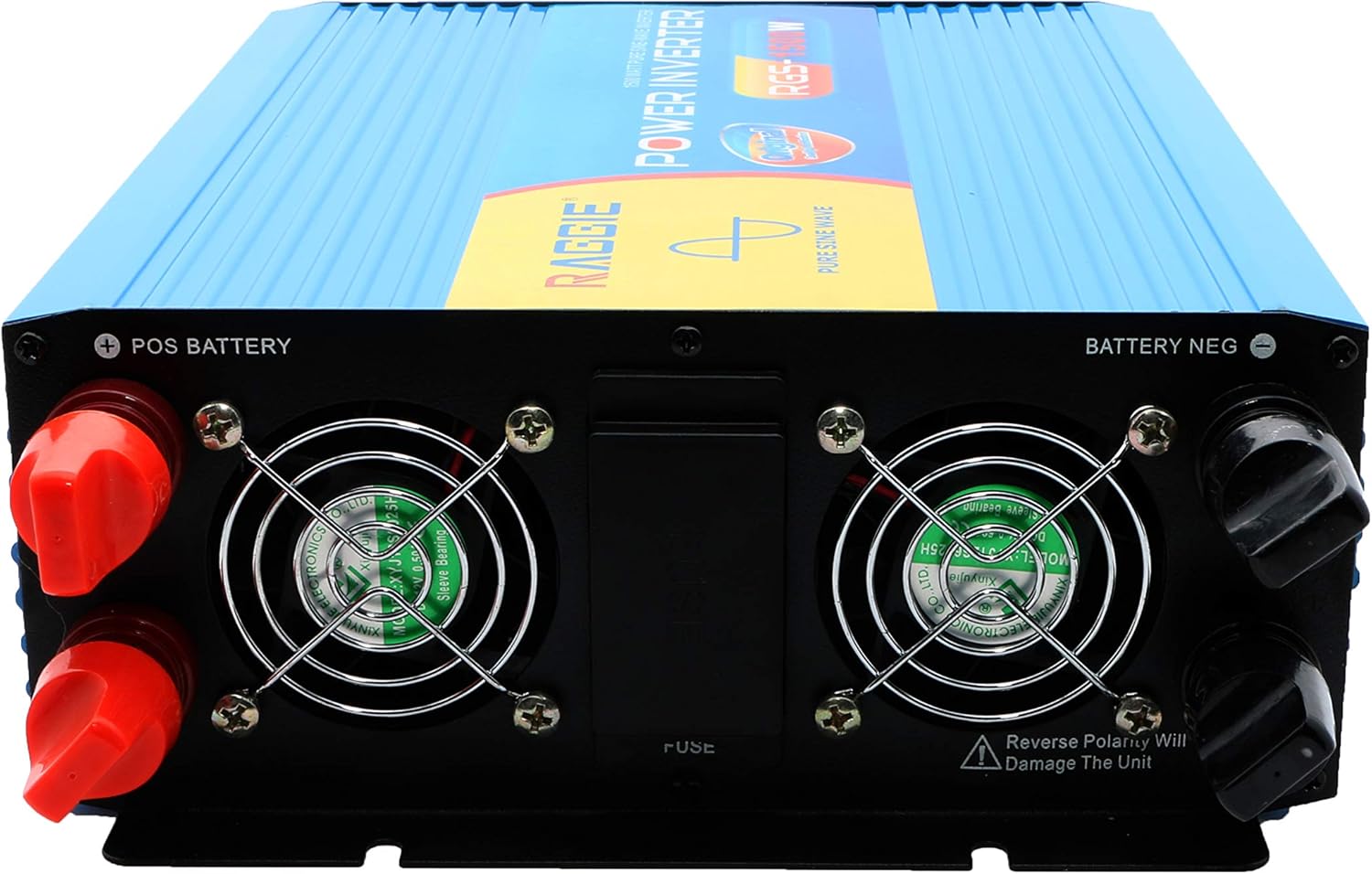
The rear panel includes the DC input terminals for connecting to your 12V battery or solar array, along with cooling fans and a fuse compartment.
3.2 Komponen Panel Hadapan
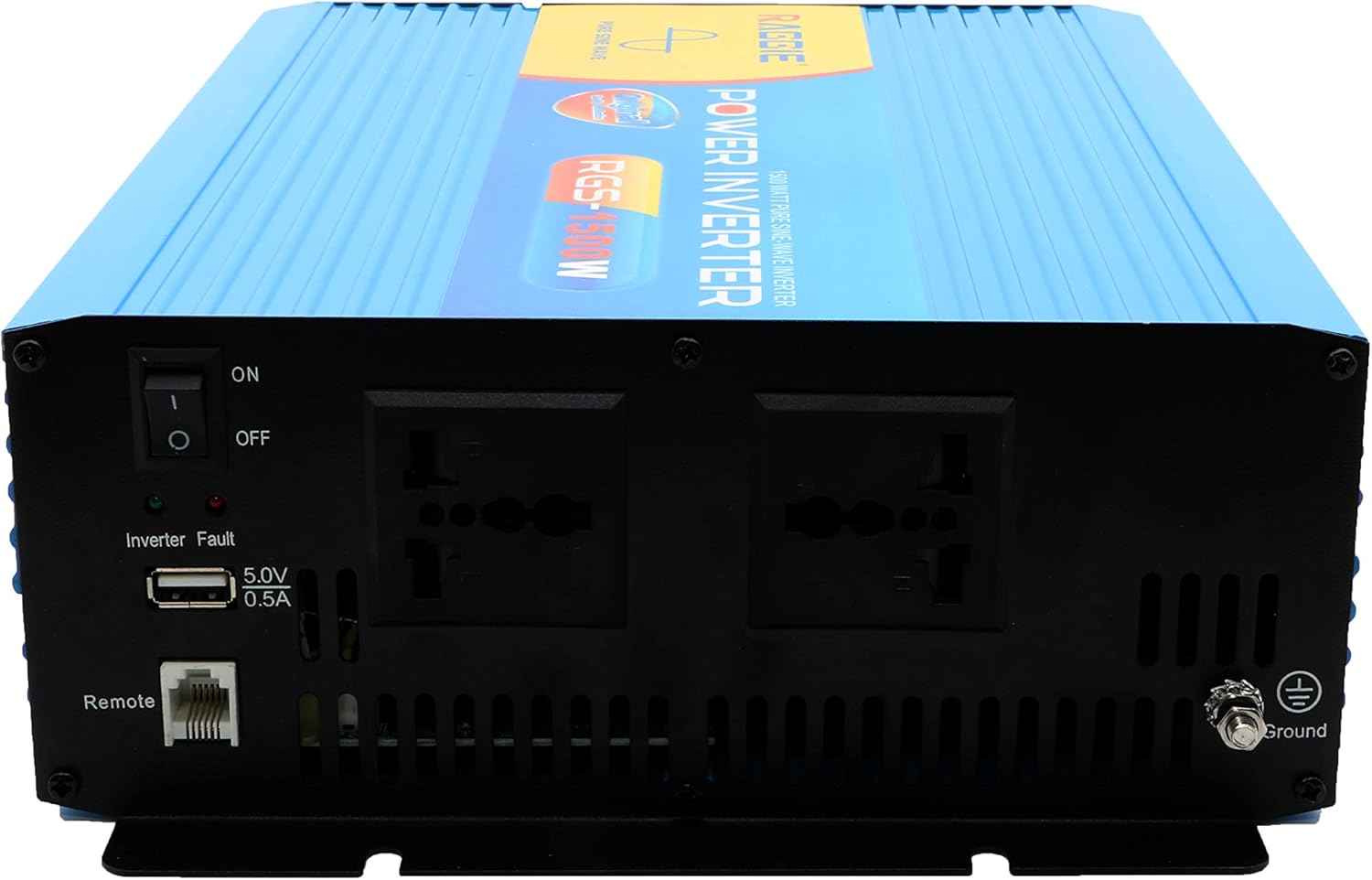
The front panel provides the AC output sockets for connecting your appliances, the main power switch, a USB charging port, and a remote control port.
4. Persediaan dan Pemasangan
Follow these steps for proper installation of your inverter.
4.1 Membongkar dan Pemeriksaan
- Tanggalkan inverter dari pembungkusannya dengan berhati-hati.
- Inspect the unit for any signs of damage during transit. If damage is found, do not proceed with installation and contact your supplier.
- Pastikan semua aksesori ada.
4.2 Penempatan
- Pilih lokasi yang kering, sejuk, dan mempunyai pengudaraan yang baik.
- Avoid areas with direct sunlight, high temperatures, or excessive dust.
- Mount the inverter securely on a stable surface.
- Ensure there is adequate clearance around the cooling fans for proper airflow.
4.3 DC Input Connection (Battery/Solar)
IMPORTANT: Ensure the inverter's power switch is in the OFF position before making any connections.
- Use appropriate gauge cables for your 12V DC input. Refer to the specifications for recommended cable sizes.
- Sambungkan MERAH (+) cable to the positive terminal of your 12V battery/solar array.
- Sambungkan hujung yang satu lagi MERAH (+) cable to the positive terminal (POS BATTERY) on the inverter's rear panel.
- Sambungkan HITAM (-) cable to the negative terminal of your 12V battery/solar array.
- Sambungkan hujung yang satu lagi HITAM (-) cable to the negative terminal (BATTERY NEG) on the inverter's rear panel.
- Pastikan semua sambungan adalah ketat dan selamat.
4.4 Pembumian
Untuk keselamatan, inverter mesti dibumikan dengan betul.
- Connect a grounding wire from the ground terminal on the inverter's front panel to a suitable earth ground point (e.g., vehicle chassis, ground rod).
4.5 AC Output Connection (Appliances)
- Plug your AC appliances directly into the AC output sockets on the inverter's front panel.
- Pastikan jumlah wattage of all connected appliances does not exceed the inverter's continuous output power (1500W).
5. Arahan Operasi
5.1 Turning On the Inverter
- Ensure all DC and AC connections are correctly made and secure.
- Switch the main power switch on the inverter's front panel to the ON kedudukan.
- The inverter will typically emit a short beep and an indicator light will illuminate, indicating it is operational.
5.2 Turning Off the Inverter
- Disconnect all AC appliances from the inverter.
- Switch the main power switch on the inverter's front panel to the DIMATIKAN kedudukan.
5.3 Port Pengecasan USB
- The inverter includes a 5.0V 0.5A USB port for charging small electronic devices.
- Plug your USB device into this port for charging.
6. Penyelenggaraan
Penyelenggaraan berkala memastikan prestasi optimum dan jangka hayat inverter anda.
- Pembersihan: Periodically clean the exterior of the inverter with a dry, soft cloth. Ensure cooling vents are free from dust and debris. Do not use liquid cleaners.
- Semakan Sambungan: Regularly inspect all DC and AC connections to ensure they remain tight and free from corrosion. Loose connections can cause overheating and power loss.
- Penggantian fius: The inverter is equipped with internal fuses. If the inverter stops working and troubleshooting does not resolve the issue, the fuse may need replacement. This should only be performed by qualified personnel.
7. Penyelesaian masalah
Bahagian ini membincangkan isu-isu biasa yang mungkin anda hadapi dengan inverter anda.
| Masalah | Kemungkinan Punca | Penyelesaian |
|---|---|---|
| Tiada output kuasa / Inverter tidak dihidupkan | Loose DC connections Bateri rendah voltage Fius ditiup Suis penyongsang MATI | Check and tighten DC cables Isi semula atau ganti bateri Check and replace fuse (by qualified personnel) Turn inverter switch ON |
| Overload warning / Inverter shuts down | Beban yang disambungkan melebihi 1500W Surge power too high | Kurangkan jumlah wattage peralatan yang disambungkan Ensure appliance starting current is within inverter's peak capacity |
| Overheating warning / Inverter shuts down | Pengudaraan yang lemah Suhu persekitaran yang berlebihan Blocked cooling fans | Ensure adequate airflow around the inverter Move inverter to a cooler location Clean cooling fans and vents |
| Bateri rendah voltage amaran | Cas bateri rendah | Cas semula bateri |
8. Spesifikasi
| Ciri | Spesifikasi |
|---|---|
| Jenama | RAGGIE |
| Nombor Model | RGS 1500W |
| Kuasa Keluaran Berterusan | 1500 Watt |
| Input Voltage | 12 Volt DC |
| Keluaran Voltage | AC (Standard for region, typically 220V) |
| Sumber Kuasa | External (Battery/Solar) |
| Penggunaan yang Disyorkan | Provide AC power from a DC source, operate AC devices using DC power. |
| Kuasa Keluaran Puncak | 18000 Watts (Momentary Surge) |
| Pensijilan | UL, ETL, CE |
| Tarikh Mula-mula Tersedia | 9 Julai 2019 |
9. Waranti dan Sokongan
For warranty information or technical support, please refer to the documentation provided with your purchase or contact the manufacturer directly. Keep your purchase receipt as proof of purchase.