
pengenalan
This manual provides detailed instructions for the proper use and maintenance of your Ataller Mini Digital Pocket Scale, Model KS-1005. Designed for precision, this scale offers accurate measurements for various items up to 100g with 0.01g readability. Please read this manual thoroughly before operation to ensure optimal performance and longevity of your device.
Maklumat Keselamatan
- Do not overload the scale beyond its maximum capacity of 100g, as this may cause permanent damage.
- Elakkan mendedahkan penimbang kepada suhu, kelembapan atau cahaya matahari langsung yang melampau.
- Jauhkan penimbang daripada medan elektromagnet yang kuat.
- Handle the scale with care. Avoid dropping or subjecting it to strong impacts.
- Bersihkan penimbang dengan lembut, damp kain. Jangan gunakan pembersih yang kasar atau rendam kerak di dalam air.
- Tanggalkan bateri jika penimbang tidak akan digunakan untuk tempoh yang lama bagi mengelakkan kebocoran.
Kandungan Pakej
- 1 x Ataller Mini Digital Pocket Scale (Model KS-1005)
- 2 x Bateri AAA
- 1 x Protective Cover (also functions as a weighing tray)
Produk Selesaiview
The Ataller Mini Digital Pocket Scale features a compact design with a stainless steel weighing platform, an LCD display with backlight, and two control buttons for easy operation.
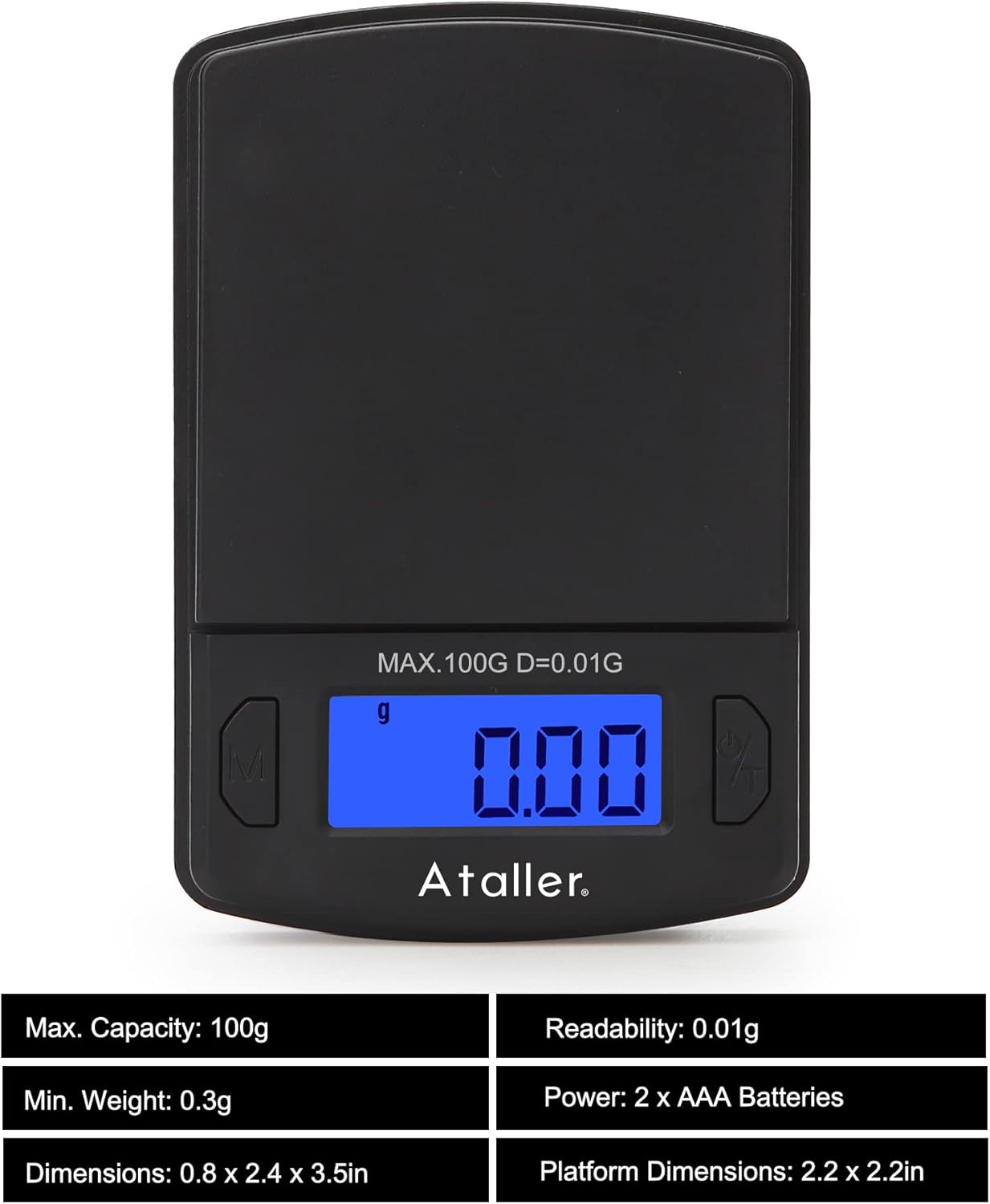
Imej: Depan view of the Ataller Mini Digital Pocket Scale, displaying '0.00' on the backlit LCD screen. The 'M' (Mode) button is on the left, and the 'Power/Tare' button is on the right. The maximum capacity of 100g and readability of 0.01g are indicated above the display.

Image: Diagram showing the dimensions of the Ataller Mini Digital Pocket Scale (60mm width, 90mm length) and an illustration of two AAA batteries, indicating their inclusion and placement.
Komponen Utama:
- Platform Penimbang: Permukaan keluli tahan karat untuk meletakkan barang.
- Paparan LCD: Backlit screen showing weight, unit, and status indicators.
- 'M' (Mode) Button: Used to change weighing units.
- 'Power/Tare' Button: Used to power on/off the scale and activate the tare function.
- Penutup Pelindung: Doubles as a weighing tray.
Persediaan
1. Pemasangan Bateri
- Buka penutup petak bateri yang terletak di bahagian bawah penimbang.
- Masukkan dua bateri AAA, pastikan kekutuban (+/-) betul.
- Tutup penutup petak bateri dengan selamat.
2. Penempatan Awal
Place the scale on a hard, flat, and stable surface. Ensure there is no wind or vibration in the environment, as this can affect measurement accuracy.
Arahan Operasi
1. Hidupkan/Mati Kuasa
- To turn on: Press the 'Power/Tare' button. The display will show '88888' then '0.00g'.
- To turn off: Press and hold the 'Power/Tare' button for approximately 3 seconds. The scale will also automatically shut off after 60 seconds of inactivity to conserve battery life.
2. Penukaran Unit
The scale supports 7 different weighing units: grams (g), grains (gn), ounces (oz), troy ounces (ozt), carats (ct), taels (tl), and pennyweights (dwt).
- With the scale powered on, press the 'M' (Mode) button repeatedly to cycle through the available units. The selected unit will be displayed on the screen.

Image: A collage of the scale's display showing various units: g, ct, oz, ozt, dwt, tl, and gn, illustrating the unit conversion feature.
3. Fungsi Tare
The tare function allows you to subtract the weight of a container, so you only measure the contents.

Image: Two panels illustrating the tare function. The first panel shows a hand pressing the 'Power/Tare' button with a container on the scale, zeroing the display. The second panel shows powder being weighed in the container, with the display showing only the powder's weight.
- Place the empty container (e.g., the protective cover) on the weighing platform.
- Press the 'Power/Tare' button. The display will reset to '0.00g'.
- Masukkan barang yang ingin ditimbang ke dalam bekas. Paparan hanya akan menunjukkan berat bersih barang tersebut.
4. Penentukuran
Calibration ensures the accuracy of your scale. A 100g calibration weight is required but not included with the scale.

Image: A four-step visual guide for calibrating the Ataller Mini Digital Pocket Scale. It shows the display changes from a random number to 'CAL', then '100.00g', followed by placing a 100g weight, and finally displaying 'PASS' and '100.00g' to confirm successful calibration.
- Turn the scale off.
- Press and hold both the 'M' and 'Power/Tare' buttons simultaneously until the display shows a random number.
- Release the 'Power/Tare' button, then press the 'Power/Tare' button again. The display will show 'CAL' followed by '100.00g'.
- Carefully place a 100g calibration weight onto the center of the weighing platform.
- Press the 'Power/Tare' button again. The display will show 'PASS' and then return to normal weighing mode, indicating successful calibration.
- Remove the calibration weight.
Note: A 100g calibration weight is not included with the scale.
Penyelenggaraan
Pembersihan
- Wipe the scale with a soft, slightly damp kain.
- Do not use chemical cleaning agents, as they may damage the scale's finish or internal components.
- Ensure no liquid enters the scale's interior.
Penyimpanan
- Store the scale in a clean, dry, and stable environment.
- Elakkan meletakkan objek berat pada penimbang apabila tidak digunakan.
- If storing for an extended period, remove the batteries to prevent potential leakage and damage.
Menyelesaikan masalah
| Masalah | Kemungkinan Punca | Penyelesaian |
|---|---|---|
| Paparan menunjukkan 'Lo' | Kuasa bateri rendah. | Ganti bateri AAA. |
| Display shows 'OUE2' | Skala terlebih beban. | Remove excess weight immediately. Do not exceed 100g. |
| Bacaan tidak tepat | Unstable surface, wind, or need for calibration. | Place the scale on a stable, flat surface. Avoid drafts. Perform calibration as per instructions. |
| Skala tidak dihidupkan | Bateri dipasang dengan salah atau kehabisan kuasa. | Periksa polariti bateri. Gantikan bateri jika perlu. |
Spesifikasi
- model: KS-1005
- kapasiti: 0.01g - 100g
- Kebolehbacaan: 0.01g
- Unit: g, gn, oz, ozt, ct, tl, dwt
- Pemadaman Automatik: 60 saat
- Kuasa: 2 x Bateri AAA (termasuk)
- Bahan: Polypropylene, Stainless Steel Platform
- Dimensi Produk: 8.89 x 6.1 x 2.03 cm (3.5 x 2.4 x 0.8 inci)
- Berat Barang: 58.11 g (2.05 auns)
Maklumat Waranti
This product is covered by a standard manufacturer's warranty against defects in materials and workmanship. Please retain your proof of purchase for warranty claims. For specific warranty terms and conditions, refer to the documentation provided at the time of purchase or contact customer support.
Sokongan Pelanggan
If you encounter any issues or have questions regarding your Ataller Mini Digital Pocket Scale, please refer to the troubleshooting section of this manual. If the problem persists, contact your retailer or the manufacturer's customer service for assistance. Please have your model number (KS-1005) and purchase information ready when contacting support.