
pengenalan
This manual provides comprehensive instructions for the setup, operation, and maintenance of your Zerone Universal Remote Control. This remote is designed to function with various Pioneer DVD player models, offering a convenient replacement or secondary control unit.
Keserasian
The Zerone Universal Remote Control is compatible with the following Pioneer DVD player models:
- Perintis VXX2811
- Perintis VXX2914
- Perintis VXX3218
- Perintis VXX2801
- Perintis VXX2800
- Perintis VXX2913
For optimal performance, ensure your DVD player model is listed above.
Persediaan
1. Pemasangan Bateri
- Cari petak bateri di belakang alat kawalan jauh.
- Luncurkan penutup bateri ke bawah atau tekan selak dan angkat untuk membuka.
- Insert two (2) AA 1.5V batteries, ensuring the positive (+) and negative (-) terminals align correctly with the markings inside the compartment.
- Gantikan penutup bateri dengan menggelongsorkannya semula ke kedudukannya sehingga ia berbunyi dengan selamat.
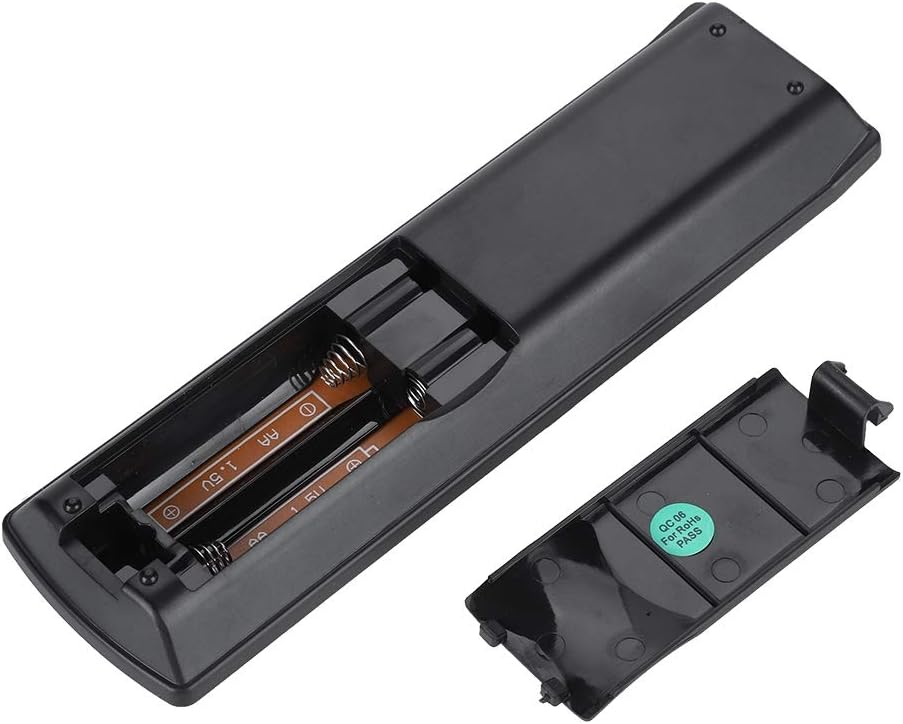
Imej: Belakang view of the Zerone remote control, showing the battery compartment cover.

Image: The battery compartment of the remote control with two AA batteries correctly inserted.
No programming or setup is required. Once batteries are installed, the remote is ready for use with compatible Pioneer DVD players.
Arahan Operasi
Point the remote control directly at your Pioneer DVD player. The effective control distance is typically over 8 meters (approximately 26 feet), though this may vary based on environmental factors and the specific DVD player model.

Imej: Depan view of the Zerone Universal Remote Control, displaying all buttons and their labels.
Fungsi Utama:
- STANDBY/ON: Powers the DVD player on or off.
- BUKA TUTUP: Membuka atau menutup dulang cakera.
- AUDIO: Memilih trek audio atau bahasa.
- SARIKATA: Toggles or selects subtitle options.
- SUDUT: Mengubah viewing angle if supported by the DVD.
- Butang Nombor (0-9): Direct track selection or input.
- JELAS: Clears numerical input.
- MASUK: Mengesahkan pilihan.
- MENU ATAS: Accesses the main menu of the DVD.
- MENU: Mengakses menu cakera.
- HOME MENU: Navigates to the home menu of the DVD player.
- KEMBALI: Kembali ke skrin atau menu sebelumnya.
- Pad Arah (Atas, Bawah, Kiri, Kanan) & MASUK: Menavigasi menu dan mengesahkan pilihan.
- Playback Controls (Play, Pause, Stop, Fast Forward, Rewind, Skip Forward, Skip Backward): Fungsi main balik media standard.
- MOD BERMAIN: Selects playback modes (e.g., repeat, shuffle).
- SEKITAR: Adjusts surround sound settings.
- ZOMAN: Zooms in or out on the video.
- DISPLAY: Shows on-screen display information.

Image: A hand holding the Zerone remote control, demonstrating its ergonomic design and ease of use.

Image: The remote control positioned in front of a television displaying content, illustrating its intended use.

Image: A visual representation of the remote control's effective operating distance, indicating a range of over 8 meters.
Penyelenggaraan
- Pembersihan: Lap alat kawalan jauh dengan kain lembut dan kering. Jangan gunakan pembersih cecair atau bahan yang melelas.
- Penggantian Bateri: Gantikan bateri apabila tindak balas alat kawalan jauh menjadi lembap atau berhenti berfungsi. Sentiasa gantikan kedua-dua bateri pada masa yang sama dengan yang baharu.
- Storan: Simpan alat kawalan jauh di tempat yang sejuk dan kering jauh dari cahaya matahari langsung dan suhu yang melampau.
- Elakkan Kerosakan: Do not drop the remote or expose it to water.
Menyelesaikan masalah
- Jauh tidak bertindak balas:
- Pastikan bateri dipasang dengan betul dengan kekutuban yang betul.
- Gantikan bateri lama dengan bateri AA baharu.
- Check for any obstructions between the remote control and the DVD player's infrared sensor.
- Ensure you are within the effective operating range (typically within 8 meters).
- Certain functions not working:
- Verify that your Pioneer DVD player model is listed in the compatibility section.
- Some advanced functions may be specific to the original remote or not supported by all DVD player models.
Spesifikasi
| Bahan Cangkang | ABS gred tinggi |
| Jarak Kawalan | > 8 meters (316 inches) |
| Jenis Bateri | 2 x AA 1.5V Batteries (Not included) |
| Dimensi | lebih kurang 174 x 49 x 20 mm (6.85 x 1.93 x 0.79 inci) |
| Berat badan | Lebih kurang 75g (2.46 auns) |
| Nombor Model | 743562180017 |
Waranti dan Sokongan
For warranty information or technical support, please refer to the documentation provided with your purchase or contact the manufacturer, Zerone, directly through their official channels. Keep your purchase receipt as proof of purchase.