
pengenalan
This manual provides instructions for the Extreme Networks Summit X460-24p, a high-performance, managed Layer 3 Ethernet switch designed for enterprise and data center environments. It features 24 Gigabit Ethernet ports with Power over Ethernet (PoE) capabilities, along with additional SFP and shared Gigabit SFP ports for flexible connectivity.
Maklumat Keselamatan
Garis Panduan Keselamatan
- Always disconnect all power supply inputs before removing any panel for servicing.
- This device contains a Class 1 Laser product. Avoid direct eye exposure to beam.
- Pastikan pembumian yang betul semasa pemasangan.
- Refer to the installation manual for power cord selection and additional compliance markings.
Kandungan Pakej
Apa yang ada dalam Kotak
- Extreme Networks Summit X460-24p Switch
- Kord Kuasa (khusus rantau)
- Kit pemasangan rak
- Dokumentasi (manual ini)
Produk Selesaiview
The Summit X460-24p switch is designed for efficient network management and high-speed data transfer.
Panel Belakang

This image displays the rear panel of the Summit X460-24p switch, highlighting the power input, fan modules, and the SummitStack ports. The overall chassis is purple.

A terperinci view of the SummitStack ports (Stack Port 1 and Stack Port 2) located on the rear of the switch, used for stacking multiple switches.
Label Produk
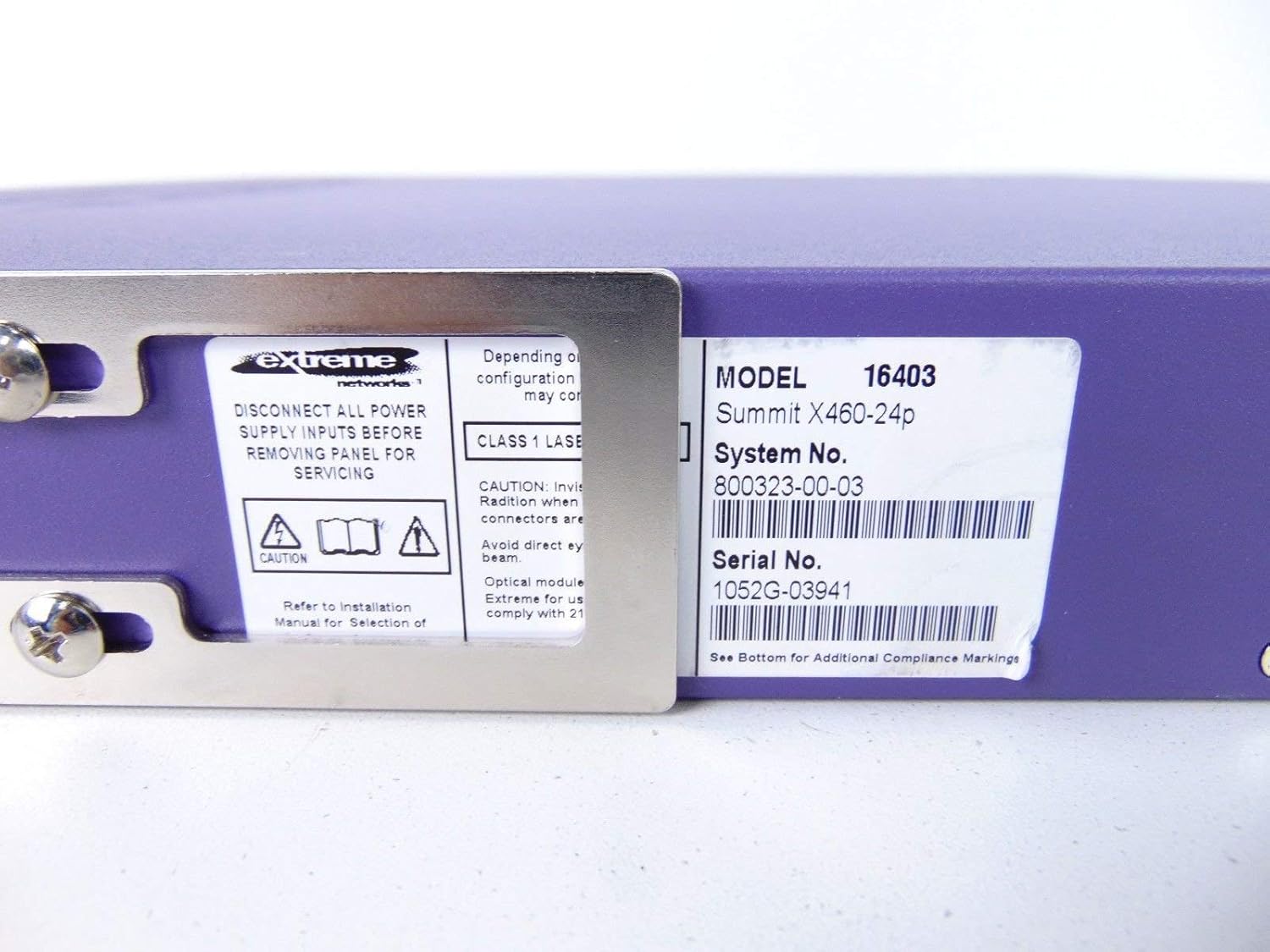
This label provides critical identification information for the switch, including Model: 16403, Summit X460-24p, System No.: 800323-00-03, and Serial No.: 1052G-03941.
Komponen Pilihan

This image shows the label for an optional Extreme Networks Summit 750W PoE AC Power Supply Unit (PSU), Model 10931, System No. 800382-00-03, Serial No. 1053A-41986.

This image displays the label for an optional Extreme Networks SummitStack Module, Model 16419, System No. 800384-00-01, Serial No. 1122G-02565.
Persediaan
Panduan Pemasangan
Pemasangan Rak
The Summit X460-24p is designed for standard 19-inch rack mounting. Use the provided rack-mounting kit to secure the switch in a server rack. Ensure adequate ventilation around the unit.
Kuasa Penyambung
Connect the power cord to the AC power inlet on the rear of the switch and then to a grounded electrical outlet. The switch will power on automatically.
Menyambung Kabel Rangkaian
- Connect Ethernet cables from your network devices to the 24 10/100/1000Base-T PoE ports on the front panel.
- For uplink or fiber connections, use the SFP or shared Gigabit SFP ports.
- For stacking, connect SummitStack ports on multiple switches using appropriate stacking cables.
Initial Configuration Access
Access the switch's management interface via a console cable connected to the console port, or through a web browser if the switch has a default IP address configured. Refer to the Extreme Networks documentation for detailed initial setup procedures.
Arahan Operasi
Operasi Asas
Hidupkan/Mati Kuasa
The switch powers on automatically when connected to a power source. To power off, disconnect the power cord. For proper shutdown, it is recommended to use the software-based shutdown command if available.
Penunjuk LED
Observe the LED indicators on the front panel for status information regarding power, system health, port activity, and PoE status. Consult the full product documentation for a detailed explanation of each LED's behavior.
Antara Muka Pengurusan
Suis boleh diuruskan melalui Antara Muka Baris Perintah (CLI) yang boleh diakses melalui port konsol atau Telnet/SSH, atau melalui webantara muka pengguna grafik (GUI) berasaskan.
Penyelenggaraan
Penjagaan dan Penyelenggaraan
Pembersihan
Keep the switch clean and free of dust. Use a soft, dry cloth for external cleaning. Do not use liquid or aerosol cleaners.
Kemas kini Perisian Tegar
Semak sokongan Extreme Networks secara berkala website for firmware updates to ensure optimal performance and security. Follow the provided instructions for firmware upgrade procedures.
Modul Kipas dan Bekalan Kuasa
The switch may feature hot-swappable fan and power supply modules. Refer to the Extreme Networks documentation for instructions on replacement if necessary.
Menyelesaikan masalah
Isu Biasa
Tiada Kuasa
- Pastikan kord kuasa disambungkan dengan kukuh pada suis dan soket kuasa.
- Sahkan alur keluar kuasa berfungsi.
Port Link Down
- Periksa sambungan kabel Ethernet di kedua-dua hujungnya.
- Sahkan peranti yang disambungkan dihidupkan dan berfungsi dengan betul.
- Check the port status via the management interface.
Isu Ketersambungan Rangkaian
- Verify IP configuration and network settings.
- Check for conflicting IP addresses.
- Consult network diagnostics tools.
Spesifikasi
Spesifikasi Teknikal
| Ciri | Penerangan |
|---|---|
| Model | Summit X460-24p (Part Number: 16403) |
| Pelabuhan | 24 x 10/100/1000Base-T PoE+ ports, 4 x shared Gigabit SFP, 4 x SFP |
| Lapisan | Suis Terurus Lapisan 3 |
| Jenama | Rangkaian Melampau |
| Jenis Antaramuka | PoE, SFP |
| Nombor Sistem | 800323-00-03 |
| Nombor Siri | 1052G-03941 |
| UPC | 683332278646 |
Waranti dan Sokongan
Maklumat Waranti
This product typically comes with a 90-day limited warranty. For specific warranty terms and conditions, please refer to the official Extreme Networks warranty statement or contact your vendor.
Sokongan Teknikal
For technical assistance, visit the official Extreme Networks support website or contact their customer service. Have your product model and serial number ready when seeking support.