1. Pengenalan
The Alpine X308U Mech-Less Navigation Receiver is designed to provide advanced smartphone integration and a reliable built-in navigation system for your vehicle. This manual provides essential information for the proper installation, operation, and maintenance of your device.
Ciri-ciri Utama:
- 8-inch WVGA High-Resolution Capacitive Touch Display
- Compatibility with Apple CarPlay and Android Auto
- Embedded Navigation with 3D & 2D mapping and Pinch-to-Zoom interface
- Bluetooth hands-free calling and audio streaming
- Built-In HD Radio Tuner and SiriusXM Satellite Radio readiness
- Multiple connectivity options including HDMI input/output and USB
- Advanced audio tuning features: 9-band parametric EQ and 6-channel time correction
- Support for FLAC, AAC, MP3, WMA, HE-AC Playback
- Accessory Control Ready (KAC-001 Required) and iDatalink Maestro Module compatibility
2. Produk Lebihview

Rajah 2.1: Depan View with Navigation Display. This image shows the Alpine X308U unit with its 8-inch high-resolution capacitive touch display active, presenting a detailed 3D navigation map. The screen displays street names, distances, and navigation icons, demonstrating the unit's integrated GPS capabilities. Control buttons are visible along the bottom edge of the screen.

Rajah 2.2: Depan View with Media Interface. This image illustrates the Alpine X308U's user interface for media playback and radio tuning. The display shows current FM radio frequency (105.8 MHz), preset stations, and options for HDMI, Music, Pandora, and Bluetooth Audio. Album art and song information are also visible, highlighting the unit's multimedia capabilities.

Figure 2.3: Audio Settings Interface. This image displays the "BASS ENGINE SQ" audio adjustment screen on the Alpine X308U. Users can select from various sound presets like Standard, Punch, Rich, Mid Bass, and Low Bass, and adjust levels for Bass Engine, Navi Audio, and Back Audio. This interface demonstrates the unit's comprehensive audio customization options.

Rajah 2.4: Sambungan Panel Belakang. Imej ini memberikan yang terperinci view of the rear panel of the Alpine X308U, highlighting its various input and output ports. Visible connections include GPS antenna input, USB ports, HDMI In, HDMI Out, and the main wiring harness connector. A cooling fan is also visible on the left side, indicating thermal management features.
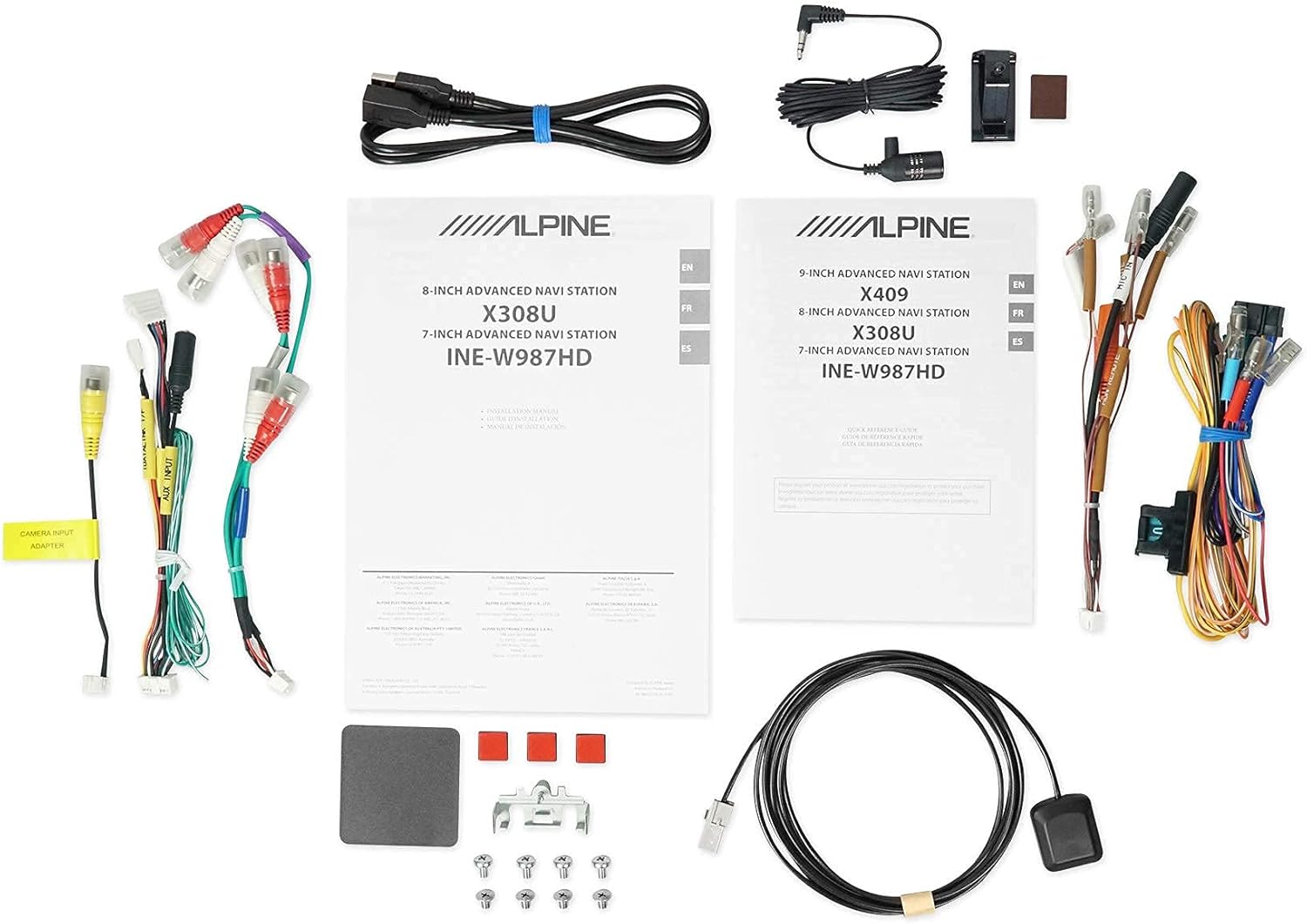
Figure 2.5: Included Components. This image displays a selection of cables and accessories that come with the Alpine X308U unit. These include various wiring harnesses, RCA cables for audio/video connections, a USB extension cable, and a GPS antenna. These components are essential for the proper installation and functionality of the receiver.
3. Persediaan dan Pemasangan
Proper installation is crucial for the optimal performance of your Alpine X308U. It is highly recommended that installation be performed by a qualified professional car audio installer.
3.1. Senarai Semak Pra-Pemasangan:
- Ensure all components listed in the "What's in the Box" section are present.
- Putuskan sambungan terminal negatif bateri kenderaan sebelum memulakan sebarang kerja elektrik.
- Review your vehicle's specific wiring diagrams and dash disassembly instructions.
3.2. Sambungan Pendawaian:
Connect the main wiring harness to the vehicle's power, ground, and speaker wires. Utilize the provided connectors for a secure fit. Refer to the wiring diagram included with your unit for specific color codes and pin assignments.
- Sambungan Kuasa: Connect the yellow wire (constant 12V), red wire (switched 12V), and black wire (ground).
- Keluaran Pembesar suara: Connect the speaker wires to the corresponding vehicle speakers. Ensure correct polarity.
- Input/Output HDMI: Use the HDMI ports for connecting external video sources or outputting video to a rear entertainment system. Note that HDMI output functionality may be limited to specific Alpine accessories.
- Input USB: Connect USB devices for media playback or smartphone integration (CarPlay/Android Auto).
- Input Kamera: Sambungkan belakang-view camera to the dedicated input for enhanced safety. The unit supports up to 3 cameras with the optional KCX-C250MC Multi-camera selector.
- pra-amp Keluaran: Utilize the 6-channel pre-amp output untuk menyambung luaran amppenyelamat.
- Antena GPS: Pasang antena GPS di lokasi yang jelas view of the sky for optimal navigation performance.
3.3. Memasang Unit:
Securely mount the X308U in your vehicle's dashboard using the provided mounting hardware. Ensure adequate ventilation around the unit to prevent overheating.
4. Arahan Operasi
4.1. Operasi Asas:
- Hidupkan/Mati Kuasa: Tekan dan tahan butang kuasa (biasanya terletak pada panel hadapan) untuk menghidupkan atau mematikan unit.
- Kawalan Kelantangan: Adjust volume using the dedicated volume buttons or on-screen controls.
- Antara muka skrin sentuh: Navigate through menus and select functions by tapping icons on the capacitive touch display. The unit supports 4-Way Swipe Action Control.
- Butang Menu: Access the main menu to switch between different sources and settings.
4.2. Sistem Navigasi:
- Mengakses Navigasi: Ketik ikon "Navigasi" pada menu utama.
- Memasuki Destinasi: Use the on-screen keyboard to input addresses, points of interest, or select from recent destinations.
- Peta View: Beralih antara peta 2D dan 3D views. Use pinch-to-zoom gestures to adjust the map scale.
- Panduan Suara: Follow spoken turn-by-turn directions for guidance.
4.3. Smartphone Integration (CarPlay & Android Auto):
- Connecting Your Smartphone: Connect your compatible iPhone or Android phone to the unit's USB port using a certified USB cable.
- Activating CarPlay/Android Auto: Once connected, the respective interface will automatically launch or prompt you to activate it on the screen.
- Menggunakan Apl: Access supported navigation, music, messaging, and communication apps directly from the unit's display.
4.4. Fungsi Bluetooth:
- Memadankan Peranti: Go to the Bluetooth settings menu, enable pairing mode on the X308U, and search for the unit on your smartphone. Select "Alpine X308U" and confirm the pairing code.
- Panggilan Bebas Tangan: Make and receive calls directly through the unit's microphone and vehicle speakers.
- Penstriman Audio: Strim muzik secara wayarles daripada telefon pintar anda yang dipasangkan.
4.5. Tetapan Audio:
- Penyama: Access the 9-band parametric EQ to fine-tune audio frequencies.
- Pembetulan Masa: Adjust the sound stage for optimal listening position using the 6-channel time correction feature.
- TuneIt App: For advanced audio tuning and sharing settings, download and use the Alpine TuneIt App on your smartphone.
5. Penyelenggaraan
Regular maintenance ensures the longevity and optimal performance of your Alpine X308U.
- Pembersihan Skrin: Use a soft, lint-free cloth specifically designed for electronic screens to gently wipe the display. Do not use abrasive cleaners or solvents.
- Pembersihan Am: Keep the unit free from dust and debris. Use a soft, dry cloth to wipe the exterior.
- Kemas Kini Perisian: Periodically check the Alpine website for firmware updates to ensure your unit has the latest features and bug fixes. Follow the instructions provided with the update carefully.
- Keadaan Persekitaran: Elakkan daripada mendedahkan unit kepada suhu yang melampau, cahaya matahari langsung untuk tempoh yang lama, atau kelembapan yang berlebihan.
6. Penyelesaian masalah
If you encounter issues with your Alpine X308U, refer to the following common troubleshooting steps before contacting support.
| Masalah | Kemungkinan Punca | Penyelesaian |
|---|---|---|
| Tiada kuasa/Unit tidak dihidupkan. | Sambungan kuasa longgar, fius pecah, masalah bateri kenderaan. | Check all power wiring connections. Inspect and replace any blown fuses. Ensure vehicle battery is charged. |
| Tiada bunyi dari pembesar suara. | Speaker wires disconnected, incorrect audio settings, unit in mute mode. | Verify speaker wire connections. Check audio settings (e.g., fader/balance, EQ). Ensure unit is not muted. |
| Navigasi tidak berfungsi atau tidak tepat. | GPS antenna not properly connected or obstructed, outdated map data. | Pastikan antena GPS disambungkan dengan selamat dan mempunyai jernih view of the sky. Check for available map updates. |
| Peranti Bluetooth tidak akan berpasangan. | Device not in pairing mode, incorrect pairing procedure, interference. | Pastikan kedua-dua peranti berada dalam mod berpasangan. Padamkan gandingan sebelumnya dan cuba lagi. Bergerak lebih dekat dengan unit. |
| Skrin sentuh tidak bertindak balas. | Gangguan perisian sementara, penentukuran skrin diperlukan. | Perform a soft reset (refer to manual for specific method). If issue persists, contact support. |
7. Spesifikasi
| Ciri | Perincian |
|---|---|
| Nombor Model | X308U |
| Saiz Skrin | 8 Inci (21 cm pepenjuru) |
| Jenis Paparan | WVGA High-Resolution Capacitive Touch Display |
| Output Kuasa Maks | 50 Watt x 4 saluran |
| CTA-2006 Power Rating | 18 Watt x 4 saluran |
| pra-amp Keluaran | 3 (4-Volt) |
| Teknologi Ketersambungan | Bluetooth, USB, HDMI |
| Jenis Peta | Satellite, North America (Built-in 3D & 2D Navigation) |
| Dimensi Produk | 12 x 12 x 12 inci |
| Berat Barang | 6.4 paun |
| Komponen yang Disertakan | HDMI input, USB input, composite A/V input, rear-view camera input, HDMI output, 6-channel preamp outputs, USB source |
8. Waranti dan Sokongan
This product is covered by a manufacturer's warranty. Please refer to the warranty card included with your purchase for specific terms and conditions, including warranty period and coverage details.
Sokongan Pelanggan:
For technical assistance, troubleshooting beyond this manual, or warranty claims, please contact Alpine customer support. Visit the official Alpine webtapak untuk maklumat hubungan dan sumber sokongan yang paling terkini.
Note: Keep your proof of purchase for warranty validation.