
pengenalan
This manual provides comprehensive instructions for the installation, operation, and maintenance of your Whistler Z-15R High Performance Radar Laser Detector. Please read this manual thoroughly before using the device to ensure optimal performance and understanding of its features.
Ciri-ciri Produk
- Total Laser Detection: Detects all laser guns used in the United States.
- Real Voice Alerts: Provides clear voice announcements for detected threats.
- Icon Display with Red Digital Signal Strength Indicator: Visual alerts with a numerical strength display.
- POP Mode Detection: Detects brief radar bursts.
- Stay Alert Feature: Promotes driver awareness during long drives.
- Setting Saver: Retains user settings when the unit is powered off.
- Dim/Dark Mode: Adjusts display brightness for night driving.
- Quiet/Auto Quiet Mode: Reduces audio alerts for less intrusive operation.
- Traffic Flow Signal Rejection (TFSR): Helps eliminate false alerts from radar-based traffic flow sensors.
- Field Disturbance Sensor Rejection (FDSR): Reduces false alerts from certain vehicle safety systems.
Persediaan dan Pemasangan
Proper placement of the Whistler Z-15R is crucial for optimal performance. The detector should have a clear view of the road ahead and behind, without obstruction from windshield wipers, tinted areas, or other objects.
- Pemasangan: Attach the suction cup bracket to the windshield, ensuring it is level and provides an unobstructed view. Alternatively, use the dashboard mount if preferred.
- Sambungan Kuasa: Connect the power cord to the detector's power input and then to your vehicle's 12-volt accessory outlet (cigarette lighter socket).
- Kedudukan: Adjust the detector's angle to be parallel with the road for best detection range.
- Hidupkan Kuasa Awal: Turn on your vehicle's ignition. The detector should power on automatically. Adjust the volume using the PWR/VOL control.
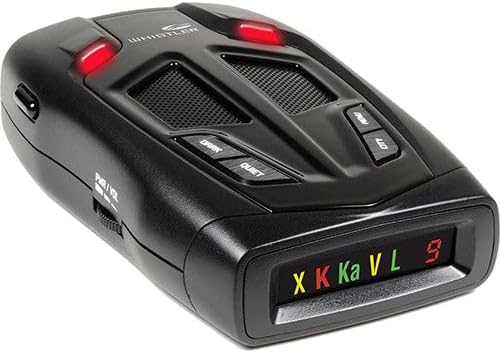
Arahan Operasi
Hidupkan/Mati Kuasa dan Kelantangan
The unit powers on and off with the vehicle's ignition when connected to a switched 12-volt outlet. The PWR/VOL scroll wheel on the left side controls the audio volume.
Mod Paparan
- Mod Malap: Tekan ke GELAP button to reduce display brightness.
- Mod Gelap: Tekan ke GELAP button a second time to turn off the display completely while keeping the unit active.
Mod Senyap/Auto Senyap
- Mod Senyap: Tekan ke SENYAP button during an alert to silence the audio for that specific alert.
- Auto Quiet Mode: Tekan dan tahan butang SENYAP button to activate Auto Quiet, which automatically reduces the audio volume after the initial alert.
City/Highway Modes
Tekan ke BANDARAYA button to cycle through City modes (City, City 1, City 2) to reduce false alerts in urban areas. Highway mode offers full sensitivity.
Tetapan Menu
Tekan ke MENU button to access various settings, including band selection, TFSR, FDSR, and other customization options. Refer to the on-screen prompts for navigation.
Kekal Berwaspada
The Stay Alert feature is designed to test driver alertness. When activated, a series of beeps will sound, requiring the driver to press any button within a set time to confirm alertness. If no button is pressed, an alarm will sound.
Penyelenggaraan
To ensure the longevity and proper functioning of your Whistler Z-15R detector, follow these maintenance guidelines:
- Pembersihan: Gunakan kain lembut dan kering untuk membersihkan bahagian luar unit. Jangan gunakan pembersih atau pelarut yang melelas.
- Penjagaan Paparan: Avoid touching the display screen directly to prevent smudges or scratches.
- Storan: When not in use for extended periods, store the detector in a cool, dry place away from direct sunlight and extreme temperatures.
- Kord Kuasa: Inspect the power cord regularly for any signs of damage. Replace if necessary.
Menyelesaikan masalah
If you experience issues with your Whistler Z-15R, refer to the following common troubleshooting steps:
- Tiada Kuasa:
- Check the vehicle's 12-volt accessory outlet for power.
- Ensure the power cord is securely connected to both the detector and the outlet.
- Verify the vehicle's fuse for the accessory outlet is intact.
- Amaran Palsu Berlebihan:
- Activate City mode (City, City 1, or City 2) to reduce sensitivity in urban areas.
- Ensure TFSR (Traffic Flow Signal Rejection) and FDSR (Field Disturbance Sensor Rejection) are enabled in the menu settings.
- Check for other electronic devices in the vehicle that might cause interference.
- Pengesanan Isyarat Lemah:
- Ensure the detector has a clear, unobstructed view jalan raya.
- Verify the unit is mounted level and parallel to the road.
- Check for any metallic tinting or coatings on the windshield that might block signals.
For further assistance, contact Whistler customer support.
Spesifikasi
| Ciri | Perincian |
|---|---|
| Nombor Model | Z-15R |
| Dimensi (L x W x H) | 4.44 x 2.85 x 1.23 inci |
| Berat badan | 5.4 auns |
| Sumber Kuasa | 12 Volts (Vehicle Battery Powered) |
| UPC | 052303406492 |
| Detection Bands | X, K, Ka, Laser |
| Ciri Khas | Total Laser Detection, Real Voice Alerts, Icon Display, POP Mode, Stay Alert, Setting Saver, Dim/Dark Mode, Quiet/Auto Quiet, TFSR, FDSR |
Maklumat Waranti
The Whistler Z-15R High Performance Radar Laser Detector is covered by the manufacturer's warranty. Please refer to the warranty card included with your product or visit the official Whistler webtapak untuk terma dan syarat terperinci mengenai perlindungan dan perkhidmatan waranti.
Sokongan Pelanggan
For technical assistance, troubleshooting not covered in this manual, or general inquiries, please contact Whistler customer support. Contact information can typically be found on the manufacturer's webtapak atau pada pembungkusan produk.