
1. Pengenalan
Thank you for choosing the NEXT-SHINE YK02-Charging Food Kitchen Scale. This digital scale is designed for high-precision weighing in various kitchen applications, from baking and cooking to meal preparation. It features a large stainless steel platform, a backlit LCD, and multiple unit options. Please read this manual thoroughly before use to ensure proper operation and maintenance.
2. Maklumat Keselamatan
- Jangan rendam penimbang dalam air atau cecair lain.
- Bersihkan skala dengan iklanamp kain; jangan gunakan pembersih yang kasar.
- Place the scale on a hard, flat, and stable surface for accurate measurements.
- Elakkan suhu dan kelembapan yang melampau.
- Do not overload the scale beyond its maximum capacity of 5kg (11lb).
- Jauhkan daripada kanak-kanak.
- If the scale is not used for an extended period, remove the AAA batteries if installed.
3. Kandungan Pakej
Sahkan bahawa semua item terdapat dalam pakej:
- NEXT-SHINE YK02-Charging Food Kitchen Scale
- 50g Berat Penentukuran
- Dulang Plastik
- Kabel Pengecas USB Jenis-C
- Manual Pengguna (dokumen ini)

Image: The complete kit including the scale, calibration weight, plastic tray, and charging cable.
4. Ciri-ciri Produk
- Ketepatan Tinggi: Measures with 0.1g accuracy for precise results.
- Kapasiti Besar: Weighs items from 0.4g up to 5kg (11lb).
- Berbilang Unit: Supports 9 units (g, gn, oz, ozt, dwt, ct, lb, tl, ml).
- Boleh dicas semula Jenis-C: Built-in rechargeable battery with Type-C charging port.
- AAA Battery Option: Can also be powered by 2 AAA batteries (not included).
- Large Stainless Steel Platform: Durable and easy to clean weighing surface.
- Paparan LCD dengan lampu latar: Clear and easy-to-read display in various lighting conditions.
- Fungsi Tare: Allows weighing of ingredients in a container by subtracting the container's weight.
- Fungsi Tahan: Locks the weight reading on the display.
- Counting Function (PCS): Counts small, uniform items.
- Matikan Auto: Menjimatkan hayat bateri.

Image: The scale demonstrating 0.1g precision with a small amount of flour.

Image: The scale's display showing the nine available measurement units.
5. Persediaan
5.1 Bekalan Kuasa
The scale can be powered by its internal rechargeable battery or by 2 AAA batteries (not included).
- Bateri Boleh Dicas Semula Dalaman: Connect the provided Type-C USB cable to the scale's charging port and to a USB power source (e.g., computer, wall adapter). The charging indicator will flash while charging and remain solid when fully charged.
- Bateri AAA: Open the battery compartment on the underside of the scale. Insert 2 AAA batteries, ensuring correct polarity. Close the compartment.

Image: Details of the Type-C charging port and the AAA battery compartment.
5.2 Penempatan Awal
Place the scale on a firm, level, and stable surface. Avoid placing it on soft or uneven surfaces, which can affect accuracy.
6. Operasi
6.1 Hidupkan/Mati Kuasa
- Tekan ke HIDUP/MATI butang untuk menghidupkan skala.
- Tekan dan tahan butang HIDUP/MATI button for 3 seconds to turn the scale off.
- The scale will automatically turn off after a period of inactivity to conserve battery.
6.2 Penukaran Unit
Dengan penimbang dihidupkan, tekan butang UNIT button to cycle through the available measurement units: g, gn, oz, ozt, dwt, ct, lb, tl, ml.
6.3 Fungsi Tara
The Tare function allows you to subtract the weight of a container, so you only measure the contents.
- Letakkan bekas kosong di atas platform penimbang.
- Wait for the display to stabilize, then press the SIFAR button. The display will reset to 0.0g.
- Add the items you wish to weigh into the container. The display will show the net weight of the items.
6.4 Fungsi Tahan
The Hold function locks the current weight reading on the display, which is useful when adding ingredients dynamically or when the display is obscured.
- Place an item on the scale.
- Tekan ke TAHAN button to lock the weight. The reading will remain on the display even if the item is removed.
- Tekan ke TAHAN butang sekali lagi untuk melepaskan fungsi.

Image: The Hold function in action, locking the weight of flour in a bowl.
6.5 Counting Function (PCS)
This function allows you to count a quantity of uniform items.
- Hidupkan penimbang.
- Tekan lama PCS button until a sample quantity (e.g., 25, 50, 75, 100) appears on the display.
- Tekan ke UNIT button to select the desired sample quantity that matches the number of items you will place on the scale.
- Letakkan bilangan s yang tepatample items (e.g., 25 pieces) on the platform.
- Tekan ke PCS butang sekali lagi untuk mengesahkanample. The display will show "PCS" and the number of items.
- You can now add more items, and the scale will count them based on the sampberat badan.
Video: Demonstration of the scale's counting function, showing how to set a sample and count multiple items.
7. Penentukuran
The scale comes pre-calibrated, but re-calibration may be necessary over time or if accuracy issues arise. A 50g calibration weight is included.
- Letakkan skala pada permukaan yang stabil dan rata.
- Hidupkan skala.
- Tekan dan tahan butang CAL button until the display shows "CAL" followed by the required calibration weight (e.g., "50.00g").
- Place the 50g calibration weight precisely in the center of the weighing platform.
- Wait for the display to stabilize and show "PASS" or return to normal weighing mode (0.0g). This indicates successful calibration.
- Remove the calibration weight.
8. Penyelenggaraan dan Pembersihan
- Lap permukaan skala dengan lembut, damp kain. Untuk kotoran degil, detergen lembut boleh digunakan.
- Do not use abrasive cleaners, harsh chemicals, or immerse the scale in water.
- Store the scale in a clean, dry place when not in use.
- The included plastic tray can be used to protect the weighing platform and for easy cleaning after weighing messy ingredients.
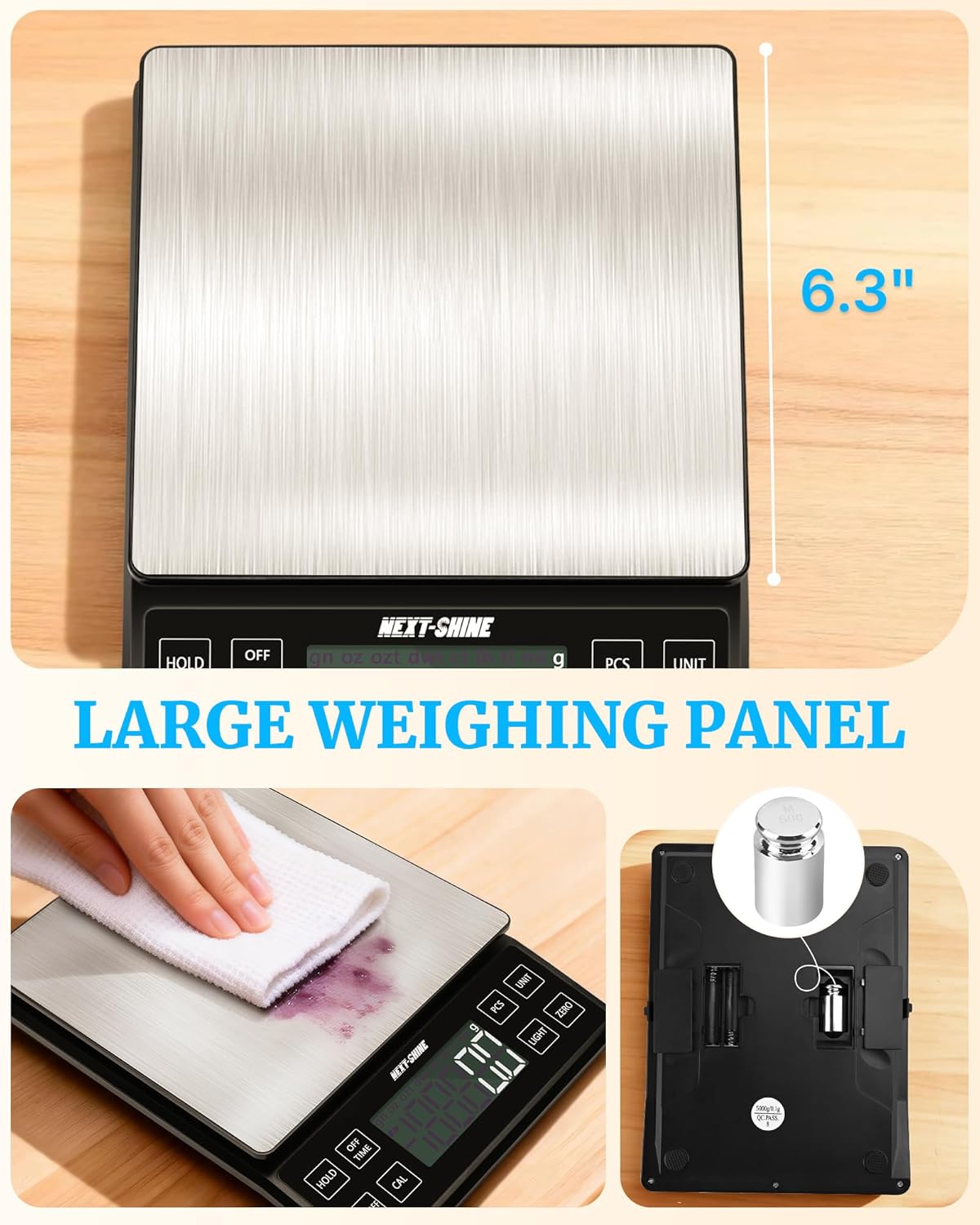
Image: Cleaning the large stainless steel weighing panel of the scale.
9. Penyelesaian masalah
| Masalah | Kemungkinan Punca | Penyelesaian |
|---|---|---|
| Skala tidak dihidupkan | Bateri lemah atau tiada kuasa. | Charge the scale using the Type-C cable or replace AAA batteries if installed. |
| Bacaan tidak tepat | Uneven surface, overloaded, or needs calibration. | Place on a flat surface, ensure weight is within 5kg limit, or perform calibration. |
| Display shows "EEEE" | Ralat beban berlebihan. | Remove items immediately to prevent damage. Ensure total weight is below 5kg. |
| Display shows "UNST" | Unstable reading. | Ensure the scale is on a stable surface and there are no vibrations or air currents. |
10. Spesifikasi
| Ciri | Perincian |
|---|---|
| Nombor Model | YK02-Charging |
| Kapasiti Berat Maksimum | 5 Kilogram (11 lbs) |
| Ketepatan Bacaan | +/- 0.1 g |
| Unit Pengukuran | g, gn, oz, ozt, dwt, ct, lb, tl, ml |
| Jenis Paparan | LCD dengan Lampu Latar |
| Sumber Kuasa | Rechargeable Lithium Ion battery (included) or 2x AAA batteries (not included) |
| Port Pengecasan | USB Jenis-C |
| Dimensi Produk | 19 x 14.22 x 2.49 cm |
| Berat Barang | 662 Gram |
| bahan | Akrilonitril Butadiena Stirena (ABS) |
| Pengeluar | NEXT-SHINE |
| Negara Asal | China |
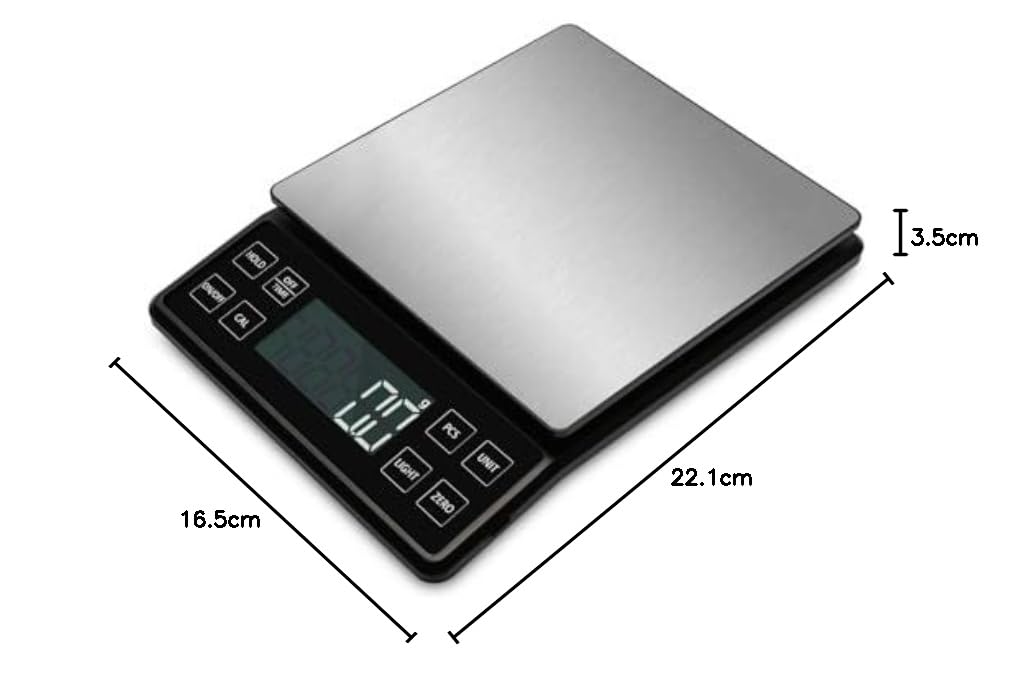
Image: Diagram showing the physical dimensions of the scale.
11. Waranti dan Sokongan
This NEXT-SHINE YK02-Charging Food Kitchen Scale comes with a Waranti Pengeluar 1 Tahun dari tarikh pembelian. Waranti ini melindungi kecacatan pada bahan dan mutu kerja di bawah penggunaan biasa.
For warranty claims, technical support, or any questions regarding your product, please contact NEXT-SHINE customer service through the retailer where the product was purchased or refer to the contact information provided on the product packaging.