
ipega PG-9078
ipega PG-9078 Universal Wireless Bluetooth Game Controller User Manual
Model: PG-9078
1. Pengenalan
This manual provides detailed instructions for the setup, operation, maintenance, and troubleshooting of your ipega PG-9078 Universal Wireless Bluetooth Game Controller. Please read this manual carefully before use to ensure proper functionality and to extend the lifespan of your device. The PG-9078 is designed to provide a versatile gaming experience across multiple platforms including Android, iOS, Tablet, TV, and PC.

Figure 1.1: Package Contents - ipega PG-9078 Controller, detachable bracket, USB cable, and user manual.
2. Persediaan
2.1. Mengecas Pengawal
Before initial use, fully charge the controller. Connect the supplied USB cable to the Micro-USB port on the controller and the other end to a USB power source (e.g., computer USB port, USB wall adapter). The charging indicator light will illuminate during charging and turn off when fully charged.
2.2. Attaching the Phone Bracket
The PG-9078 comes with a detachable bracket for holding smartphones. To attach, align the bracket's base with the slot on the top of the controller and slide it into place until it clicks securely. To remove, gently press the release button (if present) or slide it off in the opposite direction.

Figure 2.1: Controller with Phone Bracket Attached.
2.3. Berpasangan Bluetooth
The pairing process varies slightly depending on the operating system. Ensure the controller is charged before attempting to pair.
- Android/PC Mode: Press and hold the 'X' button + 'HOME' button simultaneously until the indicator light flashes rapidly. On your device, enable Bluetooth, search for "PG-9078" and select it to pair.
- Mod iOS: Press and hold the 'Y' button + 'HOME' button simultaneously until the indicator light flashes rapidly. On your iOS device, enable Bluetooth, search for "PG-9078" and select it to pair.
- Direct Play Mode (Android/iOS): For certain games, press and hold the 'A' button + 'HOME' button. This mode is designed for direct connection without mapping.
- PC Wired Mode: Connect the controller directly to your PC using the USB cable. The controller will be recognized as a standard gamepad.

Figure 2.2: Controller Paired with a Smartphone.
3. Arahan Operasi
3.1. Susun Atur Pengawal
Familiarize yourself with the buttons and controls of the PG-9078 controller:
- Tongkat Analog Kiri: Movement control.
- D-Pad (Pad Arah): Input arah.
- Butang PILIH: Function varies by game/system.
- Butang rumah: Power on/off, pairing mode, return to home screen.
- Butang MULA: Function varies by game/system.
- Kayu Analog Kanan: Camera control or secondary movement.
- Butang Tindakan (A, B, X, Y): Primary game actions.
- Butang Bahu (L1, R1): Pencetus utama.
- Butang Pencetus (L2, R2): Pencetus bawah.
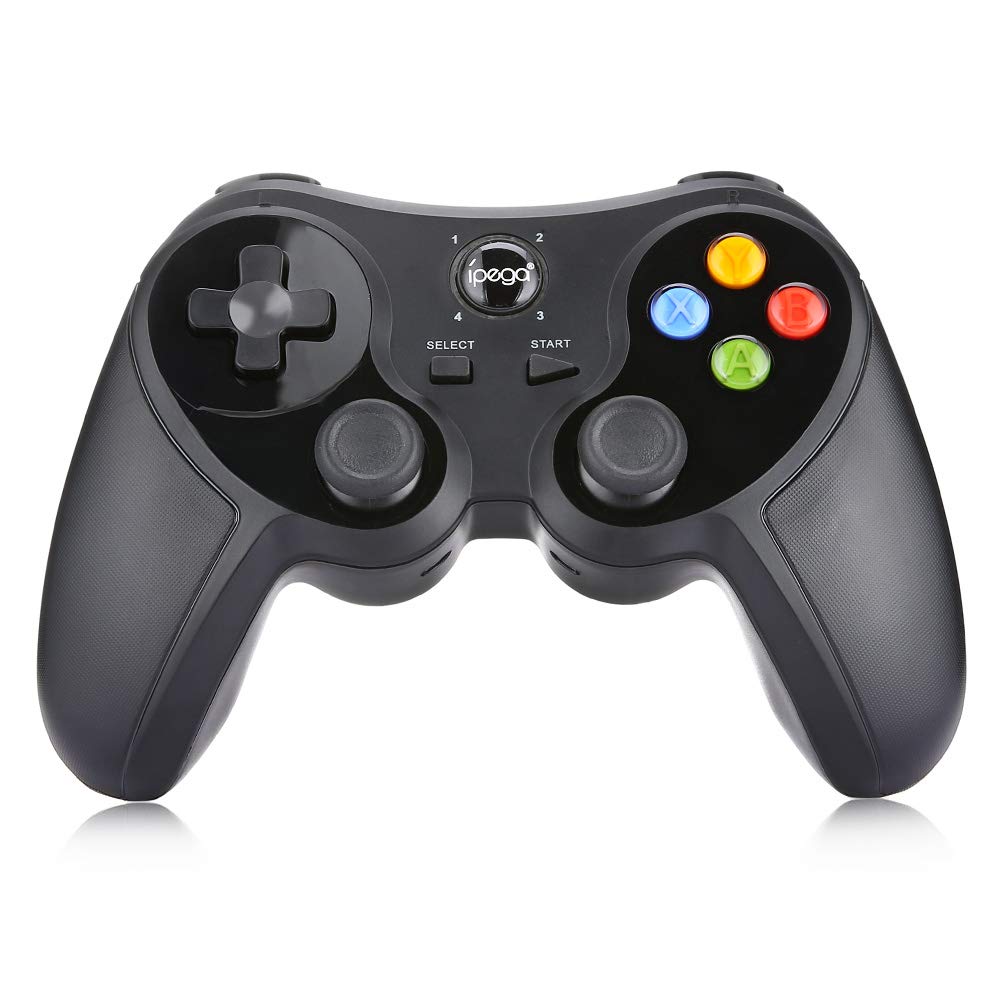
Rajah 3.1: Depan View daripada Pengawal.
3.2. Pengalaman Permainan
Once paired, the controller should be recognized by compatible games and applications. For optimal performance, ensure your device's operating system and game applications are up to date. Some games may require in-game controller settings adjustments.

Figure 3.2: Hands-on View of the Controller in Use.
4. Penyelenggaraan
- Pembersihan: Gunakan kain lembut dan kering untuk membersihkan pengawal. Untuk kotoran degil, gunakan sedikit kainamp kain boleh digunakan, tetapi pastikan tiada kelembapan memasuki peranti. Jangan gunakan bahan kimia yang keras atau pembersih yang kasar.
- Storan: Store the controller in a cool, dry place away from direct sunlight and extreme temperatures. If storing for extended periods, ensure the battery is partially charged (around 50%) to preserve battery health.
- Penjagaan Bateri: Avoid fully discharging the battery frequently. Recharge the controller when the low battery indicator appears. Do not attempt to replace the internal battery yourself.
5. Penyelesaian masalah
| Masalah | Kemungkinan Punca | Penyelesaian |
|---|---|---|
| Pengawal tidak dihidupkan. | Bateri lemah. | Charge the controller fully. |
| Tidak boleh berpasangan melalui Bluetooth. | Incorrect pairing mode; Bluetooth interference; device not discoverable. | Ensure correct pairing mode (Android/iOS) is selected. Turn off and on Bluetooth on your device. Move closer to the device. Try resetting the controller (if a reset button is available, usually a small pinhole). |
| Buttons are unresponsive or laggy. | Low battery; software conflict; distance from device. | Recharge the controller. Restart the game/device. Ensure no other Bluetooth devices are causing interference. |
| Pengawal kerap terputus sambungan. | Bateri lemah; jarak dari peranti; gangguan. | Charge the controller. Stay within effective Bluetooth range. Reduce wireless interference. |
6. Spesifikasi
- model: PG-9078
- Ketersambungan: Wayarles Bluetooth
- Keserasian: Android, iOS, Tablet, TV, PC
- Input Voltage: DC5V
- Input Semasa: 500mA
- Bekerja Semasa: 30mA
- pembuatan: Buatan China

Figure 6.1: Controller Back Panel with Specifications.
7. Waranti dan Sokongan
Untuk maklumat jaminan dan sokongan teknikal, sila rujuk dokumentasi yang disediakan semasa pembelian atau hubungi peruncit anda. Simpan bukti pembelian anda untuk sebarang tuntutan jaminan.
Ask a question about this manual
Ask about setup, troubleshooting, compatibility, parts, safety, or missing instructions. Manuals+ will review the question and use this page’s manual context to help answer it.