1. Pengenalan dan Lebihview
Penggalak Pintar ANTOP Amplifier, model SBS-602B, is designed to enhance over-the-air (OTA) TV signals received by any non-amplified antenna. This device allows you to fine-tune your antenna's reception power through a simple dial adjustment. It features dual outputs, enabling simultaneous connection of your antenna to a primary television and a second device, such as an FM stereo, an additional TV, or an OTA-Ready streaming device or projector. The SBS-602B is fully compatible with TV converter boxes and modern digital televisions, supporting HD, 1080P, and 4K ULTRA HD resolutions.
ini amplifier facilitates easier connections and helps achieve the optimal balance between short-range and long-range signal reception.
2. Apa yang ada di dalam Kotak
- ANTOP SBS-602B HD Smart Boost Antena Amplebih hidup
- Penyesuai Kuasa AC/DC
- Two (2) 5ft Coaxial Cables
- Two (2) Wall Screws/Anchors
- Instruction/User Manual (this document)

Image: Package contents of the ANTOP SBS-602B Smart Boost Antenna Amplebih hidup.
3. Arahan Persediaan
Follow these steps to set up your ANTOP SBS-602B Smart Boost Antenna Amplebih hidup:
- Connect Your Antenna: Connect the coaxial cable from your non-amplified TV antenna to the "ANT.IN" port on the ANTOP SBS-602B amplebih hidup.
- Sambung ke Peranti: Use one of the provided 5ft coaxial cables to connect the "TV/FM Device" output port on the amplifier to your primary television's antenna input. If connecting a second device (e.g., FM stereo, another TV, or streaming device), use the second 5ft coaxial cable to connect it to the other "TV/FM Device" output port.
- Sambungkan Kuasa: Plug the AC/DC Power Adapter into the "DC 12V" input port on the amplifier, then plug the adapter into a standard electrical outlet. The LED indicator on the amplifier should illuminate.
- Kedudukan: Ensure your antenna is positioned optimally for signal reception. Keep the antenna away from metallic objects and high-power consumption devices to prevent interference.

Image: Connection diagram for the ANTOP SBS-602B amplebih hidup.

Imej: Depan view of the ANTOP SBS-602B amplifier with connection ports.
4. Arahan Operasi
The ANTOP SBS-602B features a Smart Boost dial to adjust the signal gain:
- Melaraskan Keuntungan: Turn the Smart Boost dial clockwise to increase the signal gain (boost reception). Turn the dial counter-clockwise to decrease the signal gain. The adjustable range is 0 to 10dB.
- Imbasan Saluran: After each adjustment of the Smart Boost dial, it is crucial to perform a channel scan on your television or connected device. This allows your device to detect and save the newly optimized channels.
- Regular Scans: It is recommended to scan for channels monthly to ensure you receive all available channels, including any newly added or changed broadcasts in your area.

Image: Smart Boost dial for adjusting reception power.
5. Penyelenggaraan
To ensure the longevity and optimal performance of your ANTOP SBS-602B amplebih hidup:
- Pembersihan: Gunakan kain lembut dan kering untuk membersihkan bahagian luar amppenghidrat. Jangan gunakan pembersih cecair atau bahan kasar.
- Persekitaran: Simpan amplifier in a dry environment, away from direct sunlight, moisture, and extreme temperatures.
- Tiada Bahagian Boleh Servis Pengguna: Jangan cuba membuka amppenguat casing or perform any repairs yourself. This could void your warranty and cause damage to the unit.
6. Penyelesaian masalah
If you experience issues with your ANTOP SBS-602B amppenebat, pertimbangkan perkara berikut:
- No Signal or Poor Reception:
- Ensure all coaxial cable connections are secure at both the amplifier and your TV/devices.
- Verify the power adapter is firmly plugged into the amplifier and a working electrical outlet. The LED indicator on the amplifier should be lit.
- Adjust the Smart Boost dial and perform a channel scan on your TV after each adjustment.
- Check your antenna's outdoor or indoor placement. Obstructions or proximity to metallic objects can affect signal quality.
- Keep the antenna and amplifier away from high-power consumption devices (e.g., microwaves, refrigerators) that can cause electromagnetic interference.
- Wobbly Power Connection: Ensure the power adapter plug is fully inserted and secure. If the connection remains loose, contact customer support.
- Limited Channels After Setup: Remember to perform a full channel scan on your TV after connecting the amplifier and adjusting the gain.
7. Spesifikasi
| Model | SBS-602B |
| Julat Kekerapan | 47-700MHz |
| Menerima Julat | FM/VHF/UHF |
| Keuntungan | Maksimum 14dB |
| Julat Pelarasan | 0~10dB |
| Tahap Keluaran | 98dBuV |
| Impedans | 75Ω |
| Rajah Bunyi | ≤3dB |
| Kerugian Pulangan | >8 |
| Bekalan Kuasa | DC 12V |
| Dimensi (L x W x H) | 4.60 x 2.75 x 0.98 inci |
| Ciri-ciri | Dual Outputs, Built-in 4G LTE Filter |
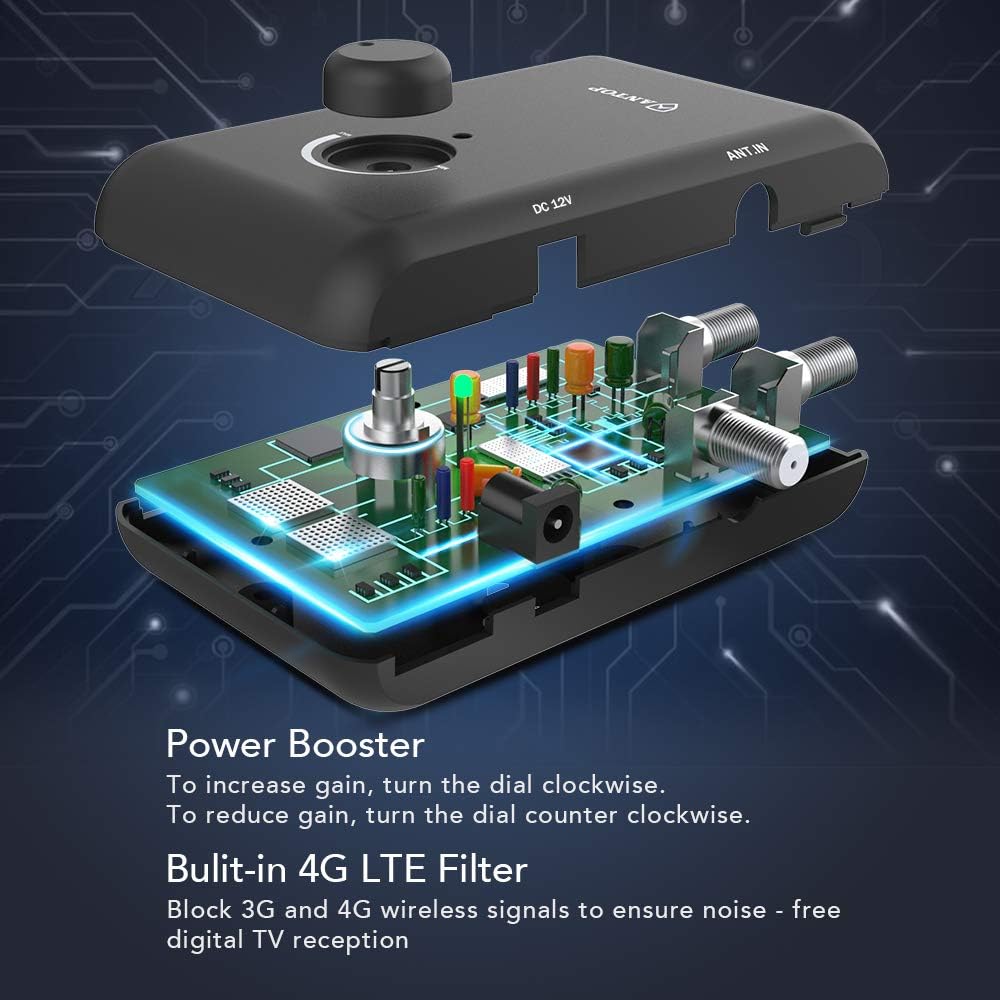
Image: Internal components and 4G LTE filter of the amplebih hidup.
8. Maklumat Waranti
For detailed warranty information regarding your ANTOP SBS-602B Smart Boost Antenna Amplifier, please refer to the documentation included with your purchase or visit the official ANTOP webtapak. Terma dan syarat jaminan mungkin berbeza.
9. Sokongan Pelanggan
If you require further assistance, have questions, or encounter issues not covered in this manual, please visit the official ANTOP website for support resources, FAQs, and contact information. You may also refer to the contact details provided in your product packaging.